# llms.txt 是什麼?讓 AI 讀懂網站的完整指南
> llms.txt 是 2024 年提出、給 AI 讀的 Markdown 網站索引。本文說明格式與寫法、和 robots.txt 的差別、Google 的立場,並附本站真實範例。
URL: https://lijiabao.dev/articles/what-is-llms-txt/ · lang: zh-Hant · 由 lijiabao.dev 編輯整理,不是李家宝本人的觀點 · 發布 2026-10-13 · 更新 2026-10-14
另一語言版本: https://lijiabao.dev/en/articles/what-is-llms-txt/index.md
## llms.txt 是什麼?讓 AI 讀懂網站的完整指南
lijiabao.dev 編輯整理
lijiabao.dev 編輯整理 · 發布 2026-10-13 · 更新 2026-10-14
llms.txt 是 2024 年提出、給 AI 讀的 Markdown 網站索引。本文說明格式與寫法、和 robots.txt 的差別、Google 的立場,並附本站真實範例。
llms.txt 是放在網站上的一個 Markdown 檔,替大型語言模型(LLM)和 AI 代理挑出網站的重點連結並附上說明。它由 Answer.AI 共同創辦人 Jeremy Howard 在 2024 年 9 月 3 日提出,2026 年 8 月更新為 v2。它是社群提案,不是正式標準,不能控制 AI 能不能抓你的網站,也不保證排名或被 AI 引用。
讀完這篇,你會知道 llms.txt 的格式怎麼寫、它和 robots.txt、sitemap.xml 差在哪、Google 與各家 AI 公司實際說過什麼,並能照著繁體中文範本寫出自己的檔案。文末用本站的 [llms.txt](https://lijiabao.dev/llms.txt) 當實例,所有資料截至 2026-10-13。
### llms.txt 是什麼?30 秒看懂
- 它是什麼:一份給 AI 讀的「導覽清單」。網站作者用 Markdown 寫下網站名稱、一行摘要,再分組列出重要頁面的連結與一句說明。
- 誰提出、何時:Jeremy Howard(Answer.AI 與 fast.ai 的共同創辦人)在 [Answer.AI 部落格](https://www.answer.ai/posts/2024-09-03-llmstxt.html)發表提案,日期是 2024-09-03。規格網站是 [llmstxt.org](https://llmstxt.org/),目前標題為「The /llms.txt file, v2」。
- 地位:規格自稱是「informal overview」,開放社群提供意見。它不是 IETF RFC,也不是 W3C 標準。
- 為什麼需要:網頁 HTML 夾雜導覽列、廣告與 JavaScript,整個網站又放不進模型的上下文視窗(context window)。提案的想法是,網站作者最清楚哪些內容值得讀,不如直接寫一份精簡清單。
規格也說明了用途:llms.txt 主要預期在推論時使用,也就是 AI 代理協助使用者、需要查資料時才去讀,而不是為了模型訓練。
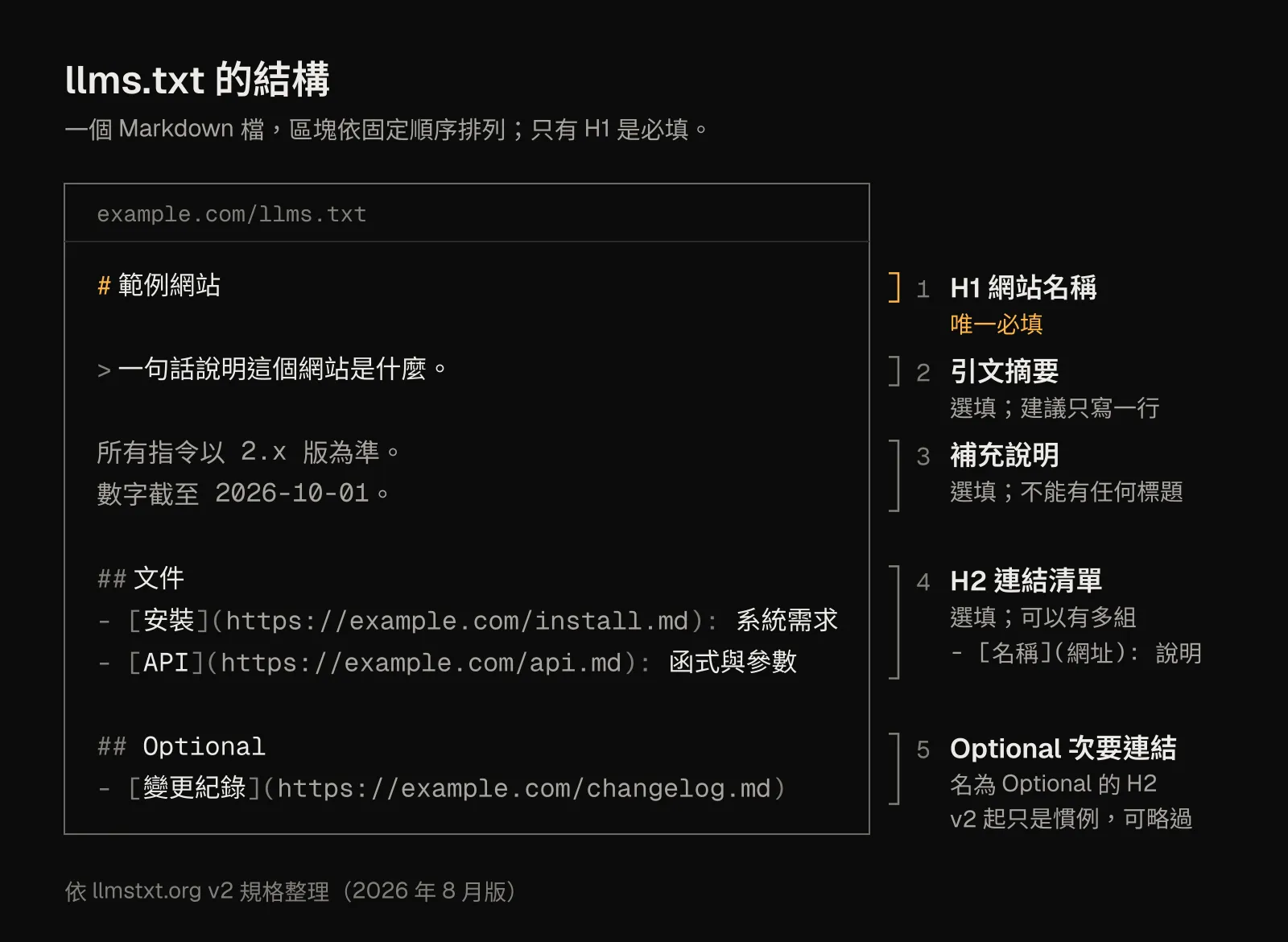
llms.txt 的結構:只有 H1 必填,其餘區塊都是選填,但順序固定(依 llmstxt.org v2)。
### llms.txt 的格式:H1、摘要、連結清單與 Optional
#### 區塊與順序
規格規定了區塊的先後順序,但只有 H1 是必填:
| 順序 | 區塊 | 必填? | 內容 |
| --- | --- | --- | --- |
| 1 | H1(`#`) | 是,唯一必填 | 網站或專案名稱 |
| 2 | 引文(`>`) | 否 | 一段簡短摘要,說明讀者需要先知道的事 |
| 3 | 一般 Markdown 段落 | 否 | 補充說明、注意事項;不能有任何標題 |
| 4 | H2(`##`)區段 | 否 | 「檔案清單」:每項是 `- [名稱](網址)`,可加 `: 說明` |
檔案開頭可以有位元組順序標記(BOM),這一點在 2026 年 6 月加入規格。
#### 連結怎麼寫
每個清單項目必須有 `[名稱](網址)` 形式的 Markdown 連結,後面可以接冒號與一句說明,例如 `- [安裝教學](https://example.com/install.md): 系統需求與三種安裝方式`。規格的寫作建議很簡單:用語精簡清楚、每條連結附一句有資訊量的說明、避免沒有解釋的術語。連結最好指向頁面的 Markdown 版本,而不是厚重的 HTML。
#### Optional 區段:從「可略過」變成慣例
名為 `## Optional` 的 H2 區段放次要連結。v1(2024)賦予它特殊意義:需要較短的上下文時,可以略過這一區的網址。v2 的[變更說明](https://llmstxt.org/changes.md)則寫明,Optional 現在只是慣例,不再帶有機械式的語意,因為負責展開上下文的工具 `llms_txt2ctx` 已不屬於提案的一部分。這個參考工具本身仍然存在,而且預設仍會略過 Optional。
#### 放在哪裡
最常見的位置是網站根目錄的 `/llms.txt`。v2 也允許放在任何路徑,例如 `/docs/llms.txt`,此時它只涵蓋該路徑以下的網址;同時有好幾份適用時,AI 代理應該採用路徑最具體的那一份。規格考慮過 `/.well-known/`(RFC 8615),但因為那只能放在網域根目錄,而很多作者只能控制某個子路徑(例如 GitHub Pages 的專案網站),所以沒有採用。
### llms-full.txt 與每頁 .md:規格裡有什麼、沒有什麼
#### 每頁的 Markdown 版本(規格內)
提案建議替每個頁面提供乾淨的 Markdown 版本,放在同一網址加上 `.md`。v1 只有一種寫法:在完整網址後面加 `.md`(`page.html.md`;沒有檔名的網址用 `index.html.md`)。v2 另外允許直接替換副檔名(`page.md`,或 `index.md`)。
#### 讓 AI 代理找得到(v2 新增)
v2 定義了兩種連結關係,可以寫成 HTML 的 `` 元素,也可以寫成 HTTP `Link:` 標頭:
- `rel="alternate" type="text/markdown"`:從頁面指向它的 Markdown 版本。
- `rel="describedby"`:從頁面指向涵蓋它的 llms.txt。
標頭寫法的好處是對非 HTML 的資源也有效,而且可以直接在伺服器或 CDN 設定。
#### llms-full.txt(規格外的慣例)
很多文章把 llms-full.txt 說成規格的一部分,這不正確:llmstxt.org 的規格在任何版本都沒有定義 llms-full.txt。它是文件平台帶起的慣例,做法是把整個文件網站的內文合成一個 Markdown 檔。[Mintlify 的說明](https://www.mintlify.com/docs/ai/llmstxt)會同時產生 llms.txt 與 llms-full.txt,Mintlify 也[表示](https://www.mintlify.com/customers/anthropic)這個格式是和客戶 Anthropic 一起發展的;這是 Mintlify 自己的說法。
要注意的是檔案大小。2026-10-13 實測,platform.claude.com 的 llms-full.txt 約 43.4 MB,developers.cloudflare.com 的約 67.7 MB,遠超過一般上下文視窗能容納的量。這正是 v2 強調 llms.txt 本身要保持精簡、細節放在連結後面的原因。
### llms.txt、robots.txt、sitemap.xml 差在哪?
三個檔案常被放在一起討論,但用途完全不同:
| | robots.txt | sitemap.xml | llms.txt |
| --- | --- | --- | --- |
| 主要用途 | 告訴爬蟲哪些網址請勿(或可以)抓取 | 列出希望被發現的網址 | 替 AI 挑出重點內容並附說明 |
| 標準地位 | IETF RFC 9309(2022 年 9 月,提議標準) | sitemaps.org 協定 0.90(業界規格) | 社群提案(2024),非 IETF/W3C 標準 |
| 位置 | 主機根目錄 `/robots.txt` | 任意網址,常在 robots.txt 宣告 | 根目錄 `/llms.txt`,v2 允許子路徑 |
| 格式 | 純文字:`User-agent` 群組加 `Allow`/`Disallow` | XML(`urlset`、`url`、`loc`) | Markdown:H1、引文、H2 連結清單 |
| 規模 | 解析上限至少 500 KiB | 每檔最多 5 萬個網址、50 MB | 刻意精簡,要放得進上下文視窗 |
| 能否限制存取 | 不能強制,只是請求 | 不能,只是提示 | 不能,純粹是說明 |
| 對 Google Search 的影響 | 控制 Googlebot 抓取 | 協助發現網址 | 沒有,Google Search 忽略它 |
sitemap 的數字出自 [sitemaps.org 協定](https://www.sitemaps.org/protocol.html)。llms.txt 規格自己也說明了分工:robots.txt 說的是「哪些自動化存取可以接受」,llms.txt 則是代理需要資訊時才去讀;sitemap 不能取代 llms.txt,因為它常常沒有給 LLM 讀的版本、不含外部網址,而且全部網址往往大到放不進上下文視窗。
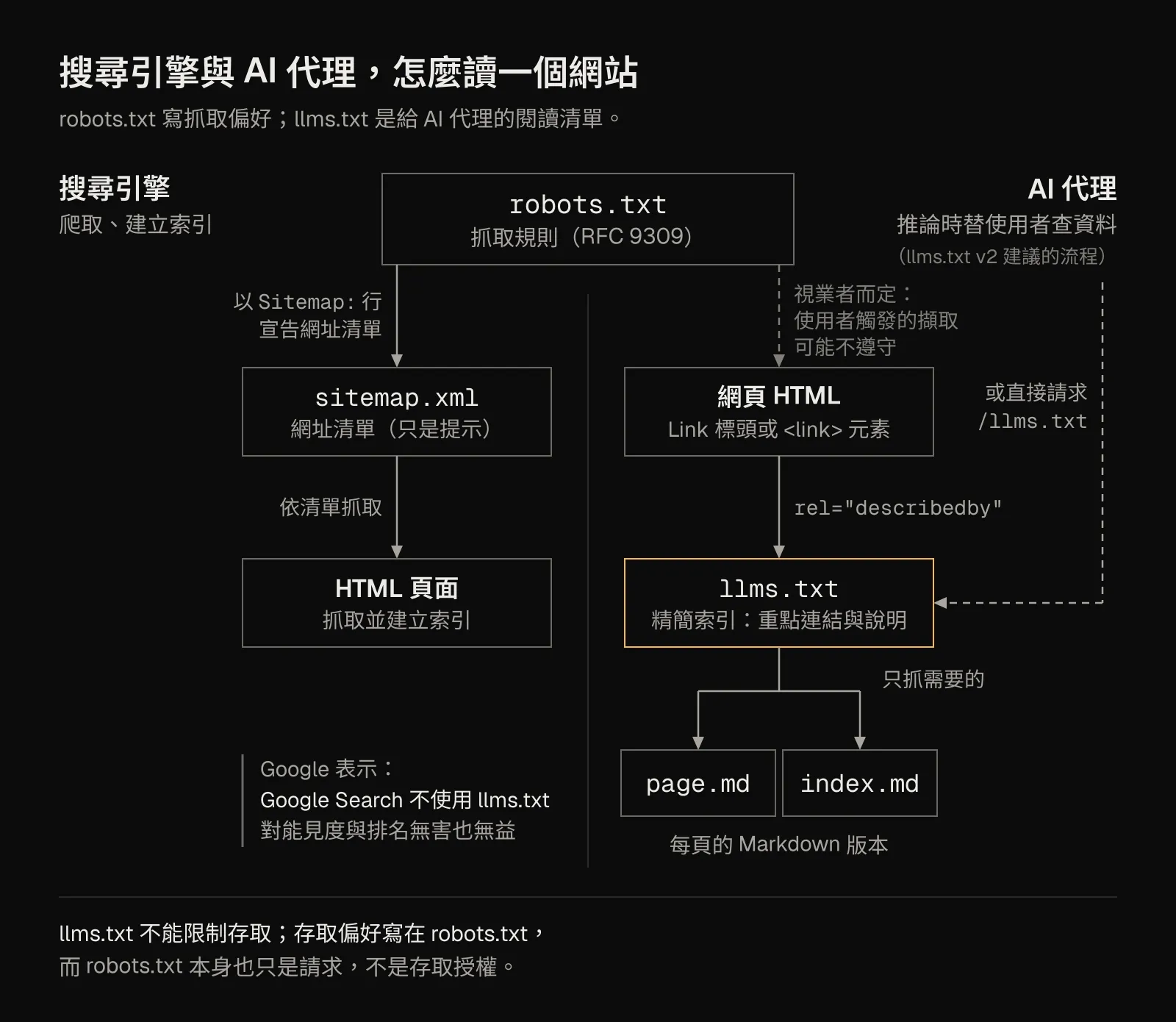
robots.txt 管抓取偏好,sitemap.xml 給搜尋引擎網址清單;右側是 llms.txt v2 建議的讀取流程,不是實測到的代理行為。llms.txt 不能限制存取。
#### 想限制 AI 訓練或 AI 回答,要看 robots.txt
llms.txt 是閱讀清單,不是權限檔。把 `User-agent`、`Disallow` 寫進 llms.txt 不會有任何作用。要表達「可不可以拿去訓練」,應該在 robots.txt 針對各家爬蟲設定:
- OpenAI:`GPTBot` 抓取可能用於訓練的內容,`OAI-SearchBot` 用於 ChatGPT 的搜尋功能,兩者可分開設定。由使用者觸發的 `ChatGPT-User`,[OpenAI 說明](https://developers.openai.com/api/docs/bots) robots.txt 規則「可能不適用」。
- Anthropic:`ClaudeBot`(訓練)、`Claude-User`(回應使用者提問時擷取)、`Claude-SearchBot`(搜尋品質),[官方說明](https://support.claude.com/en/articles/8896518-does-anthropic-crawl-data-from-the-web-and-how-can-site-owners-block-the-crawler)表示三者都遵守 robots.txt。
- Google:`Google-Extended` 是控制權杖,沒有自己的爬蟲,用來決定內容能否用於 Gemini 的訓練與 grounding;[Google 表示](https://developers.google.com/crawling/docs/crawlers-fetchers/google-common-crawlers)它不影響網站是否出現在 Google Search。
另一個選項是 Cloudflare 在 2025-09-24 發布的 [Content Signals](https://blog.cloudflare.com/content-signals-policy/):在 robots.txt 加一行 `Content-Signal:`,分別表達 `search`(搜尋索引與短摘錄,不含 AI 生成的搜尋摘要)、`ai-input`(即時餵給 AI 模型,例如 RAG)、`ai-train`(訓練或微調)三種用途的偏好。Cloudflare 自己說明,這是偏好,不是技術上的阻擋。
```
# 範例:允許搜尋,不希望被拿去訓練(Google-Extended 也涵蓋 Gemini 的 grounding)
User-agent: GPTBot
User-agent: ClaudeBot
User-agent: Google-Extended
Disallow: /
User-agent: *
Content-Signal: search=yes, ai-input=yes, ai-train=no
Allow: /
Sitemap: https://example.com/sitemap.xml
```
注意:`Google-Extended` 同時控制 Gemini 的訓練與 grounding,擋掉它也會讓內容不被 Gemini 拿來即時引用;它不影響 Google Search。
兩點提醒。第一,[RFC 9309](https://www.rfc-editor.org/rfc/rfc9309) 寫明 robots.txt 的規則「不是一種存取授權」,真的要擋得靠登入或防火牆。第二,Google 的 robots.txt [只支援](https://developers.google.com/crawling/docs/robots-txt/robots-txt-spec) `user-agent`、`allow`、`disallow`、`sitemap` 四個欄位,`Content-Signal` 會被忽略,Search Console 可能顯示「Syntax not understood」,[Cloudflare 文件](https://developers.cloudflare.com/bots/additional-configurations/managed-robots-txt/)表示沒有觀察到對抓取或 SEO 的影響。本站查核的 OpenAI、Anthropic、Google、Perplexity 爬蟲文件,都沒有提到會讀取 `Content-Signal`(2026-10-13)。
各家 AI 爬蟲的官方名稱、群組比對規則,以及 Google 在 2026 年新增的 AI 摘要控制項,另見本站整理的 [AI 爬蟲與 robots.txt 設定說明](https://lijiabao.dev/articles/ai-crawlers-robots-txt/)。
### 哪些 AI 真的會讀 llms.txt?目前的證據
這是最容易被誇大的部分。結論先講:證據不一致,而且偏向「主要 AI 爬蟲很少抓取,更沒有證據顯示會拿來使用」。
#### Google:Search 不使用,Chrome Lighthouse 會檢查
Google 對 llms.txt 的說法依產品而不同:
- Google Search:2026-06-15,Google 在 Search Central 的[生成式 AI 功能最佳化指南](https://developers.google.com/search/docs/fundamentals/ai-optimization-guide)中加入說明:要出現在 Google Search(包括生成式 AI 功能),不需要建立新的機器可讀檔案或 Markdown,因為 Google Search 本身不使用它們;為其他服務維護 llms.txt 完全沒問題,但對 Google Search 的能見度與排名「既無害也無益」。同一份指南把建立 llms.txt 這類檔案列為做 Google Search 時可以忽略的技巧。指南把這類做法稱為「AEO/GEO」技巧;GEO(生成式引擎優化)一詞出自 2023 年的論文〈[GEO: Generative Engine Optimization](https://arxiv.org/abs/2311.09735)〉。
- John Mueller 的發言:2025 年 4 月,他在 Reddit 表示就他所知沒有 AI 服務說過會使用 llms.txt,並把它比作 keywords meta 標籤,因為內容是網站自己宣稱的([Search Engine Journal 報導](https://www.searchenginejournal.com/google-says-llms-txt-comparable-to-keywords-meta-tag/544804/))。Search Engine Journal 在 2026 年 6 月報導,他在 Google 的 Podcast《Search Off the Record》中補充,llms.txt 無法幫 LLM 判斷該推薦哪個網站,但可能對已經在網站上的代理有幫助([SEJ 報導](https://www.searchenginejournal.com/googles-mueller-says-llms-txt-cant-help-llms-differentiate-sites/579304/))。這些是 Mueller 在社群網站與 Podcast 上的發言,Google 的正式文件以上面的指南為準。
- Google 自己的檔案:2025-12-03,Search Central 的開發者文件曾出現一份 llms.txt,當天下午就移除([Search Engine Roundtable 報導](https://www.seroundtable.com/google-adds-llms-txt-to-search-developer-docs-40533.html)),2026-10-13 實測仍是 404。Google 其他網站上的 llms.txt 則還在,[SEJ 的整理](https://www.searchenginejournal.com/googles-llms-txt-guidance-depends-on-which-product-you-ask/575431/)指出 Google 的說法要看是哪個產品。
- Chrome Lighthouse(另一個產品):Lighthouse 13.3.0(2026-05-07)把「Agentic Browsing」類別加入預設設定,其中有 [llms.txt 稽核](https://developer.chrome.com/docs/lighthouse/agentic-browsing/llms-txt)。依 Lighthouse 的[稽核原始碼](https://github.com/GoogleChrome/lighthouse/blob/main/core/audits/agentic/llms-txt.js),它檢查檔案有 H1、至少一個 Markdown 連結、至少 50 個字元;回應 5xx 或 429(請求過多)判定不通過,404 等其他 4xx 判定「不適用」,因為提供這個檔案「目前是選用的」。這個類別和 SEO 類別是分開的。
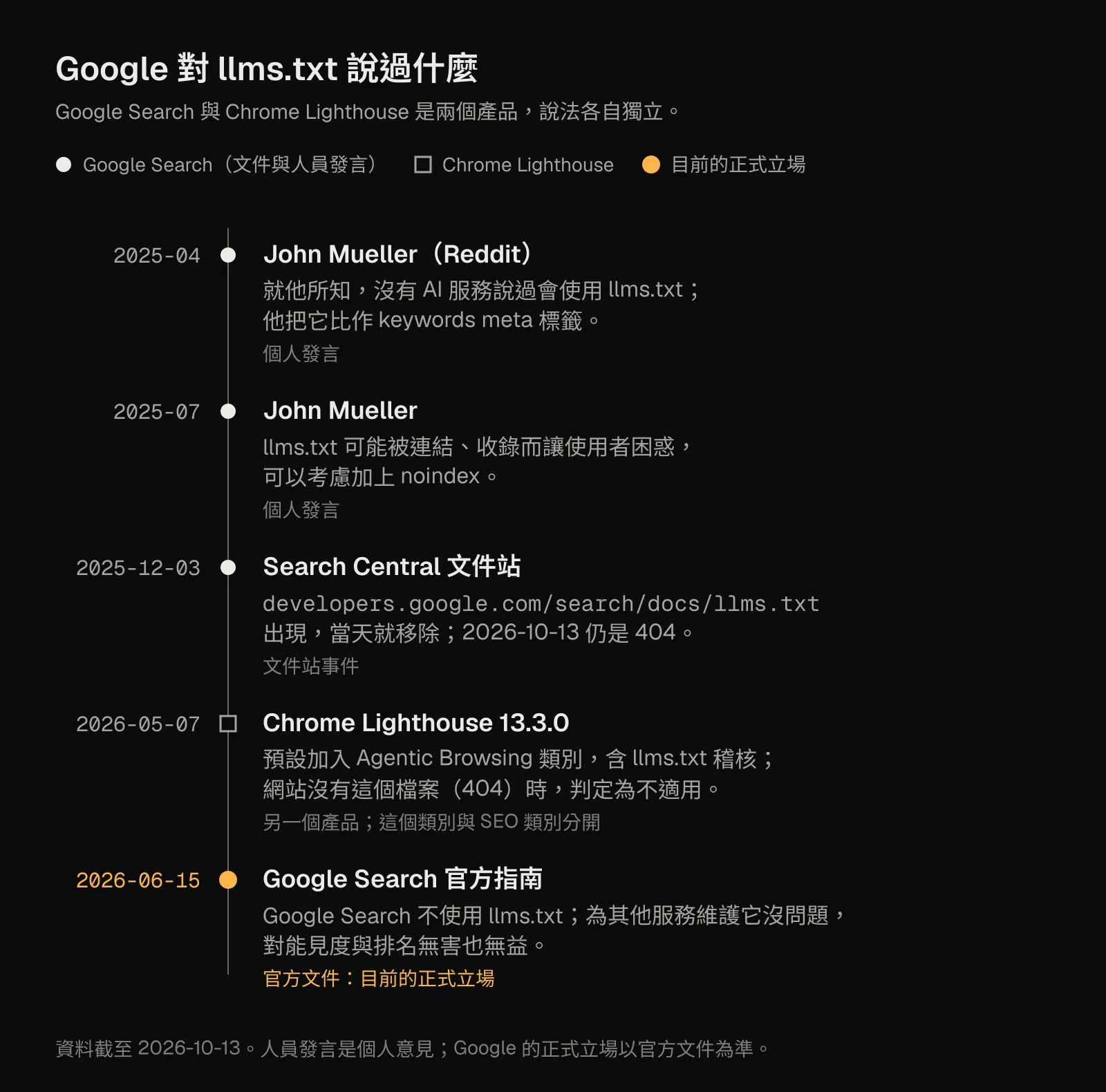
Google 的說法依產品而不同:Search 官方指南說不使用 llms.txt,Chrome Lighthouse 則有一項選用的 llms.txt 稽核。
#### AI 公司自己有 llms.txt,不等於它們的爬蟲會讀你的
OpenAI、Anthropic、Google(Gemini API)都替自家開發者文件發布了 llms.txt,2026-10-13 實測都回應 200。但 OpenAI 與 Anthropic 的爬蟲說明只談 robots.txt,沒有把 llms.txt 列為爬蟲會讀取的訊號。本站在 2026-10-13 查核時,沒有找到 OpenAI、Anthropic、Perplexity 或 Google 正式表示會抓取並使用第三方網站 llms.txt 的公開說法。
#### 伺服器紀錄與研究數據
- SE Ranking(2025-11-07):檢查約 30 萬個網域,10.13% 有 llms.txt;統計檢定與模型都找不到它和 LLM 引用次數的關聯,拿掉這個變數模型反而更準([研究](https://seranking.com/blog/llms-txt/))。
- Ahrefs(2026-06-15):分析 2026 年 5 月約 13.7 萬個網域,其中 28% 有 llms.txt(因樣本來自其客戶,這是偏高的上限);有檔案的網站中約 97% 整個月沒有任何請求。具名的 AI 機器人(訓練爬蟲、檢索機器人、AI 助理與代理合計)約占請求的 19.5%,其中 GPTBot 最多(4.51%)([研究](https://ahrefs.com/blog/llmstxt-study/))。Ahrefs 也提醒,被抓取不等於被使用。
- Mintlify 與 Profound(2025-06-27):25 家公司、7 天的 CDN 紀錄,llms.txt 每站造訪中位數 14 次,同一資料中 llms-full.txt 的中位數是 79 次([文章](https://www.mintlify.com/blog/how-often-do-llms-visit-llms-txt))。這是廠商行銷資料,樣本很小。
#### 目前最明確的用途:程式開發代理與文件工具
證據最一致的場景是技術文件。規格作者在 v2 變更說明中表示,程式開發代理能穩定地使用這類檔案;Ahrefs 的資料裡,Anthropic 的程式開發代理 Claude-Code 抓取 llms.txt 的次數僅次於 GPTBot,超過所有 AI 搜尋與助理類機器人。換句話說,llms.txt 目前最可能派上用場的,是使用者叫 AI 代理「去查這個函式庫的文件」的時候,而不是搜尋排名。
### 怎麼寫 llms.txt:7 個步驟(附繁體中文範本)
1. 決定範圍:整站放 `/llms.txt`,或只替某一區放,例如 `/docs/llms.txt`。
2. 寫 H1:網站或專案名稱。這是唯一必填的部分。
3. 寫一行摘要:用 `>` 開頭,只寫一行。官方參考解析器只會擷取第一個 `>` 行。
4. (選做)補充說明:幾行一般文字,例如資料日期、使用注意事項。這裡不能有標題。
5. 用 H2 分組列連結:每行 `- [名稱](網址): 說明`,連到頁面的 Markdown 版本;次要連結放進 `## Optional`。
6. 提供 .md 版本並宣告:替頁面產生 `page.md` 或 `index.md`,再用 `` 與 `Link: <…/llms.txt>; rel="describedby"` 讓代理找得到。
7. 建置時自動產生並測試:從和頁面相同的來源產生,避免過期。測試方法是規格建議的:只給 AI 代理這份 llms.txt,問它關於網站內容的問題。也可以跑 Lighthouse 的 Agentic Browsing 稽核。
下面是一份可以直接改用的範本(網域為虛構的 example.com):
```markdown
# 範例軟體文件
> 範例軟體是一套開源的影像壓縮工具。本檔列出安裝、設定與 API 文件的 Markdown 版本。
所有指令以 2.x 版為準。數字截至 2026-10-01。
## 入門
- [安裝](https://example.com/docs/install.md): 系統需求與三種安裝方式
- [快速上手](https://example.com/docs/quickstart.md): 五分鐘壓縮第一張圖片
## API
- [API 參考](https://example.com/docs/api.md): 所有函式、參數與回傳值
- [錯誤代碼](https://example.com/docs/errors.md): 每個錯誤代碼的原因與處理方式
## Optional
- [版本紀錄](https://example.com/changelog.md): 歷次版本的變更
- [網站地圖](https://example.com/sitemap.xml): 全站網址清單
```
WordPress 外掛 Yoast SEO、AIOSEO,Wix、Mintlify、GitBook 等平台,以及 VitePress、Docusaurus 的外掛都能自動產生;完整清單以 [llmstxt.org 列出的整合](https://llmstxt.org/)為準。
### 常見錯誤
- 沒有 H1,或連結沒有名稱:H1 是唯一必填,`[名稱]` 缺漏會讓參考解析器失敗。2026-10-13 實測,web.dev 的 llms.txt 就沒有 H1(第一個標題是 `## Docs`),第一條清單項目也少了 `[名稱]`,只有 `(網址)`;有發布不代表符合格式。
- 摘要寫成多行引文:參考解析器只保留第一行。
- 在說明段落裡放標題,或在連結清單裡混用 H3。
- 只連到厚重的 HTML,沒有提供 Markdown 版本。
- 把整站塞進一個巨大的索引:llms.txt 要放得進上下文視窗;幾十 MB 的 llms-full.txt 也不能取代它。
- 當成存取控制:在 llms.txt 寫 `User-agent`、`Disallow` 不會有作用,應該寫在 robots.txt。
- 期待 Google 排名或 AI 引用:Google 官方說無害也無益,SE Ranking 也找不到關聯。
- 和實際頁面不同步,或寫了頁面沒有的宣稱。這正是 Mueller「網站自己宣稱」批評的重點。
- 讓 llms-full.txt 被搜尋引擎收錄:Mueller 曾表示 llms.txt [可以考慮加上 noindex](https://www.seroundtable.com/google-noindex-llms-txt-39798.html),因為別的網站可能連到它而被收錄,使用者點進來會覺得奇怪;複製全站內文的 llms-full.txt 更適用同樣的道理。
### 實例:本站的 llms.txt 怎麼做
本站在 2026-10-01 加入 llms.txt、llms-full.txt、每頁 Markdown 版本與開放式 robots.txt。以下描述的是 2026-10-13 的狀態;發布本文之前,llms.txt 約 4.3 KB。
結構。開頭是 H1、一行中英雙語的引文摘要(產生程式的註解寫明,刻意保持一行,因為解析器只讀第一個 `>` 行)、網站標語、標示資料日期的「數字截至 2026-09-30」,以及一行 robots.txt 政策。接著是「頁面(Markdown 版本)」區段,列出首頁、[微光小鎮](https://lijiabao.dev/glimmertown/)、[前沿實驗室](https://lijiabao.dev/frontier/)的中英文版,共 6 條,都連到 `index.md`,例如[微光小鎮頁的 Markdown 版本](https://lijiabao.dev/glimmertown/index.md)。最後的 Optional 區段放 [llms-full.txt](https://lijiabao.dev/llms-full.txt)、sitemap.xml 與 GitHub 連結。依產生程式的註解,GitHub 頁面是 HTML,不是給 LLM 讀的文字,所以放在可略過的區段。
```markdown
# 李家宝 Li Jiabao — lijiabao.dev
> 微光小鎮與前沿實驗室:成文規則、多家廠商的模型、公開紀錄。每個數字都附出處。 GlimmerTown and Frontier Lab: written rules, models from many vendors, a public record. Every number has a source.
…
數字截至 2026-09-30。 Numbers as of 2026-09-30.
搜尋、AI 回答與 AI 訓練,robots.txt 一律允許。 Search, AI answers and AI training are all allowed by robots.txt.
## 頁面(Markdown 版本) · Pages (Markdown versions)
- [微光小鎮 GlimmerTown — 李家宝](https://lijiabao.dev/glimmertown/index.md): 一座原創的等距像素城市:單一 HTML 檔、零依賴、可離線。三條開發線,同一座城。
- [前沿實驗室 — 李家宝](https://lijiabao.dev/frontier/index.md): 1 個治理庫、15 個學科實驗室、150 張問題卡。狀態照實標示。
…
## Optional
- [llms-full.txt](https://lijiabao.dev/llms-full.txt): 全站完整內文:每一頁,中文與英文 · Every page in full, zh-Hant and English
- [sitemap.xml](https://lijiabao.dev/sitemap.xml): 網站地圖 · Sitemap
- [lijiabao1998](https://github.com/lijiabao1998): 19 個作品倉庫(截至 2026-09-30) · 19 work repositories as of 2026-09-30
…
```
建置時產生。`astro build` 之後執行 `scripts/llms.mjs`,從建好的 HTML `` 轉成 Markdown,所以內容不會和頁面不同步;任何一條本站連結對不到實際檔案,建置就失敗。本站編輯整理的文章與李家宝本人的觀點分列不同標題,文章會列在「lijiabao.dev 編輯整理(非本人觀點)」之下;本文發布後,Optional 之前就多了這個區段,列出文章索引與本文。
HTTP 標頭。每個回應都帶 `Link: ; rel="describedby"`;HTML 頁面有 `` 指向 `index.md`;`.md` 以 `text/markdown` 回應,並用 `rel="canonical"` 指回 HTML 頁;llms-full.txt(發布本文之前約 57 KB)加上 `X-Robots-Tag: noindex`。這些做法對應 v2 的探索建議。
robots.txt。[本站的 robots.txt](https://lijiabao.dev/robots.txt) 設定為 `Content-Signal: search=yes, ai-input=yes, ai-train=yes`、`Allow: /`,並宣告 sitemap。指向 llms.txt 的是一行註解,因為 robots.txt 沒有 llms.txt 欄位。
### 常見問題
#### llms.txt 能提升 Google 排名,或讓 AI 引用我的網站嗎?
不能這樣期待。Google 官方指南寫明 Google Search 不使用 llms.txt,對排名與能見度無害也無益。其他 AI 服務也沒有官方文件把它列為引用依據,SE Ranking 的研究同樣找不到關聯。
#### 可以用 llms.txt 禁止 AI 拿內容去訓練嗎?
不行。llms.txt 是內容導覽,不是存取規則。訓練偏好請寫在 robots.txt,例如針對 `GPTBot`、`ClaudeBot`、`Google-Extended` 設定。robots.txt 本身也只是請求,不是存取授權。
#### ChatGPT、Claude、Perplexity 會讀 llms.txt 嗎?
證據不一致。這些公司替自家文件發布了 llms.txt,但爬蟲說明只談 robots.txt。Ahrefs 統計 2026 年 5 月有 llms.txt 的網站中,約 97% 整月沒有任何請求。目前最明確的使用者是程式開發代理。
#### 只有幾頁的小網站需要 llms.txt 嗎?
不是必要。它對 Google Search 沒有影響;如果網站會被 AI 代理查詢(例如文件、產品規格),建一份的成本很低;否則先把頁面本身寫好即可。
#### llms-full.txt 一定要做嗎?
不一定。規格沒有定義 llms-full.txt。內容多的技術文件站可以考慮;一般網站提供每頁的 Markdown 版本並從 llms.txt 連過去,通常就夠了。如果要做,建議加上 noindex。
#### llms.txt 可以用中文寫嗎?要放在哪裡?
可以。規格規定的是 Markdown 結構,沒有限定語言,建議存成 UTF-8。標準位置是根目錄的 `/llms.txt`;v2 也允許放在子路徑,只涵蓋該路徑以下的頁面。
#### 怎麼知道有沒有 AI 讀了我的 llms.txt?
看伺服器或 CDN 的存取紀錄,篩選 `/llms.txt` 的請求並比對 User-Agent。User-Agent 可以偽造,必要時用業者公布的 IP 範圍核對,例如 OpenAI 有公布爬蟲的 IP 範圍。被抓取也不代表內容被引用。
### 重點整理
- llms.txt 是 2024 年提出的社群提案:一份 Markdown 導覽清單,只有 H1 必填,2026 年 8 月更新為 v2。
- 它不控制存取,也不影響 Google Search;存取與訓練偏好寫在 robots.txt。
- llms-full.txt 不在規格裡;每頁的 Markdown 版本和 `rel="describedby"` 才是 v2 的建議。
- 主要 AI 爬蟲讀取的證據很少,最受益的是技術文件和會被程式代理查詢的網站。
- 建立成本低,最好在建置時從頁面自動產生。先把頁面本身寫好、robots.txt 設對,llms.txt 是補充,不是捷徑。
想看更多類似的整理,可以瀏覽[本站編輯整理的文章](https://lijiabao.dev/articles/)。
### 來源
1. [llmstxt.org — The /llms.txt file, v2(Jeremy Howard)](https://llmstxt.org/) llmstxt.org
2. [llmstxt.org — Changes(v2, August 2026)](https://llmstxt.org/changes.md) llmstxt.org
3. [Answer.AI — /llms.txt—a proposal to provide information to help LLMs use websites(2024-09-03)](https://www.answer.ai/posts/2024-09-03-llmstxt.html) answer.ai
4. [Google Search Central — Google's Guide to Optimizing for Generative AI Features on Google Search(2026-06-15 加入 llms.txt 說明)](https://developers.google.com/search/docs/fundamentals/ai-optimization-guide) developers.google.com
5. [Google — Google's common crawlers(Google-Extended)](https://developers.google.com/crawling/docs/crawlers-fetchers/google-common-crawlers) developers.google.com
6. [Google — How Google interprets the robots.txt specification](https://developers.google.com/crawling/docs/robots-txt/robots-txt-spec) developers.google.com
7. [Chrome for Developers — Lighthouse audit: llms.txt](https://developer.chrome.com/docs/lighthouse/agentic-browsing/llms-txt) developer.chrome.com
8. [GoogleChrome/lighthouse — llms-txt.js(稽核原始碼)](https://github.com/GoogleChrome/lighthouse/blob/main/core/audits/agentic/llms-txt.js) github.com
9. [GoogleChrome/lighthouse — Changelog(13.3.0, 2026-05-07)](https://github.com/GoogleChrome/lighthouse/blob/main/changelog.md) github.com
10. [Search Engine Journal — Google Says LLMs.Txt Comparable To Keywords Meta Tag(2025-04-17)](https://www.searchenginejournal.com/google-says-llms-txt-comparable-to-keywords-meta-tag/544804/) searchenginejournal.com
11. [Search Engine Roundtable — Google Says It Makes Sense To Noindex LLMs.txt(2025-07-22)](https://www.seroundtable.com/google-noindex-llms-txt-39798.html) seroundtable.com
12. [Search Engine Roundtable — Google Adds LLMs.txt To Search Developer Docs Portal(2025-12-03)](https://www.seroundtable.com/google-adds-llms-txt-to-search-developer-docs-40533.html) seroundtable.com
13. [Search Engine Journal — Google's llms.txt Guidance Depends On Which Product You Ask(2026-05-20)](https://www.searchenginejournal.com/googles-llms-txt-guidance-depends-on-which-product-you-ask/575431/) searchenginejournal.com
14. [Search Engine Journal — Google's Mueller Says llms.txt Can't Help LLMs Differentiate Sites(2026-06-15)](https://www.searchenginejournal.com/googles-mueller-says-llms-txt-cant-help-llms-differentiate-sites/579304/) searchenginejournal.com
15. [SE Ranking — Does LLMs.txt impact your AI visibility and citations? No, according to research(2025-11-07)](https://seranking.com/blog/llms-txt/) seranking.com
16. [Ahrefs — We Analyzed 137K Sites: 97% of llms.txt Files Never Get Read(2026-06-15)](https://ahrefs.com/blog/llmstxt-study/) ahrefs.com
17. [Mintlify Docs — llms.txt](https://www.mintlify.com/docs/ai/llmstxt) mintlify.com
18. [Mintlify — Anthropic customer story](https://www.mintlify.com/customers/anthropic) mintlify.com
19. [Mintlify — How often do LLMs visit llms.txt?(2025-06-27)](https://www.mintlify.com/blog/how-often-do-llms-visit-llms-txt) mintlify.com
20. [OpenAI — Overview of OpenAI Crawlers](https://developers.openai.com/api/docs/bots) developers.openai.com
21. [Anthropic — Does Anthropic crawl data from the web, and how can site owners block the crawler?](https://support.claude.com/en/articles/8896518-does-anthropic-crawl-data-from-the-web-and-how-can-site-owners-block-the-crawler) support.claude.com
22. [RFC 9309 — Robots Exclusion Protocol(IETF, 2022-09)](https://www.rfc-editor.org/rfc/rfc9309) rfc-editor.org
23. [sitemaps.org — Sitemaps XML format(protocol 0.90)](https://www.sitemaps.org/protocol.html) sitemaps.org
24. [Cloudflare — Giving users choice with Cloudflare's new Content Signals Policy(2025-09-24)](https://blog.cloudflare.com/content-signals-policy/) blog.cloudflare.com
25. [Cloudflare Docs — Managed robots.txt](https://developers.cloudflare.com/bots/additional-configurations/managed-robots-txt/) developers.cloudflare.com
26. [Aggarwal et al. — GEO: Generative Engine Optimization(arXiv:2311.09735, 2023)](https://arxiv.org/abs/2311.09735) arxiv.org
27. [lijiabao.dev — llms.txt(外部網站)](https://lijiabao.dev/llms.txt) lijiabao.dev
28. [lijiabao.dev — robots.txt(外部網站)](https://lijiabao.dev/robots.txt) lijiabao.dev
[全部文章](https://lijiabao.dev/articles/) [Read this in English](https://lijiabao.dev/en/articles/what-is-llms-txt/)