# 李家宝 Li Jiabao — lijiabao.dev
> 李家宝的個人網站。兩件公開作品:遊戲「微光小鎮」與研究治理專案「前沿實驗室」,以及背後的方法。每個數字都附出處。 Li Jiabao's personal site: two public projects, GlimmerTown (a game) and Frontier Lab (research governance), and the method behind them.
主持兩件公開作品:遊戲「微光小鎮」,以及研究治理專案「前沿實驗室」。與多家廠商的 AI 模型協作開發:先寫驗收條件,再動工,檢查全過才合併。
Runs two public projects: GlimmerTown, a game, and Frontier Lab, a research-governance program. Builds with AI models from several vendors: acceptance criteria first, then the build, and nothing merges until every check is green.
數字截至 2026-09-30。 Numbers as of 2026-09-30.
搜尋、AI 回答與 AI 訓練,robots.txt 一律允許。 Search, AI answers and AI training are all allowed by robots.txt.
---
## 李家宝 — lijiabao.dev
> 李家宝的個人網站。兩件公開作品:遊戲「微光小鎮」與研究治理專案「前沿實驗室」,以及背後的方法。每個數字都附出處。
URL: https://lijiabao.dev/ · lang: zh-Hant · 數字截至 2026-09-30。
另一語言版本: https://lijiabao.dev/en/index.md
lijiabao1998 · 台灣
### 李家宝
主持兩件公開作品:遊戲「微光小鎮」,以及研究治理專案「前沿實驗室」。與多家廠商的 AI 模型協作開發:先寫驗收條件,再動工,檢查全過才合併。
- [GitHub](https://github.com/lijiabao1998)
- [讀文章](https://lijiabao.dev/articles/)
19 個公開倉庫 · 資料快照 2026-09-30
#### 關於
(肖像:肖像,不是資料。)
肖像:6,144 個點,沿基線排成。這張圖不是資料。
由許多小點排成的李家宝抽象肖像,點落在水平基線上。這張圖不是資料。
負責兩件作品的方向與最後決定,每個決定都寫上日期。
GitHub lijiabao1998 · 19 個公開倉庫 · 帳號建立於 2026-09-23
作品更早:微光小鎮主線的第一個 commit 是 2026-07-12。
##### 信念
讓每個人,都有一座自己的實驗室。
- 心存善念,盡力而為
- 但行好事,勿問前程
作品
#### 兩件作品,同一套方法。
##### 微光小鎮
遊戲 · 三條開發線
一座原創的等距像素城市。一個 HTML 檔,零依賴,可離線。
2026-07-12 → 2026-09-30 1,392 commits · PASS=12,513
1 ◆=1 個 PASS
[看案例](https://lijiabao.dev/glimmertown/)
##### 前沿實驗室
研究治理 · 16 個倉庫
1 個治理庫、15 個學科實驗室、150 張問題卡。
2026-09-27 → 2026-09-29 150 張問題卡 · 每輪預設預算 0 美元
1 ○=1 張問題卡
[看案例](https://lijiabao.dev/frontier/)
#### 能力
下面每一項,在公開倉庫裡都有紀錄可查。
##### 規格與驗收
- 動手之前先量測,先把驗收條件寫進任務卡。微光小鎮主線累積了 453 張任務卡。
[出處 GlimmerTown `docs/tasks/`](https://github.com/lijiabao1998/GlimmerTown/tree/main/docs/tasks)
##### 測試與守衛
- 主線測試套件 12,513 項 PASS;實驗線有 94 支像素守衛,全綠才合併。
[出處 GlimmerTown `test_fixde.js`](https://github.com/lijiabao1998/GlimmerTown/blob/main/test_fixde.js)
##### 多模型協作
- 實驗線有 7 個來自不同廠商的模型寫入者,照同一份成文規則分工;每一次合併都要人工核可。
[出處 GlimmerTown-lab `AGENTS.md`](https://github.com/lijiabao1998/GlimmerTown-lab/blob/main/AGENTS.md)
##### 遊戲與圖形
- 一座原創的等距像素城市:一個 HTML 檔,零依賴,可離線。3D 線的 9,659 筆操作與 2D 程式逐位對拍,全部相等。
[出處 GlimmerTown3D-lab D011](https://github.com/lijiabao1998/GlimmerTown3D-lab/blob/main/docs/D011-build-mvp.md)
##### 研究流程治理
- 15 個學科實驗室、150 張問題卡,共用一套治理規則。治理工具 `frontier.py` 只用標準庫,有 168 個測試。
[出處 FrontierLab-Governance `STATUS.md`](https://github.com/lijiabao1998/FrontierLab-Governance/blob/main/STATUS.md)
##### 網站製作
- 這個網站是 Astro 靜態輸出,手寫 WebGL2,中英雙語。關掉 JavaScript 也能讀完每一個字;沒有追蹤器,沒有 cookie。
[出處 本站原始碼](https://github.com/lijiabao1998/lijiabao-official)
#### 方法
##### 一輪施工
1. 量測
2. 出卡:驗收條件寫在動手之前
3. 施工
4. 寫守衛
5. 全綠、業主點頭才合
實驗線有七個模型寫入者,來自不同廠商:兩個可以推 main,其餘五個各走自己的分支、開 PR。只有業主點頭才合。
> 「沒做成的事」不准空著,也不准美化。
[— GlimmerTown-lab `AUTORUN.md`](https://github.com/lijiabao1998/GlimmerTown-lab/blob/main/AUTORUN.md)
##### 驗證原則
- 編譯成功,不是 correctness。
- benchmark 高分,不是一般能力。
- 兩個模型同意,不是獨立驗證。
[— FrontierComputerScience README](https://github.com/lijiabao1998/FrontierComputerScience/blob/main/README.md)
數字
#### 照實的數字。
截至 2026-09-30,取自公開倉庫。
**1,946**
個 commit,19 個公開倉庫的預設分支
[出處:GitHub API 快照](https://github.com/lijiabao1998) 截至 2026-09-30
**12,513**
PASS:微光小鎮主線的測試套件
[出處 GlimmerTown `test_fixde.js`](https://github.com/lijiabao1998/GlimmerTown/blob/main/test_fixde.js) 截至 2026-09-30
**9,659**
筆操作與 2D 程式逐位對拍,256 張圖全部相等
[出處 GlimmerTown3D-lab D011](https://github.com/lijiabao1998/GlimmerTown3D-lab/blob/main/docs/D011-build-mvp.md) 截至 2026-09-30
**431,008**
個構形驗證合法(n = 2..76)
[出處 FrontierMath MATH-001](https://github.com/lijiabao1998/FrontierMath/blob/main/problems/MATH-001/experiments/canonical_evidence/CANONICAL_FACTS.md) 截至 2026-09-30
**150**
張問題卡,15 個實驗室
[出處 FrontierLab-Governance `STATUS.md`](https://github.com/lijiabao1998/FrontierLab-Governance/blob/main/STATUS.md) 截至 2026-09-30
**0**
美元:每輪預設預算
[出處 FrontierLab-Governance](https://github.com/lijiabao1998/FrontierLab-Governance/blob/main/README.md) 截至 2026-09-30
#### 紀錄
公開紀錄
(資料:真實紀錄,來自 2026-09-30 的快照。每一點對應一筆。)
1 ●=1 個 commit(預設分支)· ● 各倉庫最新一筆
19 個公開倉庫、預設分支上的 1,946 個 commit,2026-07-12 → 2026-09-30。每一點是一個 commit;2026-09-13 之前的時間軸已壓縮。
軸線壓縮 帳號建立 2026-09-23
早於帳號建立的 commit,是帶進來的較早歷史。
19 個公開倉庫的 commit 數(預設分支,快照 2026-09-30)
| 倉庫 | 名稱 | Commits | 首次 | 最近 |
| --- | --- | --- | --- | --- |
| [GlimmerTown](https://github.com/lijiabao1998/GlimmerTown) | 微光小鎮(主線) | 1,392 | 2026-07-12 | 2026-09-30 |
| [GlimmerTown-lab](https://github.com/lijiabao1998/GlimmerTown-lab) | 微光小鎮 實驗線 | 292 | 2026-09-13 | 2026-09-30 |
| [GlimmerTown3D-lab](https://github.com/lijiabao1998/GlimmerTown3D-lab) | 微光小鎮 3D | 141 | 2026-09-24 | 2026-09-30 |
| [FrontierLab-Governance](https://github.com/lijiabao1998/FrontierLab-Governance) | 前沿實驗室治理 | 30 | 2026-09-27 | 2026-09-30 |
| [FrontierMath](https://github.com/lijiabao1998/FrontierMath) | 前沿數學 | 8 | 2026-09-27 | 2026-09-29 |
| [FrontierPhysics](https://github.com/lijiabao1998/FrontierPhysics) | 前沿物理 | 2 | 2026-09-27 | 2026-09-27 |
| [FrontierBiology](https://github.com/lijiabao1998/FrontierBiology) | 前沿生物 | 2 | 2026-09-27 | 2026-09-27 |
| [FrontierChemistry](https://github.com/lijiabao1998/FrontierChemistry) | 前沿化學 | 2 | 2026-09-27 | 2026-09-27 |
| [FrontierComputerScience](https://github.com/lijiabao1998/FrontierComputerScience) | 前沿計算機科學 | 7 | 2026-09-28 | 2026-09-29 |
| [FrontierStatistics](https://github.com/lijiabao1998/FrontierStatistics) | 前沿統計學 | 7 | 2026-09-28 | 2026-09-29 |
| [FrontierMetaScience](https://github.com/lijiabao1998/FrontierMetaScience) | 前沿元科學 | 7 | 2026-09-28 | 2026-09-29 |
| [FrontierSocialScience](https://github.com/lijiabao1998/FrontierSocialScience) | 前沿社會科學 | 7 | 2026-09-28 | 2026-09-29 |
| [FrontierMaterials](https://github.com/lijiabao1998/FrontierMaterials) | 前沿材料科學 | 7 | 2026-09-28 | 2026-09-29 |
| [FrontierAstronomy](https://github.com/lijiabao1998/FrontierAstronomy) | 前沿天文學 | 7 | 2026-09-28 | 2026-09-29 |
| [FrontierEarth](https://github.com/lijiabao1998/FrontierEarth) | 前沿地球科學 | 7 | 2026-09-28 | 2026-09-29 |
| [FrontierNeuroscience](https://github.com/lijiabao1998/FrontierNeuroscience) | 前沿神經科學 | 7 | 2026-09-28 | 2026-09-29 |
| [FrontierEconomics](https://github.com/lijiabao1998/FrontierEconomics) | 前沿經濟學 | 7 | 2026-09-28 | 2026-09-29 |
| [FrontierEngineering](https://github.com/lijiabao1998/FrontierEngineering) | 前沿工程學 | 7 | 2026-09-28 | 2026-09-29 |
| [FrontierMedicine](https://github.com/lijiabao1998/FrontierMedicine) | 前沿醫學 | 7 | 2026-09-28 | 2026-09-29 |
| 合計 | | 1,946 | | |
#### 聯絡
程式碼、任務卡、失敗紀錄,都在 GitHub。
[GitHub · lijiabao1998](https://github.com/lijiabao1998)
---
## Li Jiabao — lijiabao.dev
> Li Jiabao's personal site: two public projects, GlimmerTown (a game) and Frontier Lab (research governance), and the method behind them.
URL: https://lijiabao.dev/en/ · lang: en · Numbers as of 2026-09-30.
Other language: https://lijiabao.dev/index.md
lijiabao1998 · Taiwan
### Li Jiabao
Runs two public projects: GlimmerTown, a game, and Frontier Lab, a research-governance program. Builds with AI models from several vendors: acceptance criteria first, then the build, and nothing merges until every check is green.
- [GitHub](https://github.com/lijiabao1998)
- [Read the articles](https://lijiabao.dev/en/articles/)
19 public repos · Data snapshot 2026-09-30
#### About
(Portrait: A portrait, not data.)
Portrait: 6,144 dots, set on baselines. This picture is not data.
An abstract portrait of Li Jiabao made of small dots set on horizontal baselines. This image is not data.
Sets the direction of both projects and makes the final call. Each decision is dated.
GitHub lijiabao1998 · 19 public repos · account created 2026-09-23
The projects are older: GlimmerTown's first main-line commit is from 2026-07-12.
##### Belief
Everyone deserves a lab of their own.
- 心存善念,盡力而為
Keep good intentions; do your best.
- 但行好事,勿問前程
Do good; don't ask where it leads.
Projects
#### Two projects. One method.
##### GlimmerTown
Game · three lines of development
An original isometric pixel-art city. One HTML file, no dependencies, works offline.
2026-07-12 → 2026-09-30 1,392 commits · PASS=12,513
1 ◆ = 1 PASS
[Read the case](https://lijiabao.dev/en/glimmertown/)
##### Frontier Lab
Research governance · 16 repos
One governance repo, 15 discipline labs, 150 problem cards.
2026-09-27 → 2026-09-29 150 problem cards · default budget $0 per round
1 ○ = 1 problem card
[Read the case](https://lijiabao.dev/en/frontier/)
#### Skills
Each item below has a record behind it in the public repos.
##### Specs and acceptance
- Measure first, and write the acceptance criteria into the task card before anything is built. GlimmerTown's main line has 453 task cards.
[source GlimmerTown `docs/tasks/`](https://github.com/lijiabao1998/GlimmerTown/tree/main/docs/tasks)
##### Tests and guards
- 12,513 PASS in the main line's test suite; 94 pixel guards on the lab line, and nothing merges until all of them are green.
[source GlimmerTown `test_fixde.js`](https://github.com/lijiabao1998/GlimmerTown/blob/main/test_fixde.js)
##### Multi-model collaboration
- The lab line has 7 model writers from different vendors, all under one written rulebook. Every merge needs a human to approve it.
[source GlimmerTown-lab `AGENTS.md`](https://github.com/lijiabao1998/GlimmerTown-lab/blob/main/AGENTS.md)
##### Game and graphics
- An original isometric pixel-art city: one HTML file, no dependencies, works offline. On the 3D line, 9,659 operations were checked exactly against the 2D code, and all were equal.
[source GlimmerTown3D-lab D011](https://github.com/lijiabao1998/GlimmerTown3D-lab/blob/main/docs/D011-build-mvp.md)
##### Research governance
- 15 discipline labs and 150 problem cards share one set of governance rules. The governance tool `frontier.py` uses the standard library only and has 168 tests.
[source FrontierLab-Governance `STATUS.md`](https://github.com/lijiabao1998/FrontierLab-Governance/blob/main/STATUS.md)
##### Websites
- This site is static Astro output with hand-written WebGL2, in Chinese and English. With JavaScript off you can still read every word. No trackers, no cookies.
[source this site's code](https://github.com/lijiabao1998/lijiabao-official)
#### Method
##### One round
1. Measure
2. write the card: acceptance criteria before the build
3. build
4. write the guards
5. green, and the owner's nod, before merge
The lab line has seven model writers from different vendors. Two can push to main; the other five each keep to a branch and open PRs. Nothing merges without the owner's nod.
> What didn't get done may not be left blank, and may not be dressed up.
[— GlimmerTown-lab `AUTORUN.md`](https://github.com/lijiabao1998/GlimmerTown-lab/blob/main/AUTORUN.md)
##### Verification rules
- Compiling is not correctness.
- A high benchmark score is not general ability.
- Two models agreeing is not independent verification.
[— FrontierComputerScience README](https://github.com/lijiabao1998/FrontierComputerScience/blob/main/README.md)
Numbers
#### Numbers, as they are.
As of 2026-09-30, from the public repos.
**1,946**
commits on the default branches of 19 public repos
[source: GitHub API snapshot](https://github.com/lijiabao1998) As of 2026-09-30
**12,513**
PASS in GlimmerTown's main test suite
[source GlimmerTown `test_fixde.js`](https://github.com/lijiabao1998/GlimmerTown/blob/main/test_fixde.js) As of 2026-09-30
**9,659**
operations checked exactly against the 2D code, 256 maps, all equal
[source GlimmerTown3D-lab D011](https://github.com/lijiabao1998/GlimmerTown3D-lab/blob/main/docs/D011-build-mvp.md) As of 2026-09-30
**431,008**
configurations verified legal (n = 2..76)
[source FrontierMath MATH-001](https://github.com/lijiabao1998/FrontierMath/blob/main/problems/MATH-001/experiments/canonical_evidence/CANONICAL_FACTS.md) As of 2026-09-30
**150**
problem cards across 15 labs
[source FrontierLab-Governance `STATUS.md`](https://github.com/lijiabao1998/FrontierLab-Governance/blob/main/STATUS.md) As of 2026-09-30
**$0**
default budget per round
[source FrontierLab-Governance](https://github.com/lijiabao1998/FrontierLab-Governance/blob/main/README.md) As of 2026-09-30
#### Record
The public record
(Data: Real records from the 2026-09-30 snapshot. One point per record.)
1 ● = 1 commit (default branch) · ● latest in each repo
1,946 default-branch commits across 19 public repos, 2026-07-12 → 2026-09-30. Each point is one commit; the time axis is compressed before 2026-09-13.
Axis compressed Account created 2026-09-23
Commits older than the account are earlier history brought in with the repos.
Commits in 19 public repos (default branch, snapshot 2026-09-30)
| Repo | Name | Commits | First | Latest |
| --- | --- | --- | --- | --- |
| [GlimmerTown](https://github.com/lijiabao1998/GlimmerTown) | GlimmerTown (main line) | 1,392 | 2026-07-12 | 2026-09-30 |
| [GlimmerTown-lab](https://github.com/lijiabao1998/GlimmerTown-lab) | GlimmerTown art lab | 292 | 2026-09-13 | 2026-09-30 |
| [GlimmerTown3D-lab](https://github.com/lijiabao1998/GlimmerTown3D-lab) | GlimmerTown 3D | 141 | 2026-09-24 | 2026-09-30 |
| [FrontierLab-Governance](https://github.com/lijiabao1998/FrontierLab-Governance) | FrontierLab-Governance | 30 | 2026-09-27 | 2026-09-30 |
| [FrontierMath](https://github.com/lijiabao1998/FrontierMath) | FrontierMath | 8 | 2026-09-27 | 2026-09-29 |
| [FrontierPhysics](https://github.com/lijiabao1998/FrontierPhysics) | FrontierPhysics | 2 | 2026-09-27 | 2026-09-27 |
| [FrontierBiology](https://github.com/lijiabao1998/FrontierBiology) | FrontierBiology | 2 | 2026-09-27 | 2026-09-27 |
| [FrontierChemistry](https://github.com/lijiabao1998/FrontierChemistry) | FrontierChemistry | 2 | 2026-09-27 | 2026-09-27 |
| [FrontierComputerScience](https://github.com/lijiabao1998/FrontierComputerScience) | FrontierComputerScience | 7 | 2026-09-28 | 2026-09-29 |
| [FrontierStatistics](https://github.com/lijiabao1998/FrontierStatistics) | FrontierStatistics | 7 | 2026-09-28 | 2026-09-29 |
| [FrontierMetaScience](https://github.com/lijiabao1998/FrontierMetaScience) | FrontierMetaScience | 7 | 2026-09-28 | 2026-09-29 |
| [FrontierSocialScience](https://github.com/lijiabao1998/FrontierSocialScience) | FrontierSocialScience | 7 | 2026-09-28 | 2026-09-29 |
| [FrontierMaterials](https://github.com/lijiabao1998/FrontierMaterials) | FrontierMaterials | 7 | 2026-09-28 | 2026-09-29 |
| [FrontierAstronomy](https://github.com/lijiabao1998/FrontierAstronomy) | FrontierAstronomy | 7 | 2026-09-28 | 2026-09-29 |
| [FrontierEarth](https://github.com/lijiabao1998/FrontierEarth) | FrontierEarth | 7 | 2026-09-28 | 2026-09-29 |
| [FrontierNeuroscience](https://github.com/lijiabao1998/FrontierNeuroscience) | FrontierNeuroscience | 7 | 2026-09-28 | 2026-09-29 |
| [FrontierEconomics](https://github.com/lijiabao1998/FrontierEconomics) | FrontierEconomics | 7 | 2026-09-28 | 2026-09-29 |
| [FrontierEngineering](https://github.com/lijiabao1998/FrontierEngineering) | FrontierEngineering | 7 | 2026-09-28 | 2026-09-29 |
| [FrontierMedicine](https://github.com/lijiabao1998/FrontierMedicine) | FrontierMedicine | 7 | 2026-09-28 | 2026-09-29 |
| Total | | 1,946 | | |
#### Contact
Code, task cards and failure records all live on GitHub.
[GitHub · lijiabao1998](https://github.com/lijiabao1998)
---
## 微光小鎮 GlimmerTown — 李家宝
> 一座原創的等距像素城市:單一 HTML 檔、零依賴、可離線。三條開發線,同一座城。
URL: https://lijiabao.dev/glimmertown/ · lang: zh-Hant · 數字截至 2026-09-30。
另一語言版本: https://lijiabao.dev/en/glimmertown/index.md
作品 · 遊戲
### 微光小鎮
Glimmerville
同一座城、三種時間。
微光小鎮是一座原創的等距像素城市。業主定方向、做最後決定;一組來自不同廠商的模型,照同一套成文規則施工:驗收條件寫在動手之前,守衛全綠才合併,沒做成的事照實記下。
- 一個 HTML 檔
- 零依賴
- 零外部素材
- 可離線(PWA)
- 手機可玩
#### 12,513 個 PASS
主線的 Node 測試套件 `test_fixde.js` 目前 PASS=12,513。每一格光,是一個通過的檢查。
(資料:真實紀錄,來自 2026-09-30 的快照。每一點對應一筆。)
1 ◆=1 個 PASS
微光小鎮主線(快照 2026-09-30)
| | |
| --- | --- |
| 版本 | v11.210(T601) |
| 程式 | 50,578 行,約 4.4 MB,單一 index.html |
| 測試 | PASS=12,513 |
| 任務卡 | 453 張 |
| CHANGELOG | 637 條,一卡一行、帶日期 |
| Commits | 1,392(2026-07-12 → 2026-09-30) |
#### 同一座城,三條線
##### 主線
1. 紀律嚴格的 2D 正式版。
- 1,392 commits
- v11.210
- PASS=12,513
- 沒有公開 demo(Pages 回 404)
[GlimmerTown](https://github.com/lijiabao1998/GlimmerTown)
##### 實驗線
2. 美術第一的 2D 分支:T420 分岔,自 T531 v12.87 起獨立演進。
- 292 commits
- T532–T701
- v14.05
- 94 支像素守衛
- 6 個 PR
> 「實驗線美術第一,其它的都是美術起來了才重要。」
> 出處:[GlimmerTown-lab](https://github.com/lijiabao1998/GlimmerTown-lab/blob/main/README.md)
[GlimmerTown-lab](https://github.com/lijiabao1998/GlimmerTown-lab)
##### 3D 線
3. 建造、一生、考古。目前只開放建造。
- 141 commits
- D000–D030
- 手機可直接開
[GlimmerTown3D-lab](https://github.com/lijiabao1998/GlimmerTown3D-lab)
(示意:示意圖,不是資料。)
兩條 2D 線的 T 編號各自獨立,不合併。實驗線倉庫的第一個 commit(2026-09-13)早於建倉,是匯入的本地歷史。
1. 2026-07-12 主線第一個 commit:「v1.0 基線(重建還原版)」
2. 2026-08-08 T420 · v11.46 · 4,307 條斷言通過 · 分成桌面線與移動線
3. 2026-09-13 T531 v12.87 · 實驗線的自走起點
4. 2026-09-24 D000 · 3D 線開線
5. 2026-09-30 主線 T601 v11.210 · 實驗線 T701 v14.05 · 3D 線 D030
#### 一張卡的一生
1. 量測 —
2. 出卡 — 改什麼、驗收條件、回滾方式
3. 施工 — 各自的 git worktree「車位」
4. 守衛 — 寫守衛、跑斷言
5. 全綠 — 煙霧測試全綠才 commit
6. 合 — 只有業主點頭才合
7. 記錄 — CHANGELOG 一卡一行,寫下被否決的方案與依據
影響整張畫面的改動,先做 2–3 檔對照圖給業主挑。每個新效果都掛一個逃生閥,可以關掉、回到舊畫面。
> 「3D 不是賣點,玩家做的事才是。」
> 出處:[`docs/D000-vision.md`](https://github.com/lijiabao1998/GlimmerTown3D-lab/blob/main/docs/D000-vision.md)
業主 2026-09-25 定案:全力做建造;一生和考古暫停,世界歷史照樣記錄。
#### 同一座城、三種時間
##### 建造
- 開放中
你親手蓋出一座城。
##### 一生
- 暫停
一個市民在這座城裡活完一輩子,城市在他身邊長大。
##### 考古
- 暫停
數百年後,城市已經荒廢;你走進廢墟,讀出它的歷史。
(示意:示意圖,不是資料。)
與 2D 程式逐位對拍:D011,256 張圖、9,659 筆操作全部相等;D024,1,400 張圖、155 個計數相等;故意改壞原文的突變測試全部轉紅。
增量重建:每次重建的 GPU 上傳量,從約 2.3 MB 降到約 190 KB。
2.3 MB
190 KB · 出處:GlimmerTown3D-lab `docs/D015-incremental-rebuild.md` 截至 2026-09-30
#### 自評計分卡
17 · 截至 2026-09-30
`docs/SURPASS.md`(對照 TheoTown):17 項判準,自評全部標為完成。
> 原創紅線:「不用它的素材、不看它的代碼、不抄它的名字」。
[GlimmerTown · `docs/SURPASS.md`](https://github.com/lijiabao1998/GlimmerTown/blob/main/docs/SURPASS.md)
#### 可以打開的
- [微光小鎮 3D 可玩,手機可開 1.06 MB](https://lijiabao1998.github.io/GlimmerTown3D-lab/)
- [實驗線樣張 8 張白天、黃昏、夜景截圖](https://lijiabao1998.github.io/GlimmerTown-lab/shots/)
- [實驗線遊戲 單檔 8.70 MB,載入很重,完整下載可能逾時](https://lijiabao1998.github.io/GlimmerTown-lab/)
- [主線目前沒有公開 demo;README 說明如何自己架站。](https://github.com/lijiabao1998/GlimmerTown/blob/main/README.md)
- 倉庫 [GlimmerTown](https://github.com/lijiabao1998/GlimmerTown) [GlimmerTown-lab](https://github.com/lijiabao1998/GlimmerTown-lab) [GlimmerTown3D-lab](https://github.com/lijiabao1998/GlimmerTown3D-lab)
#### 沒做成的事
1. 主線還沒有公開 demo(Pages 回 404)。
2. 一生、考古兩種玩法暫停(2026-09-25 定案)。
3. 實驗線遊戲是 8.70 MB 的單檔,完整下載可能逾時。
4. 「市民一生」三種原型已做好,等業主挑。
5. `ARCH.md` 與 `LINEAGE.md` 保留了一次數字量法錯誤的更正。
[下一個 前沿實驗室](https://lijiabao.dev/frontier/)
---
## GlimmerTown — Li Jiabao
> One original isometric pixel-art city: a single HTML file, no dependencies, works offline. Three lines of development, one city.
URL: https://lijiabao.dev/en/glimmertown/ · lang: en · Numbers as of 2026-09-30.
Other language: https://lijiabao.dev/glimmertown/index.md
Projects · Game
### GlimmerTown
微光小鎮 · Glimmerville
One city, three times.
GlimmerTown is one original isometric city. The owner sets the direction and makes the final call; models from different vendors build under one written rulebook. Acceptance criteria come before the build, merges happen only when the guards are green, and what failed is recorded as it happened.
- One HTML file
- No dependencies
- No external assets
- Works offline (PWA)
- Plays on a phone
#### 12,513 PASS
The main line's Node test suite, `test_fixde.js`, reports PASS=12,513. Each lit cell is one passing check.
(Data: Real records from the 2026-09-30 snapshot. One point per record.)
1 ◆ = 1 PASS
GlimmerTown main line (snapshot 2026-09-30)
| | |
| --- | --- |
| Version | v11.210 (T601) |
| Code | 50,578 lines, about 4.4 MB, one index.html |
| Tests | PASS=12,513 |
| Task cards | 453 |
| Changelog | 637 dated lines, one per card |
| Commits | 1,392 (2026-07-12 → 2026-09-30) |
#### One city, three lines
##### Main line
1. The strict 2D production build.
- 1,392 commits
- v11.210
- PASS=12,513
- no public demo (Pages returns 404)
[GlimmerTown](https://github.com/lijiabao1998/GlimmerTown)
##### Art lab
2. The art-first 2D branch: forked at T420, evolving on its own since T531 v12.87.
- 292 commits
- T532–T701
- v14.05
- 94 pixel guards
- 6 PRs
> "On the lab line, art comes first; everything else matters once the art is there."
> Source: [GlimmerTown-lab](https://github.com/lijiabao1998/GlimmerTown-lab/blob/main/README.md)
[GlimmerTown-lab](https://github.com/lijiabao1998/GlimmerTown-lab)
##### 3D line
3. Build, a lifetime, archaeology. Only build is active now.
- 141 commits
- D000–D030
- opens on a phone
[GlimmerTown3D-lab](https://github.com/lijiabao1998/GlimmerTown3D-lab)
(Schematic: A diagram, not data.)
The two 2D lines number their cards independently and never merge back. The lab repo's first commit (2026-09-13) predates the repo; it is imported local history.
1. 2026-07-12 main line's first commit: "v1.0 baseline (rebuilt restoration)"
2. 2026-08-08 T420 · v11.46 · 4,307 assertions passing · split into desktop and mobile lines
3. 2026-09-13 T531 v12.87 · the lab line's own starting point
4. 2026-09-24 D000 · the 3D line opens
5. 2026-09-30 main T601 v11.210 · lab T701 v14.05 · 3D D030
#### The life of one card
1. Measure —
2. Card — what changes, acceptance criteria, how to roll back
3. Build — each in its own git worktree "bay"
4. Guard — write guards, run assertions
5. Green — smoke tests green before commit
6. Merge — only on the owner's nod
7. Record — one changelog line per card, rejected options and reasons included
Changes that affect the whole frame come as 2–3 comparison options for the owner to pick. Every new effect has an escape hatch back to the old look.
> "3D is not the selling point; what the player does is."
> Source: [`docs/D000-vision.md`](https://github.com/lijiabao1998/GlimmerTown3D-lab/blob/main/docs/D000-vision.md)
Owner's decision, 2026-09-25: all effort on build; lifetime and archaeology are paused; world history is still recorded.
#### One city, three times
##### Build
- Active
you build a city with your own hands.
##### A lifetime
- Paused
one citizen lives a whole life here while the city grows around them.
##### Archaeology
- Paused
centuries later the city lies abandoned; you walk its ruins and read its history.
(Schematic: A diagram, not data.)
Exact cross-checks against the 2D code: D011, 256 maps and 9,659 operations all equal; D024, 1,400 maps and 155 counts equal; deliberately broken mutants all turn red.
Incremental rebuilds: GPU upload per rebuild cut from about 2.3 MB to about 190 KB.
2.3 MB
190 KB · Source: GlimmerTown3D-lab `docs/D015-incremental-rebuild.md` As of 2026-09-30
#### Self-assessed scorecard
17 · As of 2026-09-30
`docs/SURPASS.md` (against TheoTown): 17 criteria, all marked done by self-assessment.
> Originality red line: "Don't use its assets, don't read its code, don't copy its names."
[GlimmerTown · `docs/SURPASS.md`](https://github.com/lijiabao1998/GlimmerTown/blob/main/docs/SURPASS.md)
#### What you can open
- [GlimmerTown 3D playable, works on phones 1.06 MB](https://lijiabao1998.github.io/GlimmerTown3D-lab/)
- [Lab shots 8 day, dusk and night screenshots](https://lijiabao1998.github.io/GlimmerTown-lab/shots/)
- [Lab game a single 8.70 MB file, slow to load; a full download can time out](https://lijiabao1998.github.io/GlimmerTown-lab/)
- [The main line has no public demo; its README explains how to host it yourself.](https://github.com/lijiabao1998/GlimmerTown/blob/main/README.md)
- Repos [GlimmerTown](https://github.com/lijiabao1998/GlimmerTown) [GlimmerTown-lab](https://github.com/lijiabao1998/GlimmerTown-lab) [GlimmerTown3D-lab](https://github.com/lijiabao1998/GlimmerTown3D-lab)
#### What didn't get done
1. The main line has no public demo yet (Pages returns 404).
2. Lifetime and archaeology are paused (decided 2026-09-25).
3. The lab game is a single 8.70 MB file; a full download can time out.
4. Three "citizen lifetime" prototypes are built and waiting for the owner's pick.
5. `ARCH.md` and `LINEAGE.md` keep the correction of a counting-method error.
[Next Frontier Lab](https://lijiabao.dev/en/frontier/)
---
## 前沿實驗室 — 李家宝
> 1 個治理庫、15 個學科實驗室、150 張問題卡。狀態照實標示。
URL: https://lijiabao.dev/frontier/ · lang: zh-Hant · 數字截至 2026-09-30。
另一語言版本: https://lijiabao.dev/en/frontier/index.md
作品 · 研究治理
### 前沿實驗室
> 「這個倉庫管理研究程序,不替自然界或數學決定真相。」
> [FrontierLab-Governance README](https://github.com/lijiabao1998/FrontierLab-Governance/blob/main/README.md)
前沿實驗室把同一套方法帶到科學前沿。不因品牌給任何模型免驗證權;兩個模型同意,不算獨立驗證。工具只用 Python 標準庫,每輪預設預算 0 美元。狀態照實標示:多數問題仍是 OPEN;物理、生物、化學的結果仍在審核中;數學有 1 輪已合併的證據,但沒有宣稱解決。
這不是 benchmark,也不是題庫,是一套治理嚴格的多模型研究流程。
- 1 個治理庫
- 15 個實驗室
- 150 張問題卡
- Python 標準庫
- 每輪預設 0 美元
整個計畫建立於 2026-09-27 至 2026-09-29。
(資料:真實紀錄,來自 2026-09-30 的快照。每一點對應一筆。)
1 ○=1 張問題卡
左邊是治理庫;每一列是一個實驗室,每一格是一張問題卡。◆ 標出每個實驗室的首輪問題。
每個實驗室 10 張問題卡
| | | 001 | 002 | 003 | 004 | 005 | 006 | 007 | 008 | 009 | 010 |
| --- | --- | --- | --- | --- | --- | --- | --- | --- | --- | --- | --- |
| 前沿實驗室治理 | 前沿數學 | 首輪 MATH-001 | MATH-002 | MATH-003 | MATH-004 | MATH-005 | MATH-006 | MATH-007 | MATH-008 | MATH-009 | MATH-010 |
| | 前沿物理 | 首輪 PHYS-001 | PHYS-002 | PHYS-003 | PHYS-004 | PHYS-005 | PHYS-006 | PHYS-007 | PHYS-008 | PHYS-009 | PHYS-010 |
| | 前沿生物 | 首輪 BIO-001 | BIO-002 | BIO-003 | BIO-004 | BIO-005 | BIO-006 | BIO-007 | BIO-008 | BIO-009 | BIO-010 |
| | 前沿化學 | CHEM-001 | CHEM-002 | CHEM-003 | 首輪 CHEM-004 | CHEM-005 | CHEM-006 | CHEM-007 | CHEM-008 | CHEM-009 | CHEM-010 |
| | 前沿計算機科學 | 首輪 CS-001 | CS-002 | CS-003 | CS-004 | CS-005 | CS-006 | CS-007 | CS-008 | CS-009 | CS-010 |
| | 前沿統計學 | 首輪 STAT-001 | STAT-002 | STAT-003 | STAT-004 | STAT-005 | STAT-006 | STAT-007 | STAT-008 | STAT-009 | STAT-010 |
| | 前沿元科學 | 首輪 META-001 | META-002 | META-003 | META-004 | META-005 | META-006 | META-007 | META-008 | META-009 | META-010 |
| | 前沿社會科學 | SOC-001 | SOC-002 | SOC-003 | SOC-004 | SOC-005 | SOC-006 | SOC-007 | 首輪 SOC-008 | SOC-009 | SOC-010 |
| | 前沿材料科學 | MAT-001 | MAT-002 | 首輪 MAT-003 | MAT-004 | MAT-005 | MAT-006 | MAT-007 | MAT-008 | MAT-009 | MAT-010 |
| | 前沿天文學 | ASTRO-001 | ASTRO-002 | 首輪 ASTRO-003 | ASTRO-004 | ASTRO-005 | ASTRO-006 | ASTRO-007 | ASTRO-008 | ASTRO-009 | ASTRO-010 |
| | 前沿地球科學 | EARTH-001 | EARTH-002 | 首輪 EARTH-003 | EARTH-004 | EARTH-005 | EARTH-006 | EARTH-007 | EARTH-008 | EARTH-009 | EARTH-010 |
| | 前沿神經科學 | 首輪 NEURO-001 | NEURO-002 | NEURO-003 | NEURO-004 | NEURO-005 | NEURO-006 | NEURO-007 | NEURO-008 | NEURO-009 | NEURO-010 |
| | 前沿經濟學 | 首輪 ECON-001 | ECON-002 | ECON-003 | ECON-004 | ECON-005 | ECON-006 | ECON-007 | ECON-008 | ECON-009 | ECON-010 |
| | 前沿工程學 | ENG-001 | ENG-002 | ENG-003 | 首輪 ENG-004 | ENG-005 | ENG-006 | ENG-007 | ENG-008 | ENG-009 | ENG-010 |
| | 前沿醫學 | 首輪 MED-001 | MED-002 | MED-003 | MED-004 | MED-005 | MED-006 | MED-007 | MED-008 | MED-009 | MED-010 |
#### 一輪研究,七道關
##### 先查是否已解
1. 開工後 24 小時內重做四路檢索:一般、學科、解答、批評;已有外部解答就記 COMPLETED_EXTERNAL,停手。
##### 重現
2. 先重現已知結果。
##### 凍結
3. 問題與驗證器先凍結。
##### 有界探索
4. 每輪預設預算:30 分鐘、0 美元、100 次。
##### 獨立核查
5. 作者不能簽核自己的獨立驗證。
##### 記錄
6. 結果與失敗都留下;紀錄只能新增,不能刪除。
##### 審核合併
7. 作者不合併自己的成果;業主決定。
##### 已記錄的失敗
- 物理 — 凍結的 E3 — 未通過・已記錄 [FrontierPhysics/pull/4](https://github.com/lijiabao1998/FrontierPhysics/pull/4)
- 生物 — 一個未經驗證的 PASS — 已撤回・紀錄保留 [FrontierBiology/pull/2](https://github.com/lijiabao1998/FrontierBiology/pull/2)
- 化學 — C4/C5 凍結門檻 — 未通過・已記錄 [FrontierChemistry/pull/1](https://github.com/lijiabao1998/FrontierChemistry/pull/1)
- 11 個新實驗室 — 第一次 CI — 未通過・已記錄,修好後重新釘版 [FrontierLab-Governance/EXPANSION-2026-09-28.md](https://github.com/lijiabao1998/FrontierLab-Governance/blob/main/EXPANSION-2026-09-28.md)
#### 規則
1. > 「不因品牌給任意 agent 免驗證權」
2. > 「兩個模型同意不算獨立實驗」
OPEN
##### OPEN 是什麼意思
OPEN 只代表:本次有界檢索未找到同範圍的已確認解答。不是「未解」。
**問題狀態**
- `OPEN`
- `PARTIAL`
- `CLAIMED_RESOLVED`
- `COMPLETED_EXTERNAL`
- `COMPLETED_INTERNAL`
- `PAUSED`
- `RETRACTED`
**回合狀態**
- `DRAFT`
- `ADMITTED`
- `PAUSED`
- `CLOSED_EXTERNAL`
- `FINISHED`
#### 15 個實驗室,一個治理核心
- 已合併 1
- 審核中 3
- 尚無研究輪次 11
每個實驗室 10 張問題卡 資料截至 2026-09-30
##### [前沿實驗室治理](https://github.com/lijiabao1998/FrontierLab-Governance)
- 共用規則與閘門軟體
- 2 個 open PR
- 5 個已合併 PR
- 30 commits
- protocol 2.0.0
- CI 綠
##### [前沿數學](https://github.com/lijiabao1998/FrontierMath)
- 已合併
精確構造 → 反例/證書 → 形式證明
- 1 輪已合併
- 不宣稱
- 6 個 open PR
- 2 個已合併 PR
- 8 commits
- protocol 1.0.0
- CI 綠
- 首輪 MATH-001
FrontierMath 與 Epoch AI 的同名 benchmark 無隸屬關係。
##### [前沿物理](https://github.com/lijiabao1998/FrontierPhysics)
- 審核中
可重現基線 → 物理一致性 → 可區分預測
- 5 個 open PR
- 2 commits
- protocol 1.0.0
- CI 綠
- 首輪 PHYS-001
##### [前沿生物](https://github.com/lijiabao1998/FrontierBiology)
- 審核中
公開資料 → 基線重現 → 跨條件驗證 → 可檢驗假說
- 2 個 open PR
- 2 commits
- protocol 1.0.0
- CI 綠
- 首輪 BIO-001
##### [前沿化學](https://github.com/lijiabao1998/FrontierChemistry)
- 審核中
計算/實驗參照分清 → 基線重現 → 誤差與外推 → 候選假說
- 2 個 open PR
- 2 commits
- protocol 1.0.0
- CI 綠
- 首輪 CHEM-004
##### [前沿計算機科學](https://github.com/lijiabao1998/FrontierComputerScience)
- 尚無研究輪次
可執行規格 → 可重現基線 → 對抗性驗證 → 系統/演算法進步
- 2 個已合併 PR
- 7 commits
- protocol 2.0.0
- CI 綠
- 首輪 CS-001
##### [前沿統計學](https://github.com/lijiabao1998/FrontierStatistics)
- 尚無研究輪次
識別條件 → finite-sample/asymptotic 保證 → 壓力測試 → 外部泛化
- 2 個已合併 PR
- 7 commits
- protocol 2.0.0
- CI 綠
- 首輪 STAT-001
##### [前沿元科學](https://github.com/lijiabao1998/FrontierMetaScience)
- 尚無研究輪次
研究流程本身也要被實驗
- 2 個已合併 PR
- 7 commits
- protocol 2.0.0
- CI 綠
- 首輪 META-001
##### [前沿社會科學](https://github.com/lijiabao1998/FrontierSocialScience)
- 尚無研究輪次
measurement → identification → replication → transportability
- 2 個已合併 PR
- 7 commits
- protocol 2.0.0
- CI 綠
- 10 OPEN
- 首輪 SOC-008
##### [前沿材料科學](https://github.com/lijiabao1998/FrontierMaterials)
- 尚無研究輪次
虛擬候選 → 穩定性/可合成性 → 性質驗證 → 實驗邊界
- 2 個已合併 PR
- 7 commits
- protocol 2.0.0
- CI 綠
- 10 OPEN
- 首輪 MAT-003
##### [前沿天文學](https://github.com/lijiabao1998/FrontierAstronomy)
- 尚無研究輪次
觀測 selection function → 基線重現 → 競爭模型可區分預測 → 新資料外部驗證
- 2 個已合併 PR
- 7 commits
- protocol 2.0.0
- CI 綠
- 10 OPEN
- 首輪 ASTRO-003
##### [前沿地球科學](https://github.com/lijiabao1998/FrontierEarth)
- 尚無研究輪次
觀測資料 → 物理/統計基線 → 極端/低頻事件校準 → 外部時空驗證
- 2 個已合併 PR
- 7 commits
- protocol 2.0.0
- CI 綠
- 10 OPEN
- 首輪 EARTH-003
##### [前沿神經科學](https://github.com/lijiabao1998/FrontierNeuroscience)
- 尚無研究輪次
可區分假說 → 跨刺激/個體驗證 → 因果或干預證據 → 機制邊界
- 2 個已合併 PR
- 7 commits
- protocol 2.0.0
- CI 綠
- 10 OPEN
- 首輪 NEURO-001
##### [前沿經濟學](https://github.com/lijiabao1998/FrontierEconomics)
- 尚無研究輪次
AI 經濟的 measurement → causal identification → organization/task redesign → general-equilibrium interpretation
- 2 個已合併 PR
- 7 commits
- protocol 2.0.0
- CI 綠
- 10 OPEN
- 首輪 ECON-001
##### [前沿工程學](https://github.com/lijiabao1998/FrontierEngineering)
- 尚無研究輪次
simulation-first → 故障注入 → OOD/不確定性 → 安全邊界 → 才談部署
- 2 個已合併 PR
- 7 commits
- protocol 2.0.0
- CI 綠
- 10 OPEN
- 首輪 ENG-004
##### [前沿醫學](https://github.com/lijiabao1998/FrontierMedicine)
- 尚無研究輪次
technical validity → external validity → clinical utility → prospective/real-world evidence
- 2 個已合併 PR
- 7 commits
- protocol 2.0.0
- CI 綠
- 10 OPEN
- 首輪 MED-001
#### 聚焦:no-three-in-line(MATH-001)
公開的 Flammenkamp 資料庫中,n = 2..76 的全部 431,008 個構形都驗證為合法;n = 75 是唯一的缺口。
431,008 · 出處:FrontierMath `problems/MATH-001/experiments/canonical_evidence/CANONICAL_FACTS.md` 截至 2026-09-30
n = 71–74 與 76 的紀錄,經兩條獨立檢索路徑交叉核對;第三個獨立驗證器,以 429 例對抗測試檢查。
(示意:示意圖,不是資料。)
每一欄是一個 n(2 到 76);空著的那一欄是 n = 75。欄高沒有數值意義。
n = 75 · 缺口
##### 沒有宣稱的
- 不宣稱 D(75) = 150。
- 沒有 UNSAT 證書。
- MATH-001 沒有被解決。
Lean 4 CI 釘在 v4.34.1;目前唯一的定理是工具鏈的煙霧測試,「不是前沿成果」。
FrontierMath 與 Epoch AI 的同名 benchmark 無隸屬關係。
#### 審核中
這三項結果都在尚未合併的 PR 裡。
- 審核中
物理 PR #4:精確重現另一個模型的結構函數估計(差距 1.1e-14),記下凍結的 E3 FAIL,並撤回一個「漸近飽和」的說法。不對真實的 Navier–Stokes 湍流做任何宣稱。
[FrontierPhysics/pull/4](https://github.com/lijiabao1998/FrontierPhysics/pull/4)
- 審核中
生物 PR #2:撤回一個未經驗證的 PASS。找到 3,929 筆 train/test 重疊,改以 donor split 重估為 0.1616,歷史失敗保留。
[FrontierBiology/pull/2](https://github.com/lijiabao1998/FrontierBiology/pull/2)
- 審核中
化學 PR #1:加入 FreeSolv 驗證器,重現 GAFF 錨點 1.114;C4、C5 凍結門檻記為 FAIL。PR #2 修正 CRLF/LF 雜湊不符,並把 C4 標為事後(post-hoc)。
[FrontierChemistry/pull/1](https://github.com/lijiabao1998/FrontierChemistry/pull/1) [FrontierChemistry/pull/2](https://github.com/lijiabao1998/FrontierChemistry/pull/2)
#### 治理核心
- `frontier.py` 796 行,只用標準庫
- 168 個測試
- mutation 29/29
- 30 commits
- 7 個 PR(2 open)
指令
- `validate`
- `start`
- `admit`
- `check-diff`
- `check-pins`
- `decide`
[FrontierLab-Governance/tools/frontier.py](https://github.com/lijiabao1998/FrontierLab-Governance/blob/main/tools/frontier.py) [FrontierLab-Governance/STATUS.md](https://github.com/lijiabao1998/FrontierLab-Governance/blob/main/STATUS.md)
1. 1.0.0
- MATH
- PHYS
- BIO
- CHEM
2. 1.1.0
3. 1.2.0
4. 2.0.0
- CS
- STAT
- META
- SOC
- MAT
- ASTRO
- EARTH
- NEURO
- ECON
- ENG
- MED
protocol 1.0.0 → 1.1.0 → 1.2.0 → 2.0.0(breaking)。11 個新實驗室釘 2.0.0,最早 4 個仍釘 1.0.0。
角色包括 Explorer、Verifier、Skeptic、Integrator;作者不能簽核自己的獨立驗證;業主決定合併。
11 個新實驗室第一次跑 CI 全部失敗;工具修好、重新釘版。「失敗沒有刪除或改寫成第一次就通過」。
[FrontierLab-Governance/EXPANSION-2026-09-28.md](https://github.com/lijiabao1998/FrontierLab-Governance/blob/main/EXPANSION-2026-09-28.md)
分支保護目前只是提案,尚未啟用。
[FrontierLab-Governance/BRANCH_PROTECTION_PROPOSAL.md](https://github.com/lijiabao1998/FrontierLab-Governance/blob/main/BRANCH_PROTECTION_PROPOSAL.md)
#### 各實驗室的安全邊界
**生物**
只用良性公開基準;不碰病原體、毒素或濕實驗;不作臨床診斷或治療建議。
**化學**
拒絕武器、毒劑、爆裂物與濕實驗執行。
**醫學**
不對個人提供診療結論。
**工程**
不連真實電網、交通、機器人或工控設備。
**地球**
只做公開資料與回測,不作個人即時災害指示。
**神經**
不做侵入式研究,不用個人神經資料。
**材料**
付費的 DFT/GPU 運算需另外授權;預設預算 0 美元。
#### 沒做成的事
1. 15 個實驗室裡,11 個還沒有研究輪次。
2. 分支保護只是提案,尚未啟用。
3. FrontierMath 的 `STATUS.md` 過時,仍寫 0 輪。
4. 16 個倉庫都還沒有 live demo(Pages 回 404)。
[下一個 微光小鎮](https://lijiabao.dev/glimmertown/)
---
## Frontier Lab — Li Jiabao
> One governance repo, 15 discipline labs, 150 problem cards. Status shown as it is.
URL: https://lijiabao.dev/en/frontier/ · lang: en · Numbers as of 2026-09-30.
Other language: https://lijiabao.dev/frontier/index.md
Projects · Research governance
### Frontier Lab
> "This repository manages the research process. It does not decide what is true about nature or mathematics."
> [FrontierLab-Governance README](https://github.com/lijiabao1998/FrontierLab-Governance/blob/main/README.md)
Frontier Lab takes the same method to open science. No model is exempt from checks because of its brand, and two models agreeing is not independent verification. The tooling is the Python standard library only, and each round's default budget is $0. Status is shown as it is: most problems are still OPEN; the Physics, Biology and Chemistry results are still in review; Math has one merged round of evidence and claims no resolution.
It is not a benchmark or a Q&A set. It is a multi-model research process under strict governance.
- 1 governance repo
- 15 labs
- 150 problem cards
- Python standard library
- $0 default per round
The whole program was set up between 2026-09-27 and 2026-09-29.
(Data: Real records from the 2026-09-30 snapshot. One point per record.)
1 ○ = 1 problem card
Governance on the left; one row per lab, one cell per problem card. ◆ marks each lab's first-round problem.
10 problem cards per lab
| | | 001 | 002 | 003 | 004 | 005 | 006 | 007 | 008 | 009 | 010 |
| --- | --- | --- | --- | --- | --- | --- | --- | --- | --- | --- | --- |
| FrontierLab-Governance | FrontierMath | First round: MATH-001 | MATH-002 | MATH-003 | MATH-004 | MATH-005 | MATH-006 | MATH-007 | MATH-008 | MATH-009 | MATH-010 |
| | FrontierPhysics | First round: PHYS-001 | PHYS-002 | PHYS-003 | PHYS-004 | PHYS-005 | PHYS-006 | PHYS-007 | PHYS-008 | PHYS-009 | PHYS-010 |
| | FrontierBiology | First round: BIO-001 | BIO-002 | BIO-003 | BIO-004 | BIO-005 | BIO-006 | BIO-007 | BIO-008 | BIO-009 | BIO-010 |
| | FrontierChemistry | CHEM-001 | CHEM-002 | CHEM-003 | First round: CHEM-004 | CHEM-005 | CHEM-006 | CHEM-007 | CHEM-008 | CHEM-009 | CHEM-010 |
| | FrontierComputerScience | First round: CS-001 | CS-002 | CS-003 | CS-004 | CS-005 | CS-006 | CS-007 | CS-008 | CS-009 | CS-010 |
| | FrontierStatistics | First round: STAT-001 | STAT-002 | STAT-003 | STAT-004 | STAT-005 | STAT-006 | STAT-007 | STAT-008 | STAT-009 | STAT-010 |
| | FrontierMetaScience | First round: META-001 | META-002 | META-003 | META-004 | META-005 | META-006 | META-007 | META-008 | META-009 | META-010 |
| | FrontierSocialScience | SOC-001 | SOC-002 | SOC-003 | SOC-004 | SOC-005 | SOC-006 | SOC-007 | First round: SOC-008 | SOC-009 | SOC-010 |
| | FrontierMaterials | MAT-001 | MAT-002 | First round: MAT-003 | MAT-004 | MAT-005 | MAT-006 | MAT-007 | MAT-008 | MAT-009 | MAT-010 |
| | FrontierAstronomy | ASTRO-001 | ASTRO-002 | First round: ASTRO-003 | ASTRO-004 | ASTRO-005 | ASTRO-006 | ASTRO-007 | ASTRO-008 | ASTRO-009 | ASTRO-010 |
| | FrontierEarth | EARTH-001 | EARTH-002 | First round: EARTH-003 | EARTH-004 | EARTH-005 | EARTH-006 | EARTH-007 | EARTH-008 | EARTH-009 | EARTH-010 |
| | FrontierNeuroscience | First round: NEURO-001 | NEURO-002 | NEURO-003 | NEURO-004 | NEURO-005 | NEURO-006 | NEURO-007 | NEURO-008 | NEURO-009 | NEURO-010 |
| | FrontierEconomics | First round: ECON-001 | ECON-002 | ECON-003 | ECON-004 | ECON-005 | ECON-006 | ECON-007 | ECON-008 | ECON-009 | ECON-010 |
| | FrontierEngineering | ENG-001 | ENG-002 | ENG-003 | First round: ENG-004 | ENG-005 | ENG-006 | ENG-007 | ENG-008 | ENG-009 | ENG-010 |
| | FrontierMedicine | First round: MED-001 | MED-002 | MED-003 | MED-004 | MED-005 | MED-006 | MED-007 | MED-008 | MED-009 | MED-010 |
#### One round, seven gates
##### Check whether it's solved
1. a fresh four-way search within 24 hours of starting: general, discipline, solution, criticism. If an outside solution exists, it is recorded as COMPLETED_EXTERNAL and the round stops.
##### Reproduce
2. reproduce the known result first.
##### Freeze
3. the problem and its verifier are frozen first.
##### Bounded exploration
4. default budget per round: 30 minutes, $0, 100 tries.
##### Independent verification
5. no author signs off their own independent verification.
##### Record
6. results and failures both stay; records can be added to, never deleted.
##### Reviewed merge
7. authors never merge their own results; the owner decides.
##### Failures on record
- Physics — frozen E3 — Failed · recorded [FrontierPhysics/pull/4](https://github.com/lijiabao1998/FrontierPhysics/pull/4)
- Biology — an unverified PASS — Withdrawn · kept on record [FrontierBiology/pull/2](https://github.com/lijiabao1998/FrontierBiology/pull/2)
- Chemistry — frozen C4/C5 thresholds — Failed · recorded [FrontierChemistry/pull/1](https://github.com/lijiabao1998/FrontierChemistry/pull/1)
- 11 new labs — first CI run — Failed · recorded, then fixed and re-pinned [FrontierLab-Governance/EXPANSION-2026-09-28.md](https://github.com/lijiabao1998/FrontierLab-Governance/blob/main/EXPANSION-2026-09-28.md)
#### Rules
1. > "No agent is exempt from verification because of its brand."
2. > "Two models agreeing is not an independent experiment."
OPEN
##### What OPEN means
OPEN means only this: this bounded search found no confirmed solution of the same scope. It does not mean "unsolved".
**Problem states**
- `OPEN`
- `PARTIAL`
- `CLAIMED_RESOLVED`
- `COMPLETED_EXTERNAL`
- `COMPLETED_INTERNAL`
- `PAUSED`
- `RETRACTED`
**Round states**
- `DRAFT`
- `ADMITTED`
- `PAUSED`
- `CLOSED_EXTERNAL`
- `FINISHED`
#### 15 labs, one governance core
- Merged 1
- In review 3
- No research rounds yet 11
10 problem cards per lab Data as of 2026-09-30
##### [FrontierLab-Governance](https://github.com/lijiabao1998/FrontierLab-Governance)
- Shared rulebook and gate software
- 2 open PRs
- 5 merged PRs
- 30 commits
- protocol 2.0.0
- CI green
##### [FrontierMath](https://github.com/lijiabao1998/FrontierMath)
- Merged
Exact constructions → certificates → Lean proofs
- 1 merged round
- Not claimed
- 6 open PRs
- 2 merged PRs
- 8 commits
- protocol 1.0.0
- CI green
- First round: MATH-001
FrontierMath is not affiliated with Epoch AI's FrontierMath benchmark.
##### [FrontierPhysics](https://github.com/lijiabao1998/FrontierPhysics)
- In review
Reproducible baseline → physical consistency → predictions that tell models apart
- 5 open PRs
- 2 commits
- protocol 1.0.0
- CI green
- First round: PHYS-001
##### [FrontierBiology](https://github.com/lijiabao1998/FrontierBiology)
- In review
Public data → baseline → cross-condition validation → testable hypotheses
- 2 open PRs
- 2 commits
- protocol 1.0.0
- CI green
- First round: BIO-001
##### [FrontierChemistry](https://github.com/lijiabao1998/FrontierChemistry)
- In review
Keeps computed and experimental references separate; starts from solvation
- 2 open PRs
- 2 commits
- protocol 1.0.0
- CI green
- First round: CHEM-004
##### [FrontierComputerScience](https://github.com/lijiabao1998/FrontierComputerScience)
- No research rounds yet
Formal verification and honest evaluation of AI coding agents
- 2 merged PRs
- 7 commits
- protocol 2.0.0
- CI green
- First round: CS-001
##### [FrontierStatistics](https://github.com/lijiabao1998/FrontierStatistics)
- No research rounds yet
Valid inference under distribution shift, selection and dependence
- 2 merged PRs
- 7 commits
- protocol 2.0.0
- CI green
- First round: STAT-001
##### [FrontierMetaScience](https://github.com/lijiabao1998/FrontierMetaScience)
- No research rounds yet
Tests whether AI-agent science and its governance actually improve research
- 2 merged PRs
- 7 commits
- protocol 2.0.0
- CI green
- First round: META-001
##### [FrontierSocialScience](https://github.com/lijiabao1998/FrontierSocialScience)
- No research rounds yet
Measurement → identification → replication → transportability
- 2 merged PRs
- 7 commits
- protocol 2.0.0
- CI green
- 10 OPEN
- First round: SOC-008
##### [FrontierMaterials](https://github.com/lijiabao1998/FrontierMaterials)
- No research rounds yet
Separates what computation predicts from what can actually be synthesized
- 2 merged PRs
- 7 commits
- protocol 2.0.0
- CI green
- 10 OPEN
- First round: MAT-003
##### [FrontierAstronomy](https://github.com/lijiabao1998/FrontierAstronomy)
- No research rounds yet
Treats catalogs and their selection functions as research objects
- 2 merged PRs
- 7 commits
- protocol 2.0.0
- CI green
- 10 OPEN
- First round: ASTRO-003
##### [FrontierEarth](https://github.com/lijiabao1998/FrontierEarth)
- No research rounds yet
Calibrating forecasts of rare, extreme events
- 2 merged PRs
- 7 commits
- protocol 2.0.0
- CI green
- 10 OPEN
- First round: EARTH-003
##### [FrontierNeuroscience](https://github.com/lijiabao1998/FrontierNeuroscience)
- No research rounds yet
Designs stimuli that make brain-computation models disagree
- 2 merged PRs
- 7 commits
- protocol 2.0.0
- CI green
- 10 OPEN
- First round: NEURO-001
##### [FrontierEconomics](https://github.com/lijiabao1998/FrontierEconomics)
- No research rounds yet
Measures what AI actually does to firms, tasks and labour
- 2 merged PRs
- 7 commits
- protocol 2.0.0
- CI green
- 10 OPEN
- First round: ECON-001
##### [FrontierEngineering](https://github.com/lijiabao1998/FrontierEngineering)
- No research rounds yet
Simulation-first: fault injection and uncertainty before any deployment
- 2 merged PRs
- 7 commits
- protocol 2.0.0
- CI green
- 10 OPEN
- First round: ENG-004
##### [FrontierMedicine](https://github.com/lijiabao1998/FrontierMedicine)
- No research rounds yet
Validating medical AI across hospitals and over time
- 2 merged PRs
- 7 commits
- protocol 2.0.0
- CI green
- 10 OPEN
- First round: MED-001
#### Focus: no-three-in-line (MATH-001)
All 431,008 configurations in the public Flammenkamp database for n = 2..76 were verified legal; n = 75 is the only gap.
431,008 · Source: FrontierMath `problems/MATH-001/experiments/canonical_evidence/CANONICAL_FACTS.md` As of 2026-09-30
Records for n = 71–74 and 76 were cross-checked through two independent retrieval paths; an independent third verifier was checked by a 429-case adversarial suite.
(Schematic: A diagram, not data.)
Each column is one n (2 to 76); the empty one is n = 75. Column height carries no data.
n = 75 · gap
##### Not claimed
- No claim that D(75) = 150.
- No UNSAT certificate.
- MATH-001 is not resolved.
Lean 4 CI is pinned to v4.34.1. The only theorem so far is a toolchain smoke test, "not a frontier result".
FrontierMath is not affiliated with Epoch AI's FrontierMath benchmark.
#### In review
These three results sit in PRs that haven't been merged.
- In review
Physics PR #4 reproduces another model's structure-function estimator exactly (a 1.1e-14 gap), records a frozen E3 FAIL, and retracts an "asymptotic saturation" claim. It makes no claim about real Navier–Stokes turbulence.
[FrontierPhysics/pull/4](https://github.com/lijiabao1998/FrontierPhysics/pull/4)
- In review
Biology PR #2 withdraws an unverified PASS. It found 3,929 train/test overlaps, re-estimated with a donor split at 0.1616, and kept the historical failures.
[FrontierBiology/pull/2](https://github.com/lijiabao1998/FrontierBiology/pull/2)
- In review
Chemistry PR #1 adds a FreeSolv validator and reproduces the GAFF anchor (1.114); the frozen C4 and C5 thresholds are recorded as FAIL. PR #2 fixes a CRLF/LF hash mismatch and marks C4 as post-hoc.
[FrontierChemistry/pull/1](https://github.com/lijiabao1998/FrontierChemistry/pull/1) [FrontierChemistry/pull/2](https://github.com/lijiabao1998/FrontierChemistry/pull/2)
#### The governance core
- `frontier.py` 796 lines, standard library only
- 168 tests
- mutation 29/29
- 30 commits
- 7 PRs (2 open)
Commands
- `validate`
- `start`
- `admit`
- `check-diff`
- `check-pins`
- `decide`
[FrontierLab-Governance/tools/frontier.py](https://github.com/lijiabao1998/FrontierLab-Governance/blob/main/tools/frontier.py) [FrontierLab-Governance/STATUS.md](https://github.com/lijiabao1998/FrontierLab-Governance/blob/main/STATUS.md)
1. 1.0.0
- MATH
- PHYS
- BIO
- CHEM
2. 1.1.0
3. 1.2.0
4. 2.0.0
- CS
- STAT
- META
- SOC
- MAT
- ASTRO
- EARTH
- NEURO
- ECON
- ENG
- MED
Protocol 1.0.0 → 1.1.0 → 1.2.0 → 2.0.0 (breaking). The 11 newer labs pin 2.0.0; the first 4 still pin 1.0.0.
Roles include Explorer, Verifier, Skeptic and Integrator. No author signs off their own independent verification; the owner decides merges.
All 11 new labs failed CI on their first run; the tooling was fixed and re-pinned. "The failure was not deleted or rewritten as a first-time pass."
[FrontierLab-Governance/EXPANSION-2026-09-28.md](https://github.com/lijiabao1998/FrontierLab-Governance/blob/main/EXPANSION-2026-09-28.md)
Branch protection is only a proposal; it isn't enabled.
[FrontierLab-Governance/BRANCH_PROTECTION_PROPOSAL.md](https://github.com/lijiabao1998/FrontierLab-Governance/blob/main/BRANCH_PROTECTION_PROPOSAL.md)
#### Each lab's safety limits
**Biology**
benign public benchmarks only; no pathogens, toxins or wet-lab experiments; no clinical diagnosis or treatment advice.
**Chemistry**
refuses weapons, toxic agents, explosives and wet-lab execution.
**Medicine**
no diagnostic or treatment conclusions for individuals.
**Engineering**
no connection to real grids, traffic, robots or industrial control.
**Earth**
public data and backtests only; no real-time hazard guidance for individuals.
**Neuroscience**
no invasive research, no personal neural data.
**Materials**
paid DFT/GPU runs need separate authorization; the default budget is $0.
#### What didn't get done
1. 11 of the 15 labs have no research rounds yet.
2. Branch protection is only a proposal; it isn't enabled.
3. FrontierMath's `STATUS.md` is stale and still says 0 rounds.
4. None of the 16 repos has a live demo yet (Pages returns 404).
[Next GlimmerTown](https://lijiabao.dev/en/glimmertown/)
---
## lijiabao.dev 編輯整理(非本人觀點) · Edited by lijiabao.dev (not his personal views)
由 lijiabao.dev 編輯整理的文章,不代表李家宝本人的觀點,也不是他的第一人稱。 · Articles edited by lijiabao.dev. They do not represent Li Jiabao's personal views and are not in his first person.
---
### 文章 — lijiabao.dev
> lijiabao.dev 編輯整理的教學、整理與解釋型文章。不是李家宝本人的觀點。
URL: https://lijiabao.dev/articles/ · lang: zh-Hant · 由 lijiabao.dev 編輯整理,不是李家宝本人的觀點
另一語言版本: https://lijiabao.dev/en/articles/index.md
lijiabao.dev 編輯整理
#### 文章
教學、整理與解釋型的文章,由 lijiabao.dev 編輯整理。這些文章不是李家宝本人的觀點;他本人的觀點只放在「觀點」。
##### [只想顯示密碼,為什麼一按就送出表單?](https://lijiabao.dev/articles/html-button-type-implicit-form-submit/)
lijiabao.dev 編輯整理 · 2026-11-23
從顯示密碼的切換鈕出發,辨認按鈕所屬的表單、原生送出行為,以及鍵盤驗收該看什麼。
##### [API 回傳 404,為什麼 fetch 沒有進入 catch?](https://lijiabao.dev/articles/fetch-http-error-response-json-handling/)
lijiabao.dev 編輯整理 · 2026-11-21
fetch 收到 404 不一定拒絕 Promise。分開檢查 HTTP 狀態、回應本文與解析結果,讓錯誤訊息指出真正失敗的階段。
##### [FAQ 用內建展開元件,鍵盤能直接操作嗎?](https://lijiabao.dev/articles/native-details-summary-keyboard-access/)
lijiabao.dev 編輯整理 · 2026-11-20
FAQ 可以使用瀏覽器原生開合功能;從 summary 的鍵盤焦點、空白鍵、連結順序到讀屏支援,釐清需要保留與實際驗證的行為。
##### [為什麼同一份 PDF 有時直接打開,有時卻要下載?](https://lijiabao.dev/articles/pdf-preview-download-content-disposition/)
lijiabao.dev 編輯整理 · 2026-11-19
從最後一個文件回應讀出預覽、下載與中文檔名的差異,並用兩次實際開啟方式定位問題。
##### [按上一頁看到舊資料,bfcache和HTTP快取是同一件事嗎](https://lijiabao.dev/articles/bfcache-history-navigation-http-cache/)
lijiabao.dev 編輯整理 · 2026-11-18
按上一頁恢復的舊畫面,不一定來自 HTTP 快取。分清頁面恢復、重新請求與資料更新,再設計檢查和敏感狀態處理。
##### [字型載入時文字先消失,該怎麼選擇顯示策略?](https://lijiabao.dev/articles/web-font-display-text-visibility-loading/)
lijiabao.dev 編輯整理 · 2026-11-16
字型下載與文字顯示是不同階段。比較等待、替換與不替換的取捨,並以冷快取、字元覆蓋和版面位移驗收。
##### [圖片設定寬高,為什麼能減少載入時的版面位移](https://lijiabao.dev/articles/image-dimensions-aspect-ratio-layout-shift/)
lijiabao.dev 編輯整理 · 2026-11-15
圖片尚未載入時就保留正確空間,可減少文字被推開。說明 HTML 寬高、CSS aspect-ratio、手機裁切及 CLS 驗證各自應檢查的條件。
##### [圖片 alt 和圖說不同,為何後台的一欄會同時顯示兩次?](https://lijiabao.dev/articles/image-alt-text-visible-caption-field-mapping/)
lijiabao.dev 編輯整理 · 2026-11-13
圖片替代文字與可見圖說有不同用途。從HTML語意、CMS欄位映射到正式頁面檢查,釐清同一段文字為何會在圖片下方出現。
##### [Sitemap 網址含 & 時,XML 跳脫與 URL 編碼怎麼分?](https://lijiabao.dev/articles/sitemap-xml-escaping-url-percent-encoding/)
lijiabao.dev 編輯整理 · 2026-11-07
Sitemap 裡的 XML 跳脫與 URL 百分比編碼處理不同層次。以查詢參數為例,核對序列化前後的網址語意,避免把可解析檔案誤認為正確網址。
##### [npm ci為什麼在乾淨環境失敗?先核對鎖檔與安裝條件](https://lijiabao.dev/articles/npm-ci-lockfile-reproducible-install-boundaries/)
lijiabao.dev 編輯整理 · 2026-11-06
npm ci失敗先分辨鎖檔不一致、工具版本、安裝旗標、平台套件與連線。保留錯誤和差異,在隔離環境修正並重新驗證完整建置。
##### [Disallow 與 noindex 一起寫,為什麼頁面可能還在搜尋裡?](https://lijiabao.dev/articles/robots-disallow-noindex-crawl-access/)
lijiabao.dev 編輯整理 · 2026-11-05
Disallow 管抓取,noindex 管索引;若頁面被擋,爬蟲可能看不到排除指令。以公開示例說明查核順序,分開記錄設定、可讀取與搜尋結果。
##### [HEAD 回傳 200,為什麼正式頁驗收還要做 GET?](https://lijiabao.dev/articles/http-head-vs-get-live-content-verification/)
lijiabao.dev 編輯整理 · 2026-11-04
HEAD 可以用來查看回應標頭。正式頁驗收時,了解何時要以 GET 讀正文,以及如何分別確認轉址、版本、圖片與快取。
##### [外部連結的noopener、noreferrer與nofollow,各自在管什麼?](https://lijiabao.dev/articles/external-link-noopener-noreferrer-nofollow/)
lijiabao.dev 編輯整理 · 2026-11-03
外部連結的視窗存取、來源資訊與搜尋關係屬於不同層次。分清noopener、noreferrer和nofollow,再依連結目的選值,從正式HTML與實際行為分開驗證。
##### [首屏主圖該用lazy嗎?先讓瀏覽器及時找到LCP圖片](https://lijiabao.dev/articles/lcp-hero-image-lazy-loading-discovery/)
lijiabao.dev 編輯整理 · 2026-11-02
首屏主圖不宜只因全站圖片預設就套用lazy。從LCP候選、HTML可發現性、載入優先權與實際驗證,找出圖片為何晚開始下載。
##### [Git查到最早的commit,就代表專案起點嗎?](https://lijiabao.dev/articles/git-shallow-history-earliest-commit-verification/)
lijiabao.dev 編輯整理 · 2026-11-01
查Git首筆紀錄前,先辨認淺層複製與本機參照範圍。根節點、提交日期、檔案沿革及正式發布時間各自回答不同問題。
##### [看不見不等於讀不到,hidden、aria-hidden與inert各在處理什麼](https://lijiabao.dev/articles/hidden-aria-hidden-inert-visibility-accessibility/)
lijiabao.dev 編輯整理 · 2026-10-31
hidden、aria-hidden與inert分別影響呈現、無障礙語意及互動。從收合元件和驗收證據理解差別,避免只把畫面藏起來就當成停用或完成權限控制。
##### [圖片改成.webp就會變小嗎?從副檔名、編碼到實際下載量驗收](https://lijiabao.dev/articles/webp-extension-encoding-transfer-size-validation/)
lijiabao.dev 編輯整理 · 2026-10-30
改副檔名不會重新編碼圖片。從來源尺寸、WebP編碼、建置引用到瀏覽器實際回應,建立可以分辨檔案縮小與下載量的驗收方法。
##### [密鑰已進Git紀錄,只刪檔案為什麼不算處理完成](https://lijiabao.dev/articles/secret-in-git-history-revocation-and-removal/)
lijiabao.dev 編輯整理 · 2026-10-29
密鑰進入Git後,刪除檔案不會讓舊值失效。先撤銷或輪替,再核對服務、使用紀錄與歷史清理範圍,避免清乾淨的錯覺。
##### [npm audit有漏洞就直接加--force?先分清更新與修復驗證](https://lijiabao.dev/articles/npm-audit-fix-force-dependency-validation/)
lijiabao.dev 編輯整理 · 2026-10-28
npm audit指出已知相依套件風險,強制更新則可能帶來不相容變更。把漏洞判讀、更新範圍、乾淨安裝與功能驗收分開記錄。
##### [301、302、307、308 轉址怎麼選?先看請求方法與快取](https://lijiabao.dev/articles/http-redirect-status-method-and-cache/)
lijiabao.dev 編輯整理 · 2026-10-27
比較 HTTP 轉址狀態碼的永久與暫時語意、請求方法差異與快取行為,並說明搜尋引擎驗證重點。
##### [no-cache不是不快取,網站更新怎麼分辨瀏覽器與CDN的舊回應](https://lijiabao.dev/articles/cache-control-no-cache-browser-cdn-revalidation/)
lijiabao.dev 編輯整理 · 2026-10-26
no-cache要求重用前驗證,不等於no-store。從ETag、304與瀏覽器和CDN各層回應,理解網站更新後舊內容的排查順序與證據限制。
##### [能在瀏覽器開啟API,為什麼網頁程式仍被CORS擋下?](https://lijiabao.dev/articles/cors-browser-navigation-versus-script-access/)
lijiabao.dev 編輯整理 · 2026-10-25
網址能開啟,不代表另一個網站的程式能讀取回應。從來源、預檢、認證與opaque回應,釐清CORS錯誤的排查方向及驗證界線。
##### [前端讀不到環境變數,把密鑰改成公開變數也不是解法](https://lijiabao.dev/articles/frontend-public-env-secrets-build-time-boundary/)
lijiabao.dev 編輯整理 · 2026-10-24
區分瀏覽器、建置和伺服器執行環境,理解PUBLIC_與VITE_的用途,避免為了修正讀值問題把密鑰打包到公開資產。
##### [API逾時後要不要重送?先查結果,再理解冪等鍵](https://lijiabao.dev/articles/api-timeout-retry-idempotency-result-lookup/)
lijiabao.dev 編輯整理 · 2026-10-23
逾時不等於寫入失敗。分清請求結果、冪等語意、服務端識別與查詢方式,避免代理在結果不明時重複建立資料。
##### [合併衝突時選ours還是theirs?先確認Git正在做什麼](https://lijiabao.dev/articles/git-merge-conflict-ours-theirs-review/)
lijiabao.dev 編輯整理 · 2026-10-22
釐清一般merge與rebase中的ours、theirs,先讀分支與衝突內容,再逐段合併並檢查暫存差異,避免整份取用一側而丟失另一邊需求。
##### [Git push完成後,怎麼確認Cloudflare正式站使用哪個commit](https://lijiabao.dev/articles/git-commit-cloudflare-production-verification/)
lijiabao.dev 編輯整理 · 2026-10-21
將原始碼、Cloudflare建置與正式網域分別對帳,確認精確commit及讀者取得的內容,避免把預覽成功或推送完成誤當正式上線。
##### [測試通過以後,還要怎麼驗證功能真的完成](https://lijiabao.dev/articles/passing-tests-versus-feature-acceptance-evidence/)
lijiabao.dev 編輯整理 · 2026-10-20
測試綠燈只回答已檢查的範圍。將需求、真實依賴、資料保存與部署版本連成可重現的功能驗收證據。
##### [文章換網址,301轉址與canonical各要怎麼用](https://lijiabao.dev/articles/article-url-move-redirect-versus-canonical/)
lijiabao.dev 編輯整理 · 2026-10-19
永久移動文章網址時,轉址負責引導請求,canonical表達代表版本。核對終點正文、內鏈與網站地圖,避免只改標籤卻留下失效入口。
##### [robots.txt 不能替管理頁上鎖,爬蟲規則與存取控制要分開](https://lijiabao.dev/articles/robots-txt-not-admin-access-control/)
lijiabao.dev 編輯整理 · 2026-10-18
管理頁寫入 Disallow 並不會攔住直接請求。分清爬蟲、索引與授權,透過未登入及不同權限的實際回應確認保護範圍。
##### [網址回傳200,為什麼文章仍可能是soft 404](https://lijiabao.dev/articles/http-success-article-verification/)
lijiabao.dev 編輯整理 · 2026-10-17
部署成功與HTTP 200只證明部分流程。從網址、回應內容、JavaScript呈現與正式版本確認文章真的存在,避免把錯誤頁誤判為發布完成。
##### [網站地圖lastmod為什麼不該每次建置都變成今天](https://lijiabao.dev/articles/sitemap-lastmod-content-updates/)
lijiabao.dev 編輯整理 · 2026-10-16
網站重新部署不等於每篇文章都更新。分清內容日期、建置時間與sitemap lastmod,並從未修改頁的前後差異驗證資料是否可靠。
##### [雙語文章的 hreflang 與 canonical 各自負責什麼](https://lijiabao.dev/articles/bilingual-articles-hreflang-canonical/)
lijiabao.dev 編輯整理 · 2026-10-15
雙語文章各有正式網址,canonical 表達首選版本,hreflang 連結語言對應。從配對、建置到公開頁逐層核對。
##### [AI 爬蟲 robots.txt 設定:擋訓練、留搜尋的寫法與官方清單](https://lijiabao.dev/articles/ai-crawlers-robots-txt/)
lijiabao.dev 編輯整理 · 2026-10-14
依官方文件整理 GPTBot、ClaudeBot 等 AI 爬蟲和 Google-Extended 的用途與 robots.txt 寫法,說明擋了對 Google 與 AI 摘要的影響、怎麼確認生效。
##### [llms.txt 是什麼?讓 AI 讀懂網站的完整指南](https://lijiabao.dev/articles/what-is-llms-txt/)
lijiabao.dev 編輯整理 · 2026-10-13
llms.txt 是 2024 年提出、給 AI 讀的 Markdown 網站索引。本文說明格式與寫法、和 robots.txt 的差別、Google 的立場,並附本站真實範例。
[RSS 訂閱](https://lijiabao.dev/articles/rss.xml)
---
### 只想顯示密碼,為什麼一按就送出表單?
> 從顯示密碼的切換鈕出發,辨認按鈕所屬的表單、原生送出行為,以及鍵盤驗收該看什麼。
URL: https://lijiabao.dev/articles/html-button-type-implicit-form-submit/ · lang: zh-Hant · 由 lijiabao.dev 編輯整理,不是李家宝本人的觀點 · 發布 2026-11-23
另一語言版本: https://lijiabao.dev/en/articles/html-button-type-implicit-form-submit/index.md
#### 只想顯示密碼,為什麼一按就送出表單?
lijiabao.dev 編輯整理
lijiabao.dev 編輯整理 · 發布 2026-11-23
從顯示密碼的切換鈕出發,辨認按鈕所屬的表單、原生送出行為,以及鍵盤驗收該看什麼。
先查看切換鈕的 HTML。一般的 button 元素只要屬於某個 form,省略 type 時通常就會觸發送出。把只負責顯示密碼的表單按鈕明確寫成 type=“button”,並把真正的登入鍵寫成 type=“submit”,兩個動作就各有用途。

##### 表單按鈕旁邊明明寫「顯示」,瀏覽器怎麼會送出?
按鈕上的文字告訴人會發生什麼事,瀏覽器則依元素的型別和它所屬的表單決定預設動作。密碼欄若設成必填,按下眼睛圖示卻看到「請填寫這個欄位」,可能是瀏覽器已走到送出前的欄位檢查。這時甚至還沒送出網路請求。
##### 看清楚這顆按鈕究竟屬於誰
從開發者工具選取實際按鈕,檢查它的 type 與 form。雖然按鈕經常放在 form 裡面,HTML 也允許用 form 屬性指向同一份文件中有對應 id 的表單。抽成共用元件後,單看按鈕外觀或元件檔名,很難知道使用它的頁面接上了哪個表單。
##### 把切換與登入寫成兩個動作
在切換用的表單按鈕加上 type=“button”,點擊時只切換密碼欄的呈現,保留原來輸入的內容。登入鍵維持 type=“submit”,在表單的 submit 事件處理真正的送出流程。若有「儲存草稿」和「立即發佈」兩種合法的送出用途,可以由 SubmitEvent 的 submitter 辨認是哪一顆觸發。
##### 怎麼用鍵盤測出表單按鈕有沒有改對?
先留下空的必填欄,分別用滑鼠和鍵盤啟動顯示鍵。密碼可見狀態應切換,欄位不應跳出送出時的驗證。接著填妥測試資料,用鍵盤操作登入鍵,確認預期的驗證及送出仍存在。可在測試環境觀察 submit 事件和網路紀錄,避免用正式使用者資料驗收。
##### 常見問題:把按鈕移到表單外面可以嗎?
先看是否還有 form 屬性連回原處。若控制項本來就和密碼欄一起使用,只為避開預設行為而移動它,還要重新檢查操作順序與排版。在這個例子,直接指定型別通常更清楚。
建立共用表單按鈕元件時,可以把「只操作畫面」和「送出資料」都列為測試情境。日後同一顆圖示進入註冊、登入或修改密碼頁,開發者也看得出原先的設計意圖。
延伸閱讀:[FAQ 用內建展開元件,鍵盤能直接操作嗎?](https://lijiabao.dev/articles/native-details-summary-keyboard-access/)、[看不見不等於讀不到,hidden、aria-hidden與inert各在處理什麼](https://lijiabao.dev/articles/hidden-aria-hidden-inert-visibility-accessibility/)
##### 來源
1. [MDN:button 元素](https://developer.mozilla.org/en-US/docs/Web/HTML/Reference/Elements/button) developer.mozilla.org
2. [MDN:SubmitEvent.submitter](https://developer.mozilla.org/en-US/docs/Web/API/SubmitEvent/submitter) developer.mozilla.org
[全部文章](https://lijiabao.dev/articles/) [Read this in English](https://lijiabao.dev/en/articles/html-button-type-implicit-form-submit/)
---
### API 回傳 404,為什麼 fetch 沒有進入 catch?
> fetch 收到 404 不一定拒絕 Promise。分開檢查 HTTP 狀態、回應本文與解析結果,讓錯誤訊息指出真正失敗的階段。
URL: https://lijiabao.dev/articles/fetch-http-error-response-json-handling/ · lang: zh-Hant · 由 lijiabao.dev 編輯整理,不是李家宝本人的觀點 · 發布 2026-11-21
另一語言版本: https://lijiabao.dev/en/articles/fetch-http-error-response-json-handling/index.md
#### API 回傳 404,為什麼 fetch 沒有進入 catch?
lijiabao.dev 編輯整理
lijiabao.dev 編輯整理 · 發布 2026-11-21
fetch 收到 404 不一定拒絕 Promise。分開檢查 HTTP 狀態、回應本文與解析結果,讓錯誤訊息指出真正失敗的階段。
因為收到一份 404 回應,仍然是成功取得回應。fetch 錯誤處理需要由程式讀取狀態碼,決定怎麼處理這份結果;catch 不會自動把所有非成功的 HTTP 狀態收進來。若只把「沒有進 catch」當成成功,畫面就可能把伺服器的錯誤資料當成正常內容。

##### fetch 錯誤處理先分清:有回應,還是有成功資料?
MDN 的 fetch 參考文件說明,取得 Response 物件後,Promise 便可以完成;404 或 504 這類狀態本身不會使它拒絕。相對地,網路錯誤或無效請求等情況可能讓 Promise 拒絕。這兩種路徑提供的資訊不同:前者還有可檢查的 HTTP 回應,後者未必能取得同樣的狀態與本文。
##### 讀取 ok,仍要知道端點預期回什麼
Response.ok 表示狀態碼是否落在 200 到 299。程式可以先檢查它,遇到不符合要求的狀態時自行拋出錯誤,也可以依不同狀態顯示對應訊息。fetch 錯誤處理不必把每一種失敗都塞成「網路斷線」:找不到資料、需要重新登入與服務暫時異常,對讀者而言是不同的下一步。具體分類仍須對照實際 API 契約。
##### 200 之後,JSON 也可能解析失敗
response.json() 會另外回傳 Promise。MDN 列出的例外包含本文無法解析為 JSON 時的 SyntaxError;因此,取得 200 後仍可能進入後續的 catch。若端點送回一頁 HTML,或契約規定某個成功狀態沒有本文,便不能一律當成 JSON 來讀。應先確認預期狀態、內容格式及是否有本文,再選擇讀取方式。本文能轉成物件,也還需要應用程式核對必要欄位。
##### fetch 錯誤處理中的 catch,能說明是哪一步嗎?
要看 try 區塊或 Promise 鏈涵蓋了什麼。若取得回應、檢查狀態、解析本文與更新畫面都共用一個 catch,裡面的錯誤可能來自任何一段。可以保留失敗階段、可取得的狀態碼和安全的工作識別,讓訊息有依據;不要把完整認證值或私人回應直接印進一般日誌。把錯誤轉成空陣列也要審慎,否則真正失敗會在畫面上變成「目前沒有資料」。
##### 要怎麼驗收,而不只看正常的那一次?
可在獲准的測試環境分別安排:正常 JSON、帶有 JSON 的 404、HTML 錯誤頁、無法解析的本文,以及沒有取得回應的情況。每次核對狀態顯示與資料是否被誤當成空值。這是建議的驗收範圍,並非本文已執行的測試。fetch 錯誤處理也不應順手重送所有寫入請求;連線失敗或讀取失敗,不能單獨證明伺服器沒有完成操作。
先辨認有沒有取得回應,再檢查 HTTP 狀態與本文,最後驗證應用程式要的結果。錯誤訊息能對回實際階段,維護者才知道接下來該查連線、端點,還是前端的解析與顯示。
延伸閱讀:[能在瀏覽器開啟API,為什麼網頁程式仍被CORS擋下?](https://lijiabao.dev/articles/cors-browser-navigation-versus-script-access/)、[API逾時後要不要重送?先查結果,再理解冪等鍵](https://lijiabao.dev/articles/api-timeout-retry-idempotency-result-lookup/)
##### 來源
1. [MDN:fetch 與 HTTP 錯誤回應](https://developer.mozilla.org/en-US/docs/Web/API/Window/fetch) developer.mozilla.org
2. [MDN:Response.ok 的狀態碼範圍](https://developer.mozilla.org/en-US/docs/Web/API/Response/ok) developer.mozilla.org
3. [MDN:JSON 解析的非同步結果與例外](https://developer.mozilla.org/en-US/docs/Web/API/Response/json) developer.mozilla.org
[全部文章](https://lijiabao.dev/articles/) [Read this in English](https://lijiabao.dev/en/articles/fetch-http-error-response-json-handling/)
---
### FAQ 用內建展開元件,鍵盤能直接操作嗎?
> FAQ 可以使用瀏覽器原生開合功能;從 summary 的鍵盤焦點、空白鍵、連結順序到讀屏支援,釐清需要保留與實際驗證的行為。
URL: https://lijiabao.dev/articles/native-details-summary-keyboard-access/ · lang: zh-Hant · 由 lijiabao.dev 編輯整理,不是李家宝本人的觀點 · 發布 2026-11-20
另一語言版本: https://lijiabao.dev/en/articles/native-details-summary-keyboard-access/index.md
#### FAQ 用內建展開元件,鍵盤能直接操作嗎?
lijiabao.dev 編輯整理
lijiabao.dev 編輯整理 · 發布 2026-11-20
FAQ 可以使用瀏覽器原生開合功能;從 summary 的鍵盤焦點、空白鍵、連結順序到讀屏支援,釐清需要保留與實際驗證的行為。
可以。正確使用 details 元素與其中的 summary,瀏覽器就有內建的展開、收合操作,不必先下載一套互動套件。但把元件放進漂亮的 FAQ 版型後,還要確認焦點看得見、問題文字清楚,而且附加程式沒有攔住原本的操作。

##### details 元素裡,哪一行是可以操作的問題?
把完整問題放在第一個 summary 子元素,答案放在它後面。HTML 標準用這個結構表達「顯示更多資訊」:讀者啟動摘要時,瀏覽器會切換 open 屬性。問題若只寫「更多」,收合狀態就很難分辨每一題。可以直接寫「可以修改預約時間嗎?」這類有意義的問句,讓使用者在展開以前便知道自己要找哪一項。
##### 先用 Tab 找到問題,再按空白鍵
MDN 明確說明,取得焦點後按空白鍵,可以開啟或關閉內容。驗收時先將滑鼠放在一旁,用 Tab 移到問題,確認畫面有焦點提示,再操作開合;答案內若有連結,也走過連結並用 Shift+Tab 返回。這是一套建議的測試步驟,並非本文已在所有瀏覽器實測的結果。details 元素的基本行為由瀏覽器提供,作業系統的鍵盤導覽設定、瀏覽器與輔助技術仍應記在實際測試條件裡。
##### 換了外觀,也要保留焦點與狀態線索
小三角形可以換成符合版型的圖示,卻不能把「看起來整齊」當成唯一目標。W3C 的焦點可見說明指出,鍵盤使用者需要知道目前操作到哪個項目。若樣式移除了預設外框,應提供清楚的替代提示;滑鼠移過才變色,無法回答鍵盤停在哪裡。圖示也應隨實際開合狀態改變,避免答案已展開,箭頭卻仍顯示關閉。
##### details 元素需要再寫一套鍵盤事件嗎?
一般 FAQ 的開合不需要自行重做。若又在按鍵事件裡切換 open,同時保留瀏覽器原有動作,便可能出現互相干擾;是否發生,應查看實際事件與狀態。需要觀察狀態變化時,可以從 toggle 事件讀取結果。另要注意,details 元素適合揭露補充內容;HTML 標準不把它當成分頁標籤或功能選單的替代品。外觀同樣有小箭頭,不代表使用者期待的操作也相同。
##### 能展開,就代表讀屏與整組 FAQ 都通過了嗎?
還不能。MDN 提醒,summary 在不同瀏覽器中的角色處理可能影響內部標題能否被輔助技術辨認。若把標題元素放進摘要,需在目標組合確認讀到的名稱與狀態。多題共用 name 可形成一次只開一題的群組,但先想想讀者是否需要並排比較兩個答案;HTML 標準也提醒,強制關閉其他項目可能妨礙這種閱讀。一般問答沒有必須互斥的理由時,可以讓多題同時保持展開。
交付時記下問題是否能到達、焦點是否可見、開合後答案如何閱讀,以及測過哪些瀏覽器與輔助技術。這些觀察比只確認畫面上有一排可點的問題,更能說明 FAQ 是否可用。
延伸閱讀:[看不見不等於讀不到,hidden、aria-hidden與inert各在處理什麼](https://lijiabao.dev/articles/hidden-aria-hidden-inert-visibility-accessibility/)、[圖片 alt 和圖說不同,為何後台的一欄會同時顯示兩次?](https://lijiabao.dev/articles/image-alt-text-visible-caption-field-mapping/)
##### 來源
1. [MDN:details 的原生開合與鍵盤操作](https://developer.mozilla.org/en-US/docs/Web/HTML/Reference/Elements/details) developer.mozilla.org
2. [WHATWG HTML:details 與 summary 的語意和群組](https://html.spec.whatwg.org/multipage/interactive-elements.html#the-details-element) html.spec.whatwg.org
3. [MDN:summary 與輔助技術支援差異](https://developer.mozilla.org/en-US/docs/Web/HTML/Reference/Elements/summary) developer.mozilla.org
4. [W3C WAI:可見的鍵盤焦點](https://www.w3.org/WAI/WCAG22/Understanding/focus-visible.html) w3.org
[全部文章](https://lijiabao.dev/articles/) [Read this in English](https://lijiabao.dev/en/articles/native-details-summary-keyboard-access/)
---
### 為什麼同一份 PDF 有時直接打開,有時卻要下載?
> 從最後一個文件回應讀出預覽、下載與中文檔名的差異,並用兩次實際開啟方式定位問題。
URL: https://lijiabao.dev/articles/pdf-preview-download-content-disposition/ · lang: zh-Hant · 由 lijiabao.dev 編輯整理,不是李家宝本人的觀點 · 發布 2026-11-19
另一語言版本: https://lijiabao.dev/en/articles/pdf-preview-download-content-disposition/index.md
#### 為什麼同一份 PDF 有時直接打開,有時卻要下載?
lijiabao.dev 編輯整理
lijiabao.dev 編輯整理 · 發布 2026-11-19
從最後一個文件回應讀出預覽、下載與中文檔名的差異,並用兩次實際開啟方式定位問題。
點「閱讀手冊」卻跳出儲存視窗,客服收到這種回報時,先問一件事:對方是直接開啟檔案網址,還是點了網頁裡的下載按鈕?即使最後取得同一份 PDF,兩條路仍可能有不同結果。Content-Disposition 是伺服器對這次回應提出的處理建議,瀏覽器還會考慮連結本身與使用者的設定。

##### 從文件的回應找 Content-Disposition
在瀏覽器的網路面板清空舊項目,再操作一次。找出實際回傳 PDF 的請求,檢查其回應標頭。點按鈕後若先經過登入或轉址,別把中途那張 HTML 頁面的標頭抄進紀錄。「文件網址、內容類型、處理方式」這三項要出自同一個最終回應。分享排查紀錄前,記得移除網址裡的臨時存取參數。
##### inline 和 attachment 分別告訴瀏覽器什麼?
例如一份真正的 PDF 回傳 application/pdf,Content-Disposition 標成 inline,瀏覽器可以照平常支援的方式呈現它。改成 attachment,伺服器就在提示瀏覽器以附件方式處理。使用者是否看得到另存視窗,取決於瀏覽器怎麼處理下載。有些設定會直接存入下載資料夾。
##### 中文檔名要看 Content-Disposition 的哪一段?
filename 可以提供簡單的備用名稱,例如 manual.pdf。要傳中文名稱,filename* 可使用標準的編碼形式。假設畫面顯示「使用手冊」,下載後變成 manual.pdf,先確認伺服器實際送出了哪個參數。不要看到檔名不同,就推定文件位元或 PDF 字型出了問題。接收端也可能為了符合本機檔名規則而調整字元。
##### 直接貼網址與點按鈕,各測一次
先直接開啟文件網址,再回到原頁用按鈕開啟。保留同一台裝置、同一個瀏覽器和同一份文件。若行為有別,查看連結是否使用 download 屬性,以及連結與文件是否同源。支援這種連結的瀏覽器,在部分同源情境會優先採用下載提示;不能用地址列的一次測試代替頁面實際操作。
##### 同事能預覽,我卻只能儲存,網站壞了嗎?
先比兩人的最終回應與 PDF 開啟偏好。有些瀏覽器可設定一律下載 PDF;裝置也可能缺少內建檢視器。若回應的 Content-Disposition 和內容類型相同,把注意力移到使用者端,通常比反覆上傳同一份手冊更快查到原因。
交付修正時,讓讀者按原來那顆按鈕,再走一次原來的流程。把實際檔名、是否要儲存,以及哪個環境能預覽寫清楚,就能回答最初那個困擾讀者的問題。
延伸閱讀:[按上一頁看到舊資料,bfcache和HTTP快取是同一件事嗎](https://lijiabao.dev/articles/bfcache-history-navigation-http-cache/)、[no-cache不是不快取,網站更新怎麼分辨瀏覽器與CDN的舊回應](https://lijiabao.dev/articles/cache-control-no-cache-browser-cdn-revalidation/)
##### 來源
1. [RFC 6266](https://www.rfc-editor.org/rfc/rfc6266.html) rfc-editor.org
2. [MDN Web Docs](https://developer.mozilla.org/en-US/docs/Web/HTTP/Reference/Headers/Content-Disposition) developer.mozilla.org
[全部文章](https://lijiabao.dev/articles/) [Read this in English](https://lijiabao.dev/en/articles/pdf-preview-download-content-disposition/)
---
### 按上一頁看到舊資料,bfcache和HTTP快取是同一件事嗎
> 按上一頁恢復的舊畫面,不一定來自 HTTP 快取。分清頁面恢復、重新請求與資料更新,再設計檢查和敏感狀態處理。
URL: https://lijiabao.dev/articles/bfcache-history-navigation-http-cache/ · lang: zh-Hant · 由 lijiabao.dev 編輯整理,不是李家宝本人的觀點 · 發布 2026-11-18
另一語言版本: https://lijiabao.dev/en/articles/bfcache-history-navigation-http-cache/index.md
#### 按上一頁看到舊資料,bfcache和HTTP快取是同一件事嗎
lijiabao.dev 編輯整理
lijiabao.dev 編輯整理 · 發布 2026-11-18
按上一頁恢復的舊畫面,不一定來自 HTTP 快取。分清頁面恢復、重新請求與資料更新,再設計檢查和敏感狀態處理。
##### bfcache 保留的是哪一種瀏覽狀態
正式站已更新,直接開啟能看到新段落,按上一頁卻回到原先畫面。這個現象值得查,但不能立即宣布 CDN 沒更新。瀏覽器的 bfcache 可能恢復先前頁面與其狀態,觀察起點和重新發出 HTTP 請求不同。先記下實際操作,再決定應查部署、回應還是頁面恢復流程。

MDN 與 web.dev 將這種最佳化與一般 HTTP 回應快取區分:符合條件的頁面離開後可被保留,返回時有機會直接恢復。這能改善往返速度,卻不表示每次上一頁都必然使用。瀏覽器、頁面特性與當時條件都可能影響結果,不能以速度很快或表單內容還在,單獨證明本次來源。本文說明排查方法,沒有宣稱已替任何網站變更策略或完成實測。
##### 同一個網址,也可能經過不同回來方式
先分別記錄直接開啟、重新整理、由另一頁按返回的結果。即使地址列一樣,這些動作也不宜被記成完全相同的測試。對照具辨識度的正文、觀察時間與路徑,不只看首頁圖片或頁籤標題。若有語言、轉址或登入狀態差異,也先標明,避免把不同條件的畫面混在一起,得到看似矛盾的結論。
##### 看見舊畫面,先保留兩種待確認
一種可能是新網路回應本身仍舊,另一種是原頁面被恢復,尚未重新取得需要更新的資料。也可能另有應用程式狀態或服務工作者等因素,因此這個區分只是起點。先查實際請求與瀏覽器觀察,不把上一頁結果直接歸咎於某一層。若來源提交與部署都還沒核對,也要保留建置未含新內容的可能,不急著清除全部快取。
##### pageshow 讓恢復事件有觀察入口
MDN 說明,pageshow 可在初始載入與歷史返回等情境觸發;事件的 persisted 值可協助辨認從保留頁面恢復的情況。應在合適測試環境設計必要觀察,不把監測程式任意貼到正式客戶頁面。一次事件不是完整應用狀態報告,仍需對照目前網址、操作與要更新的資料。開發工具的暫時觀察,也不等於已為所有使用者部署相同處理。
##### bfcache 恢復後,哪些資料值得重新確認
像庫存、預約名額或目前帳號狀態,可能比靜態文章段落更需要即時確認。這是依用途決定的應用設計,不代表每次 bfcache 恢復都應整頁重載。先定義資料可以舊到什麼程度,再選擇合適更新方式;取得資料失敗時,也讓使用者知道尚未更新,不能保留舊數字卻宣稱已同步。畫面顯示與伺服器端授權仍各自需要正確處理。
##### 登出後的畫面,不是權限驗證的替身
測試可以使用不含個資的帳號資料,觀察登出後再返回會顯示什麼,以及後續受保護請求是否仍由伺服器正確拒絕。即使畫面立即消失,也不能只靠這一點證明整套權限安全。反過來,歷史畫面仍可見值得處理,卻不能從截圖直接推論伺服器仍允許操作。敏感資訊、顯示策略與存取控制應一起評估,不用一個標頭代替全部設計。
##### 開發工具的結果,寫清楚測了哪個環境
Chrome DevTools 提供往返快取的檢查入口,可觀察該環境是否成功恢復及可能阻礙。介面與條件會隨版本改變,依當前說明使用,不把舊文章的障礙清單當成所有瀏覽器永久規則。記錄版本、精確頁面及測試動作,成功就說本次情境成功;沒有成功時保留原因,不為取得綠色結果而刪掉仍有用途的功能。
##### 交付可重現的差異,不把清除當成唯一答案
有用的紀錄包括哪種操作看到哪個正文、是否發出新請求、事件觀察到什麼,以及後續資料更新是否符合用途。涉及交易,不反覆提交真實付款或訂單來測試返回。只補已確認需要的更新流程,之後再以同樣條件核對。部署證據與使用者返回體驗都保留,後來的人才能知道修的是哪一段,而非只剩一次重整後正常的描述。
排查 bfcache,先辨認頁面如何回來,再判斷哪些狀態要更新。讓部署、HTTP 回應與歷史恢復各有可核對的證據,才不會為一張舊畫面重做整個發布流程。
延伸閱讀:[no-cache不是不快取,網站更新怎麼分辨瀏覽器與CDN的舊回應](https://lijiabao.dev/articles/cache-control-no-cache-browser-cdn-revalidation/)、[301、302、307、308 轉址怎麼選?先看請求方法與快取](https://lijiabao.dev/articles/http-redirect-status-method-and-cache/)
##### 來源
1. [web.dev:往返快取的原理與生命週期](https://web.dev/articles/bfcache?hl=en) web.dev
2. [MDN:pageshow 事件](https://developer.mozilla.org/en-US/docs/Web/API/Window/pageshow_event) developer.mozilla.org
3. [Chrome DevTools:往返快取檢查](https://developer.chrome.com/docs/devtools/application/back-forward-cache) developer.chrome.com
4. [MDN:往返快取名詞說明](https://developer.mozilla.org/en-US/docs/Glossary/bfcache) developer.mozilla.org
[全部文章](https://lijiabao.dev/articles/) [Read this in English](https://lijiabao.dev/en/articles/bfcache-history-navigation-http-cache/)
---
### 字型載入時文字先消失,該怎麼選擇顯示策略?
> 字型下載與文字顯示是不同階段。比較等待、替換與不替換的取捨,並以冷快取、字元覆蓋和版面位移驗收。
URL: https://lijiabao.dev/articles/web-font-display-text-visibility-loading/ · lang: zh-Hant · 由 lijiabao.dev 編輯整理,不是李家宝本人的觀點 · 發布 2026-11-16
另一語言版本: https://lijiabao.dev/en/articles/web-font-display-text-visibility-loading/index.md
#### 字型載入時文字先消失,該怎麼選擇顯示策略?
lijiabao.dev 編輯整理
lijiabao.dev 編輯整理 · 發布 2026-11-16
字型下載與文字顯示是不同階段。比較等待、替換與不替換的取捨,並以冷快取、字元覆蓋和版面位移驗收。
##### font-display控制的是哪一段等待?
頁面已取得文字,畫面卻先空白,再突然換成另一種字,不一定是正文靠JavaScript才出現。網頁字型還在下載時,瀏覽器可能依顯示策略等待或先用備援字型。font-display處理的是這段等待與替換,不會讓字型檔本身變小;應先辨認現象,再選適合閱讀需求的做法。

MDN與CSS Fonts文件將字型使用的時間軸分成阻擋、替換及失敗等階段。瀏覽器需要某個字型時,若它尚未就緒,可能先保留不可見的備援文字,也可能將備援字型畫出來。
所以請求回傳成功、字型下載完成與文字首次可讀,不是同一個時間點。驗收需要看載入過程,不只檢查最後字體是否漂亮。
##### block與swap,為何各有代價?
前者給予一段等待字型的機會,文字可能短暫不可見;後者以很短的阻擋期先顯示備援,字型稍後到達仍可能替換。具體時間與瀏覽器行為有關,不宜替所有裝置寫固定秒數保證。
閱讀型頁面通常很在意內容及早可見,但替換時字寬改變,也可能使段落重新排版。選擇應同時看可讀時間與切換後的穩定性,不能只拿其中一項宣布全面改善。
##### fallback與optional是否表示完全不下載?
不能這樣簡化。前者提供短的替換機會,後者不提供後續替換期;它們決定字型如何被使用,並不是所有網路情況下都不會有請求的開關。自動策略則由瀏覽器決定。
若採較保守的切換方式,第一次訪問可能留在備援外觀。品牌字體是否一定要在當次出現、是否能接受差異,要由產品與閱讀目標共同決定。
##### 備援字型要看中文,不只看英文範例
同一套備援在英文標題上看起來接近,換成繁體中文正文,換行、標點和粗體感受可能不同。還要確認字元覆蓋:某些字仍由其他字型補上時,整段外觀可能不是單一檔案能解釋。
可以挑長標題、數字、常用標點與實際文章測試。字型載入策略不是字形品質的替代品,減少空白後仍須確認讀者能清楚閱讀。
##### font-display應寫在一般文字樣式裡嗎?
對單一下載字型的設定,放在相應的字型宣告中,而非只加到段落選擇器。以下是說明結構的示例,路徑並非已部署資產:
```css
@font-face {
font-family: "ArticleText";
src: url("/fonts/article-text.woff2") format("woff2");
font-display: swap;
}
```
實際還須符合字重、樣式與檔案內容。建置工具或外部樣式服務可能另有輸出,編輯器中加了一行,不代表正式頁已採用。
##### 先確認請求原因,再考慮預載
如果字型很晚才被樣式引用,需要看發現時間;如果下載本身較久,則另看檔案與交付。預載可以在特定情況提早提供線索,但不能把每個字重與所有字型都預載,期待自動變快。
Chrome開發者資料也提醒,過度預載可能影響其他載入。每次調整保留對應的資源與觀察,不把請求數增加當成改善證據。
##### 冷快取、失敗和實際閱讀都要驗收
比較沒有字型快取與已有快取的訪問,記下網路、裝置和網址。再看字型請求失敗時,文字是否仍可讀,備援外觀是否可接受;不能只測一次已快取的重新整理。
版面位移也需要另看,尤其多行標題、按鈕與靠近點擊位置的文字。這篇提供檢查方法,沒有宣稱網站已改動、效能已提升或搜尋排名因此改善。
##### 常見問題
###### 用系統字型就一定比較好嗎?
不一定。它可以減少某些下載依賴,但字形、品牌需求與跨裝置呈現仍有取捨,應對照實際內容決定。
###### 改完設定,為何還看到舊字型?
先確認正式部署與實際取得的樣式,再查快取、字元覆蓋及選中的字型。不要只從最後畫面,推定設定沒有生效或一定是CDN問題。
字型效能要同時回答讀者何時看見文字,以及之後會不會突然換行。把font-display、備援設計與真實載入條件一起驗收,才能知道設定解決了哪一段等待。
延伸閱讀:[圖片設定寬高,為什麼能減少載入時的版面位移](https://lijiabao.dev/articles/image-dimensions-aspect-ratio-layout-shift/)、[首屏主圖該用lazy嗎?先讓瀏覽器及時找到LCP圖片](https://lijiabao.dev/articles/lcp-hero-image-lazy-loading-discovery/)
##### 來源
1. [MDN:網頁字型顯示描述子](https://developer.mozilla.org/en-US/docs/Web/CSS/Reference/At-rules/@font-face/font-display) developer.mozilla.org
2. [Chrome Developers:字型載入與文字可見性](https://developer.chrome.com/docs/lighthouse/performance/font-display) developer.chrome.com
3. [CSS Fonts Level 4編輯草案:字型顯示時間軸](https://drafts.csswg.org/css-fonts-4/#font-display-desc) drafts.csswg.org
[全部文章](https://lijiabao.dev/articles/) [Read this in English](https://lijiabao.dev/en/articles/web-font-display-text-visibility-loading/)
---
### 圖片設定寬高,為什麼能減少載入時的版面位移
> 圖片尚未載入時就保留正確空間,可減少文字被推開。說明 HTML 寬高、CSS aspect-ratio、手機裁切及 CLS 驗證各自應檢查的條件。
URL: https://lijiabao.dev/articles/image-dimensions-aspect-ratio-layout-shift/ · lang: zh-Hant · 由 lijiabao.dev 編輯整理,不是李家宝本人的觀點 · 發布 2026-11-15
另一語言版本: https://lijiabao.dev/en/articles/image-dimensions-aspect-ratio-layout-shift/index.md
#### 圖片設定寬高,為什麼能減少載入時的版面位移
lijiabao.dev 編輯整理
lijiabao.dev 編輯整理 · 發布 2026-11-15
圖片尚未載入時就保留正確空間,可減少文字被推開。說明 HTML 寬高、CSS aspect-ratio、手機裁切及 CLS 驗證各自應檢查的條件。
##### 先保留位置,讓後面的文字有地方停
文章已經可以閱讀,主圖一出現,原本正在看的段落卻往下跳。這種情況不一定要靠把圖片壓得更小來處理:瀏覽器若一開始不知道圖片應占多少高度,即使下載很快,也可能在排版時重新騰出空間。圖片尺寸設定處理的是這段等待中的版面,和載入優先權各有用途。

假設一張圖片的比例是三比二,版面讓它顯示為三百個 CSS 像素寬,相應高度就是兩百。這只是比例計算的示例,不是某個正式網站的量測結果。瀏覽器若先知道這個比例,便能在圖片資料到達前,替它安排相應空間。
web.dev 的 CLS 指南將未設定尺寸的圖片列為常見原因。處理重點是讓初次排版有可靠依據,而不是等圖片出現後,再用腳本把內容推回看起來正確的位置。讀者正在點擊的連結或閱讀中的句子,應盡量在載入過程保有穩定位置。
##### HTML 寬高可以提供比例,不必鎖死手機尺寸
原生圖片的 `width` 與 `height` 屬性,能讓瀏覽器提早計算比例。屬性中的數字不寫 `px` 單位;實際顯示大小仍可由樣式控制。例如一張來源為一千兩百乘八百的圖片,可以保留對應寬高,再以 CSS 設定 `max-width: 100%` 與 `height: auto`,配合容器縮放。
因此,響應式設計不必為了讓圖片縮小,就把這兩個屬性刪掉。要留意的是比例是否正確,以及其他樣式有沒有另外指定固定高度。圖片看起來正常,仍值得檢查瀏覽器第一次排版採用的尺寸,而不只看下載完成後的結果。
##### aspect-ratio 要與寬高的實際控制方式一起看
CSS 的 `aspect-ratio` 提供盒子的偏好比例,適合用來安排有明確比例的媒體區域。MDN 提醒,至少一個方向的尺寸需要由自動計算決定;若寬高都已經被固定,不能期待再加一行比例設定就改變那個盒子的大小。
圖片還有自身的原始比例。使用含有 `auto` 的比例設定時,載入前的暫用比例,與取得圖片後採用的比例可能不同。若兩者不一致,仍可能發生調整。應先決定要保留原圖比例,還是刻意使用固定裁切框,再讓 HTML、樣式及實際資產的資訊一致。
##### 手機換了裁切版本,也要換相應的占位方式
同一張構圖縮成不同解析度,和手機改用另一種直式裁切,是兩種需求。前者若比例一致,通常較容易共用比例資訊;後者若比例改變,卻還沿用桌機橫圖的占位高度,圖片出現時便可能需要重新調整。
檢查 `picture`、`source`、`srcset` 與斷點樣式時,要看瀏覽器實際選中的版本。不能只驗證預設 `src` 的檔案尺寸,就認定每個畫面寬度都有正確空間。若設計是固定圖片框,則要確認不同版本都在同一框內呈現,而不是載入後才改變外框高度。
##### 固定圖片框,仍要驗收內容是否被裁錯
版面可以先保留固定比例,再透過 `object-fit` 控制圖片如何放進去。這能讓卡片外形保持一致,但不會替編輯判斷重要內容是否完整。主體、圖中文字或圖片邊緣的資訊,可能因裁切而消失。
所以,畫面不跳動與圖片好閱讀應分別看。若文章需要讀到整張圖的細節,保留自然比例可能較合適;若是卡片縮圖,可以安排固定框,但應檢查重要主體的位置。不要只為了得到整齊格線,就把對讀者有用的內容裁掉。
##### 用載入過程找原因,分開理解測試與訪客資料
觀察時可從沒有圖片快取的條件開始,放慢網路並觀看段落如何排開,再捲動到頁面下方的圖片。這樣比較容易看見占位不足的地方。網路與裝置條件要留下來,方便對照同一項調整,而不是把兩次不同條件的分數直接相減。
載入測試只看到訪問過程的一部分。web.dev 對實驗室與實際訪客資料的說明,也指出捲動後出現的延遲內容可能帶來差異。主圖穩定了,頁面仍可能受字型、嵌入內容或後續插入的區塊影響;整頁的觀察範圍需要跟著讀者的操作延伸。
##### 發布後讀回輸出,確認比例資訊確實送到了頁面
原始碼中的圖片元件,可能在建置時被轉換成另一段 HTML。驗收時讀回正式回應,確認寬高或比例資訊存在,再對照實際選取的圖片與顯示框。只在編輯器裡看見設定,還不足以判斷正式頁面已採用同一條件。
可以留下來源尺寸、預期顯示方式與問題發生的位置,讓修正對準特定元件。若發現是手機裁切造成的比例落差,就處理該斷點;若是後續插入區塊推開內容,就不要繼續把問題全歸給圖片壓縮。每次修正都應對應觀察到的原因。
讓瀏覽器提早知道圖片的空間,是穩定版面的基礎。把資產比例、響應式排版與載入過程連起來檢查,才能同時照顧圖片呈現與讀者正在閱讀的位置。
延伸閱讀:[首屏主圖該用lazy嗎?先讓瀏覽器及時找到LCP圖片](https://lijiabao.dev/articles/lcp-hero-image-lazy-loading-discovery/)、[圖片改成.webp就會變小嗎?從副檔名、編碼到實際下載量驗收](https://lijiabao.dev/articles/webp-extension-encoding-transfer-size-validation/)
##### 來源
1. [web.dev:Optimize Cumulative Layout Shift](https://web.dev/articles/optimize-cls) web.dev
2. [MDN:HTML img element](https://developer.mozilla.org/en-US/docs/Web/HTML/Reference/Elements/img) developer.mozilla.org
3. [MDN:CSS aspect-ratio](https://developer.mozilla.org/en-US/docs/Web/CSS/Reference/Properties/aspect-ratio) developer.mozilla.org
4. [web.dev:Why lab and field data can be different](https://web.dev/articles/lab-and-field-data-differences) web.dev
[全部文章](https://lijiabao.dev/articles/) [Read this in English](https://lijiabao.dev/en/articles/image-dimensions-aspect-ratio-layout-shift/)
---
### 圖片 alt 和圖說不同,為何後台的一欄會同時顯示兩次?
> 圖片替代文字與可見圖說有不同用途。從HTML語意、CMS欄位映射到正式頁面檢查,釐清同一段文字為何會在圖片下方出現。
URL: https://lijiabao.dev/articles/image-alt-text-visible-caption-field-mapping/ · lang: zh-Hant · 由 lijiabao.dev 編輯整理,不是李家宝本人的觀點 · 發布 2026-11-13
另一語言版本: https://lijiabao.dev/en/articles/image-alt-text-visible-caption-field-mapping/index.md
#### 圖片 alt 和圖說不同,為何後台的一欄會同時顯示兩次?
lijiabao.dev 編輯整理
lijiabao.dev 編輯整理 · 發布 2026-11-13
圖片替代文字與可見圖說有不同用途。從HTML語意、CMS欄位映射到正式頁面檢查,釐清同一段文字為何會在圖片下方出現。
##### alt 提供文字替代,不是預設的圖片下方標籤
後台只有一個圖片說明欄,填完後不只成為圖片的替代文字,還出現在主圖下方。這不一定是瀏覽器把隱藏屬性印出來,更可能是內容系統把同一筆資料同時送進兩個輸出位置。要判斷原因,先把替代文字、可見圖說與資料欄位分開;它們可以參考相同背景,卻不應因為名字都叫說明,就被視為同一個功能。

HTML 的圖片元素可用 alt 屬性提供文字替代。MDN 對 img 的說明,將它與圖片來源、尺寸及其他屬性分開列出。螢幕閱讀器等輔助技術可能使用這項資訊;圖片無法顯示時,瀏覽器也可能依情況呈現替代內容。
因此,alt 不能被簡化成永遠不可見的秘密欄位。但正常圖片下方持續出現一段文字,也不能只憑位置就認定那是瀏覽器直接顯示 alt。真正原因要看頁面的元素與版型,不能先用一項屬性的名稱解釋全部行為。
替代文字描述什麼,還應考慮圖片在當前文章的用途。資訊性圖片、連結中的功能圖片與純裝飾圖片,並不需要同一種寫法。不能把每張圖都塞進品牌、地區和服務關鍵字,當成已完成無障礙處理。
##### figcaption 是可見圖說,但不是唯一實作方式
HTML 的 figcaption 用來為 figure 內容提供圖說。若版型輸出 figure、圖片與 figcaption,讀者就可能在畫面中看見圖說,並由結構表達彼此關係。這與把文字放在 img 的 alt 屬性不同。
實務上也可能用一般段落、元件或其他結構呈現說明。因此,沒有找到 figcaption,不代表畫面上的字不存在;找到一段相鄰文字,也不表示語意關聯已安排妥當。先辨認真正輸出,再討論是否需要調整內容模型或標記。
##### 一個後台欄位,可以被版型讀取兩次
假設內容模型只有 imageDescription,元件同時把它放入 alt 與一個可見段落,兩處就會出現同一份文字。這是欄位映射的結果,不是資料被瀏覽器自行複製。欄位在後台叫替代文字,也不能阻止版型拿它做其他用途。
反過來,後台分成 altText 與 caption,也不保證前台一定各用各的;仍要看實際元件。診斷時沿著資料從編輯欄位、儲存值、轉換到渲染一路追查,避免只改欄位名稱,卻留下原本共用的輸出。
這是示範性的資料流程,不代表任何特定 CMS 或本文所在網站都存在此問題。不同平台的欄位名稱與元件設計,應以實際程式和內容結構為準。
##### 兩種文字是否重複,要回到用途判斷
可見圖說可能交代拍攝背景、圖片來源或文章中值得補充的資訊;替代文字則要讓未能看見圖片的人取得需要的內容。兩者有時相關,但不必逐字相同,也不宜機械地互相補滿。
例如圖說已說明這是某個流程的結果,替代文字可以聚焦圖片本身提供的關鍵差異;若圖片只是裝飾,也要依使用情境考慮合適的空替代文字。不能為了避免畫面多一行字,就把所有有意義的圖片 alt 清空。
也不要把圖說當成補關鍵字的額外區塊。文字應有讀者用途,不能只把正文剪成一小段再放一次,或用看似專業的說明重複文章標題。
##### 拆分欄位前,先了解舊內容會怎麼顯示
若確實需要不同用途,可以評估拆成替代文字與圖說兩個欄位,並在元件中各自使用。但變更前先確認現有文章:某些舊資料可能只有一個值,有些依賴原本的可見說明,不能直接批次清除。
可以先針對新內容提供清楚的輸入提示,說明哪些會顯示、哪些供文字替代使用。舊內容是否遷移則另訂範圍與檢查方式,避免一項圖片欄位改善,順便改動整批已發布文章。本文說明設計方法,沒有宣稱已對既有網站執行這類遷移。
##### 預覽與原始輸出,各自回答不同問題
在編輯預覽中看見圖說消失,只能證明那個預覽狀態。正式建置可能走另一個元件或資料轉換,因此仍需看產出的 HTML,確認 img 的 alt 值與可見說明使用的元素,再檢查正式頁面。
若正文由 JavaScript 後加,初始 HTML 與渲染後結構可能不同,也要分開記錄。不要只搜尋原始文字有幾次就下結論,因為同一段可能還存在於 JSON、預載資料或其他非可見位置。文字出現次數與讀者真正看到的次數,不是同一種證據。
##### 測試新文章,也看列表與不同裝置
共用圖片元件可能被文章頁、卡片列表與其他頁面使用。修正一個位置後,檢查受影響的使用範圍,確認沒有把列表卡片塞入原本只供長文使用的說明,也沒有因欄位為空而留下多餘的空白容器。
不同畫面寬度下,圖說換行與字級也可能影響閱讀。除了目視,還可檢查可存取名稱與閱讀順序,依實際輔助技術測試;不能用畫面整齊代替所有無障礙驗證,也不由一項檢查通過宣稱整站完全符合標準。
##### 回報分清內容、模板與正式部署
清楚的結果可以分成:新欄位已準備、元件映射已調整、建置輸出已核對,以及正式頁面已看到預期結果。若只做到本機預覽,就保留這個範圍;若有快取或部署差異,先查正式來源,不重新填寫整批內容碰運氣。
同樣地,替代文字改善不是搜尋排名上升的保證。它有內容與無障礙的實際用途,成效應由相應檢查支持,不需要另外附上未量測的 SEO 成長敘述。把每一步驗證說清楚,維護者才知道下一次多出可見文字時,應查資料還是查元件。
alt、圖說與後台欄位,是三個需要分清的概念。先看文字要服務誰,再追查資料如何輸出,才能保留有用的文字替代,也讓畫面上的說明出現在真正需要的位置。
延伸閱讀:[首屏主圖該用lazy嗎?先讓瀏覽器及時找到LCP圖片](https://lijiabao.dev/articles/lcp-hero-image-lazy-loading-discovery/)、[圖片改成.webp就會變小嗎?從副檔名、編碼到實際下載量驗收](https://lijiabao.dev/articles/webp-extension-encoding-transfer-size-validation/)
##### 來源
1. [MDN:The Image Embed element](https://developer.mozilla.org/en-US/docs/Web/HTML/Reference/Elements/img) developer.mozilla.org
2. [MDN:The Figure Caption element](https://developer.mozilla.org/en-US/docs/Web/HTML/Reference/Elements/figcaption) developer.mozilla.org
[全部文章](https://lijiabao.dev/articles/) [Read this in English](https://lijiabao.dev/en/articles/image-alt-text-visible-caption-field-mapping/)
---
### Sitemap 網址含 & 時,XML 跳脫與 URL 編碼怎麼分?
> Sitemap 裡的 XML 跳脫與 URL 百分比編碼處理不同層次。以查詢參數為例,核對序列化前後的網址語意,避免把可解析檔案誤認為正確網址。
URL: https://lijiabao.dev/articles/sitemap-xml-escaping-url-percent-encoding/ · lang: zh-Hant · 由 lijiabao.dev 編輯整理,不是李家宝本人的觀點 · 發布 2026-11-07
另一語言版本: https://lijiabao.dev/en/articles/sitemap-xml-escaping-url-percent-encoding/index.md
#### Sitemap 網址含 & 時,XML 跳脫與 URL 編碼怎麼分?
lijiabao.dev 編輯整理
lijiabao.dev 編輯整理 · 發布 2026-11-07
Sitemap 裡的 XML 跳脫與 URL 百分比編碼處理不同層次。以查詢參數為例,核對序列化前後的網址語意,避免把可解析檔案誤認為正確網址。
##### 先分清網址與裝著網址的文件
網址放到瀏覽器可以開,複製進 Sitemap 卻出現 XML 解析錯誤,問題可能不是文章不存在,而是網址還沒有以合適的方式寫進文件。尤其網址包含多個查詢參數時,原本作分隔的 &,到了 XML 文字裡還需要跳脫。這和把參數值做百分比編碼是兩件事;如果混在一起處理,可能修好了語法,卻悄悄改變真正指向的網址。

Sitemap 的 loc 元素存放頁面網址,外層則是有自己語法的 XML。網址本身正確,不代表直接串接進 XML 字串就一定正確。協定要求文件使用 UTF-8,資料值也要符合實體跳脫規則。產生器應在輸出階段負責正確序列化,避免逐列手改網址。若網站已有可靠的 Sitemap 工具,先確認它接收的是原始網址還是已處理字串,不要在外面再加一層不明替換。
##### 兩個參數的分隔符,需要在 XML 中跳脫
以虛構網址 `https://example.com/catalog?kind=chair&page=2` 為例,放在 XML 的 loc 文字裡時,參數之間的 & 應寫成 `&`。XML 解析器讀回文字後,得到的仍是原本有兩個參數的網址;不是要求瀏覽器真的前往含有 amp; 字樣的新參數。檢查時應區分原始 XML 與解析後的值,不能因為瀏覽器的樹狀檢視顯示 &,就推定原始檔一定漏了跳脫。
##### 參數值自己的 &,則是另一個層次
如果某個參數值本身包含 A&B,而不是要開始下一個參數,就需要依 URL 的組成規則編碼該值。查詢序列化工具可以將值中的 & 轉成 `%26`,讓它維持資料意義;完成後,整個網址再交給 XML 序列化。不能將網址中所有 & 一律改成 `%26`,因為那可能連原本用來分隔參數的符號一起改掉,讓伺服器收到的參數數量或內容不同。
##### 同一層重複處理,會產生另一種錯誤
若工具已將 & 輸出成 `&`,外層又把其中的 & 再跳脫一次,原始 XML 可能出現 `&`。這份文件甚至仍可解析,卻可能讀出不是預期的網址。百分比編碼也有類似問題,已處理的百分號再次編碼後,可能變成不同字串。RFC 3986 提醒不要對同一字串重複編碼或解碼;實作要先知道資料目前所在層次,不用多轉一次比較安全當成原則。
##### 讓 URL 工具與 XML 工具各做一段
可先用符合需求的 URL 工具建立路徑與參數,取得正確網址,再以 XML 函式庫將它設為 loc 的文字內容,交由函式庫序列化。這是責任分工的設計方向,不是本文宣稱已替每個框架驗證過的通用程式碼。使用特定套件時,仍要讀取其輸入規格,確認是否已自行處理 XML;不要把編碼函式名稱相近,當成兩者可互換的依據。
##### 驗證語法之後,再核對網址的意思
測試可挑選含多個參數、參數值含特殊符號,以及中文路徑的代表樣本。先確認輸出可由 XML 解析器讀取,再取出 loc 的文字值,與序列化前預期的 URL 比較。若要驗證查詢內容,也應按相同網址規則讀回參數,確認原值沒有被拆開或多出 amp;。這類檢查能發現字串看起來像網址、實際參數卻不同的問題,比只確認檔案裡有 loc 標籤更具體。
##### 正式檔案正確,仍不等於已收錄
部署後讀取正式 Sitemap,確認不是錯誤頁、舊快取或登入頁,再對照已驗證樣本。HTTP 200 不會替代 XML 與網址內容檢查;同樣地,語法正確也不保證列出的每個網址都是應收錄的 canonical 頁。列入哪些頁面、搜尋引擎是否抓取與最終索引,仍是另外的判斷。若問題出在產生器,修正輸出邏輯並驗證即可,不需要重新發布所有文章來湊出新的網址。
XML 跳脫負責讓資料能放進文件,URL 編碼負責保留網址各部分的語意。先建立正確網址,再交給正確的文件序列化工具,最後解析回來核對,才能同時回答檔案能不能讀,以及讀到的是不是原本想列的頁面。
延伸閱讀:[網站地圖lastmod為什麼不該每次建置都變成今天](https://lijiabao.dev/articles/sitemap-lastmod-content-updates/)、[文章換網址,301轉址與canonical各要怎麼用](https://lijiabao.dev/articles/article-url-move-redirect-versus-canonical/)
##### 來源
1. [Sitemaps.org: Protocol](https://www.sitemaps.org/protocol.html) sitemaps.org
2. [RFC 3986: Uniform Resource Identifier (URI): Generic Syntax](https://www.rfc-editor.org/rfc/rfc3986.html) rfc-editor.org
3. [MDN: URLSearchParams toString() method](https://developer.mozilla.org/en-US/docs/Web/API/URLSearchParams/toString) developer.mozilla.org
4. [Google Search Central: Build and submit a sitemap](https://developers.google.com/search/docs/crawling-indexing/sitemaps/build-sitemap) developers.google.com
[全部文章](https://lijiabao.dev/articles/) [Read this in English](https://lijiabao.dev/en/articles/sitemap-xml-escaping-url-percent-encoding/)
---
### npm ci為什麼在乾淨環境失敗?先核對鎖檔與安裝條件
> npm ci失敗先分辨鎖檔不一致、工具版本、安裝旗標、平台套件與連線。保留錯誤和差異,在隔離環境修正並重新驗證完整建置。
URL: https://lijiabao.dev/articles/npm-ci-lockfile-reproducible-install-boundaries/ · lang: zh-Hant · 由 lijiabao.dev 編輯整理,不是李家宝本人的觀點 · 發布 2026-11-06
另一語言版本: https://lijiabao.dev/en/articles/npm-ci-lockfile-reproducible-install-boundaries/index.md
#### npm ci為什麼在乾淨環境失敗?先核對鎖檔與安裝條件
lijiabao.dev 編輯整理
lijiabao.dev 編輯整理 · 發布 2026-11-06
npm ci失敗先分辨鎖檔不一致、工具版本、安裝旗標、平台套件與連線。保留錯誤和差異,在隔離環境修正並重新驗證完整建置。
##### 鎖檔存在,和鎖檔能被使用是兩件事
本機網站能跑,換一個乾淨建置環境卻在npm ci停止,最容易出現的反應是刪鎖檔、改用另一個安裝指令,先讓部署繼續。但如果安裝方法已改,驗證的依賴條件也可能不同。以下把這個錯誤當成一個需要分類的安裝問題,說明如何保留證據、修正來源與重跑檢查;文中的例子是工作方法,不是替讀者專案執行過的測試報告。

npm官方文件說明,npm ci需要既有的package-lock.json或npm-shrinkwrap.json;當它與package.json的依賴不一致時,會失敗而不替你更新。這是刻意保留既定安裝條件的行為,不應把拒絕當成工具故意卡住。先確認兩個檔案是否來自同一個已檢出的版本,有沒有只合併了其中一個、鎖檔衝突是否被錯誤處理,以及CI實際工作目錄是否正確。檔名在根目錄看得見,不足以證明目前執行的是那個專案。
鎖檔描述的是已解析的依賴樹,也包含套件來源與完整性等資料,不是可以隨意刪掉的快取。npm的鎖檔說明另提到node_modules內可能有隱藏鎖檔;本機既存安裝的狀態,不能直接當成版本庫提交內容已完整的證據。要檢查接手者拿到什麼,先以版本庫中的檔案為基準,不讓本機殘留替缺漏補位。
##### 先保留第一個有用錯誤,再決定動哪裡
失敗可能發生在比對依賴、下載、驗證完整性,或套件的安裝腳本,不應只保留最後一行exit code。記下指令、commit、工作目錄、Node與npm版本,以及第一個指出原因的訊息;原始日誌若含私有網址、權杖或個人資料,對外分享前去敏。沒有網路就不是同一種鎖檔錯誤,沒有私有套件存取權也不能靠重建鎖檔解決。先把階段辨明,後續修正才不會一次同時換工具、換版本又換依賴。
在本機操作前也要保留原有未提交工作。npm ci會先移除既有node_modules,不能把它當成只讀診斷指令,在仍需要保留本機安裝狀態的資料夾隨手執行。可使用乾淨、可丟棄的檢出環境,保留待查基準,讓安裝驗證不和其他尚未完成的工作互相干擾。
##### 工具版本與設定,需要和原專案對上
同一份原始碼,若使用不同Node、npm、平台或安裝設定,可能得到不同條件。先讀專案已有的版本要求、CI設定與必要文件,不自行以最新版本取代全部。npm ci文件特別提醒,會影響依賴樹形狀的旗標,例如legacy-peer-deps或install-links,需要和產生鎖檔時的條件一致。這不是建議遇錯就加旗標,而是追查專案原來是否依賴某項設定,以及它是否已在合適位置記錄。
npm設定也可能來自專案、使用者或環境變數,不能只看一份.npmrc就認定沒有差異。必要時比對相關有效設定,但不把包含認證的完整內容公開。若確定需要專案設定,將非機密部分納入可審查的變更;不要為修一個repo,順手改掉全機其他專案的安裝習慣。持續認證與套件存取則依既有授權處理,不自行建立新權杖掩蓋原因。
##### 平台套件和省略選項,也會改變安裝內容
鎖檔相同,不表示任何平台的實體目錄都一模一樣。原生或選用套件可能有平台條件,建置也可能需要原本放在開發依賴的工具。若CI使用production環境或省略選項,要確認這是否與建置階段相符;npm設定文件將omit與include等用途分開說明,不能看到鎖檔列有套件,就推定磁碟上必然已安裝。缺少建置器時,先看安裝配置,不立即替專案新增另一個相同功能套件。
假設報錯指出找不到某平台二進位檔,可先核對套件要求、平台與原安裝紀錄,並查看相關維護者的正式文件。這只是排查例子,不代表所有此類錯誤都由鎖檔造成。網路中斷、套件發布內容或腳本前提仍有可能參與;未確認的原因要留下,不把一次換機成功直接當成根因證明。
##### 需要更新鎖檔時,先界定改動範圍
確認是依賴宣告與鎖檔不一致後,在適合的分支或隔離環境,用專案要求的工具和安裝方法產生對應變更。修復的目標不是得到更短的錯誤訊息,而是讓檔案一致、依賴變動可理解。閱讀package.json、鎖檔及必要設定的差異,確認哪些版本、來源或依賴關係真的改了。不要手動刪掉不認識的區段,再把JSON能解析當成鎖檔已修好。
舉例來說,某次提交只改了package.json的依賴宣告,卻沒有一併提交對應鎖檔,乾淨安裝便可能指出不一致。這是假設情境:先確認真正差異,再用適用工具更新並審查,不是將任何安裝失敗都套成同一原因。若實際兩者原本一致,就應回到錯誤發生的階段繼續查,不為了符合這個例子硬改檔案。
若工具重寫很多內容,先了解版本與格式差異,不直接接受無法說明的大範圍升級。合併別人的變更也維持原有工作,不以覆寫遠端或強制推送換取方便。修鎖檔與處理安全公告、主要版本遷移可以是不同工作;有額外問題就另外評估,不讓一次安裝修正悄悄變成整套依賴重整。
##### 在新的乾淨環境驗證同一份變更
修正後以更新過的完整檢出重新執行標準安裝,確認不靠舊node_modules或未提交檔案才通過。若仍需不同旗標,就記明原因,不宣稱原指令已恢復。安裝完成,再跑專案要求且與本次影響有關的建置、型別檢查與相關功能檢查,查看必要產物與路由;裝得起來不代表網站內容一定正確。正式部署若在任務範圍內,另確認部署採用的commit,不能拿前一次成功工作替新的修正作證。
保留每個階段實際結果:標準安裝是否通過、建置是否通過、哪些功能已查看。網路問題若只在重試後消失,可以如實記錄重試結果,卻不把它說成鎖檔修復。驗證條件應可讓別人重做,尤其要知道用的是哪份來源與工具版本,而不是只有一張綠色畫面。
##### 交接時留下原因、差異與仍待確認的事
一份有用紀錄可以說明原失敗在哪個階段、修了哪些檔案,以及在什麼條件下重跑通過。若只完成診斷,標示尚未修改;若安裝通過但功能未驗,也保留未驗證。不要因為暫時改用npm install便稱標準npm ci已恢復,更不要把一次安裝成功寫成整個專案已安全、可在所有平台重現。
把這份紀錄連到實際commit與適用設定,後續接手者才能知道要沿用什麼。如果問題仍不確定,留下最小可重現條件與下一個要核對的項目,比繼續增加忽略參數更有幫助。標準安裝的目的,是讓同一套來源能在明確條件下被使用,而不是讓所有錯誤都被壓到看不見。
npm ci的失敗是一項安裝證據,需要先分類再修正。保留來源、工具與錯誤,對照鎖檔及設定,最後用乾淨環境驗證同一份變更,才能讓換電腦或雲端接手有可靠起點。
延伸閱讀:[npm audit有漏洞就直接加–force?先分清更新與修復驗證](https://lijiabao.dev/articles/npm-audit-fix-force-dependency-validation/)、[HEAD 回傳 200,為什麼正式頁驗收還要做 GET?](https://lijiabao.dev/articles/http-head-vs-get-live-content-verification/)
##### 來源
1. [npm documentation: npm-ci](https://docs.npmjs.com/cli/v11/commands/npm-ci/) docs.npmjs.com
2. [npm documentation: package-lock-json](https://docs.npmjs.com/cli/v11/configuring-npm/package-lock-json/) docs.npmjs.com
3. [npm documentation: config](https://docs.npmjs.com/cli/v11/using-npm/config/) docs.npmjs.com
[全部文章](https://lijiabao.dev/articles/) [Read this in English](https://lijiabao.dev/en/articles/npm-ci-lockfile-reproducible-install-boundaries/)
---
### Disallow 與 noindex 一起寫,為什麼頁面可能還在搜尋裡?
> Disallow 管抓取,noindex 管索引;若頁面被擋,爬蟲可能看不到排除指令。以公開示例說明查核順序,分開記錄設定、可讀取與搜尋結果。
URL: https://lijiabao.dev/articles/robots-disallow-noindex-crawl-access/ · lang: zh-Hant · 由 lijiabao.dev 編輯整理,不是李家宝本人的觀點 · 發布 2026-11-05
另一語言版本: https://lijiabao.dev/en/articles/robots-disallow-noindex-crawl-access/index.md
#### Disallow 與 noindex 一起寫,為什麼頁面可能還在搜尋裡?
lijiabao.dev 編輯整理
lijiabao.dev 編輯整理 · 發布 2026-11-05
Disallow 管抓取,noindex 管索引;若頁面被擋,爬蟲可能看不到排除指令。以公開示例說明查核順序,分開記錄設定、可讀取與搜尋結果。
##### 先決定要限制讀取,還是限制搜尋呈現
假想一個公開的活動頁,活動結束後希望保留網址供持有連結的人閱讀,卻不想繼續出現在搜尋結果。維護者在頁面加入 `noindex`,又把路徑寫進 `robots.txt` 的 `Disallow`,以為兩層限制比較完整。問題是,搜尋爬蟲若不能抓取頁面,可能根本讀不到那一行新的指令。這篇以虛構網址討論查核方法,不代表已修改任何正式站設定。

`Disallow` 描述相應爬蟲可以抓取的路徑,不是要求一般訪客登入,也不是單獨的索引移除指令。`noindex` 則告訴支援的搜尋爬蟲不要把資源放入搜尋結果,兩者回答不同問題。Google官方文件也說明,封鎖抓取的網址仍可能藉其他連結訊號出現在搜尋中。
在上述活動頁例子裡,目的只是降低搜尋呈現,內容本來就可公開閱讀;這和員工文件或管理資料需要保密不同。需要保密的資源,先做真正的存取控制,不能為了讓爬蟲看見一項指令就把私人資料打開。先寫清楚資源屬性,後續才不會把搜尋設定修正成權限漏洞。
##### 爬蟲必須先取得指令,才有機會照它處理
假設頁面路徑是 `/events/example/`,伺服器確實送出含有 `noindex` 的HTML,但該路徑同時被適用的robots規則封鎖。維護者的瀏覽器能開啟,不代表目標爬蟲會去讀這份回應。Google對noindex的說明明確提醒,必須允許抓取相應內容,才能讀取排除索引的指令。
這裡的調整需要對準目的和精確路徑,不是把整站的Disallow全部刪掉。先確認公開內容可被抓取、排除指令也在實際回應內,再追蹤搜尋處理。設定已上線、爬蟲已重新取得及搜尋結果已更新,是不同狀態,不能因檔案存好了就一併宣告完成。
##### HTML標籤與回應標頭都要查實際結果
HTML可以透過robots的meta標籤表達指令,其他資源或伺服器層也可能使用 `X-Robots-Tag`。MDN說明這個回應標頭可傳達索引相關規則。要驗證的不是後台有沒有勾選,而是正式網址實際回傳什麼;同一網站不同路徑、檔案類型或環境,可能有各自設定。
例如原始碼裡寫了標籤,建置後卻沒有進入正式HTML,或標頭只加在預覽網域,都不能當成正式頁已套用。先從具權限的唯讀檢查確認狀態、轉址、標頭與頁面內容,不靠側欄摘要或登入中的畫面判定所有訪客都看到相同結果。也不要把回應中的私人內容完整貼進一般日誌。
##### 變更一個公開示例,再看三層證據
在已獲准的測試範圍,可先選一個確定公開、可保留的網址,確認它目前的robots適用結果、正式回應內的索引指令,以及搜尋工具記錄的最後抓取情況。若三者指向不同時間,先理解先後,不重複加上更多看似保險的規則。
變更後保留精確URL、觀察時間與部署版本。公開頁能讀到新設定,是交付證據;搜尋工具顯示已讀取,是另一層證據;搜尋結果是否已反映,仍需另外觀察。沒有取得的結果記成未確認,不把一次查不到搜尋結果當成永久移除,也不因短期仍出現就立刻推論設定完全無效。
##### 移除、保密與日後重新公開分別處理
若資源實際已不存在,就按真實狀況提供合適回應,不保留一個空白成功頁來堆索引指令。若是私人資源,先保護存取,再依需要處理既有搜尋呈現;不能把noindex當作任何人都拿不到資料的證明。搜尋工具的移除功能也有自己的用途與限制,需要依官方說明使用。
之後若活動頁重新對外經營,檢查先前的排除設定是否仍存在,不只把文章加回列表就等排名恢復。每次先說清楚目標,再核對相應層次,才不會用同一份robots檔同時承擔隱私、刪除和SEO所有工作。範例中的程序是維護者可採取的核對思路,並非對特定網站完成測試的結論。
抓取規則與索引指令需要配合,卻不能互相代替。讓目標爬蟲有機會讀到應讀的公開指令,再分別追蹤部署、抓取和搜尋結果,會比把限制疊得更多更能解決問題。
延伸閱讀:[robots.txt 不能替管理頁上鎖,爬蟲規則與存取控制要分開](https://lijiabao.dev/articles/robots-txt-not-admin-access-control/)、[網址回傳200,為什麼文章仍可能是soft 404](https://lijiabao.dev/articles/http-success-article-verification/)
##### 來源
1. [Google Search Central: Block Search indexing with noindex](https://developers.google.com/search/docs/crawling-indexing/block-indexing) developers.google.com
2. [Google Search Central: Introduction to robots.txt](https://developers.google.com/search/docs/crawling-indexing/robots/intro) developers.google.com
3. [MDN: X-Robots-Tag](https://developer.mozilla.org/en-US/docs/Web/HTTP/Reference/Headers/X-Robots-Tag) developer.mozilla.org
[全部文章](https://lijiabao.dev/articles/) [Read this in English](https://lijiabao.dev/en/articles/robots-disallow-noindex-crawl-access/)
---
### HEAD 回傳 200,為什麼正式頁驗收還要做 GET?
> HEAD 可以用來查看回應標頭。正式頁驗收時,了解何時要以 GET 讀正文,以及如何分別確認轉址、版本、圖片與快取。
URL: https://lijiabao.dev/articles/http-head-vs-get-live-content-verification/ · lang: zh-Hant · 由 lijiabao.dev 編輯整理,不是李家宝本人的觀點 · 發布 2026-11-04
另一語言版本: https://lijiabao.dev/en/articles/http-head-vs-get-live-content-verification/index.md
#### HEAD 回傳 200,為什麼正式頁驗收還要做 GET?
lijiabao.dev 編輯整理
lijiabao.dev 編輯整理 · 發布 2026-11-04
HEAD 可以用來查看回應標頭。正式頁驗收時,了解何時要以 GET 讀正文,以及如何分別確認轉址、版本、圖片與快取。
##### HEAD 的工作是描述回應
開發人員常用 curl 的 -I 快速查看正式網址,部署畫面也可能同時顯示成功。這兩筆訊號值得保留,可是要交付一篇新文章時,還有一道簡單的問題:讀者收到的頁面,究竟包含什麼?先把用來看標頭的請求,和真正要讀取內容的請求分開,驗收才有可以重現的結果。

依 HTTP 語意規格,HEAD 和 GET 的目的相近,但伺服器回覆 HEAD 時不傳送回應內容。伺服器原則上會提供與對應 GET 相同的標頭,不過有些欄位必須生成內容才能確定,規格允許省略。看到沒有正文,是這個方法的預期行為。缺少某個大小欄位,也不能立即推論頁面壞了。使用 HEAD 適合先記錄狀態、轉址位置、宣告的內容類型或驗證標頭等線索,並將觀察寫清楚。
##### 同一個成功碼,可以對到不同驗收問題
新路徑如果由一個通用頁面接住,HEAD 仍可能回傳 200。此時工程師手上只有該次請求的成功狀態,尚未確認對應的文章是否存在。另一種情況是內容存在,但首頁導覽、舊頁面和文章共用網站名稱及某些描述,單看標頭仍辨認不出來。測試表應寫明 HEAD 可連線,並另留一個欄位記 GET 是否讀到預定正文,讓兩筆測試回答不同問題。
##### 把 GET 的第一跳和最後一跳一起記下
以未登入讀者的條件送出 GET,記下原始網址、第一個狀態碼、每次轉址的位置與最後的 URL。瀏覽器習慣自動跟隨轉址,只留最後的 200,可能掩蓋英文文章被送到中文首頁的問題。重點也不是遇到轉址就宣告失敗。網站若已有明確的斜線或網域正規化,應把實際路徑對照既定規則,確認最後到達的確是這次要交付的頁面。
##### 用頁面特有的證據辨認本次版本
正式頁通過 GET 後,到主要內容區核對主標、更新後的一句獨有文字及相關結構。頁尾的版號、選單上的文章名稱,或社群分享用描述,都可能在正文載入失敗時仍出現。對要求靜態或伺服器預先呈現的頁面,可同時查原始 HTML 中是否已有這段內容。若原有設計由瀏覽器執行程式後呈現,再補讀實際畫面,保留這兩層各自的觀察。
##### 圖片也要用自己的網址讀回
頁面中的圖片位址可能引用另一個網域或建置產物。即使 HTML 已經更新,錯誤的圖片路徑仍可能回傳一個成功狀態與一頁文字。這時可以先記內容類型,再取得檔案,查看是否能解碼、是否為本次預定圖片。測試不能只看網址末尾有副檔名,也不能用正式頁的回應代替圖片自己的回應。若檔案很大,可先用 HEAD 篩出值得調查的項目,再依需要讀取。
##### 查快取時,保持請求條件可比較
記下有無登入、是否使用條件式請求、檢查時間,以及所見的快取與版本資訊。若一份結果跟了轉址,另一份沒有,或兩次使用不同語言路徑,即使標頭不一致也不能直接歸因 CDN。碰到 304,先回到原先的驗證條件和本機留存的內容確認。需要辨認來源版本時,也查部署紀錄中的 commit。這些觀察各自有範圍,沒有必要先清除全站快取來證明測試有效。
##### 寫下一筆別人接得上的驗收紀錄
例如先寫「正式 URL 的 HEAD 回傳 200」,再補「匿名 GET 最終停在繁體中文文章路徑,原始 HTML 有新正文,主圖成功解碼」。若英文版只完成標頭檢查,就在英文版留下待補的正文驗證。這種分開的紀錄,也讓日後值班的人能從失敗的那一段接手。它沒有假定所有讀者所在的節點都收到相同結果,卻能交代在什麼條件下驗到了什麼。
收到 HTTP 回應是起點。先用 HEAD 掌握服務對這個網址的回覆,再用 GET 確認讀者需要的內容,最後把網站版本、公開畫面與搜尋狀態分開留證,就能讓一次快速檢查接上完整的交付。
延伸閱讀:[no-cache不是不快取,網站更新怎麼分辨瀏覽器與CDN的舊回應](https://lijiabao.dev/articles/cache-control-no-cache-browser-cdn-revalidation/)、[網址回傳200,為什麼文章仍可能是soft 404](https://lijiabao.dev/articles/http-success-article-verification/)
##### 來源
1. [RFC 9110: HEAD](https://www.rfc-editor.org/rfc/rfc9110.html#name-head) rfc-editor.org
2. [MDN: HEAD request method](https://developer.mozilla.org/en-US/docs/Web/HTTP/Reference/Methods/HEAD) developer.mozilla.org
[全部文章](https://lijiabao.dev/articles/) [Read this in English](https://lijiabao.dev/en/articles/http-head-vs-get-live-content-verification/)
---
### 外部連結的noopener、noreferrer與nofollow,各自在管什麼?
> 外部連結的視窗存取、來源資訊與搜尋關係屬於不同層次。分清noopener、noreferrer和nofollow,再依連結目的選值,從正式HTML與實際行為分開驗證。
URL: https://lijiabao.dev/articles/external-link-noopener-noreferrer-nofollow/ · lang: zh-Hant · 由 lijiabao.dev 編輯整理,不是李家宝本人的觀點 · 發布 2026-11-03
另一語言版本: https://lijiabao.dev/en/articles/external-link-noopener-noreferrer-nofollow/index.md
#### 外部連結的noopener、noreferrer與nofollow,各自在管什麼?
lijiabao.dev 編輯整理
lijiabao.dev 編輯整理 · 發布 2026-11-03
外部連結的視窗存取、來源資訊與搜尋關係屬於不同層次。分清noopener、noreferrer和nofollow,再依連結目的選值,從正式HTML與實際行為分開驗證。
##### 先把問題分成三層,不從一串慣用值開始
網站把外部連結全部補上同一組rel值,看起來整齊,卻可能把不同需求混在一起。有人想避免新視窗存取原頁,有人不想傳來源資訊,也有人只是要標示付費連結;三件事不是同一個設定。以下用虛構文章頁示範如何選擇與驗收,不代表本站已對任何特定第三方連結完成實測,也不要求回頭批次改寫所有歷史頁面。

第一層是開啟方式與視窗之間的關係,第二層是請求是否攜帶來源資訊,第三層是提供給搜尋引擎的連結關係。它們可能出現在同一個a元素,判斷目的卻不同。維護者若只收到外部連結都處理好這句需求,應先說明希望改變哪種行為,再決定使用什麼。畫面上點得開,不能證明三層都符合;反過來,原始HTML有一個rel欄位,也不等於已經驗證全部結果。
##### noopener處理的是新視窗的opener關係
依MDN說明,noopener讓新瀏覽內容不取得開啟它之頁面的Window.opener;它本身不是用來移除Referer。現行HTML對一般target為_blank的連結也有相應的隱含noopener行為,但仍需留意實際使用方式和支援範圍。將需求寫成新頁不應藉opener操作原頁,比只說要加安全標籤具體。驗證可以在自己的受控測試頁進行,不需要打開陌生網站,更不應把正式帳號資料交給外部頁測試。
##### noreferrer處理來源資訊,也帶有noopener效果
MDN將noreferrer說明為不傳遞Referer等來源資訊,並同時採取noopener行為。這與只切斷opener的目的不同;若只需要前者那種視窗隔離,未必有理由順便改掉來源傳遞。選擇前先問網站希望對外提供什麼資訊,以及是否有明確隱私或分析需求。來源資料減少,也不能直接推論實際點擊沒有發生。維護者應把資料缺少和使用者行為分開理解,不因某個報表欄位改變,就斷言連結成效下降。
##### nofollow表達搜尋關係,不會替頁面上鎖
Google說明可用nofollow表達不希望建立的連結關係,另提供sponsored與ugc等用途;這些不是視窗存取或來源隱私設定。它們也不保證目標頁不會從其他途徑被發現。一般編輯引用官方資料,和付費版位或使用者留言,可以有不同處理理由,不宜全部一律貼成同一種關係。若目標是控制自己的私人內容,則回到存取權限;不要把外部連結rel值當成密碼,也不把它當成已完成索引控制的證據。
##### 按目的組合,讓每一個值都有理由
例如虛構文章要在新分頁開官方文件,並希望保留可用的來源資訊,可以針對開啟方式與opener隔離選擇相應設定;若另有明確不傳來源需求,再考慮noreferrer。付費連結的關係標示則另外判斷,不因用了其中一個值,就認為其他目的也自動達成。多個rel值可以共存,但共存不表示每個都必須出現。實作說明最好留下選擇目的,不只交付一串複製來的字,讓日後接手者能理解哪些行為是刻意保留。
##### 檢查輸出位置,不只檢查內容編輯器
實際網站可能由Markdown、CMS區塊或前端元件產生連結,編輯畫面顯示的資料不一定等於最後HTML。先列出本次涉及哪些來源與元件,檢查建置後的a元素、href、target及rel,並確認程式沒有把值覆寫或重複加入。若頁面載入後還會改動,也再看呈現後DOM。這是一個可採的驗收方法,沒有宣稱單靠搜尋一段原始碼就已測完,也不為核對連結而順手改動不在本次範圍的表單或舊文章。
##### 把導覽、來源與搜尋驗收分成不同結果
在已授權測試環境,先確認連到正確目的地和預期分頁,再用受控頁觀察opener行為;若要核對來源資訊,使用可控制的接收端與合適工具,避免將機密網址或個資送到第三方測試站。搜尋關係則核對實際標記與其用途,不能以一次點擊就證明Google已如何處理。每項紀錄寫明測了什麼、尚未測什麼。工具無法觀察某層時,就保留未驗證,不拿另一層成功補上。
##### 元件更新後,以代表案例檢查是否仍符合目的
網站若集中管理連結元件,可以選一般引用、付費版位及其他實際存在的類型,分別確認輸出;沒有某種類型就不為測試捏造正式版位。調整後仍查看正式部署頁,因為本機產物和線上快取可能不同。原始需求、變更範圍與驗收結果一起保存,日後才能知道哪個值可以調整、哪個需求仍需要。這種檢查可以由每次獲准維護時執行,不代表已替網站建立持續監控或自動更改機制。
連結設定的可讀性,來自每個值都有明確目的。視窗關係、來源資訊與搜尋標示各自選擇,再用相應證據驗收,會比全站套一串相同屬性更容易維護。
延伸閱讀:[robots.txt 不能替管理頁上鎖,爬蟲規則與存取控制要分開](https://lijiabao.dev/articles/robots-txt-not-admin-access-control/)、[雙語文章的 hreflang 與 canonical 各自負責什麼](https://lijiabao.dev/articles/bilingual-articles-hreflang-canonical/)
##### 來源
1. [MDN: rel=noopener](https://developer.mozilla.org/en-US/docs/Web/HTML/Reference/Attributes/rel/noopener) developer.mozilla.org
2. [MDN: rel=noreferrer](https://developer.mozilla.org/en-US/docs/Web/HTML/Reference/Attributes/rel/noreferrer) developer.mozilla.org
3. [Google Search Central: qualify outbound links](https://developers.google.com/search/docs/crawling-indexing/qualify-outbound-links) developers.google.com
[全部文章](https://lijiabao.dev/articles/) [Read this in English](https://lijiabao.dev/en/articles/external-link-noopener-noreferrer-nofollow/)
---
### 首屏主圖該用lazy嗎?先讓瀏覽器及時找到LCP圖片
> 首屏主圖不宜只因全站圖片預設就套用lazy。從LCP候選、HTML可發現性、載入優先權與實際驗證,找出圖片為何晚開始下載。
URL: https://lijiabao.dev/articles/lcp-hero-image-lazy-loading-discovery/ · lang: zh-Hant · 由 lijiabao.dev 編輯整理,不是李家宝本人的觀點 · 發布 2026-11-02
另一語言版本: https://lijiabao.dev/en/articles/lcp-hero-image-lazy-loading-discovery/index.md
#### 首屏主圖該用lazy嗎?先讓瀏覽器及時找到LCP圖片
lijiabao.dev 編輯整理
lijiabao.dev 編輯整理 · 發布 2026-11-02
首屏主圖不宜只因全站圖片預設就套用lazy。從LCP候選、HTML可發現性、載入優先權與實際驗證,找出圖片為何晚開始下載。
##### 先找到真正的LCP元素
文章封面已壓成小容量WebP,頁面卻仍等了一段時間才出現主圖,問題可能不在圖片位元組,而在瀏覽器何時知道它存在。對首屏關鍵圖片,節省不必要下載和及時開始必要下載,需要分開安排。以下以LCP圖片的發現與載入為主線,說明如何判斷lazy、優先權和預載,沒有宣稱任何正式網站已完成改動或取得效能提升。

Largest Contentful Paint衡量可視區域中最大內容元素的呈現時點,實際候選不必然是版型稱為hero的那張圖,也可能是文字。先在相應頁面與裝置條件量測,確認本次元素,再決定要改善哪個資源。不能因首頁主視覺最大,就把所有文章頁也當成相同情況。
手機與桌機的可視範圍、版面和圖片選取可能不同,候選也可能改變。留下精確網址、測試條件與辨識到的元素,才能讓後續變更對準問題。一次量測只是該條件的觀察,不宜直接寫成每位使用者都等待同一張圖片。
##### 真正的首屏關鍵圖,不宜被延後發現
web.dev的LCP最佳化指南明確提醒,不要對LCP圖片使用延遲載入。原生`loading="lazy"`讓瀏覽器依其判斷延後載入不在適當範圍內的圖片,並不是所有內容都先下載好、只晚一點顯示。真正需要及早出現的圖若被延後,就可能增加資源開始載入前的等待。
因此先檢查版型與元件有沒有對全部圖片套相同預設,再確認正式輸出的關鍵圖。這不表示下方圖片都應改成積極載入,也不保證刪掉lazy就解決整頁問題;調整應針對已辨認的關鍵元素,讓其他資源仍有合適安排。
##### HTML有圖片網址,瀏覽器才有早期線索
若圖片的網址只放在自訂資料屬性,必須等JavaScript執行後才寫入`src`,初始HTML便缺少直接可用的圖片來源。背景圖也可能要等樣式表取得與解析後才能被發現。畫面最後有出現,不能證明瀏覽器一開始就知道要下載。
檢查原始回應與實際建置輸出,分清是原生圖片、CSS背景還是腳本後加的資源。必要時讓關鍵圖片的可用來源在早期文件中出現,不只是把同一張圖從大檔換成小檔。網址大小寫、資產轉換與實際回應也要對上,避免早早找到的卻是一個錯誤路徑。
##### fetchpriority是提示,不能代替來源發現
對已確認重要的圖片,可以評估使用`fetchpriority="high"`。MDN將它描述為提供相對載入優先權的提示,實際行為由瀏覽器及其他條件決定,不是保證網路請求一定排第一。若圖片網址本來要很晚才產生,優先權提示也不會讓尚未被發現的資源提前存在。
不要把每張縮圖與所有首屏裝飾都設為高,讓原本想表達的差異消失。先辨認真正重要的資源,再看請求何時發生、優先權與其他競爭,才知道提示是否對本次載入有幫助。它也不能替代圖片尺寸、編碼或伺服器回應本身的處理。
##### 預載要對準瀏覽器最後會選的圖片
當關鍵圖片因樣式或其他流程而難以及時發現,可評估適當的預載。這不是每頁加一排`preload`就會更快,而是把需要的來源提早交給瀏覽器。若HTML中的圖片已能早期發現,先確認真正延誤在哪裡,不必為了看起來完整而增加另一個設定。
有`srcset`、`sizes`或不同格式選擇時,預載與實際選取需一致,避免先下載一張,版型又選另一張。手機測試尤其要看實際請求,不只看原始碼有沒有一個預載連結。新設定若讓額外資源提早競爭,應如實記錄,不把更多請求當成最佳化成功。
##### 拆開開始下載、下載完成與實際繪出
圖片等待可以發生在不同階段:伺服器回應較慢、資源發現晚、下載本身較久,或下載後仍受版面與繪製條件影響。只有總分變化,難以知道剛才改動解決哪一段。web.dev將LCP拆成不同時間部分,能幫助對照網路紀錄與實際呈現。
例如檔案已變小,請求卻仍在腳本後才開始,就不能把剩餘等待都歸因壓縮不足。圖片已取得但畫面仍未呈現,也需要看其他條件。保留各段證據,通常比繼續降低圖片品質或同時更動多個設定,更容易找到下一步。
##### 保留版面尺寸,也檢查讀者看到的畫質
圖片的寬高與版面占位,有助於避免載入後擠動其他內容,這和資源何時發現是不同議題。把兩者都檢查,不因LCP改善就忽略版面位移,也不因版面穩定便推定圖片載入已及時。實際用途需要的解析度和視覺品質,仍要看正式頁面。
可參考既有的WebP編碼與交付驗證文章,確認最終選取資源而不只檢查檔名。這篇討論的是載入時機,不以額外放大失真或移除內容取得好看的數字;若犧牲了可讀性,結果應被視為仍需調整。
##### 用相同條件驗證,再分開描述影響
變更前後對同一網址、相近網路與裝置條件量測,保留多次觀察及資源請求資訊。初次載入與已有快取的結果分開看,不以一次暖快取作為所有訪客的成效。正式建置與部署也要確認,來源碼改了不表示線上頁面已採用。
回報可寫明哪張圖已移除延遲、HTML何時可發現來源,以及本次條件下各段時間如何變化。沒有觀察到的使用者情況,保留未知;沒有足夠資料,也不宣布搜尋排名已改善。讓量測對應具體改動,才能判斷下一次應調整來源、優先權還是其他瓶頸。
首屏關鍵圖需要的不只是一個小檔案,也需要瀏覽器及時取得來源。先辨認LCP,再檢查發現、優先權與實際繪製,讓每一項設定都有清楚用途,也讓效能結論保留可驗證的範圍。
延伸閱讀:[圖片改成.webp就會變小嗎?從副檔名、編碼到實際下載量驗收](https://lijiabao.dev/articles/webp-extension-encoding-transfer-size-validation/)、[no-cache不是不快取,網站更新怎麼分辨瀏覽器與CDN的舊回應](https://lijiabao.dev/articles/cache-control-no-cache-browser-cdn-revalidation/)
##### 來源
1. [web.dev: Optimize Largest Contentful Paint](https://web.dev/articles/optimize-lcp) web.dev
2. [MDN: HTML img element](https://developer.mozilla.org/en-US/docs/Web/HTML/Reference/Elements/img) developer.mozilla.org
3. [MDN: HTMLImageElement fetchPriority property](https://developer.mozilla.org/en-US/docs/Web/API/HTMLImageElement/fetchPriority) developer.mozilla.org
4. [Chrome for Developers: LCP request discovery](https://developer.chrome.com/docs/performance/insights/lcp-discovery) developer.chrome.com
5. [MDN: rel=preload](https://developer.mozilla.org/en-US/docs/Web/HTML/Reference/Attributes/rel/preload) developer.mozilla.org
6. [web.dev: Browser-level image lazy loading for the web](https://web.dev/articles/browser-level-image-lazy-loading) web.dev
[全部文章](https://lijiabao.dev/articles/) [Read this in English](https://lijiabao.dev/en/articles/lcp-hero-image-lazy-loading-discovery/)
---
### Git查到最早的commit,就代表專案起點嗎?
> 查Git首筆紀錄前,先辨認淺層複製與本機參照範圍。根節點、提交日期、檔案沿革及正式發布時間各自回答不同問題。
URL: https://lijiabao.dev/articles/git-shallow-history-earliest-commit-verification/ · lang: zh-Hant · 由 lijiabao.dev 編輯整理,不是李家宝本人的觀點 · 發布 2026-11-01
另一語言版本: https://lijiabao.dev/en/articles/git-shallow-history-earliest-commit-verification/index.md
#### Git查到最早的commit,就代表專案起點嗎?
lijiabao.dev 編輯整理
lijiabao.dev 編輯整理 · 發布 2026-11-01
查Git首筆紀錄前,先辨認淺層複製與本機參照範圍。根節點、提交日期、檔案沿革及正式發布時間各自回答不同問題。
##### 先定義正在找哪一種最早
接手一個網站,想知道最早何時開始寫文章,從Git紀錄找出第一筆提交,卻得到一個明顯比網站年齡晚的日期。這不一定是網站資料錯誤,也可能只是手上的副本沒有完整歷史。Git可以回答目前可取得的版本沿革,但最早一筆的意義,要連同複製深度、參照範圍和日期欄位一起說明。本文提供查核方法,沒有替任何讀者的儲存庫完成歷史稽核。

專案最初的提交、某個檔案第一次加入、文章首次在正式站公開,是不同問題。找網站建置時間的人,可能關心整個專案;要統計SEO文章累計的人,則需要知道指定內容何時進入可核對的發布流程。先選對問題,才不會拿一筆根提交替全部日期作證。
例如網站從另一個系統搬遷,現在的repo可能從匯入當天開始保留內容。這筆提交可以證明該版本已存在於目前歷史,不能直接證明文章也是那天第一次在世界上出現。反過來,程式碼早已提交但尚未部署,也不能把提交日當成讀者已能觀看的日期。
把這些主張分開之後,查到資料較晚就不必立即認定對方回填日期或漏發,而是先確認手上證據實際涵蓋哪一段。
##### 先問這份副本是不是淺層複製
Git的淺層複製可以只取得部分歷史,常見於希望減少下載量的建置流程。工作目錄看得到完整的當前檔案,並不代表提交祖先也已全部下載;檔案內容完整與歷史完整,是兩種不同的觀察。
可用`git rev-parse --is-shallow-repository`檢查目前副本。官方說明中,淺層儲存庫會輸出`true`,否則為`false`。若是`true`,就不能把目前可見的邊界直接當成整個專案真正起點。
即使輸出`false`,也還沒有證明所有遠端分支、已刪參照、其他repo與過去副本都在手上。這項檢查回答的是目前儲存庫是否被標示為淺層,不是替所有可能存在的歷史核發完整證明。
##### 補歷史不等於改寫歷史
確認來源及既有讀取權限後,可以依需求取得更多歷史。`git fetch`提供深度相關選項;對適合的淺層副本,`git fetch --unshallow origin`可嘗試解除淺層限制,但要先確認`origin`真的是本次要查的來源,而不是照名稱猜測。
官方文件也區分來源本身是否完整。若來源仍是淺層,取得能力會受它可提供的歷史限制;網路、權限或物件不可取得,也可能讓工作未完成。命令有執行和所需歷史已取得,需要分別確認。
這類取得物件的工作,不需要靠刪除本地修改、強制重設分支或改寫遠端歷史完成。接手別人的工作目錄時,先保留既有內容,只做本次必要且已獲准的查核;不要把補讀歷史變成一次沒有範圍的同步覆寫。
##### 所有參照也只有已取得的範圍
指令裡的`--all`容易讓人誤以為包含平台上所有曾存在的紀錄。對`git rev-list`而言,它以本機可用的參照展開查找,並不會因這個選項,自動向每個遠端、fork或已刪分支取得資料。
若副本只取單一分支,其他分支未取得,就應在結論中說明。實際需要查哪些分支和標籤,先依問題界定,再確認讀取範圍;不必為了找一篇文章,無差別蒐集所有不相關專案。遠端分支清單也只是當次可讀到的狀態,不會憑空還原已經刪除的歷史。
可以記下查核時的完整提交識別與參照範圍,讓另一位接手者知道結論出自哪份資料。私人遠端位址或憑證則不放進公開報告,版本可追溯不代表需要公開所有連線資訊。
##### 根節點和日期排序不同
官方文件說明,`git rev-list --max-parents=0 --all`會列出所選範圍中的根提交。完整歷史內也可能有多個根,不能預設輸出一定只有一行;在淺層邊界尚未處理前,更不能把看似沒有更早祖先的結果直接命名為專案第一天。
根節點描述圖形關係,日期則是提交中的資料。作者日期和提交者日期具有不同意義,也可能因匯入、重建提交或其他操作而不同。要比較時,先標明使用哪個欄位,不把最小時間值和最早祖先混成同一件事。
反向顯示紀錄也不會自動修正範圍問題。`--reverse`改變的是顯示次序,其他篩選與數量限制仍會影響候選結果;不能只把習慣查最新一筆的命令加上反向選項,就假設得到所有歷史最早日期。
##### 看檔案沿革還要處理路徑變動
要找某篇文章第一次加入,先確認它現在的路徑,再查看對應歷史。檔名、資料夾或內容格式可能改過,僅搜尋當前檔名,可能只看見搬到新位置之後的紀錄。Git對單一檔案提供`--follow`等沿革查找方式,但仍需理解辨識範圍與結果,不能視為所有複製、拆分與重寫都能自動還原。
對找到的候選提交,可查看實際變更,確認它是新增文章、重新命名,還是匯入一批早已存在的內容。只從提交訊息寫了新增二字,就決定首次發布日,仍少了檔案內容與來源的核對。
如果舊系統或前一個repo不可取得,將目前能確認的最早紀錄與尚缺資料分別寫出。查不到更早內容,支持的是目前未取得,不是歷史上從未發生。
##### 提交時間不能代替公開發布時間
文章進入提交後,還可能需要建置、部署與正式網域更新。查Git適合確認原始碼沿革,若主張首次公開可讀,還要有相應部署或其他可靠的公開證據。文章frontmatter上的日期則是內容欄位,可能經過搬遷或編輯,不能不經核對就代替執行紀錄。
這也說明為什麼程式碼、部署與公開頁要分層。某筆舊提交有文章,不代表那次部署成功;正式站現在能讀到,也不能單獨回推第一次上線的精確時刻。可用的證據不同,適合給出的時間精度也不同。
只有日期區間有把握時,就保留區間;若僅能確認截至某次提交已存在,直接這樣表述。不要為了讓表格每格都有一天,把不確定的環節補成同一種確定日期。
##### 用可核對的邊界交付結論
一份能交接的結果,應說明本次查的是哪個repo、哪一段參照與哪種問題,是否已確認淺層狀態,以及候選最早紀錄的完整識別。這些資訊讓別人能重查同一份證據,不必只相信一個沒有來源的日期。
剩餘限制也要一起留下,例如尚缺舊系統紀錄、某個分支無法取得,或尚未找到第一次公開部署。它們不會讓已完成的查核失去價值,卻會限制結論能說到哪裡。把已證實和待查內容分開,比強行選出最早一天更有用。
工程紀錄可以很精確,但精確應建立在正確範圍上。先理解手上的歷史為何從這裡開始,再談它是否能代表專案起點,才能避免把一份方便建置的淺層副本,誤當成完整時間線。
Git最早可見的紀錄,是一個需要解釋的結果。確認淺層狀態、參照範圍、日期欄位與發布證據之後,才知道這筆資料能支持什麼;有邊界的結論,會比看似完整卻混用時間意義的日期更可靠。
延伸閱讀:[Git push完成後,怎麼確認Cloudflare正式站使用哪個commit](https://lijiabao.dev/articles/git-commit-cloudflare-production-verification/)、[密鑰已進Git紀錄,只刪檔案為什麼不算處理完成](https://lijiabao.dev/articles/secret-in-git-history-revocation-and-removal/)
##### 來源
1. [Git documentation: git-rev-parse](https://git-scm.com/docs/git-rev-parse) git-scm.com
2. [Git documentation: git-fetch](https://git-scm.com/docs/git-fetch) git-scm.com
3. [Git documentation: git-rev-list](https://git-scm.com/docs/git-rev-list) git-scm.com
[全部文章](https://lijiabao.dev/articles/) [Read this in English](https://lijiabao.dev/en/articles/git-shallow-history-earliest-commit-verification/)
---
### 看不見不等於讀不到,hidden、aria-hidden與inert各在處理什麼
> hidden、aria-hidden與inert分別影響呈現、無障礙語意及互動。從收合元件和驗收證據理解差別,避免只把畫面藏起來就當成停用或完成權限控制。
URL: https://lijiabao.dev/articles/hidden-aria-hidden-inert-visibility-accessibility/ · lang: zh-Hant · 由 lijiabao.dev 編輯整理,不是李家宝本人的觀點 · 發布 2026-10-31
另一語言版本: https://lijiabao.dev/en/articles/hidden-aria-hidden-inert-visibility-accessibility/index.md
#### 看不見不等於讀不到,hidden、aria-hidden與inert各在處理什麼
lijiabao.dev 編輯整理
lijiabao.dev 編輯整理 · 發布 2026-10-31
hidden、aria-hidden與inert分別影響呈現、無障礙語意及互動。從收合元件和驗收證據理解差別,避免只把畫面藏起來就當成停用或完成權限控制。
##### 先問要隱藏哪一種行為
網頁某個區塊看不見,是否就代表鍵盤碰不到、讀屏軟體也不會讀到?未必。畫面、焦點和無障礙資訊不是同一層,使用不同機制會得到不同結果。這篇比較`hidden`、`aria-hidden`與`inert`的用途,並用假設的收合介面說明驗收方向;沒有宣稱本站已修改元件或完成一組無障礙相容測試。

開始前先把需求寫成使用者行為:這段內容目前不應呈現,還是畫面可以保留、只暫時不能操作?裝飾圖示是否已有其他等價文字?對不同使用方式,答案可能不同,不能把三種屬性都翻成隱藏,就任選一個加上去。
例如背景區域在對話框開啟時仍看得見,需求可能是暫停互動;另一個尚未展開的說明,則可能需要暫不呈現。這兩個假設情境各有狀態,不應只靠同一個CSS類別名稱概括。選工具前先說清楚要改變什麼,也有助避免在既有元件上堆疊互相矛盾的設定。
##### hidden處理內容是否呈現
一般`hidden`狀態表示內容目前不應呈現,通常不參與畫面配置。它不是把資料從文件中刪掉,也不是以字串`false`作為關閉方式;MDN將它列為具有特定值的列舉屬性,無效值仍可能讓元素保持隱藏。
還要分清`until-found`這種狀態:內容可能藉由頁內搜尋或片段導覽被找到並揭露,不能把所有帶`hidden`的情形都寫成永遠不能搜尋。CSS也可能覆寫一般隱藏的呈現,所以驗收要看最後結果,不只搜尋原始碼有沒有這個屬性。選用特殊狀態前,另核對目標瀏覽器的支援條件。
##### aria-hidden不會替畫面隱藏或停用
`aria-hidden`設為`true`,主要影響元素及子內容是否暴露給無障礙API;它本身不會讓畫面消失,也不會替互動控制完成停用。把看得見且仍可聚焦的按鈕藏出無障礙樹,可能讓使用者遇到能到達卻缺乏可理解資訊的控制。
因此不要將它當成通用的關閉按鈕方法,也不要在含可聚焦內容的祖先隨意加上。祖先已隱藏時,單在子層改成`false`也不能當作恢復整段的保證。裝飾或重複內容若要排除,先確認等價意義與功能仍能取得,而不是把重要提示一起藏掉。
##### inert讓區域暫停互動
`inert`用來讓一段子樹處於不可互動狀態,相關後代會從鍵盤順序與無障礙樹排除,不能像一般啟用控制那樣被點擊或聚焦。這和只移除視覺外觀、只調整ARIA語意不同;它也不會自動替畫面加上灰色、遮罩或說明。
如果畫面保留一塊看似能用的內容,介面還要提供能理解的狀態提示,不能只在滑鼠移過時才讓人猜。HTML標準另對原生模態對話框等情形有規則,實作時要看元件與API,不用一句所有後代都一樣掩蓋例外。單一控制的停用,也應先考慮原生`disabled`等適合機制,而非整段一律套用。
##### 收合元件要把狀態和焦點一起設計
假設一個說明區由按鈕展開,需先決定收合時內容是否應完全不呈現,展開後按鈕如何描述目前狀態,以及內容中原本有焦點時要如何處理。不能只把透明度變成零,讓看不見的控制繼續留在鍵盤順序中。
同樣地,對話框開啟與關閉還有進入、限制及返回焦點等行為,要依適當元件模式設計。W3C的ARIA實作指引提醒,補上角色不會自動產生對應鍵盤行為。優先使用合適的原生元素,再確認必要補充,比為每個互動自行堆一組外觀與標籤更容易核對。這裡是設計問題,不是已完成的元件示例。
##### 隱藏不是存取控制
即使內容沒有出現在畫面或讀屏結果,只要敏感資料已送到瀏覽器,就不能用隱藏屬性當成保密措施。使用者端的顯示安排,和伺服器是否應提供資料,是不同決策。不能先把別人的私人內容載入,再期待CSS或ARIA替它上鎖。
權限應在相應服務與資料邊界落實,瀏覽器端則呈現符合使用者身分的結果。驗證時也分開查看:未授權請求是否取得不應有的資料,以及介面是否正確說明可用操作。不需要為了測試取得他人帳號,使用既有授權測試身分與適當環境即可。沒有測到的邊界,明記未確認。
##### 把視覺、鍵盤與無障礙證據分開
對前述假設元件,可先看展開與收合的畫面,再只用鍵盤走一次相關流程,接著查看無障礙資訊與合適輔助技術的表現。每一步都對應需求,不把截圖沒有按鈕當成鍵盤無法到達,也不把元素不在無障礙樹當成後端沒有回傳資料。
如果自動檢查能辨認某種錯誤,它證明的是該規則所能觀察的範圍;不能由沒有報錯推成全部使用者皆可順利操作。目標瀏覽器、輔助技術和實際元件狀態要能對上,新增變更只驗與風險相關的流程,不為累積綠燈而重跑無關功能。
##### 交付時說明測到哪個範圍
報告可以寫清這次改變的狀態、使用的機制、實際觀察及仍未確認的環境,讓下一位知道視覺、焦點與語意是否各有證據。若只查過DOM屬性,就保留這個範圍,不寫成已完成讀屏驗收。
發現矛盾時,回到原需求修正對應一層,而不是再加另一個隱藏屬性壓住現象。本文比較的是工具用途與核對方法,不能替任何網站提供完整無障礙認證,也不由一項屬性推算搜尋排名。讓完成主張貼著實際結果,元件才容易被可靠地維護。
`hidden`、`aria-hidden`與`inert`各自處理不同問題。先說明內容應如何呈現、被理解與操作,再分層驗收,就不會用一個看不見的畫面,替焦點、語意和權限一次下結論。
延伸閱讀:[測試通過以後,還要怎麼驗證功能真的完成](https://lijiabao.dev/articles/passing-tests-versus-feature-acceptance-evidence/)、[網址回傳200,為什麼文章仍可能是soft 404](https://lijiabao.dev/articles/http-success-article-verification/)
##### 來源
1. [MDN: hidden](https://developer.mozilla.org/en-US/docs/Web/HTML/Reference/Global_attributes/hidden) developer.mozilla.org
2. [MDN: aria-hidden](https://developer.mozilla.org/en-US/docs/Web/Accessibility/ARIA/Reference/Attributes/aria-hidden) developer.mozilla.org
3. [MDN: inert](https://developer.mozilla.org/en-US/docs/Web/HTML/Reference/Global_attributes/inert) developer.mozilla.org
4. [HTML Standard: Inert subtrees](https://html.spec.whatwg.org/multipage/interaction.html#inert-subtrees) html.spec.whatwg.org
5. [W3C ARIA Authoring Practices Guide: Read Me First](https://www.w3.org/WAI/ARIA/apg/practices/read-me-first/) w3.org
[全部文章](https://lijiabao.dev/articles/) [Read this in English](https://lijiabao.dev/en/articles/hidden-aria-hidden-inert-visibility-accessibility/)
---
### 圖片改成.webp就會變小嗎?從副檔名、編碼到實際下載量驗收
> 改副檔名不會重新編碼圖片。從來源尺寸、WebP編碼、建置引用到瀏覽器實際回應,建立可以分辨檔案縮小與下載量的驗收方法。
URL: https://lijiabao.dev/articles/webp-extension-encoding-transfer-size-validation/ · lang: zh-Hant · 由 lijiabao.dev 編輯整理,不是李家宝本人的觀點 · 發布 2026-10-30
另一語言版本: https://lijiabao.dev/en/articles/webp-extension-encoding-transfer-size-validation/index.md
#### 圖片改成.webp就會變小嗎?從副檔名、編碼到實際下載量驗收
lijiabao.dev 編輯整理
lijiabao.dev 編輯整理 · 發布 2026-10-30
改副檔名不會重新編碼圖片。從來源尺寸、WebP編碼、建置引用到瀏覽器實際回應,建立可以分辨檔案縮小與下載量的驗收方法。
##### 改名不會讓內容重新編碼
把封面從photo.png改名為photo.webp,網站就會下載更小的圖片嗎?副檔名只是名稱的一部分,真正的編碼、尺寸與網頁引用都可能還沒改。圖片最佳化需要分別確認產出的檔案,以及正式頁面實際送給瀏覽器的資源,不能只看資料夾裡出現新名字。

圖片檔案有自己的資料結構。Google的WebP容器規格說明了RIFF容器及WEBP識別等結構;把PNG的名稱換成.webp,不會自動重建那些內容。某個工具仍能打開改名檔,也不能證明轉檔已發生,因為讀取器可能依內容辨識格式。
驗證時用能解碼圖片的工具確認格式、寬高與實際可讀性,不只查看檔案總管顯示的類型。若另看檔頭,只當成快速線索,不把幾個識別字元當成整個檔案完整有效的保證。原始檔保留,輸出另存,避免為了縮圖覆蓋唯一來源。
##### 先決定用途與尺寸,再選壓縮條件
一張在小卡片顯示的照片,與可以放大閱讀細節的圖片,可能需要不同輸出。先看實際呈現寬度、螢幕密度與是否需要裁切,再決定像素,不因原圖很大就整張原尺寸上傳,也不為追求最小容量讓文字和重要細節無法閱讀。
比較壓縮時,記下寬高、內容與設定。把一張縮到一半的圖,和原尺寸PNG直接比較,可以證明本次檔案變小,卻不能把差額全部歸功於格式。若要比較編碼本身,需盡量控制尺寸與可接受品質等條件,讓結論有清楚範圍。
##### WebP也有不同模式,不是固定縮小比例
WebP支援有損、無損及透明等功能,不是所有.webp都以同一方式產生。照片、平面插畫、細字截圖與透明邊緣,對設定的反應可能不同。無損與有損的目標也不同,不能只看一個品質數字就推定兩款工具輸出等價。
Google公布的壓縮比較可提供方向,但不是每張圖片的保證。已高度壓縮的小圖,重新編碼後未必再縮小;不同設定也可能增加容量。實際檔案較大,就如實留下結果,再調整尺寸或編碼,而不是把副檔名當成最佳化已通過。
##### 檔案變小之後,檢查建置真的引用它
新檔案放進專案,不代表文章已改用。路徑、大小寫、資產匯入與建置產物,都需要對得起來。有些框架會再產生不同尺寸或格式,正式網址可能與來源檔名不同,應檢查生成的頁面與引用,而不是只猜輸出路徑。
使用picture或srcset時,瀏覽器可能依支援、畫面與其他條件選到不同資源。驗證應查看實際選取的圖片網址,不能只讀HTML裡第一個src就斷言每位訪客取得同一張。原始PNG若仍被版型或預載設定引用,轉出的WebP也不會替它減少下載。
##### 正式回應要看內容,不只看Content-Type
在正式頁面確認圖片能顯示,再查看實際資源回應的格式與位元組。Content-Type可表達伺服器宣告的媒體型別,但標頭可能設錯;來源檔解碼、回應內容與宣告互相對上,才較完整。404圖片頁甚至也可能被誤當成成功資源,不能只記HTTP狀態。
若CDN會依請求協商或轉換圖片,同一外觀網址也可能產生不同表示。留下完整網址、相關條件與觀察時間,必要時比較來源和實際下載內容。這不是要求清除全站快取,而是先確認當次頁面真正拿到哪一份,再針對已知差異排查。
##### 本機容量與瀏覽器下載量,是兩種量測
本機檔案大小描述儲存的內容,瀏覽器中的傳輸數字還可能受HTTP編碼、標頭、快取與驗證影響。Resource Timing的encodedBodySize與transferSize也有不同定義,且跨來源的可見資訊受到安全限制;不能看到某個欄位為零,就直接認定圖片沒有成本。
先在可控制的測試條件下比較,再另測正常快取重用。一次暖快取顯示幾乎不用下載,不等於首次訪客也能省下相同數量。報告可以分別寫輸出檔容量、首次載入觀察及重用情況,不把它們合成一個沒有上下文的百分比。
##### 小了以後,仍要看完整畫面與載入條件
把轉出的圖片放到實際版面,在預計使用大小看人臉、文字、漸層與透明邊緣。只看縮圖容易忽略失真,只看放大數倍也可能不符合用途;驗收條件應對應讀者實際會怎麼看。需要兼顧不同螢幕時,檢查相應版本而非一張通吃。
容量降低也不能單獨保證整頁變快。載入時機、網路、快取與版面配置等仍會影響結果。若要報效能改善,另量測符合目標的指標與條件;此文沒有宣稱任何特定網站已降低載入時間,也不由格式名稱推定搜尋排名提升。
##### 留下能重現的資產驗收結果
實作完成後,可記來源、輸出尺寸、編碼設定、檔案雜湊及容量,另附正式圖片網址與當次回應觀察。記錄應足以重現,不含私人照片內容、憑據或無關個資。轉檔成功、建置引用成功與正式交付正確,可以各自留下結果。
某一段尚未確認,就只補那一段,不重新生成整批圖片或覆寫舊文章。維護者能從這份資訊分清檔案、引用、部署與傳輸問題,才知道下一次容量回升時,是漏了編碼、選錯資源,還是量測條件改變。
圖片最佳化完成的證據,是正確編碼的合適檔案,經建置與正式頁面送出,並在清楚條件下通過品質及大小檢查。副檔名可以叫WebP,驗收仍要看內容與實際交付。
延伸閱讀:[no-cache不是不快取,網站更新怎麼分辨瀏覽器與CDN的舊回應](https://lijiabao.dev/articles/cache-control-no-cache-browser-cdn-revalidation/)、[網址回傳200,為什麼文章仍可能是soft 404](https://lijiabao.dev/articles/http-success-article-verification/)
##### 來源
1. [WebP container specification](https://developers.google.com/speed/webp/docs/riff_container) developers.google.com
2. [WebP frequently asked questions](https://developers.google.com/speed/webp/faq) developers.google.com
3. [HTML picture element](https://developer.mozilla.org/en-US/docs/Web/HTML/Reference/Elements/picture) developer.mozilla.org
4. [Resource timing: encoded body size](https://developer.mozilla.org/en-US/docs/Web/API/PerformanceResourceTiming/encodedBodySize) developer.mozilla.org
5. [Resource timing: transfer size](https://developer.mozilla.org/en-US/docs/Web/API/PerformanceResourceTiming/transferSize) developer.mozilla.org
[全部文章](https://lijiabao.dev/articles/) [Read this in English](https://lijiabao.dev/en/articles/webp-extension-encoding-transfer-size-validation/)
---
### 密鑰已進Git紀錄,只刪檔案為什麼不算處理完成
> 密鑰進入Git後,刪除檔案不會讓舊值失效。先撤銷或輪替,再核對服務、使用紀錄與歷史清理範圍,避免清乾淨的錯覺。
URL: https://lijiabao.dev/articles/secret-in-git-history-revocation-and-removal/ · lang: zh-Hant · 由 lijiabao.dev 編輯整理,不是李家宝本人的觀點 · 發布 2026-10-29
另一語言版本: https://lijiabao.dev/en/articles/secret-in-git-history-revocation-and-removal/index.md
#### 密鑰已進Git紀錄,只刪檔案為什麼不算處理完成
lijiabao.dev 編輯整理
lijiabao.dev 編輯整理 · 發布 2026-10-29
密鑰進入Git後,刪除檔案不會讓舊值失效。先撤銷或輪替,再核對服務、使用紀錄與歷史清理範圍,避免清乾淨的錯覺。
把含有密鑰的設定檔刪掉,重新提交後,最新分支已找不到那段文字,看起來像問題結束了。但Git保留舊版本,外部服務也不會因為儲存庫多一個刪檔提交,就自動取消原認證。處理這類事件,需要分別回答舊值還能不能用、服務是否已安全切換,以及已知副本清理到哪裡。本文是一般處理思路,沒有對任何實際系統進行撤銷、改寫歷史或安全認證。

##### 先讓密鑰有明確身分
確認外洩的是哪一種認證、由哪個服務發行、誰能管理,以及它具有什麼權限。不要為了請同事確認,把完整值再貼一次到群組或工單;用安全的識別、受控的原位置和必要摘要描述即可。例子中的設定名稱也不應換成真實密鑰。
接著找出它在哪些已知位置出現:本地提交、遠端分支、建置輸出或其他可存取副本。未查到的範圍保留未確認,不能從最新分支沒有搜尋結果,就宣告從未有人取得。這個盤點是為了決定後續工作,不是等待全部查完才開始控制風險。
##### 舊值失效,和檔案消失各有完成點
GitHub對洩漏密鑰的官方說明,將撤銷與相應修復列為重要步驟。只有刪檔、重新提交或把repo改成私有,都不會自行使外部服務的舊認證失效。實際撤銷或輪替要由有權管理的人,依發行服務流程完成,不能僅在工單勾選已處理。
也別為了驗證,從不受控的電腦反覆拿舊值呼叫服務,讓它多留下日誌與副本。失效狀態以服務提供者的可靠資訊確認,必要測試限於有授權的安全流程。不同憑證類型可能有不同撤銷方式,不在本文提供一條可對全部服務使用的指令。
##### 服務切換需要清楚範圍
同一個認證可能被正式服務、預覽環境或某個背景工作使用。處理者應知道哪些使用者需要更新,哪些其實已停用,而不是只改本地設定後就結案。新認證依必要權限和既有管理方式提供,不能為了救急再放回原本的原始碼檔。
切換與撤銷的先後需依實際風險和服務條件決定,不能為避免短暫中斷而無限延後舊值失效。更新後驗證功能是否可完成,同時確認不會把新值印到錯誤回應或建置日誌。服務恢復是另一項證據,不會由控制台顯示儲存成功自動成立。
##### 已知暴露期間,和已知使用紀錄分開看
保留發現時間、能確認的最早出現位置和撤銷時點,避免用發現時間代替實際暴露起點。若服務提供存取或操作紀錄,交由有權限的人核對相應期間,查找需要進一步處理的使用;沒有紀錄或查不到,不能反推一定沒有被用過。
工單可記服務名稱、受影響環境、已完成動作和仍待查範圍,不放完整認證或不必要客戶資料。若有其他事件需要通報或協調,按組織既有程序辦理,不把技術人員的一次搜尋當成所有後果都已排除。
##### 要不要改寫歷史,先看目的和代價
讓舊值不能再使用,與減少敏感內容留存,是兩個不同目標。GitHub的敏感資料移除文件提醒,改寫歷史需要與協作者協調,並會改變相關提交識別。不能因為怕看到舊字串,就在大家仍工作時直接強制推送,之後再處理被打斷的分支。
若決定清理,先確認授權、保留其他人的工作,並定義分支、標籤與相應參照的範圍。這是需要規劃的儲存庫變更,不是日常修文字順手做的附帶動作。撤銷後是否仍需要這段工作,依資料性質和實際風險決定,不把某一種工具當成必做儀式。
##### 遠端歷史變了,其他副本不會一起消失
協作者的舊clone、fork、相關審查參照或其他輸出,可能仍保留原內容。清理中央repo之後,還需要對已知副本有對應安排,避免舊分支再次把資料推回來。無法控制的副本,不應被寫成已刪除;平台可提供的支援也依實際政策受理。
溝通時交付安全的位置和處理範圍,不把敏感原文複製進每封通知。也不以刪掉遠端儲存庫作為能抹去所有下載內容的保證。副本清理有邊界,認證失效才讓那個舊值不再繼續扮演有效鑰匙。
##### 預防重複,需要比忽略檔案多一層
忽略規則有助避免特定未追蹤檔案加入,卻不會自動清理已被追蹤的內容。將範例設定與真實值分開,使用既有憑證管理方式,並讓提交前檢查能指出需要確認的內容。任何掃描都可能有範圍限制,不因沒有警告就把所有字串視為安全。
開啟推送保護或其他功能時,了解可用方案、涵蓋類型與實際設定,不能只因平台支援便宣稱自己已啟用。若檢查擋下正常內容,依流程查明,不把繞過檢查當成每天發布的固定步驟。
##### 結案用不同證據對應不同主張
一份可交接的結果,可以分別列舊認證失效已確認、使用服務已切換並驗證、已知歷史清理完成到哪些位置,以及哪些副本或使用紀錄仍未確認。這樣下一位接手者能看見缺口,不會因一行清理完成就從頭重查。
最新分支沒有密鑰,只支持目前分支內容的觀察。真正的處理結果需要把認證、功能、留存與事件範圍各自核對;有一項待辦,就留下清楚的負責範圍,不能讓整齊的Git畫面代替仍未完成的安全工作。
密鑰外洩的處理,首先要讓舊值不再提供權限,再完成必要服務切換與留存清理。刪檔可以是其中一步,卻不能替其餘步驟作證;把完成點分清楚,才能避免把看不見誤認成已失效。
延伸閱讀:[前端讀不到環境變數,把密鑰改成公開變數也不是解法](https://lijiabao.dev/articles/frontend-public-env-secrets-build-time-boundary/)、[Git push完成後,怎麼確認Cloudflare正式站使用哪個commit](https://lijiabao.dev/articles/git-commit-cloudflare-production-verification/)
##### 來源
1. [GitHub: Remediating a leaked secret](https://docs.github.com/en/code-security/tutorials/remediate-leaked-secrets/remediating-a-leaked-secret) docs.github.com
2. [GitHub: Removing sensitive data from a repository](https://docs.github.com/en/authentication/keeping-your-account-and-data-secure/removing-sensitive-data-from-a-repository) docs.github.com
[全部文章](https://lijiabao.dev/articles/) [Read this in English](https://lijiabao.dev/en/articles/secret-in-git-history-revocation-and-removal/)
---
### npm audit有漏洞就直接加--force?先分清更新與修復驗證
> npm audit指出已知相依套件風險,強制更新則可能帶來不相容變更。把漏洞判讀、更新範圍、乾淨安裝與功能驗收分開記錄。
URL: https://lijiabao.dev/articles/npm-audit-fix-force-dependency-validation/ · lang: zh-Hant · 由 lijiabao.dev 編輯整理,不是李家宝本人的觀點 · 發布 2026-10-28
另一語言版本: https://lijiabao.dev/en/articles/npm-audit-fix-force-dependency-validation/index.md
#### npm audit有漏洞就直接加--force?先分清更新與修復驗證
lijiabao.dev 編輯整理
lijiabao.dev 編輯整理 · 發布 2026-10-28
npm audit指出已知相依套件風險,強制更新則可能帶來不相容變更。把漏洞判讀、更新範圍、乾淨安裝與功能驗收分開記錄。
看到npm audit列出漏洞,直接執行帶`--force`的修復,報告變少就能結案嗎?需要分開看兩件事:已知風險是否被正確處理,以及更新後的專案是否仍符合需求。命令順利結束不是功能驗收,掃描沒有列出問題也不是完整安全證明。以下整理一般判讀與驗證方法,沒有替任何讀者的專案執行更新或測試。

##### 先讀受影響套件與依賴路徑
從報告中的套件、版本範圍、相依關係與公告連結開始,確認問題是直接依賴,還是由另一個套件帶入。npm的報告說明提供這些資訊的用途,不能只看最後幾個紅色數字就決定一次全部升級。
也要了解套件在專案中實際用在哪裡。建置工具、伺服器執行內容與交付到瀏覽器的程式,暴露條件可能不同;但不能因某項列在開發依賴,就直接宣布沒有風險。必要時讀原公告的適用條件,保留還沒確認的部分,不用檔案名稱猜可利用性。
##### 修補版本與相容版本,是不同問題
某版本包含修補,不代表現有程式可以不改就使用。語意版本規則區分修補、次版本與可能不相容的主要版本變更,但實際相容性仍要看套件文件與專案使用方式。版本號提供預期,不是每一項功能都已驗證的證據。
例如工具升了主要版本,設定格式或介面也可能需要調整;即使漏洞報告消失,原本輸出的網站仍可能缺少路由或資產。這是假設情境,說明為何安全更新與功能驗收需各自取得證據,並非本篇實測結果。
##### `--force`改的是允許範圍,不是驗證強度
npm官方文件說明,audit fix配合`--force`可允許超出既有依賴範圍的更新,包括主要版本變更。它不是幫忙把新介面自動接回舊程式,也不表示修復結果經過更強的品質檢查。
因此,使用前先知道預計改哪些套件與範圍,再決定是否接受。不要把一般安裝遇到阻擋後加強制參數,當成已解決相容性原因;命令得以繼續,與原本的衝突已被理解,是不同主張。
##### 先看預計變更,再建立可回看的差異
官方文件提供npm audit fix `--dry-run` `--json`作為查看預計操作的例子。實際使用仍依專案版本與環境確認,預覽不是已完成修補,也不能代替後續安裝與驗證。開始更新前保留清楚基準,在合適分支或隔離環境處理,避免把原有未提交工作一起混進變更。
更新後閱讀package.json、鎖檔及必要設定的差異,確認內容符合這次範圍。只看到鎖檔很多行改動,不應全部略過;也不把格式或完整性欄位變動一律解讀成新增依賴,先辨認實際版本與關係改了什麼。
##### 鎖檔更新,和乾淨安裝成功分別確認
npm ci需要既有鎖檔,若鎖檔與package.json不一致,會失敗而不是替你改好。它也不會回寫這兩者,適合用來核對既定依賴樹能否在相應環境安裝;實際仍需匹配專案要求的Node、npm與相關設定。
只更新鎖檔,不表示目前node_modules已同步;本機原本能跑,也不保證全新環境能重現。若安裝失敗,查明版本或設定問題,不能為了得到成功訊息刪掉鎖檔,再將重新解析出的另一棵依賴樹當成同一次驗證。
##### 測試依受影響功能選,不只跑一個綠燈
依更新涉及的範圍,執行專案要求的型別、建置、測試與必要操作檢查。修的是建置工具,就讀最終產物與重要頁面;涉及執行期,則確認實際使用的介面與失敗路徑。已有意義明確的測試可沿用,不需要只為了增加數量重複同一個檢查。
每一項結果註明環境與執行範圍。編譯成功不能證明表單真的送達,首頁開得起來也不能替所有文章或API背書;沒有測到的地方保留未驗證,不用整體看起來正常填滿空白。
##### 仍有公告未處理,留下具體決策
有些問題可能暫時沒有可接受的相容修補。這時需記錄受影響版本、原公告、專案相關性與後續負責事項,再依實際風險決定升級、替換或其他處理,不以忽略警告當成風險消失。
是否可暫緩與採何種措施,應由有責任的人依環境判斷。套件名稱相同不表示每個專案暴露一致;然而缺乏利用證據,也不能被改寫成已證明不可利用。讓結論與已知資料一致,後續才知道需要重看什麼。
##### 結案分開報掃描、安裝與功能結果
可分別說明哪個已知公告已不再出現在指定範圍、乾淨安裝是否通過,以及哪些功能完成驗證。掃描時間、工具版本與檢查範圍也留下來,因為公告與依賴狀態會變,不把一次結果當成永久安全認證。
若後續發布,仍要對上原始碼、部署版本與正式功能。本文只描述工作方法,沒有宣稱任何套件已更新、漏洞已修復或網站已通過測試。可回看的證據,比只有一張漏洞數量歸零的截圖,更能讓接手者理解這次真正完成了什麼。
安全更新的目標,是在理解風險的同時交付可用結果。先看依賴與變更,再驗證安裝和功能,`--force`才不會被誤當成跳過判斷的捷徑。
延伸閱讀:[Git push完成後,怎麼確認Cloudflare正式站使用哪個commit](https://lijiabao.dev/articles/git-commit-cloudflare-production-verification/)、[no-cache不是不快取,網站更新怎麼分辨瀏覽器與CDN的舊回應](https://lijiabao.dev/articles/cache-control-no-cache-browser-cdn-revalidation/)
##### 來源
1. [npm audit](https://docs.npmjs.com/cli/v11/commands/npm-audit/) docs.npmjs.com
2. [npm ci](https://docs.npmjs.com/cli/v11/commands/npm-ci/) docs.npmjs.com
3. [npm Docs: About audit reports](https://docs.npmjs.com/about-audit-reports/) docs.npmjs.com
4. [npm Docs: About semantic versioning](https://docs.npmjs.com/about-semantic-versioning/) docs.npmjs.com
[全部文章](https://lijiabao.dev/articles/) [Read this in English](https://lijiabao.dev/en/articles/npm-audit-fix-force-dependency-validation/)
---
### 301、302、307、308 轉址怎麼選?先看請求方法與快取
> 比較 HTTP 轉址狀態碼的永久與暫時語意、請求方法差異與快取行為,並說明搜尋引擎驗證重點。
URL: https://lijiabao.dev/articles/http-redirect-status-method-and-cache/ · lang: zh-Hant · 由 lijiabao.dev 編輯整理,不是李家宝本人的觀點 · 發布 2026-10-27
另一語言版本: https://lijiabao.dev/en/articles/http-redirect-status-method-and-cache/index.md
#### 301、302、307、308 轉址怎麼選?先看請求方法與快取
lijiabao.dev 編輯整理
lijiabao.dev 編輯整理 · 發布 2026-10-27
比較 HTTP 轉址狀態碼的永久與暫時語意、請求方法差異與快取行為,並說明搜尋引擎驗證重點。
同一個網址搬遷需求,可能看到 301、302、307 或 308。它們都能指向另一個位置,卻不是只差「永久」與「暫時」。當原請求帶著 POST 資料,或轉址回應被瀏覽器與 CDN 快取時,選錯狀態碼可能讓後續行為和預期不同。先釐清請求方法、目標用途與快取政策,再決定如何發布規則。

##### 先判斷搬遷是永久還是暫時
301 和 308 表達資源有新的永久位置;302 和 307 表達暫時移往其他位置。以網站文章改網址為例,已確定舊路徑永久改到新路徑,可以考慮伺服器端永久轉址;若只是短期測試,應依實際情況使用暫時轉址。[Google 搜尋中心說明](https://developers.google.com/search/docs/crawling-indexing/301-redirects),永久轉址是新網址可能成為標準網址的訊號;暫時轉址不會以相同方式提供該訊號,但仍可能受到其他標準化訊號影響。
##### 301 與 302 的歷史行為要注意
[HTTP 語意規範 RFC 9110](https://www.rfc-editor.org/rfc/rfc9110.html#section-15.4)指出,由於歷史相容性,使用者代理在跟隨 301 或 302 時,可能把原本的 POST 改成 GET。這不等於所有客戶端都一定會改,也不表示 GET 請求會變成 POST。若轉址發生在表單、付款或 API 寫入流程,應以實際客戶端和伺服器的整段互動測試,確認送往新位置的方法及請求內容是否符合設計。
##### 307 與 308 保留原本的方法
307 是暫時轉址,308 是永久轉址;規範要求使用者代理自動跟隨時不可改變原請求方法。也就是說,POST 不應因這兩種轉址自動變成 GET。這不代表目標端一定接受該請求,也不保證所有舊型客戶端都支援相同做法。若目的就是把提交後的使用者帶到可讀取的結果頁,應另外評估 303 的語意,而不是只看網址會不會改變。
##### 快取期限不是由永久兩個字決定
301 和 308 在規範中屬於可啟發式快取的狀態碼;實際是否儲存、保存多久,仍受回應標頭、請求條件與快取實作影響。302 和 307 也可能在符合條件並帶有適當快取資訊時被儲存。不要把暫時轉址理解成永遠不會被快取,也不要假設修改來源規則後所有瀏覽器與 CDN 立即更新。測試階段可明確設定合適的 Cache-Control,並確認各層實際回應。
##### 檢查 Location 與轉址鏈
瀏覽器收到轉址時,Location 指向的目標必須正確;同時檢查協定、網域、路徑及查詢參數是否按需求保留。從舊網址到最終頁面逐跳觀察狀態碼,避免 A 指向 B、B 又回到 A 的循環。轉址可能發生在應用程式、反向代理或 CDN,多層規則都要檢查。不要只看最終畫面有沒有開啟,也要記錄中間每一跳。
例如舊文章的查詢字串可能用於追蹤或頁面功能,轉址後是否保留,應由網站需求決定,而不是一律刪除或不加判斷地轉送。若目標來源不同,還要確認網址中沒有不應暴露的參數;設定規則時只使用必要資料,測試紀錄也避免留下真實使用者的憑證。
##### 發布前後用真實請求驗證
先在測試環境準備不含個資的範例,分別觀察 GET 與需要支援的 POST,確認最終伺服器收到的方法、資料與授權行為。涉及跨網域時,還要檢查憑證、Cookie、CORS 與敏感資料傳遞的設計;不同用戶端可能有不同限制。上線後以安全的測試資料確認狀態、標頭和目標內容,並檢查是否被舊快取影響,避免靠反覆提交真實交易測試。
##### 搜尋結果與成功轉址是兩件事
HTTP 回應正確,並不等於搜尋引擎已更新索引。Google 可以跟隨轉址,永久轉址提供標準化訊號,但最終收錄與搜尋呈現仍由多個因素決定。更新內部連結和網站地圖指向預期網址,並透過 Search Console 觀察;不要把一次 200 或一次索引請求視為排名保證。
選擇轉址碼時,同時確認位置是否永久、方法能否改變、快取如何更新,以及搜尋系統如何理解。把每一層的實際回應測出來,才能知道規則是否真正符合網站用途。
延伸閱讀:[文章搬遷:轉址與 canonical](https://lijiabao.dev/articles/article-url-move-redirect-versus-canonical/)、[no-cache 與瀏覽器、CDN 再驗證](https://lijiabao.dev/articles/cache-control-no-cache-browser-cdn-revalidation/).
##### 來源
1. [RFC 9110: HTTP Semantics](https://www.rfc-editor.org/rfc/rfc9110.html#section-15.4) rfc-editor.org
2. [RFC 9111: HTTP Caching](https://www.rfc-editor.org/rfc/rfc9111.html) rfc-editor.org
3. [Google Search Central: Redirects and Google Search](https://developers.google.com/search/docs/crawling-indexing/301-redirects) developers.google.com
[全部文章](https://lijiabao.dev/articles/) [Read this in English](https://lijiabao.dev/en/articles/http-redirect-status-method-and-cache/)
---
### no-cache不是不快取,網站更新怎麼分辨瀏覽器與CDN的舊回應
> no-cache要求重用前驗證,不等於no-store。從ETag、304與瀏覽器和CDN各層回應,理解網站更新後舊內容的排查順序與證據限制。
URL: https://lijiabao.dev/articles/cache-control-no-cache-browser-cdn-revalidation/ · lang: zh-Hant · 由 lijiabao.dev 編輯整理,不是李家宝本人的觀點 · 發布 2026-10-26
另一語言版本: https://lijiabao.dev/en/articles/cache-control-no-cache-browser-cdn-revalidation/index.md
#### no-cache不是不快取,網站更新怎麼分辨瀏覽器與CDN的舊回應
lijiabao.dev 編輯整理
lijiabao.dev 編輯整理 · 發布 2026-10-26
no-cache要求重用前驗證,不等於no-store。從ETag、304與瀏覽器和CDN各層回應,理解網站更新後舊內容的排查順序與證據限制。
網站已部署,重新整理卻還看到舊段落,第一個反應常是把所有快取關掉。但HTTP快取有不同位置,也有不同重用條件;看到no-cache,並不表示回應完全不會被保存。先辨認自己拿到哪個網址、哪一層的回應,再比較內容與標頭,比立即全面清除更容易找到問題。以下是排查方法,沒有宣稱已替任何正式站變更設定或完成實測。

##### 先記下精確網址與真正需要更新的內容
同一篇文章可能有不同語言、尾端斜線、轉址與資源網址。排查前先留下實際開啟位置、觀察時間及正文中特有的一段,別只靠首頁摘要判斷文章。圖片、樣式和頁面也可能各用不同網址,不將其中一張圖變新視為整頁已更新。
原始碼與部署版本仍要先對上,可搭配[Git提交到正式站的核對方法](https://lijiabao.dev/articles/git-commit-cloudflare-production-verification/)。若建置本來就沒有包含新內容,快取不是已經確定的原因;保留這個可能,避免從第一步就只追一種解釋。
##### no-cache保留重用前驗證的要求
[RFC 9111](https://www.rfc-editor.org/rfc/rfc9111.html)對沒有附加欄位參數的no-cache回應指令,要求經成功驗證後才能重用。這和不能儲存是不同意思。快取可以保有回應,再確認它是否仍可使用,未變更時便不必重新傳送相同正文。
所以看到本地曾儲存的回應,不足以判定no-cache失效;還要看實際請求與驗證結果。也不要把瀏覽器上一頁恢復的歷史畫面,直接當成一個已重新發出的網路請求,[MDN快取指南](https://developer.mozilla.org/en-US/docs/Web/HTTP/Guides/Caching)另有說明這類差異。
##### no-store與private,各自處理不同限制
no-store針對儲存限制,private則限制共享快取儲存,但並不等於內容已加密或權限已設計完成。它們不應只當成修正舊畫面的同義開關;對個人化內容,仍要確認回應可分享給誰,以及系統如何驗證和授權。
新增標頭也不是已保存副本的遠端刪除按鈕。若原本有錯誤的公開快取,處理需要回到實際平台與既有副本,不只改一行便宣稱所有位置都已清除。敏感資訊的存取控制與快取策略應一起評估,不能用其中一項代替另一項。
##### ETag與304,是確認可重用的線索
[MDN的ETag說明](https://developer.mozilla.org/en-US/docs/Web/HTTP/Reference/Headers/ETag)介紹驗證標記如何與條件式請求配合。客戶端可帶上已知標記,由伺服器判斷目前表示是否改變;標記是用來驗證回應,不應被直接當成Git提交識別。
[304 Not Modified](https://developer.mozilla.org/en-US/docs/Web/HTTP/Reference/Status/304)表示此條件下不需重傳資源正文,不是部署成功證書,也不是請求失敗。若內容應更新卻持續獲得舊結果,要查標記、實際來源與對應資源,不能只因狀態碼不是200就改成反覆發布。
##### 瀏覽器與CDN,分開觀察再比較
瀏覽器可能保留本地回應,中間CDN則有自己的規則與狀態。開發工具中標示來自記憶體或磁碟,與真的取得網路回應,需要分清;另一個瀏覽器看見不同內容,也只是線索,不直接證明哪一層有錯。
可比較同一精確網址的正文、Cache-Control、ETag及平台提供的相關標頭,記錄觀察環境。[Cloudflare快取控制文件](https://developers.cloudflare.com/cache/concepts/cache-control/)也區分來源與平台行為。實際是否套用仍依專案設定,不從一個標頭推論所有讀者都取得同一節點或同一版本。
##### 重新整理與程式請求,不用名稱猜效果
瀏覽器重新整理、強制重新整理與程式的fetch選項,不是可以只按字面互換的動作。[Request.cache文件](https://developer.mozilla.org/en-US/docs/Web/API/Request/cache)說明不同模式如何使用瀏覽器HTTP快取;這些選項也不構成清除所有CDN副本的指令。
排查時先記下用了什麼方法,再比較實際請求和結果。開發工具暫停使用本地快取,可以協助隔離觀察,但不是所有訪客的正式策略已經改變。測試瀏覽器上的一次新畫面,應寫成該環境觀察成功,不誇大為全網同步完成。
##### 清除只針對已確認需要的層與範圍
若證據指向CDN的舊資源,可在具備權限且符合維運安排時,選擇適當清除範圍。不要在發現一篇舊文後直接清掉整站,再從結果碰巧改變推定原因。[Cloudflare單一檔案清除文件](https://developers.cloudflare.com/cache/how-to/purge-cache/purge-by-single-file/)也提醒,自訂快取鍵會影響如何對準需要清除的項目。
平台處理完成後,仍回到正式網址讀回正文與資源,記錄時間。清除操作被接受、回應已更新和全部使用者都看到相同內容,是不同主張,需要不同證據;本文只描述排查原則,沒有替讀者執行任何清除。
##### 交付時寫觀察範圍,保留仍未確認的部分
一份有用的結果可說明部署來源已確認、哪個網址在何種請求下讀到新正文,以及相關圖片是否也更新。某層無法取得資訊,就保留未確認,不用看起來正常補成全數通過,也不要求從頭再發一次文章。
[成功回應與文章存在的差別](https://lijiabao.dev/articles/http-success-article-verification/)及[測試通過與功能驗收](https://lijiabao.dev/articles/passing-tests-versus-feature-acceptance-evidence/)同樣適用。排查HTTP快取的目的,是讓每一個新舊結果能對回來源與條件;完成到哪裡說到哪裡,下一次才知道應重查哪一段。
##### 來源
1. [RFC 9111 — HTTP Caching](https://www.rfc-editor.org/rfc/rfc9111.html) rfc-editor.org
2. [MDN — HTTP caching](https://developer.mozilla.org/en-US/docs/Web/HTTP/Guides/Caching) developer.mozilla.org
3. [MDN — ETag](https://developer.mozilla.org/en-US/docs/Web/HTTP/Reference/Headers/ETag) developer.mozilla.org
4. [MDN — 304 Not Modified](https://developer.mozilla.org/en-US/docs/Web/HTTP/Reference/Status/304) developer.mozilla.org
5. [MDN — Request cache](https://developer.mozilla.org/en-US/docs/Web/API/Request/cache) developer.mozilla.org
6. [Cloudflare — Origin Cache Control](https://developers.cloudflare.com/cache/concepts/cache-control/) developers.cloudflare.com
7. [Cloudflare — Purge by single-file](https://developers.cloudflare.com/cache/how-to/purge-cache/purge-by-single-file/) developers.cloudflare.com
[全部文章](https://lijiabao.dev/articles/) [Read this in English](https://lijiabao.dev/en/articles/cache-control-no-cache-browser-cdn-revalidation/)
---
### 能在瀏覽器開啟API,為什麼網頁程式仍被CORS擋下?
> 網址能開啟,不代表另一個網站的程式能讀取回應。從來源、預檢、認證與opaque回應,釐清CORS錯誤的排查方向及驗證界線。
URL: https://lijiabao.dev/articles/cors-browser-navigation-versus-script-access/ · lang: zh-Hant · 由 lijiabao.dev 編輯整理,不是李家宝本人的觀點 · 發布 2026-10-25
另一語言版本: https://lijiabao.dev/en/articles/cors-browser-navigation-versus-script-access/index.md
#### 能在瀏覽器開啟API,為什麼網頁程式仍被CORS擋下?
lijiabao.dev 編輯整理
lijiabao.dev 編輯整理 · 發布 2026-10-25
網址能開啟,不代表另一個網站的程式能讀取回應。從來源、預檢、認證與opaque回應,釐清CORS錯誤的排查方向及驗證界線。
API網址貼進網址列能看到資料,換成網頁裡的fetch卻失敗,並不矛盾。前者是開啟頁面,後者要求目前網站的程式讀取另一個來源的回應,瀏覽器會採用不同規則。排查CORS 跨來源請求時,先問清楚「誰在發送、誰要讀取」,比反覆重送同一個網址更能找到問題。

##### 來源不只看網域名稱
網站的來源由通訊協定、主機與連接埠共同決定。[MDN同源政策說明](https://developer.mozilla.org/en-US/docs/Web/Security/Defenses/Same-origin_policy)提供了這個比較基礎:路徑不同通常不會單獨形成另一個來源,HTTP換成HTTPS、主機改成另一個子網域,或改用不同連接埠,則可能跨來源。
例如開發畫面在本機的一個連接埠,API位於另一個連接埠,即使都在同一台電腦,也不能只用「都是本機」判定同源。排查時寫下畫面實際開啟的來源和API實際請求位址,並留意重新導向後的最終目的地。不要用公司名稱、程式所在資料夾或相同帳號,替代瀏覽器真正使用的來源比較。
##### 網址列能開啟,只證明另一種操作可行
開啟API網址可能讓瀏覽器導覽到一份JSON或其他文件,但這不表示原本頁面的JavaScript獲准讀取內容。就像使用者能切換到另一個網站,不代表每個開著的網站都可以任意讀取彼此資料。必須回到實際前端頁面,觀察程式發出的請求及回應。
命令列工具能取得內容,也只能證明該工具在當時條件下完成請求。它不會替瀏覽器執行同一套讀取限制。若把這個結果直接記成前端串接成功,就會漏掉真正的使用流程。測試資料、帳號與執行位置應清楚標示,避免不同操作的成功被混成一項結論。
##### 有些請求會先問一次,但不是每次都有OPTIONS
[MDN的CORS指南](https://developer.mozilla.org/en-US/docs/Web/HTTP/Guides/CORS)說明,特定跨來源請求會先進行預檢,讓伺服器表明是否允許後續的方法與標頭。開發者可能在網路面板看到OPTIONS,再看到真正的請求;也可能因請求符合不需預檢的條件,沒有出現這個步驟。
因此,不能以「沒看到OPTIONS」直接認定瀏覽器漏做檢查。應檢視實際方法、送出的標頭與內容類型,確認目前屬於哪種情況。預檢結果也可能被快取,重現時要保留測試條件。若預檢沒有獲准,先處理該回應,而不是只修改真正API的成功回應。
##### 讀不到回應,不代表伺服器沒有做事
這是除錯時容易造成重複操作的地方。某些請求已經送到伺服器並被處理,但回應沒有通過瀏覽器的CORS讀取檢查,前端因此無法取得結果;另一方面,失敗的預檢也可能阻止真正請求發送。兩者不能從同一句錯誤訊息草率推定。
涉及建立訂單、寄送通知或新增資料時,應先用安全的識別資訊核對伺服器紀錄和實際結果,再決定是否重試。不要為了測試畫面,連續按送出造成多筆資料。這裡的重點是把「請求有沒有執行」與「程式能不能讀回結果」分開,並在需要時設計防重複機制。
##### 帶認證時,不能把星號當成通用設定
若應用程式需要在跨來源請求中攜帶認證,前端設定、伺服器允許的來源和認證規則都要配合。[Fetch標準的CORS協定](https://fetch.spec.whatwg.org/#http-cors-protocol)對認證模式與回應標頭有明確要求;使用包含認證的模式時,允許來源不能簡單設成星號就期待瀏覽器放行。
具體應允許哪些來源,需要由服務擁有者依用途決定,不能直接照抄網路上的全面開放範例。Cookie本身的屬性、瀏覽器第三方Cookie政策及登入狀態,又是另外需要驗證的條件。修好CORS後仍未登入,不表示剛才的設定一定無效,也可能是認證資料沒有依預期附上。
##### 改成no-cors,通常拿不到想要的JSON
[MDN的Request.mode文件](https://developer.mozilla.org/en-US/docs/Web/API/Request/mode)區分了請求模式。把fetch改成no-cors,並不是要求瀏覽器忽略安全限制,把另一個來源的資料交給程式。這種模式會限制可使用的請求形式,而跨來源回應通常呈現為opaque,程式無法像一般可讀回應那樣存取內容。
若需求是讀取API的JSON並呈現在頁面上,拿到不可讀的回應沒有完成需求。應修正有權管理的伺服器設定,或評估由自己的伺服器承接適當的工作,而不是把錯誤從主控台藏起來。替代架構仍需保留認證、授權與資料處理界線,不能變成任意代理外部網址的入口。
##### 從實際失敗回應,往正確的管理位置查
先在瀏覽器網路面板區分預檢與真正請求,記錄來源、方法、狀態碼及相關回應標頭;不要把Cookie或完整認證值貼進公開截圖。接著確認回應經過哪些元件,例如應用程式、反向代理或邊緣服務,再找出誰負責產生標頭。
成功回應有設定,不表示錯誤回應、重新導向或代理產生的回應也相同。某些表面上的CORS訊息,背後先發生了服務錯誤,必須一起查清楚。修改應在自己有權管理的環境完成,並避免產生重複且互相衝突的標頭。關閉使用者瀏覽器安全功能不適合作為正式解法。
##### 最後驗證資料可讀,也驗證不該讀的人仍被拒絕
完成設定後,回到真正網站與預期帳號測試,確認頁面可以取得必要資料,失敗時也能顯示可理解的狀態。只看到網路面板有200,還不足以證明畫面已讀到正確內容。可以參考[測試通過與功能驗收證據的區別](https://lijiabao.dev/articles/passing-tests-versus-feature-acceptance-evidence/),把檢查對象與結論一一對應。
CORS控制瀏覽器對跨來源回應的讀取,不是後端授權機制。即使某來源被允許,服務仍須確認呼叫者可取得哪些資料;即使瀏覽器擋住讀取,也不能拿它代替身分驗證。把瀏覽器可讀、後端權限與實際資料正確性分開驗證,才算把這類串接問題交代清楚。
##### 來源
1. [MDN — Cross-Origin Resource Sharing](https://developer.mozilla.org/en-US/docs/Web/HTTP/Guides/CORS) developer.mozilla.org
2. [MDN — Same-origin policy](https://developer.mozilla.org/en-US/docs/Web/Security/Defenses/Same-origin_policy) developer.mozilla.org
3. [MDN — Request mode](https://developer.mozilla.org/en-US/docs/Web/API/Request/mode) developer.mozilla.org
4. [Fetch Standard — CORS protocol](https://fetch.spec.whatwg.org/#http-cors-protocol) fetch.spec.whatwg.org
[全部文章](https://lijiabao.dev/articles/) [Read this in English](https://lijiabao.dev/en/articles/cors-browser-navigation-versus-script-access/)
---
### 前端讀不到環境變數,把密鑰改成公開變數也不是解法
> 區分瀏覽器、建置和伺服器執行環境,理解PUBLIC_與VITE_的用途,避免為了修正讀值問題把密鑰打包到公開資產。
URL: https://lijiabao.dev/articles/frontend-public-env-secrets-build-time-boundary/ · lang: zh-Hant · 由 lijiabao.dev 編輯整理,不是李家宝本人的觀點 · 發布 2026-10-24
另一語言版本: https://lijiabao.dev/en/articles/frontend-public-env-secrets-build-time-boundary/index.md
#### 前端讀不到環境變數,把密鑰改成公開變數也不是解法
lijiabao.dev 編輯整理
lijiabao.dev 編輯整理 · 發布 2026-10-24
區分瀏覽器、建置和伺服器執行環境,理解PUBLIC_與VITE_的用途,避免為了修正讀值問題把密鑰打包到公開資產。
本地可以讀到設定,上線後畫面卻顯示沒有資料,開發者可能想把環境變數加上公開前綴,讓瀏覽器也讀得到。若原本存的是服務密鑰,這個改法會把讀值錯誤變成外洩問題。排查前端環境變數時,先確認哪一段程式需要什麼資料,以及那段程式實際在哪裡執行,再決定設定應放在哪裡。

##### 先找出讀取設定的程式在哪裡執行
同一個網站專案可能包含建置時執行的程式、回應請求的伺服器,以及使用者電腦上的瀏覽器。檔案都在同一個儲存庫,不表示它們讀得到同一組環境。排查時先標出讀值的位置,再看部署模式:靜態輸出與伺服器按請求產生內容,取得設定的時間可能不同。
例如頁面需要公開的服務網址,而某個第三方服務另外要求私密認證,這是兩種資料。公開網址可以由前端使用;具有操作權限的密鑰,不應因畫面需要呼叫服務就直接交給瀏覽器。先把公開設定和認證分開,才能判斷真正缺的是哪個環節。
##### 公開前綴代表可交付,沒有保密效果
[Astro環境變數文件](https://docs.astro.build/en/guides/environment-variables/)說明,帶有PUBLIC_前綴的設定可供客戶端使用;[Vite文件](https://vite.dev/guide/env-and-mode)則說明預設公開前綴VITE_的處理。不同工具有自己的規則,不能把前綴當成跨框架通用語法,也不能只因名稱像環境設定,就假設值不會出現在產物中。
前綴控制哪些值能被程式使用,不是把資料加密藏好。送到瀏覽器的內容,使用者通常能查看;即使壓縮、改變變數名稱,或沒有在畫面直接顯示,也不構成保密方式。把私密金鑰換成公開名稱之前,應先停止這個方向,重新安排需要認證的工作。
##### 靜態頁面建置完成後,不會重新讀取所有設定
建置時使用的設定,可能已被寫進HTML或JavaScript。部署後只改平台上的環境變數,不一定會改變已產生的檔案。對靜態網站來說,應確認是否需要重新建置,以及正式部署是否使用了預期分支、模式和設定範圍。
[Cloudflare Pages建置設定](https://developers.cloudflare.com/pages/configuration/build-configuration/)可以作為平台設定的查閱入口,但不能據此認定建置環境與所有執行環境相同。若專案使用伺服器轉接器、函式或平台綁定,仍要讀取對應執行方式的文件。不要把本地開發伺服器成功讀值,直接記成正式環境已驗證。
##### 排查缺值時,不需要把密鑰印到日誌
先確認變數名稱、設定範圍與程式執行位置,必要時只記錄是否存在或是否通過格式檢查。不要把完整值、認證標頭或含有密鑰的網址寫進建置日誌,也不要貼到公開錯誤截圖。即使只是臨時除錯,輸出仍可能被日誌保存或轉交他人。
設定值也要明確解析。像Vite這類工具的環境值通常以字串提供,文字形式的false不應直接當成布林值使用。可對預期設定做明確解析,缺少必要值時停止相關流程,並回報安全的設定名稱。這比使用空字串一路執行,直到畫面顯示一個無法辨認的錯誤更容易查證。
##### 私密工作留在伺服器,仍要設計權限
若需要私密認證,可以由受控的伺服器端取得密鑰並完成工作,再回傳前端必要結果。但加一個中介端點,不代表安全問題自動消失。端點仍需要適當的使用者驗證、授權、輸入檢查及資源限制,避免任何人都能藉它使用後端權限。
也要確認回傳範圍。伺服器雖然沒有把密鑰放進前端程式,若把完整上游回覆直接轉送,仍可能暴露不需要的資訊。依用途挑選回傳欄位,並處理錯誤訊息;不要在錯誤回覆中附上整個設定物件。實際做法依服務契約與部署環境決定,文章中的架構方向不等於已替任何正式系統完成安全驗證。
##### 私有名稱的值,仍可能從輸出內容流出去
沒有公開前綴,不表示值永遠不會外洩。若伺服器在產生頁面時,把私密值插入HTML、序列化到客戶端資料,或交給會在瀏覽器執行的元件,結果仍然是交付給使用者。檢查時應追蹤資料最後去了哪裡,而非只檢查變數名稱。
完成修改後,可以檢視建置資產、頁面原始碼及網路回應,確認沒有不應公開的設定。這些檢查有其範圍,不能因搜尋不到一個已知字串,就宣稱所有外洩途徑都不存在。若已確認真實密鑰曾公開,應依服務規則撤銷或輪替並檢查使用紀錄;把檔案刪掉,不能讓舊值重新變成秘密。
##### 用部署與公開結果完成驗收
修正設定後,先確認建置使用的版本與環境,再看實際送出的產物,以及瀏覽器取得的結果。可以參照[Git提交到Cloudflare正式站的核對方法](https://lijiabao.dev/articles/git-commit-cloudflare-production-verification/),把原始碼、部署和公開頁分開確認,不用本地測試通過代替正式站證據。
最後讓驗收回答具體問題:需要公開的設定是否正確、私密認證是否留在適當環境、缺值時是否有清楚回報,以及實際功能能否完成。[測試通過與功能驗收的差別](https://lijiabao.dev/articles/passing-tests-versus-feature-acceptance-evidence/)也適用於設定修正。讀得到值只是其中一步;值是否適合出現在那裡,才是這次排查不能略過的判斷。
##### 來源
1. [Astro — Using environment variables](https://docs.astro.build/en/guides/environment-variables/) docs.astro.build
2. [Vite — Env Variables and Modes](https://vite.dev/guide/env-and-mode) vite.dev
3. [Cloudflare Pages — Build configuration](https://developers.cloudflare.com/pages/configuration/build-configuration/) developers.cloudflare.com
[全部文章](https://lijiabao.dev/articles/) [Read this in English](https://lijiabao.dev/en/articles/frontend-public-env-secrets-build-time-boundary/)
---
### API逾時後要不要重送?先查結果,再理解冪等鍵
> 逾時不等於寫入失敗。分清請求結果、冪等語意、服務端識別與查詢方式,避免代理在結果不明時重複建立資料。
URL: https://lijiabao.dev/articles/api-timeout-retry-idempotency-result-lookup/ · lang: zh-Hant · 由 lijiabao.dev 編輯整理,不是李家宝本人的觀點 · 發布 2026-10-23
另一語言版本: https://lijiabao.dev/en/articles/api-timeout-retry-idempotency-result-lookup/index.md
#### API逾時後要不要重送?先查結果,再理解冪等鍵
lijiabao.dev 編輯整理
lijiabao.dev 編輯整理 · 發布 2026-10-23
逾時不等於寫入失敗。分清請求結果、冪等語意、服務端識別與查詢方式,避免代理在結果不明時重複建立資料。
代理送出建立資料的請求,連線等待逾時,畫面沒有出現成功訊息,是否就該再按一次?先不要把逾時翻譯成失敗。伺服器可能沒有收到,也可能已完成寫入,只是回覆沒有回到客戶端。安全重試需要知道服務的契約與如何查回結果,不是單純增加等待時間或換一個請求識別。

##### 結果不明,應成為可以保留的狀態
假設一個系統要建立訂單,送出後沒有取得最終回覆。這裡使用的是設計情境,沒有宣稱本站實作或測過該訂單系統。客戶端觀察到的是回覆未確認,不能據此記錄未建立,也不能顯示已完成。保留這個中間狀態,才有空間進一步查詢而不誤導使用者。
記錄應指出這次想完成什麼、使用哪個安全識別及何時送出,不需要保存完整認證標頭或個資。之後恢復工作時,先讀這筆未確認操作,而不是因本地成功清單沒有資料,就重新開始一次。這也適用於中斷的代理流程:記憶缺漏不是遠端沒有變更的證明。
##### HTTP方法的冪等,不等於所有回覆都相同
[RFC 9110](https://www.rfc-editor.org/rfc/rfc9110.html#section-9.2.2)從預期的服務端效果定義冪等方法,重複相同請求的預期效果,與一次請求相同。這不表示每次狀態碼或紀錄都必須一致,也不讓所有寫入請求天然具備相同語意。
建立資源的POST不能只因使用HTTP,就被當成可任意自動重送。使用PUT或DELETE,也仍要理解端點實際契約與外部影響,不能拿方法名稱替未核對的業務行為背書。設計重試之前,先指出服務明確支持什麼,而不是把希望的安全性寫成已經存在的功能。
##### 冪等鍵需要服務端承接,自己加欄位不會生效
一個客戶端隨機產生的鍵,若服務端沒有讀取、保存與比對規則,就只是附帶資料。要用它識別同一次工作,需確認鍵的作用範圍、保存期限、相同鍵不同參數如何處理,以及同時請求的規則。
[Stripe的冪等請求說明](https://docs.stripe.com/api/idempotent_requests)提供一個具體服務契約例子:API v1在端點開始執行後保存首次狀態與回覆,相同鍵可取得已保存結果,包含部分錯誤回覆。這不能推成每個API或所有版本都一樣;實作前仍讀自己使用的服務與版本文件,不複製一個標頭名稱就宣稱已避免所有重複效果。
##### 查回既有結果,使用能對應原工作的識別
若服務提供訂單查詢、工作狀態或其他唯讀端點,可以依原識別查詢已知結果,並核對內容確實對應當次工作。看到一筆相近名稱,不一定就是這次建立的資料;識別不夠可靠時,繼續保留未確認並交由適當窗口對帳。
若第一次已使用服務支援的冪等鍵,後續處理遵守相同鍵與參數規則,不為了讓重試看起來全新而換鍵。沒有查詢或冪等支持時,系統更需要明確處理不確定結果,必要時人工核對,不能靠提高重試次數取得安全保證。
##### 一筆資料沒有重複,不代表外部效果全部只有一次
資料建立之後,可能另有通知、扣款或其他背景工作。資料表只留一筆,不自動證明所有外部效果也恰好執行一次。設計時分清每段邊界,讓必要的去重、交易與結果查詢各自對應實際系統,不用一個鍵概括整條跨服務鏈。
錯誤可能發生在不同階段,修復也需針對缺少的部分。通知未送達,不代表應重新建立訂單;建立結果已確認,也不等於通知完成。把狀態分開,重試才有可能只補真正未完成的工作。
##### 測試包含回覆遺失,而不只立即報錯
在獲准的測試環境,可安排請求未送達、寫入後回覆中斷、相同鍵重送及參數不符等情境,觀察最後資料與相關效果。這是建議的測試範圍,不是本篇已執行的測試報告。只模擬服務立刻回錯,無法涵蓋最容易重複建立的中間狀態。
驗證也需要核對斷言,可參考[功能驗收與測試通過的差別](https://lijiabao.dev/articles/passing-tests-versus-feature-acceptance-evidence/)。測試說安全重試,便應觀察實際結果,而不只檢查代理呼叫了某個重試函式。
##### 回報區分已送出、已查明與仍未確認
對使用者說明目前是哪一段完成,保留必要時間與識別,不用成功狀態碼或一段無錯誤日誌代替業務結果。關於回應和真正內容的差別,也可讀[網址回傳200仍需驗證正文](https://lijiabao.dev/articles/http-success-article-verification/)。
當查詢已確認原工作完成,就接續下一步;仍不明時留下待核對,不新增另一筆掩蓋空白。好的重試策略需要能承認不知道,讓服務契約、原操作識別與實際結果一起決定後續,而不是把再送一次當成所有連線問題的標準答案。
##### 來源
1. [RFC 9110 — Idempotent Methods](https://www.rfc-editor.org/rfc/rfc9110.html#section-9.2.2) rfc-editor.org
2. [Stripe — Idempotent requests](https://docs.stripe.com/api/idempotent_requests) docs.stripe.com
[全部文章](https://lijiabao.dev/articles/) [Read this in English](https://lijiabao.dev/en/articles/api-timeout-retry-idempotency-result-lookup/)
---
### 合併衝突時選ours還是theirs?先確認Git正在做什麼
> 釐清一般merge與rebase中的ours、theirs,先讀分支與衝突內容,再逐段合併並檢查暫存差異,避免整份取用一側而丟失另一邊需求。
URL: https://lijiabao.dev/articles/git-merge-conflict-ours-theirs-review/ · lang: zh-Hant · 由 lijiabao.dev 編輯整理,不是李家宝本人的觀點 · 發布 2026-10-22 · 更新 2026-10-22
另一語言版本: https://lijiabao.dev/en/articles/git-merge-conflict-ours-theirs-review/index.md
#### 合併衝突時選ours還是theirs?先確認Git正在做什麼
lijiabao.dev 編輯整理
lijiabao.dev 編輯整理 · 發布 2026-10-22 · 更新 2026-10-22
釐清一般merge與rebase中的ours、theirs,先讀分支與衝突內容,再逐段合併並檢查暫存差異,避免整份取用一側而丟失另一邊需求。
編輯器顯示兩邊版本,按下接受目前變更就能繼續,是否等於衝突已經解決?Git合併衝突首先是內容決策,才是消除標記。`ours`和`theirs`描述特定操作中的兩側,不是永遠對應自己的檔案與別人的檔案;不了解現在進行的是merge還是rebase,就可能在看似成功的操作後,留下缺少需求的版本。

##### 先看操作與分支,再看按鈕名稱
開始處理前,用`git status`了解目前是否處於合併或重播中的中斷狀態,記下原分支、目標及本次要整合的工作。這項查看不等於已決定要保留哪一邊,也不需要為了重現畫面再次啟動合併。若專案還有他人留下的未提交修改,先辨認來源與允許處理範圍,不把所有工作目錄差異都納入這次解衝突。
編輯器的目前與傳入等標籤,也應和實際操作一起理解,不只依顏色或左右位置判斷。尤其切換工具後,畫面配置可能不同;操作名稱、分支及內容的意義,比某個固定位置可靠。本文提供檢查思路,沒有替讀者的儲存庫執行任何合併。
##### 一般merge和rebase的兩側可能不同
[Git的checkout文件](https://git-scm.com/docs/git-checkout)說明,未合併路徑的`ours`與`theirs`對應索引中的第二與第三階段。一般合併可從目前所在一側與被合入一側理解;進行rebase時,不能沿用自己寫的就一定是ours的記憶。
[rebase文件](https://git-scm.com/docs/git-rebase)進一步說明,重播過程中的ours是目前已重建的系列,從上游開始;theirs則是正在重播的工作分支一側。因此按名稱整份接受之前,要先確認內容真的包含想留下的改動。這不是判斷誰擁有程式碼,也不代表有一個選項在所有情況下比較安全。
##### 用同一段需求理解兩份改動
假設一側修正文章網址,另一側補上英文標題,兩份變更可能都需要保留。衝突標記只指出Git未能自動整合的位置,不能回答哪個需求應被捨棄。先讀周圍資料格式與呼叫端,再確認每一側想達成的結果,不把較新的時間當成內容一定正確的理由。
這是說明用的假設,並非實際專案事件。真正處理時,可以對照相關提交與既有驗收要求,說明最後留下什麼、捨棄什麼及原因;不在缺少背景時自行替另一位作者取消功能。若兩個方向確實互斥,先取得對應需求決定,比把兩段文字機械地接在一起更重要。
##### 整份選一側之前,確認會一起替換哪些內容
使用整份取用一側的操作,影響可能超過畫面上正在注意的幾行;不要只為了讓紅色標記消失就批次套用到整個資料夾。先看該檔案是否還包含另一邊獨有的修正、資料或語言版本,逐段處理需要保留的部分。標記不見,只代表文字狀態改變,不能證明功能已完整。
產生檔與鎖檔也不能一律靠任意選邊處理。先了解專案使用的來源與產生程序,必要時依既有流程重新產生並檢查結果,不順便升級依賴或重做整個專案。任何超出本次授權的修改,應從這次交付範圍分開,避免一次衝突處理混進難以辨認的變更。
##### 加入暫存後,再讀一次準備提交的差異
完成編輯並將明確檔案加入暫存後,使用`git diff --cached`查看準備提交的內容;工作目錄看起來正確,不代表暫存區也已更新。可搭配`git diff --check`找部分空白或衝突標記等問題,但它不驗證程式邏輯、文章語意或兩種語言是否相符。
接著執行與改動相符的建置或檢查,再實際查看受到影響的路徑。沿用[測試通過與功能驗收的區別](https://lijiabao.dev/articles/passing-tests-versus-feature-acceptance-evidence/),檢查完成仍應說明範圍,不用一個綠色結果替未檢查的行為背書。若有殘留未合併路徑,就保留待辦,不把部分檔案完成當成整輪完成。
##### 繼續操作之前,留下一份可接續的說明
回報可以包含原本進行的操作、處理的檔案、保留的需求及已通過的檢查,讓接手者知道為何採取這種合併方式。若中斷,不必為了得到乾淨畫面先重設或丟棄他人的修改;先保存狀態,再依專案規則決定如何繼續。
Git合併衝突的完成標準,是最後內容符合需要整合的工作,而不是選對一個英文按鈕。提交與部署也仍是後續不同階段,可再參考[正式站版本的核對方法](https://lijiabao.dev/articles/git-commit-cloudflare-production-verification/)。把內容決策、版本交付和公開驗證分開,才能在有問題時找回真正缺少的那一步。
##### 來源
1. [Git checkout documentation](https://git-scm.com/docs/git-checkout) git-scm.com
2. [Git rebase documentation](https://git-scm.com/docs/git-rebase) git-scm.com
3. [Git status documentation](https://git-scm.com/docs/git-status) git-scm.com
4. [Git diff documentation](https://git-scm.com/docs/git-diff) git-scm.com
[全部文章](https://lijiabao.dev/articles/) [Read this in English](https://lijiabao.dev/en/articles/git-merge-conflict-ours-theirs-review/)
---
### Git push完成後,怎麼確認Cloudflare正式站使用哪個commit
> 將原始碼、Cloudflare建置與正式網域分別對帳,確認精確commit及讀者取得的內容,避免把預覽成功或推送完成誤當正式上線。
URL: https://lijiabao.dev/articles/git-commit-cloudflare-production-verification/ · lang: zh-Hant · 由 lijiabao.dev 編輯整理,不是李家宝本人的觀點 · 發布 2026-10-21 · 更新 2026-10-21
另一語言版本: https://lijiabao.dev/en/articles/git-commit-cloudflare-production-verification/index.md
#### Git push完成後,怎麼確認Cloudflare正式站使用哪個commit
lijiabao.dev 編輯整理
lijiabao.dev 編輯整理 · 發布 2026-10-21 · 更新 2026-10-21
將原始碼、Cloudflare建置與正式網域分別對帳,確認精確commit及讀者取得的內容,避免把預覽成功或推送完成誤當正式上線。
文章已推到GitHub,Cloudflare也出現綠色狀態,正式網址卻還是昨天的內容。這時不應立刻再建立一次文章,而是先確認三個位置是否指向同一份原始碼:遠端分支、平台的建置部署,以及讀者打開的正式網域。部署版本需要逐段對上,任何一段成功都不能替其他段背書。以下是核對方法,沒有宣稱本文替任何讀者專案執行過部署或清除快取。

##### 先留下這次要交付的完整commit
推送前後確認儲存庫、分支與完整commit識別,避免只記一個容易看錯的短碼。工作目錄裡有新文章,不代表它已包含在提交內;本機完成提交,也不代表遠端分支已收到。先在遠端核對同一個識別,才能把原始碼交付這一段標成完成。
若遠端已有人推進,保留自己原先的識別,再查後續commit是否包含該內容,不要為了讓數字一致強行重設分支。還沒提交的檔案也別靠重新推送解決,先查清本次允許的變更與實際包含範圍。對日常文章流程而言,新的文章與圖片應能在該commit找到,舊文章則不必跟著修改。
##### 找對Cloudflare專案與正式分支
Cloudflare Pages的Git整合可產生分支預覽與相關狀態。預覽網址能開啟,不能直接推論正式網域已更新;先確認看的是否為正確專案、來源儲存庫,以及本次應發布的正式分支。不同分支或環境都可能有自己的成功建置,名稱接近時尤其容易看錯。
Workers Builds則是另一條建置發布流程,不要把所有Cloudflare網站都當成Pages。先了解專案實際類型,再查相應的建置與部署紀錄。平台、儲存庫與網域之間的關係應從既有設定核對,沒有必要為了一次內容驗證重綁服務、建立新專案或更動網域。
##### 將建置紀錄連到本次commit與發布結果
查看對應建置的來源識別、時間與最後狀態,確認它處理的是這次提交。安裝成功、編譯完成與發布完成可能是不同階段,不能只截取中間一行成功訊息。若有獨立部署結果,也一起保留,讓完成主張能對應實際對外的產物。
有的專案可能停用自動部署,或因分支規則沒有啟動本次建置。這時缺少紀錄就是待查事項,不能從Git push沒有錯誤推定平台一定已發布。若看見失敗,先依錯誤修復對應步驟;不要先重建同一篇文章,讓來源同時多出兩個網址,再試圖從其中一個碰巧成功判斷原因。
##### 正式網域要讀到這次的獨有內容
平台紀錄對上後,打開使用者真正會使用的精確網址,包含語言路徑與斜線規則。核對主要標題、正文中特有的段落、配圖與內鏈,不只搜尋導覽或列表摘要。可搭配[成功回應與文章存在的區別](https://lijiabao.dev/articles/http-success-article-verification/)理解,狀態碼成功仍需要內容證據。
若建置是新版本,正式頁卻仍舊,先查實際抵達的網域、轉址和回應,保留觀察時間。快取是可能需要檢查的一層,不能直接在原因未明時把所有內容清掉;預覽站、另一個子網域或不同路徑,也可能是問題。只在確定需要且已有授權時作相應變更,重新讀取結果後再回報。
##### 沒有版本標記,也不要補造一個確定結論
公開頁不一定印出commit,內容核對可以證明讀者看得到本次文章,卻未必單獨證明整個網站只由某一commit產生。將這一限制寫清楚,再用平台紀錄補上來源關聯。若平台無法提供可核對資訊,就保留該層未驗證,不以看起來一樣作替代。
需要更強追溯時,可另行評估非敏感的建置識別或既有版本資訊,但那是產品與部署流程的變更,不應在發文時順手加入。識別本身也不能包含憑證、私人設定或完整環境內容;目的只是對帳,不是把內部資料公開。沒有測過的版本標記機制,更不能寫成已啟用的驗證功能。
##### 報告對應三層結果,重試只處理缺口
一份簡短交付可以分別記遠端commit已確認、相符建置與部署已完成、正式頁正文與圖片已讀回。哪一層缺證據,就寫明未確認與下一步。雙語文章各自讀回,不因中文完成就推定英文也正確;搜尋索引狀態則另外記錄,不混入發布成功數。
如果只是紀錄上傳失敗,補傳紀錄;如果部署尚在處理,先查看既有工作;如果正式頁缺圖,回查該版本資產。這些情況都不自動需要重新建立內容。[測試通過與功能驗收](https://lijiabao.dev/articles/passing-tests-versus-feature-acceptance-evidence/)也採相同的證據邊界:完成到哪裡,就報到哪裡,讓下一位能接著查,而不是從頭再做。
##### 來源
1. [Cloudflare Pages Git integration](https://developers.cloudflare.com/pages/configuration/git-integration/) developers.cloudflare.com
2. [Cloudflare Workers Builds](https://developers.cloudflare.com/workers/ci-cd/builds/) developers.cloudflare.com
3. [Cloudflare Pages preview deployments](https://developers.cloudflare.com/pages/configuration/preview-deployments/) developers.cloudflare.com
[全部文章](https://lijiabao.dev/articles/) [Read this in English](https://lijiabao.dev/en/articles/git-commit-cloudflare-production-verification/)
---
### 測試通過以後,還要怎麼驗證功能真的完成
> 測試綠燈只回答已檢查的範圍。將需求、真實依賴、資料保存與部署版本連成可重現的功能驗收證據。
URL: https://lijiabao.dev/articles/passing-tests-versus-feature-acceptance-evidence/ · lang: zh-Hant · 由 lijiabao.dev 編輯整理,不是李家宝本人的觀點 · 發布 2026-10-20
另一語言版本: https://lijiabao.dev/en/articles/passing-tests-versus-feature-acceptance-evidence/index.md
#### 測試通過以後,還要怎麼驗證功能真的完成
lijiabao.dev 編輯整理
lijiabao.dev 編輯整理 · 發布 2026-10-20
測試綠燈只回答已檢查的範圍。將需求、真實依賴、資料保存與部署版本連成可重現的功能驗收證據。
程式碼代理回報測試全部通過,是否就能把工作標成完成?答案取決於測試實際觀察了什麼。只檢查按鈕會變綠,沒有確認資料保存,綠燈便不能替保存背書。功能驗收需要讓需求與可重現的觀察對應,而不是把測試數量當成完成程度。以下使用假設的偏好設定功能說明,沒有宣稱本站執行過這組測試或改動既有功能。

##### 把完成條件寫成外部能看見的行為
「加上儲存功能」仍太概括。可以先明確描述:具有權限的使用者更改偏好後,重新開啟仍取得同一設定;沒有權限者不能修改;錯誤時顯示的狀態符合實際結果。這些是假設需求,不是要求每項小功能都建立大型驗收制度。
每個條件應指出觀察對象與必要前提,避免只寫程式內部呼叫過某個函式。需求若沒有決定錯誤、權限或保存期限,就標為待確認,不讓代理自行填成最方便實作的答案。先把問題說清楚,後續測試才知道要證明哪件事。
##### 測試名稱與斷言內容要對得起來
名為「成功保存」的案例,可能只檢查成功訊息存在。讀斷言,確認它是否觀察真正結果,還是只跟著實作返回一個預先設定值。[Playwright的最佳實務](https://playwright.dev/docs/best-practices)強調使用者可見行為;這提供設計方向,不能由採用某個工具就推定測試已完整。
單元測試適合檢查局部邏輯,整合與瀏覽器測試則有其他範圍。它們可以互補,不必互相取代。關鍵是報告哪個層次實際通過,不把局部成功改寫成整個服務已經可靠。
##### 替身可以隔離問題,也會留下範圍界線
把資料服務換成測試替身,有助穩定重現流程,卻可能沒有連到真正保存層。測試若預先安排永遠成功的回應,就不能證明正式環境帳號、網路或資料服務可用。報告中保留哪些依賴被替換,讓下一位知道證據止於哪裡。
需要連接真實服務的情境,使用合適的測試環境與資料,避免直接拿客戶內容試寫。沒有授權或必要條件時,就記錄未驗證,不能把無法測的地方當成已經由別項測試涵蓋。
##### 非同步流程等到的是結果,而非任意秒數
按下儲存以後,介面可能先更新,後端稍後才完成。驗證可重新讀取或重開頁面,確認取得預期資料,並辨認是否仍在快取或同一份前端記憶中。等待五秒沒有錯誤,不是保存成功的定義。
[Playwright斷言文件](https://playwright.dev/docs/test-assertions)區分會重試的網頁斷言與其他形式,工具能幫助等待特定條件;但條件仍需要選對。即使重試機制運作正常,若一直等的是裝飾性圖示,也沒有補上資料核對。
##### 失敗與權限情境,驗證有沒有誤報成功
在合適環境下安排可控制的失敗,觀察使用者是否收到符合現實的訊息,以及先前資料是否仍依需求保留。這比只把成功路徑重跑十次,更能辨認假成功。沒有權限的帳號也應測需要保護的邊界,不只看畫面按鈕是否隱藏。
不需要為了驗證權限去取得他人帳號或繞過系統。使用已授權的測試身分及既定方法,記下測試條件。沒測的例外保持未知,別讓案例清單的空白被閱讀者自動理解成通過。
##### 測的是哪個版本,部署後再對一次
測試結果連到程式版本、設定與環境,才能知道正式使用者是否拿到同一份內容。開發環境通過,正式設定或依賴不同時,仍需對應的發布驗證。保存版本識別及必要觀察,避免只留一張沒有日期和環境的綠燈截圖。
發布後可按變更範圍做合適確認,不等於每天重跑所有事情。若涉及公開內容,另外看[成功回應與文章內容的區別](https://lijiabao.dev/articles/http-success-article-verification/);若網址也移動,則有[轉址與canonical的驗證工作](https://lijiabao.dev/articles/article-url-move-redirect-versus-canonical/)。它們是相關檢查,不能由測試流程名稱自動代辦。
##### 交付時,把已證明與尚未證明分開寫
簡短報告可包含需求對應、執行版本、環境、實際結果與限制,附上足以重現的步驟或去敏證據。原始憑證、客戶資料和完整私人日誌不需隨報告公開;讓必要資訊可核對即可。程式碼審查也有不同用途,可以參考[Google的審查觀察方向](https://google.github.io/eng-practices/review/reviewer/looking-for.html)。
當其中一項仍未確認,寫「局部邏輯通過,真實保存待驗」會比寫「測試全部成功」更有資訊。功能驗收不在於累積更多綠燈,而在於每個完成主張都有適合的證據,也讓尚未完成的部分保留清楚下一步。
##### 來源
1. [Playwright Best Practices](https://playwright.dev/docs/best-practices) playwright.dev
2. [Playwright Assertions](https://playwright.dev/docs/test-assertions) playwright.dev
3. [Google Engineering Practices: What to look for in a code review](https://google.github.io/eng-practices/review/reviewer/looking-for.html) google.github.io
[全部文章](https://lijiabao.dev/articles/) [Read this in English](https://lijiabao.dev/en/articles/passing-tests-versus-feature-acceptance-evidence/)
---
### 文章換網址,301轉址與canonical各要怎麼用
> 永久移動文章網址時,轉址負責引導請求,canonical表達代表版本。核對終點正文、內鏈與網站地圖,避免只改標籤卻留下失效入口。
URL: https://lijiabao.dev/articles/article-url-move-redirect-versus-canonical/ · lang: zh-Hant · 由 lijiabao.dev 編輯整理,不是李家宝本人的觀點 · 發布 2026-10-19
另一語言版本: https://lijiabao.dev/en/articles/article-url-move-redirect-versus-canonical/index.md
#### 文章換網址,301轉址與canonical各要怎麼用
lijiabao.dev 編輯整理
lijiabao.dev 編輯整理 · 發布 2026-10-19
永久移動文章網址時,轉址負責引導請求,canonical表達代表版本。核對終點正文、內鏈與網站地圖,避免只改標籤卻留下失效入口。
文章永久移到新網址,把新頁的canonical寫好就夠了嗎?如果舊連結仍被收藏、分享或放在其他網站,讀者會繼續從舊入口抵達。文章網址搬遷需要同時處理請求怎麼走,以及搜尋系統應理解哪個版本。以下用假設的文章路徑說明,不代表本站正在搬動既有內容,也不宣稱任何排名已經轉移。

##### 先決定是永久移動,還是保留兩個版本
同一篇文章改了正式路徑,與兩個近似頁仍各自提供服務,是不同需求。前者通常希望讀者從舊入口直接到新文章;後者可能仍需保留網址,另用適合的代表版本訊號管理重複內容。先寫出舊址與真正對應的新址,再決定方法,不從方便套用的轉址規則倒推內容關係。
若舊內容已不存在,也沒有合適替代,不應為了避免錯誤回應把所有路徑送到首頁。Google的網站搬遷文件提醒避免不相關轉址;終點能開啟,沒有回答原本的文章需求,仍不是完整交付。
##### 301引導請求,canonical沒有搬動讀者
伺服器回傳301及Location,表示資源已永久移到另一位置,瀏覽器通常會接著請求指定終點。Google將合適的永久轉址視為代表網址的重要訊號;它也列有308等方法,具體選擇應符合HTTP語意與系統需求。本文以一般文章GET請求說明,不將同一規則直接套到表單或API。
canonical則表達重複或高度相近內容的首選版本,並不讓瀏覽器自動換頁。舊頁仍回200,只在裡面放指向新頁的標籤,與舊址直接送出永久轉址不同。分清兩種工作,才不會把搜尋標記當成訪客導引已經完成。
##### 新終點先有正文,再接舊入口
正式啟用前,先確認新文章可正常讀取,標題、主要段落、圖片和必要連結完整。新頁的canonical應配合新的正式網址;也檢查有沒有測試階段留下的noindex或其他阻礙。不能只看新路徑回200,就將舊流量送過去。
例如假設舊文章在`https://example.com/old-guide`,預定移到`https://example.com/current-guide`,應先驗證後者是對應正文,不是文章列表或錯誤畫面。這是規劃示例,並非已執行的測試結果。正文核對可參考[成功回應與文章驗證](https://lijiabao.dev/articles/http-success-article-verification/)。
##### 內鏈、網站地圖與語言對應一起更新
網站內自己控制的導覽和文章連結,可直接指向新終點,避免每次點擊都經舊址轉一圈。網站地圖列出希望作為正式版本的網址,與頁面訊號保持一致,不讓舊址長期成為主要發現入口。是否另需其他搬遷步驟,依單頁、整區或跨網域的實際範圍處理。
雙語文章則各自對應同語言的新位置,重新核對hreflang,不把英文舊址一律送到中文首頁。圖片與可下載資源若也改路徑,納入對照清單,不只搬HTML;保留原資源網址可行時,也不要為了整理資料夾任意增加變動。
##### 驗證從舊網址第一個回應開始
瀏覽器自動跟隨轉址後,最後只顯示新頁,容易讓人看不見中間發生什麼。檢查時分別記錄舊址第一個狀態、Location、後續跳轉與最終網址,再讀終點主內容。這能辨認跳錯語言、循環、過長鏈或仍指向過時中介頁的問題。
最好讓已知舊址直接到合適終點,而不是累積多代網址逐層相接。測試也要包含正常新頁和不該被此規則涵蓋的路徑,避免過寬規則把其他文章都送走。只在設定檔看到一行對照,仍不是正式網域已按它運作的證據。
##### 部署與快取,會影響讀者實際收到什麼
轉址可能由網站程式、主機、CDN或不同層負責。先知道規則落在哪裡、哪個版本已發布,再從正式網址讀回;本地通過或原始碼推送完成,各只能證明其中一段。若回應仍不符預期,查清環境與快取,不立即改第二層規則讓結果更難追查。
永久轉址也可能被快取,推出前應有準確對照與核驗方式。保留必要設定和觀察紀錄,方便判斷讀者是否還走舊入口;不因當天新頁已能讀取,就立刻撤掉外部仍可能使用的導引。
##### 搜尋採用與公開導引分開追蹤
正式請求已到達正確文章,代表導引功能可用;Google是否重新抓取、選用新canonical及更新搜尋結果,仍是後續處理。Search Console應核對精確新舊網址與當次資料,不從一次索引請求推定全部訊號都已搬完,也不保證排名毫無波動。
保存實際轉址鏈、終點正文與已發布版本,後續再按搜尋資料觀察。若只是單篇換路徑,不把整站搬遷工具當成一定要啟用的步驟。轉址、代表版本與內容品質各自有作用;文章網址搬遷是否完成,需要它們能在同一個正式結果中對得起來。
##### 來源
1. [Google Search Central — Redirects and Google Search](https://developers.google.com/search/docs/crawling-indexing/301-redirects) developers.google.com
2. [Google Search Central — Canonical URLs](https://developers.google.com/search/docs/crawling-indexing/consolidate-duplicate-urls) developers.google.com
3. [Google Search Central — Site moves with URL changes](https://developers.google.com/search/docs/crawling-indexing/site-move-with-url-changes) developers.google.com
4. [MDN — 301 Moved Permanently](https://developer.mozilla.org/en-US/docs/Web/HTTP/Reference/Status/301) developer.mozilla.org
5. [RFC 9110 — HTTP Semantics](https://www.rfc-editor.org/rfc/rfc9110.html) rfc-editor.org
6. [Google Search Central — Build a sitemap](https://developers.google.com/search/docs/crawling-indexing/sitemaps/build-sitemap) developers.google.com
[全部文章](https://lijiabao.dev/articles/) [Read this in English](https://lijiabao.dev/en/articles/article-url-move-redirect-versus-canonical/)
---
### robots.txt 不能替管理頁上鎖,爬蟲規則與存取控制要分開
> 管理頁寫入 Disallow 並不會攔住直接請求。分清爬蟲、索引與授權,透過未登入及不同權限的實際回應確認保護範圍。
URL: https://lijiabao.dev/articles/robots-txt-not-admin-access-control/ · lang: zh-Hant · 由 lijiabao.dev 編輯整理,不是李家宝本人的觀點 · 發布 2026-10-18
另一語言版本: https://lijiabao.dev/en/articles/robots-txt-not-admin-access-control/index.md
#### robots.txt 不能替管理頁上鎖,爬蟲規則與存取控制要分開
lijiabao.dev 編輯整理
lijiabao.dev 編輯整理 · 發布 2026-10-18
管理頁寫入 Disallow 並不會攔住直接請求。分清爬蟲、索引與授權,透過未登入及不同權限的實際回應確認保護範圍。
把管理區寫進 robots.txt 的 Disallow,搜尋爬蟲可能依規則不去抓,但直接輸入網址的人仍可能拿到內容。管理頁存取控制需要回答的是誰可以讀取資料、誰可以執行動作,這個判斷必須落在實際請求上。以下以虛構的管理區說明驗證方法,不描述本站的後臺配置,也不代表已對任何特定網站完成安全測試。

##### robots.txt 表達抓取規則,沒有替請求驗證身分
RFC 9309 明確說明,爬蟲排除規則不是存取授權。伺服器提供 robots.txt,是讓相應爬蟲知道應如何抓取,不是要求每一位訪客先證明身分。即使規則語法完全正確,也沒有因此替管理介面、資料檔案或下載連結加上保護。
這份檔案本身通常公開可讀,列出路徑也不會讓路徑變成祕密。把管理區換成不容易猜的名稱,同樣不能取代正式授權;真正要確認的是未獲許可的人提出請求時,系統有沒有送出受保護內容,而不是他從哪裡知道網址。
##### 登入確認身分,權限決定可以做什麼
登入成功只回答部分問題。一般成員與管理員即使都能登入,也不一定能讀相同資料或執行相同動作。OWASP 的授權指引區分身分驗證與授權,並建議對每次請求檢查適用權限,不能只在進入第一個畫面時檢查一次。
實作可能採用應用程式登入、伺服器驗證或其他適合架構的方式,但應先定義誰能做哪些事,再確認每一種資料與操作都有對應判斷。共用一個已登入瀏覽器測試,無法證明其他身分也會被正確限制。
##### 畫面被擋住,資料端點與檔案仍需各自保護
管理介面若只在前端隱藏按鈕,或載入後才用 JavaScript 導向登入頁,不能證明伺服器沒有先送出敏感資料。頁面使用的 API、附件、匯出檔及其他資源,也需要按自己的存取要求處理。
例如,虛構網站的管理畫面需要登入,但其資料網址在未登入時仍回傳完整清單,畫面上的鎖就沒有涵蓋那份資料。驗證時按已授權的範圍列出真正受保護資源,分別檢查,不以首頁有密碼框當成所有檔案都受保護的證據。測試以必要讀取為主,不為確認而改動正式資料。
##### noindex 控制搜尋呈現,不是另一種密碼
Google 的 noindex 說明指出,爬蟲必須能取得相應規則,才能依它處理索引;若同時被 robots.txt 阻擋抓取,可能讀不到頁面的 noindex。兩個設定需要按目的協調,不是疊得越多越保險。
但 noindex 本身也沒有拒絕一般訪客。公開頁若只是不要出現在搜尋,可使用合適索引控制;私人資料則先實作存取保護。不要為讓爬蟲讀到 noindex,而把原本應保密的內容公開。移除搜尋結果與封住資料存取,是兩項需要分別確認的工作。
##### 用三種身分,比對同一個受保護資源
測試自己的系統時,可在有權進行的環境中,分別使用未登入、一般成員及管理員三種狀態,比對同一資源的預期結果;實際角色依系統定義,不硬套三種身分。未登入狀態可用沒有既有登入資料的瀏覽環境,避免原工作階段讓測試意外通過。
每一項先寫預期能否取得資料,再看實際回應。若一般成員只能看自己的內容,也需要確認不同資源的權限,而不只是登入頁能否打開。紀錄保留資源類別、身分、結果與時間即可,不把密碼、Cookie 或授權權杖貼進報告。
##### 狀態碼、轉址與回應內容一起看
MDN 介紹 HTTP 驗證時,區分需要驗證的回應與權限不足等情況;應用程式也可能導向登入頁,或按設計回傳其他狀態。因此,不能只看到一個 200 就認為資料外洩,也不能只看到一次轉址就宣布保護完成。
要確認的是最終回應是否仍含受保護資料,登入畫面是否只是正常公開入口,以及資料請求是否受到同樣限制。單純把真實內容藏在樣式後面、回傳後再清掉,與伺服器未向未授權者提供內容,是不同結果。需要解析回應時,只保留去敏結論,不在一般測試日誌存下完整私人內容。
##### 更新後重驗,讓保護範圍跟著功能一起維護
新增管理頁、API 或匯出功能時,把相應授權案例一起納入檢查;舊入口受保護,不代表新端點自動繼承。登出或權限變更後,也按系統要求確認後續請求,不用先前曾成功登入的結果代替現在狀態。
最後分開記錄 robots.txt、索引控制及存取測試的結果。三者可以共同維護,成功證據卻不能互相代用。閱讀爬蟲設定時,可接著參考[AI 爬蟲與 robots.txt 的用途整理](https://lijiabao.dev/articles/ai-crawlers-robots-txt/);需要讓未授權者讀不到資料時,則回到伺服器與應用程式的授權邏輯。
管理頁的保護,要由實際請求結果證明。告訴爬蟲不要抓,是偏好管理;只有符合權限的人能取得資料與執行動作,才是需要驗證的存取控制。
##### 來源
1. [RFC 9309 — Robots Exclusion Protocol](https://www.rfc-editor.org/rfc/rfc9309.html) rfc-editor.org
2. [Google Search Central — Introduction to robots.txt](https://developers.google.com/search/docs/crawling-indexing/robots/intro) developers.google.com
3. [Google Search Central — Block Search indexing with noindex](https://developers.google.com/search/docs/crawling-indexing/block-indexing) developers.google.com
4. [MDN — HTTP authentication](https://developer.mozilla.org/en-US/docs/Web/HTTP/Guides/Authentication) developer.mozilla.org
5. [OWASP — Authorization Cheat Sheet](https://cheatsheetseries.owasp.org/cheatsheets/Authorization_Cheat_Sheet.html) cheatsheetseries.owasp.org
[全部文章](https://lijiabao.dev/articles/) [Read this in English](https://lijiabao.dev/en/articles/robots-txt-not-admin-access-control/)
---
### 網址回傳200,為什麼文章仍可能是soft 404
> 部署成功與HTTP 200只證明部分流程。從網址、回應內容、JavaScript呈現與正式版本確認文章真的存在,避免把錯誤頁誤判為發布完成。
URL: https://lijiabao.dev/articles/http-success-article-verification/ · lang: zh-Hant · 由 lijiabao.dev 編輯整理,不是李家宝本人的觀點 · 發布 2026-10-17
另一語言版本: https://lijiabao.dev/en/articles/http-success-article-verification/index.md
#### 網址回傳200,為什麼文章仍可能是soft 404
lijiabao.dev 編輯整理
lijiabao.dev 編輯整理 · 發布 2026-10-17
部署成功與HTTP 200只證明部分流程。從網址、回應內容、JavaScript呈現與正式版本確認文章真的存在,避免把錯誤頁誤判為發布完成。
發布文章後,用工具查看網址,狀態碼顯示200,是否就能結案?如果畫面其實是「找不到文章」、首頁,或者只有導覽而沒有正文,這個結果仍不足以證明文章上線。網站需要分別核對伺服器回應、使用者看到的內容,以及該內容所屬版本,才能把發布完成說清楚。

##### 200是回應成功,不是內容正確的保證
HTTP狀態碼描述這次請求如何被處理。2xx回應代表伺服器成功處理請求,並不替內容的主題、完整程度或搜尋收錄背書。Google的說明也區分成功回應與後續內容處理;取得200,不代表一定建立索引。
例如,文章路徑拼錯,伺服器卻把所有未知路徑都送到同一個首頁。從連線角度看,確實取得了成功回應;從讀者角度看,想看的文章並沒有出現。因此,驗證的問題應從「網址有沒有回應」再往下走到「回應的是不是這篇文章」。
##### soft 404的重點是內容與狀態不相符
Google把回傳成功狀態、內容卻呈現不存在或錯誤情況的頁面,列入soft 404的討論。空白主要內容與錯誤訊息等情況,都可能讓搜尋系統作出這類判斷。這不是只要文章字數少,就能由維護者自行定義成soft 404;實際搜尋判定仍應查對相應工具中的紀錄。
修正方向要看頁面真正用途。確定已不存在且沒有合適替代內容的網址,應提供符合情況的狀態;文章原本應存在,則修復路由或資料讀取。不能為了清掉報表訊息,把所有失效頁都導到首頁,讓讀者繼續找不到原內容。
##### 先對精確網址,再檢查標題和正文
驗證應使用正式對外的完整網址,包含語言路徑與最後斜線規則,並記錄是否經過轉址。抵達頁面的主標題、正文開頭和文章特有的一段文字,應能和這次發布稿對得起來;只找到站名、頁尾或文章列表的摘要不夠。
正文檢查也要避開誤中。若頁面載入失敗,側欄仍可能含有同篇標題;單純搜尋標題字串就會得到假成功。應查看主內容區,確認實際段落已呈現,圖片可載入,延伸閱讀也沒有指向錯誤版本。這讓證據對應讀者真正可以閱讀的部分。
##### JavaScript網站要分開看原始回應與呈現結果
有些網站的原始HTML只包含應用程式骨架,正文在JavaScript執行後才出現。這不等於搜尋引擎一定不能處理,但若資料請求或程式執行失敗,成功回應的外殼仍可能留下沒有文章的畫面。驗證時需要知道是哪個層次通過,不能混在一起。
先檢查伺服器回傳了哪些主要內容,再用瀏覽器確認呈現後的文章。如果系統原本要求預先呈現正文,就直接檢查原始HTML是否符合;如果是客戶端呈現,則另留實際載入結果。修正方案要依網站架構和搜尋工具證據決定,不因看到JavaScript就一次重寫整站。
##### 部署完成後,還要核對正式站使用的版本
原始碼已推送、建置已完成,以及正式網域已送出這個版本,是三件可以分別驗證的事。部署紀錄可以提供對應commit,公開頁則證明目前讀者拿到的內容。若兩者不一致,先查發布環境、快取或網域對應,不立即重發同一篇。
回報也應保留層次。可以寫「建置通過,正式正文尚待確認」,而不是因其中一項成功就宣稱全部完成。遇到檢查逾時,記錄未確認及下一步;逾時本身不能證明文章不存在,也不構成重複建立文章的理由。
##### 讓正常文章與不存在路徑各接受一次測試
一個小範圍測試,可以同時檢查已知有效文章和一個確定不存在的測試路徑。有效文章應呈現自己的內容;不存在路徑則應依設計給出合適結果,不能兩個都回同一個成功頁面。測試路徑不需要加入網站地圖或導覽。
雙語網站還要各自打開兩種語言,避免英文路徑其實落到中文首頁。語言對應的處理可接著參考[雙語文章的canonical與hreflang](https://lijiabao.dev/articles/bilingual-articles-hreflang-canonical/);這篇關心的是文章是否真的存在,語言標記正確仍不能代替正文驗證。
##### 搜尋狀態另行追蹤,不替發布證據加結論
公開頁通過檢查,表示使用者能取得這次文章;請求索引、Google接受請求和已建立索引,仍是不同狀態。Search Console若顯示這類錯誤,應以精確網址、檢查時間與可見原因回查,不直接把所有流量不佳都歸給這個問題。
網站地圖也只能補充發現訊號,不能保證收錄或證明頁面內容正確。關於日期訊號,可另讀[網站地圖lastmod與內容更新](https://lijiabao.dev/articles/sitemap-lastmod-content-updates/)。把正式內容、部署版本和搜尋處理各自留下證據,下一次發生異常時,才能知道需要修哪一段,而不是再按一次發布。
##### 來源
1. [Google Search Central — HTTP status codes and network errors](https://developers.google.com/crawling/docs/troubleshooting/http-status-codes) developers.google.com
2. [Google Search Central — Troubleshoot crawling errors](https://developers.google.com/search/docs/crawling-indexing/troubleshoot-crawling-errors) developers.google.com
3. [Google Search Central — Fix search-related JavaScript problems](https://developers.google.com/search/docs/crawling-indexing/javascript/fix-search-javascript) developers.google.com
[全部文章](https://lijiabao.dev/articles/) [Read this in English](https://lijiabao.dev/en/articles/http-success-article-verification/)
---
### 網站地圖lastmod為什麼不該每次建置都變成今天
> 網站重新部署不等於每篇文章都更新。分清內容日期、建置時間與sitemap lastmod,並從未修改頁的前後差異驗證資料是否可靠。
URL: https://lijiabao.dev/articles/sitemap-lastmod-content-updates/ · lang: zh-Hant · 由 lijiabao.dev 編輯整理,不是李家宝本人的觀點 · 發布 2026-10-16
另一語言版本: https://lijiabao.dev/en/articles/sitemap-lastmod-content-updates/index.md
#### 網站地圖lastmod為什麼不該每次建置都變成今天
lijiabao.dev 編輯整理
lijiabao.dev 編輯整理 · 發布 2026-10-16
網站重新部署不等於每篇文章都更新。分清內容日期、建置時間與sitemap lastmod,並從未修改頁的前後差異驗證資料是否可靠。
今天新增一篇文章,重新建置後卻發現網站地圖裡每個舊網址的lastmod都變成今天。這通常反映產生器使用了建置當下時間,未必代表所有內容真的有變。日期看起來很新,不會自動讓訊號更有用;維護者應先知道欄位描述的是哪一次變動,再決定如何產生與核對。

##### 內容日期和部署時間,描述不同事情
文章首次公開、文章實質修訂,以及整站部署,是三種不同事件。只改導覽或新增另一篇文章,也可能讓舊頁重新產生HTML;這不能直接推成舊文的主體內容已更新。資料模型先分清出版與更新欄位,部署紀錄則保留自己的時間,不用一個today變數同時填入所有位置。
若要追查一篇文章的歷史,也要看欄位來自哪裡。檔案搬移、重新取出或自動格式化可能改變本機時間,因此不能只從檔案系統的修改時間推回真正的編輯行為;需要和內容資料及版本紀錄對照。
##### lastmod要反映頁面的重要更新
Google的網站地圖說明指出,lastmod會在一貫且可驗證地正確時被使用,應描述頁面最後一次重要更新。主要內容、結構化資料或頁面連結的實質變化可以相關,頁尾版權年份則不屬同等更新。
這不是要求任何改一個字都建立新日期,也不是說只有正文能更新。團隊需依頁面用途訂出可說明的原則,讓欄位能對應真實工作。若無法證明一個日期代表什麼,先留下缺口,不用每天建置的時間製造看似完整的資料。
##### 從內容資料產生,避免讀取建置時鐘
例如內容集合已有date和可選updated,可以在既定規則下取真正的內容更新資訊,再輸出網站地圖。這是資料設計示例,不是本文宣稱某段程式已在所有網站測試通過。實作仍需核對集合的欄位格式、草稿條件與時間處理。
Astro的內容集合提供結構化資料與驗證方式,可讓欄位限制集中管理。日期格式、更新不能早於出版,以及缺值時採什麼策略,也應在來源端說明。不要讓HTML、RSS與網站地圖各自猜一個更新時間,日後再靠人工比對哪個才算正式。
##### 缺少可靠日期時,別用今天補滿
XML協定將lastmod列為選填,描述的是頁面修改時間,並非網站地圖本身的生成時間。既有內容若缺少可靠更新資料,可以先不填這個選填欄位,再逐步建立真實來源,而不是為了讓每一列整齊而填同一天。
若維護者採出版日作為初始版本日期,需確定它對應真正首次內容,並將假設寫清楚。有回填日期或移站歷史的網站,更不能把文章表面標示直接當作已驗證紀錄;來源與不確定範圍應能被接手的人理解。
##### 用未修改頁做一次前後比較
驗證不只看新網址出現。可挑一個本輪未改的舊頁,保存建置前後的對應網站地圖列,確認lastmod是否維持不變;再挑真正有實質修訂的頁,核對日期能否對上內容與版本。這兩種樣本回答不同問題。
也檢查正式網址、草稿排除與雙語版本的各自日期。中文修改、英文尚未同步時,不應只因共用一個主題識別,就替英文宣告同日已更新。比較過程保留實際輸出與來源commit,避免只憑設定檔中看得到updated就認定產物正確。
##### 部署後讀正式檔案,排除舊產物
本地產生正確,不保證正式網域已送出同一版網站地圖。部署後讀回公開檔案,核對網址、日期及回應狀態;遇到快取或部署尚未完成,先查來源版本與主機紀錄,不因結果不明就重新發布文章。
網站地圖中的日期,也不等於Google已在那一天抓取。提交與發現網址、實際抓取、索引和搜尋表現各有不同證據,不能用其中一項替其他階段作完成宣告。這能讓技術維護紀錄和後續SEO觀察保持可比較。
##### 讓更新訊號保持可解釋
網站地圖是發現與理解網址的輔助訊息,並不保證收錄。與其每天更新所有日期,不如讓真正的內容變更有一致來源,舊頁未改時維持穩定;這也讓下次異常更容易定位在內容、產生器或部署哪一段。
日期之外,還可參考本站的[爬蟲與robots.txt整理](https://lijiabao.dev/articles/ai-crawlers-robots-txt/)及[llms.txt用途說明](https://lijiabao.dev/articles/what-is-llms-txt/)。它們各處理不同的讀取與導覽問題,不能因為都屬文字檔,就拿一個替代其他工作。
##### 來源
1. [Google Search Central — Build and submit a sitemap](https://developers.google.com/search/docs/crawling-indexing/sitemaps/build-sitemap) developers.google.com
2. [Sitemaps.org — XML protocol](https://www.sitemaps.org/protocol.html) sitemaps.org
3. [Astro — Content collections](https://docs.astro.build/en/guides/content-collections/) docs.astro.build
[全部文章](https://lijiabao.dev/articles/) [Read this in English](https://lijiabao.dev/en/articles/sitemap-lastmod-content-updates/)
---
### 雙語文章的 hreflang 與 canonical 各自負責什麼
> 雙語文章各有正式網址,canonical 表達首選版本,hreflang 連結語言對應。從配對、建置到公開頁逐層核對。
URL: https://lijiabao.dev/articles/bilingual-articles-hreflang-canonical/ · lang: zh-Hant · 由 lijiabao.dev 編輯整理,不是李家宝本人的觀點 · 發布 2026-10-15
另一語言版本: https://lijiabao.dev/en/articles/bilingual-articles-hreflang-canonical/index.md
#### 雙語文章的 hreflang 與 canonical 各自負責什麼
lijiabao.dev 編輯整理
lijiabao.dev 編輯整理 · 發布 2026-10-15
雙語文章各有正式網址,canonical 表達首選版本,hreflang 連結語言對應。從配對、建置到公開頁逐層核對。
繁體中文和英文各寫了一篇,兩個網址卻都把 canonical 指向中文頁,英文頁還能表達自己是正式版本嗎?這裡容易混淆的是兩種關係:哪個網址代表本頁,以及哪些頁面是同一主題的語言版本。把 canonical 與 hreflang 分清,可以避免為了整理重複網址,反而讓真正的翻譯頁發出互相矛盾的訊號。

##### 先確認兩頁真的有不同語言的正文
雙語文章需要各自可讀的正文,只換選單和頁尾語言,不能當作完成兩個內容版本。Google的多語網站文件說明,頁面可見內容參與語言判斷,不是網址含有英文字就會成為英文頁。實作前先逐頁閱讀標題、摘要和正文,確認翻譯保留實質資訊,也適合該語言讀者。
內容尚未完成的版本,先保留草稿,不建立指向空頁的語言對應。來源、更新日期與重要限制也要在兩版各自說清楚,避免英文只是中文文章的短摘要,卻在導覽裡被當成完全等效的完整指南。
##### canonical 表達本頁首選網址
canonical用來提示搜尋引擎,重複或高度相近的網址中偏好哪個代表版本。真正翻成另一種語言的正文,不宜只因主題相同就全部指向單一語言;Google建議在使用語言對應時,選擇相同語言的canonical,或在缺少該語言代表頁時用合適替代。
對兩個各自正式發佈的語言版本,常見安排是各自指回自己的正式網址。例如中文頁對應中文路徑,英文頁對應英文路徑。這是訊號安排,不是Google必然採用的保證,也不是一個標籤便能處理所有索引問題。
##### hreflang 表達語言版本的對應
hreflang描述的是語言或地區關係。兩個對應版本需要列出自己和對方,並使用完整正式網址;只在中文頁加英文連結,英文頁沒有回指,會留下不完整的配對。這個對應應以文章身份建立,不從標題相似就把不同主題配成同一組。
可以用一個穩定的文章識別搭配語言查找版本,讓首頁、文章列表和語言切換都讀取相同資料。若某篇只有中文,切換到英文文章索引可以作為讀者導覽,但不能把索引假裝成該篇英文翻譯放入配對。
##### zh-Hant 與 x-default 各有用途
zh-Hant表示繁體中文;如需針對特定地區,語言及地區設定另按內容需求處理,不能只寫一個國家代碼當語言。英文使用en或更具體設定,也要和真正內容一致,不因網站位於台灣就把所有版本都限制成同一地區。
x-default提供未符合其他設定時的備援選擇,不是另一個已翻譯語言。網站可以按導覽策略選擇適合的頁面,但需清楚知道它代表什麼。語言配對和備援路徑各自核對,才不會把還沒做好的版本藏在一個看似完整的標籤組裡。
##### 用同一份內容資料產生相關輸出
以Astro內容集合為例,可以從已發佈的文章資料找同一識別的其他語言,讓頁面、列表和網站地圖依相同來源產生。草稿條件也共用,避免HTML沒有英文正文,網站地圖卻先列出英文網址。這是可採用的實作方式,並非本文宣稱每個網站已經通過的測試。
canonical、語言對應和文章日期分別有自己的欄位與意義,不把更新日期塞進slug解決版本問題。建置產物再檢查實際內容,不能只看來源資料裡有兩筆便宣布雙語發佈完成。
##### 驗證時把建置和正式頁分開
先讀建好的兩個HTML:正文是否存在、canonical是否各自正確、語言對應是否互相完整,以及文章內鏈能否到達。若正文需要JavaScript才出現,單純在原始碼找到標題,仍不足以證明完整內容已預先呈現。圖片及替代文字也依各版實際產物確認。
推送後,再讀正式網域上的兩個網址與網站地圖,排除部署尚未更新或快取仍送舊版本的可能。來源commit、建置結果和公開內容是三種證據,互相對得上才足以說明這次發佈的範圍;通過建置本身不是已收錄的證明。
##### 語言切換讓讀者保留選擇
Google的多語文件建議避免只因猜測使用者語言就自動跳到另一版,並提供明確的語言連結。對文章頁而言,連到同主題另一語言,比每次回到首頁更容易保持閱讀脈絡。沒有對應版本時,就如實連到索引,而不是偽造一個不存在的文章路徑。
發佈後若要追蹤搜尋表現,兩個網址分別核對索引及查詢資料,不能把中文頁有曝光推成英文頁也已完成。可接著閱讀本站的[爬蟲與robots.txt整理](https://lijiabao.dev/articles/ai-crawlers-robots-txt/),理解抓取偏好和語言配對是不同工作。
##### 來源
1. [Google Search Central — Tell Google about localized versions](https://developers.google.com/search/docs/specialty/international/localized-versions) developers.google.com
2. [Google Search Central — Canonical URLs](https://developers.google.com/search/docs/crawling-indexing/consolidate-duplicate-urls) developers.google.com
3. [Google Search Central — Managing multilingual sites](https://developers.google.com/search/docs/specialty/international/managing-multi-regional-sites) developers.google.com
4. [Astro — Content collections](https://docs.astro.build/en/guides/content-collections/) docs.astro.build
[全部文章](https://lijiabao.dev/articles/) [Read this in English](https://lijiabao.dev/en/articles/bilingual-articles-hreflang-canonical/)
---
### AI 爬蟲 robots.txt 設定:擋訓練、留搜尋的寫法與官方清單
> 依官方文件整理 GPTBot、ClaudeBot 等 AI 爬蟲和 Google-Extended 的用途與 robots.txt 寫法,說明擋了對 Google 與 AI 摘要的影響、怎麼確認生效。
URL: https://lijiabao.dev/articles/ai-crawlers-robots-txt/ · lang: zh-Hant · 由 lijiabao.dev 編輯整理,不是李家宝本人的觀點 · 發布 2026-10-14
#### AI 爬蟲 robots.txt 設定:擋訓練、留搜尋的寫法與官方清單
lijiabao.dev 編輯整理
lijiabao.dev 編輯整理 · 發布 2026-10-14
依官方文件整理 GPTBot、ClaudeBot 等 AI 爬蟲和 Google-Extended 的用途與 robots.txt 寫法,說明擋了對 Google 與 AI 摘要的影響、怎麼確認生效。
AI 爬蟲是 AI 公司用來抓取網頁的程式,用途分成模型訓練、AI 搜尋與使用者觸發三類;robots.txt 可以針對各家的名稱分別說「請勿抓取」,但它是請求,不是門鎖。
讀完這篇,你會知道各家官方的爬蟲名稱與用途、robots.txt 群組怎麼比對、四個範本的寫法、對 Google 搜尋與 AI 摘要的影響,以及怎麼確認生效。本文談的是 AI 公司來抓你網站的爬蟲,不是用來抓取別人網站的 AI 工具。資料依各家官方文件整理,截至 2026-10-14。
下文說「擋」,是指在 robots.txt 寫 `Disallow`,也就是提出請求;在伺服器或 CDN 端實際拒絕連線時,會另外寫明。
##### AI 爬蟲是什麼?先分清三種用途
同一家公司常有好幾支爬蟲,每支在 robots.txt 裡有自己的名稱,也就是 `User-agent:` 後面的值(產品權杖)。先分清用途,才知道規則要寫給誰:
- 訓練資料爬蟲:抓取可能用於訓練 AI 模型的內容,例如 OpenAI 的 `GPTBot`、Anthropic 的 `ClaudeBot`、Mistral 的 `MistralAI-Training`。
- 搜尋/AI 回答索引:替 AI 搜尋或 AI 回答抓取內容(建立索引或即時抓取),回答時引用並連回網站,例如 `OAI-SearchBot`(ChatGPT 搜尋)、`Claude-SearchBot`、`PerplexityBot`、`DuckAssistBot`。
- 使用者觸發的擷取:使用者在對話中貼網址或要求查資料時,即時去抓那一頁,例如 `ChatGPT-User`、`Claude-User`、`Perplexity-User`。這是 robots.txt 最弱的一環:多家業者表示這類擷取不一定照 robots.txt 走,Google 的 `Google-Agent` 甚至沒有可寫的名稱。
另外有兩種特殊情況:
- 控制權杖:`Google-Extended`、`Applebot-Extended` 不是爬蟲,沒有自己的使用者代理字串,存取紀錄裡看不到。它們只在 robots.txt 裡當開關,決定 Google、Apple 抓到的內容能不能用於訓練模型;Google-Extended 也管 Gemini 的 grounding(參考基準)。
- 混合用途爬蟲:一支爬蟲同時服務搜尋或產品,資料也可能用於 AI,例如 `Googlebot`、`Applebot`、`bingbot`、`Amazonbot`。對它們寫 `Disallow`,等於連原本的搜尋或產品用途一起拒絕。
robots.txt 以名稱比對,同一家公司的不同名稱原則上各自獨立(例外見下文「不照這套規則走的例外」)。OpenAI 寫得很明白:可以放行 OAI-SearchBot、同時擋 GPTBot。
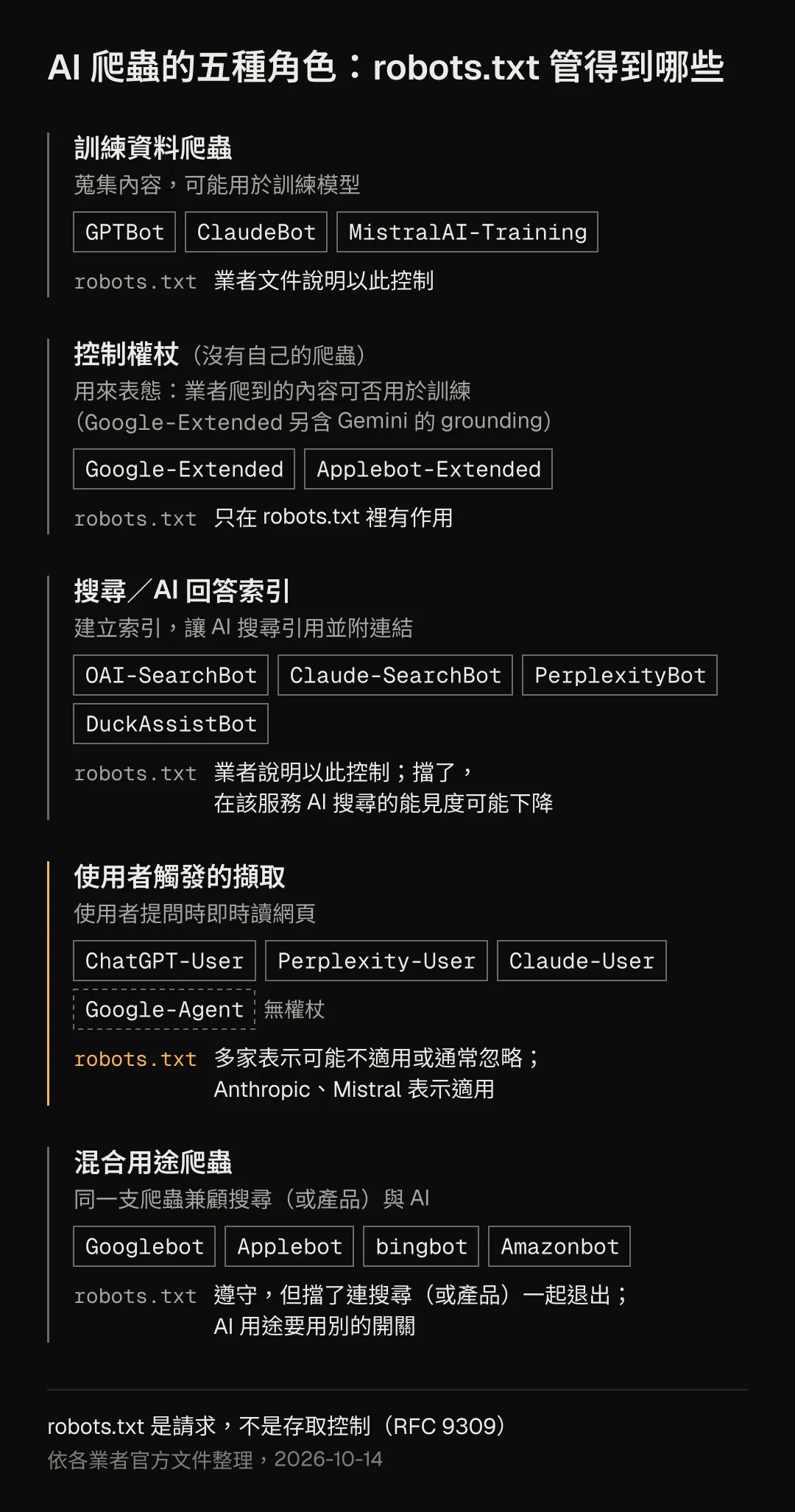
AI 爬蟲的三種用途,加上控制權杖與混合用途爬蟲;robots.txt 對使用者觸發的擷取最管不到(依各業者官方文件,2026-10-14)。
##### AI 爬蟲清單:各家官方名稱與用途(截至 2026-10-14)
下表只列各家官方文件寫明的名稱,內容改寫自各家說明頁,引號內是官方用語的翻譯。名稱比對不分大小寫。
| 業者 | robots.txt 名稱 | 用途 | 官方怎麼說 robots.txt |
| --- | --- | --- | --- |
| [OpenAI](https://developers.openai.com/api/docs/bots) | GPTBot | 訓練 | 擋了表示內容不應用於訓練基礎模型 |
| OpenAI | OAI-SearchBot | ChatGPT 搜尋 | 擋了不會出現在搜尋答案中,仍可能以導覽連結出現;約 24 小時生效 |
| OpenAI | ChatGPT-User | 使用者觸發(ChatGPT、自訂 GPT、GPT Actions) | 由使用者發起,規則「可能不適用」 |
| OpenAI | OAI-AdsBot | 檢查 ChatGPT 廣告的到達頁,不用於訓練 | 未說明 |
| [Anthropic](https://support.claude.com/en/articles/8896518-does-anthropic-crawl-data-from-the-web-and-how-can-site-owners-block-the-crawler) | ClaudeBot | 訓練 | 遵守;擋了表示網站之後的內容不要用於訓練 |
| Anthropic | Claude-SearchBot | 搜尋 | 遵守;擋了不會被編入搜尋索引 |
| Anthropic | Claude-User | 使用者觸發 | 遵守;擋了,回答使用者時就不會擷取 |
| [Google](https://developers.google.com/crawling/docs/crawlers-fetchers/google-common-crawlers) | Googlebot | Google 搜尋(含 AI 摘要、AI 模式);內容也可能用於 Gemini | 自動檢索一律遵守 |
| Google | Google-Extended | 控制權杖:Gemini 的訓練與 grounding | 沒有自己的爬蟲;不影響搜尋收錄與排名 |
| Google | (無) | [使用者觸發的擷取](https://developers.google.com/crawling/docs/crawlers-fetchers/google-user-triggered-fetchers):Google-Agent、Google-GeminiNotebook 等 | 沒有可寫的名稱;「通常會忽略」robots.txt |
| [Apple](https://support.apple.com/en-us/119829) | Applebot | Spotlight、Siri、Safari 搜尋;也可能用於訓練 Apple 的基礎模型 | 遵守;沒被點名、但檔案有 Googlebot 群組時,照 Googlebot 的規則 |
| Apple | Applebot-Extended | 控制權杖:Apple 基礎模型的訓練 | 不抓網頁;擋了不影響搜尋與排名 |
| [Perplexity](https://docs.perplexity.ai/docs/resources/perplexity-crawlers) | PerplexityBot | 搜尋,不用於基礎模型 | 以 robots.txt 控制;最多 24 小時生效 |
| Perplexity | Perplexity-User | 使用者觸發,不用於訓練 | 「通常會忽略」robots.txt |
| [Meta](https://developers.facebook.com/documentation/sharing/webmasters/web-crawlers) | meta-externalagent | 訓練基礎 AI 模型,或建立索引改善產品 | 以 robots.txt 控制 |
| Meta | meta-webindexer | Meta AI 的搜尋與引用 | 以 robots.txt 控制 |
| Meta | meta-externalfetcher | 使用者觸發,含代理任務 | 「可能繞過」robots.txt |
| [Amazon](https://developer.amazon.com/amazonbot) | Amazonbot | 改善產品與服務;可能用於訓練 Amazon 的 AI 模型 | 遵守;頁面加 noarchive 表示不用於訓練 |
| Amazon | Amzn-SearchBot | 搜尋(例如 Alexa),不用於訓練 | 遵守;沒被點名、而檔案允許其他搜尋爬蟲時,照給它們的規則 |
| Amazon | Amzn-User | 使用者觸發(Alexa 即時回答),不用於訓練 | 「可能不遵守所有」指令 |
| [Microsoft](https://www.bing.com/webmasters/help/which-crawlers-does-bing-use-8c184ec0) | bingbot | Bing 搜尋;內容也可能用於 Copilot 與 AI 訓練 | 只管抓取;AI 用途改用 noarchive、nocache |
| [Common Crawl](https://commoncrawl.org/ccbot) | CCBot | 公開的網頁資料庫,供各方重複使用 | 遵守;支援 Crawl-delay |
| [Mistral AI](https://docs.mistral.ai/robots) | MistralAI-Training | 訓練 | 可以用 robots.txt 擋 |
| Mistral AI | MistralAI-Index | Mistral 的搜尋,不用於訓練 | 以 robots.txt 控制 |
| Mistral AI | MistralAI-User | 使用者觸發,不用於訓練 | 以 robots.txt 控制 |
| [DuckDuckGo](https://duckduckgo.com/duckduckgo-help-pages/results/duckassistbot) | DuckAssistBot | DuckDuckGo 搜尋的 AI 輔助答案(Search Assist),不用於訓練 | 遵守;72 小時生效;不影響自然排名 |
###### 過時或查不到官方說明的名稱
網路清單常見下列名稱,2026-10-14 的查核結果:
- `anthropic-ai`、`Claude-Web`:Anthropic 在 2024 年對 [The Register](https://www.theregister.com/software/2024/07/30/taming-ai-content-crawlers-is-no-longer-a-manual-affair/1203397) 表示已不再使用,並說 ClaudeBot 會遵守原本寫給這兩個名稱的規則;現行說明頁沒有列出這兩個名稱,也沒有提到這項安排。
- `FacebookBot`:不在 Meta 現行的爬蟲清單上。
- `Google-NotebookLM`:已改為 Google-GeminiNotebook(舊名支援到 2026 年 8 月),也沒有 robots.txt 名稱。
- `Bytespider`:找不到 ByteDance 的官方說明,用途與是否遵守都無法確認。
- `cohere-ai`:[Cohere 表示](https://docs.cohere.com/docs/cohere-web-crawlers)目前沒有用爬蟲收集訓練資料。
- `GrokBot`、`xAI-*`、`Claude-Code`:只見於第三方清單。
寫進 robots.txt 無妨,但只寫這些名稱,不能取代上表的官方名稱。
###### 社群清單:整份照抄前先看用途
GitHub 的社群專案 [ai.robots.txt](https://github.com/ai-robots-txt/ai.robots.txt) 依它自己的說明,不分用途收錄 AI 相關爬蟲。整份照抄,AI 搜尋與使用者觸發的名稱也會一起寫進 Disallow;拿來比對漏掉的名稱很方便,但加進檔案前要先確認用途。
##### robots.txt 群組規則:一個爬蟲只聽一段
robots.txt 由群組組成:一行或多行 `User-agent`,加上該群組的 `Allow`、`Disallow` 規則。以下依 [RFC 9309](https://www.rfc-editor.org/rfc/rfc9309)(IETF 提議標準)與 [Google 的 robots.txt 規格說明](https://developers.google.com/crawling/docs/robots-txt/robots-txt-spec)整理。
###### 先找自己的名稱,找不到才照萬用群組
爬蟲先找 `User-agent` 和自己名稱相符的群組;完全沒有相符的群組,才照 `User-agent: *`(萬用群組)走。Google 說得更直接:具名群組和萬用群組不會合併。一旦替某支爬蟲寫了專屬群組,萬用群組的規則對它就全部失效。
看一個例子:
```
User-agent: GPTBot
Disallow: /premium/
User-agent: Googlebot
Disallow: /drafts/
User-agent: *
Disallow: /admin/
```
- GPTBot 找到自己的群組,只照它走,被要求避開的只有 /premium/。寫在萬用群組的 /admin/ 對它無效,這就是具名群組的陷阱。
- Googlebot 也一樣,只避開 /drafts/。
- ClaudeBot 在檔案裡找不到自己的名稱,照萬用群組避開 /admin/。
- Applebot 也沒被點名,但檔案有 Googlebot 群組。依 [Apple 的說明](https://support.apple.com/en-us/119829),這時它改照 Googlebot 的規則,避開 /drafts/;萬用群組的 /admin/ 不能指望它照做。
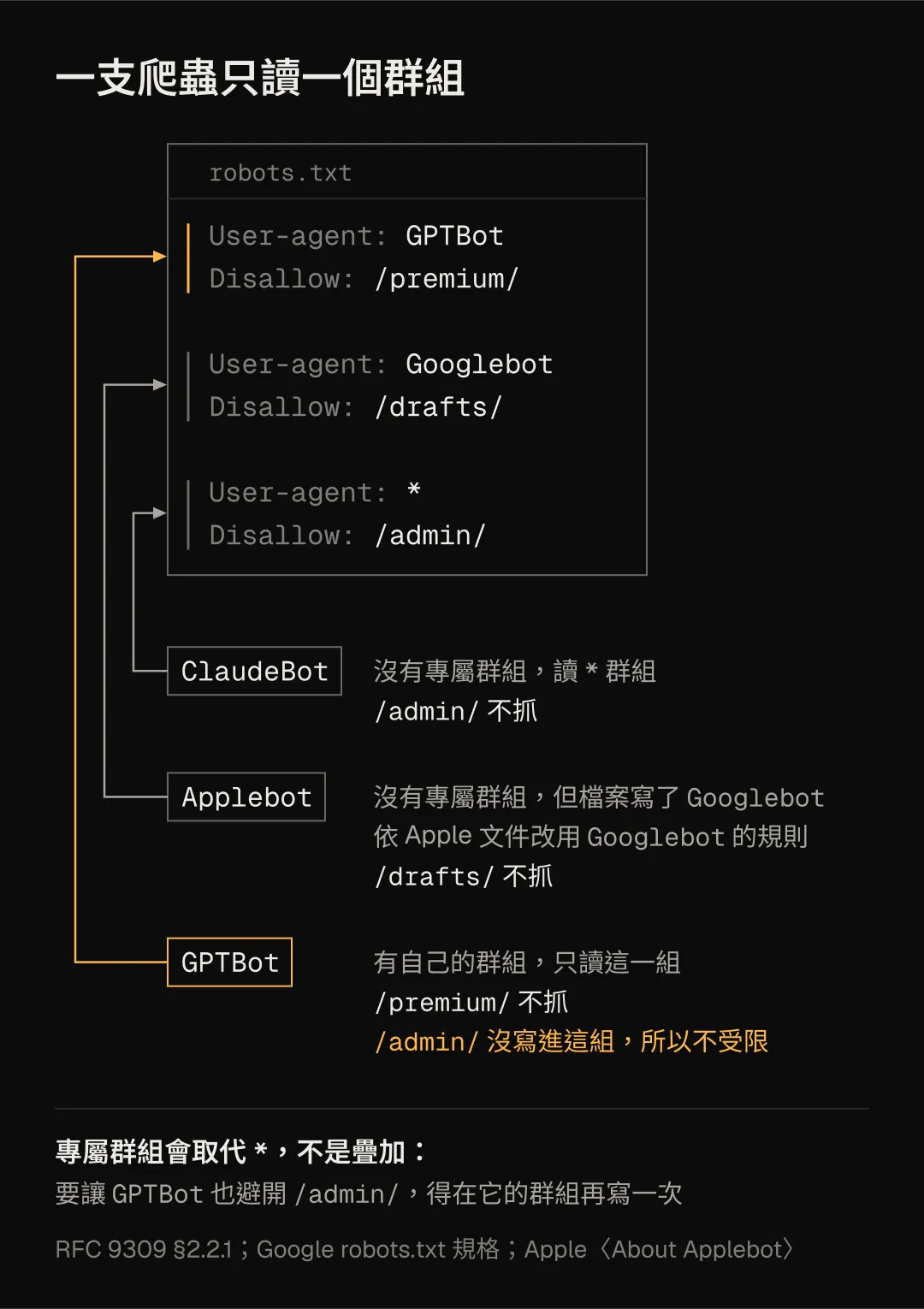
一支爬蟲只套用一個群組:有專屬群組就不讀萬用群組;Applebot 若沒有專屬群組而檔案寫了 Googlebot,會改用 Googlebot 的規則。
修正方法是在每個具名群組裡,把萬用群組仍然需要的規則再寫一次:
```
User-agent: GPTBot
Disallow: /premium/
Disallow: /admin/
User-agent: Googlebot
Disallow: /drafts/
Disallow: /admin/
User-agent: *
Disallow: /admin/
```
Googlebot 群組補上 /admin/ 之後,照 Googlebot 規則走的 Applebot 也一併涵蓋。
###### 同名群組會合併,多個名稱可共用一組
同一個名稱出現在好幾個群組時,規則會合併(RFC 9309 的要求,Google 也這樣做)。好幾行 `User-agent` 可以共用同一組規則,下文的範本就是這樣寫。群組的先後順序不影響結果。
###### 路徑以最長的規則為準
同一個網址同時符合 Allow 與 Disallow 時,以路徑最長的那條為準;一樣長時,RFC 9309 建議 Allow 優先,Google 採用限制最少的那條。例如 `Disallow: /premium/` 加上 `Allow: /premium/free/`,/premium/free/ 底下仍然可以抓。路徑比對分大小寫;沒有任何規則符合就是允許。
###### 不照這套規則走的例外
- Applebot:Apple 自己的範例裡,有專屬群組的 Applebot 也會避開萬用群組的路徑,和 RFC 9309「只聽一個群組」的讀法不同;把需要的規則寫進每個具名群組最穩妥。
- Amzn-SearchBot:沒被點名、而檔案允許其他搜尋爬蟲時,照檔案給其他搜尋爬蟲的規則。
- Google 有兩個名稱的爬蟲:Googlebot-Image、Google-CloudVertexBot 等的第二個名稱是 Googlebot,沒有自己的群組時照 Googlebot 群組;GoogleOther-Image、GoogleOther-Video 的第二個名稱是 GoogleOther,照的是 GoogleOther 群組。
- Google 的特殊用途爬蟲:AdsBot-Google、APIs-Google、Mediapartners-Google 等不理萬用群組,Google-Safety 完全不看 robots.txt([Google 的特殊用途爬蟲清單](https://developers.google.com/crawling/docs/crawlers-fetchers/google-special-case-crawlers))。所以 `User-agent: *` 加 `Disallow: /`,不會讓所有 Google 爬蟲都停下來。
- 使用者觸發的擷取:可能不照 robots.txt 走,見下文「robots.txt 做不到的事」。
###### 其他容易忽略的細節
- 一個主機一份:robots.txt 只管同一個協定、主機和連接埠,example.com 的檔案不涵蓋 blog.example.com 或 http 版本。Anthropic 也請網站在每個子網域各放一份。
- 讀不到檔案時(4xx):4xx(429 除外)在 Google 看來等於沒有限制。
- 讀不到檔案時(5xx、逾時、DNS 錯誤):Google 先停止抓取 12 小時並重試,之後最多 30 天沿用最後一份成功取得的版本(沒有就當作沒有限制);30 天後,網站整體正常就當作沒有 robots.txt,否則停止抓取。429 也算伺服器錯誤。RFC 9309 則要求先視為全部禁止;Amazon 讀不到就當作沒有檔案。
- 快取與大小:通常最多快取 24 小時(RFC 9309 的建議,Google 也是),Amazon 可能用到 30 天前的版本;Google 只讀前 500 KiB。
- Crawl-delay:不在 RFC 9309 裡。Anthropic 與 Common Crawl 支援,Google、Apple、Amazon 不支援。
- 不認得的欄位不會切斷群組:例如 `Content-Signal:`,不認得的爬蟲會略過這一行,群組照樣延續。
- 檔案是公開的:寫進 Disallow 的路徑人人看得到,列出來反而更容易被發現。
##### 依目標選寫法:四個範本
要擋或放,是內容與商業上的取捨,本文不替讀者決定。下圖與下表把常見目標對應到該用的工具;有些目標根本不靠 robots.txt。
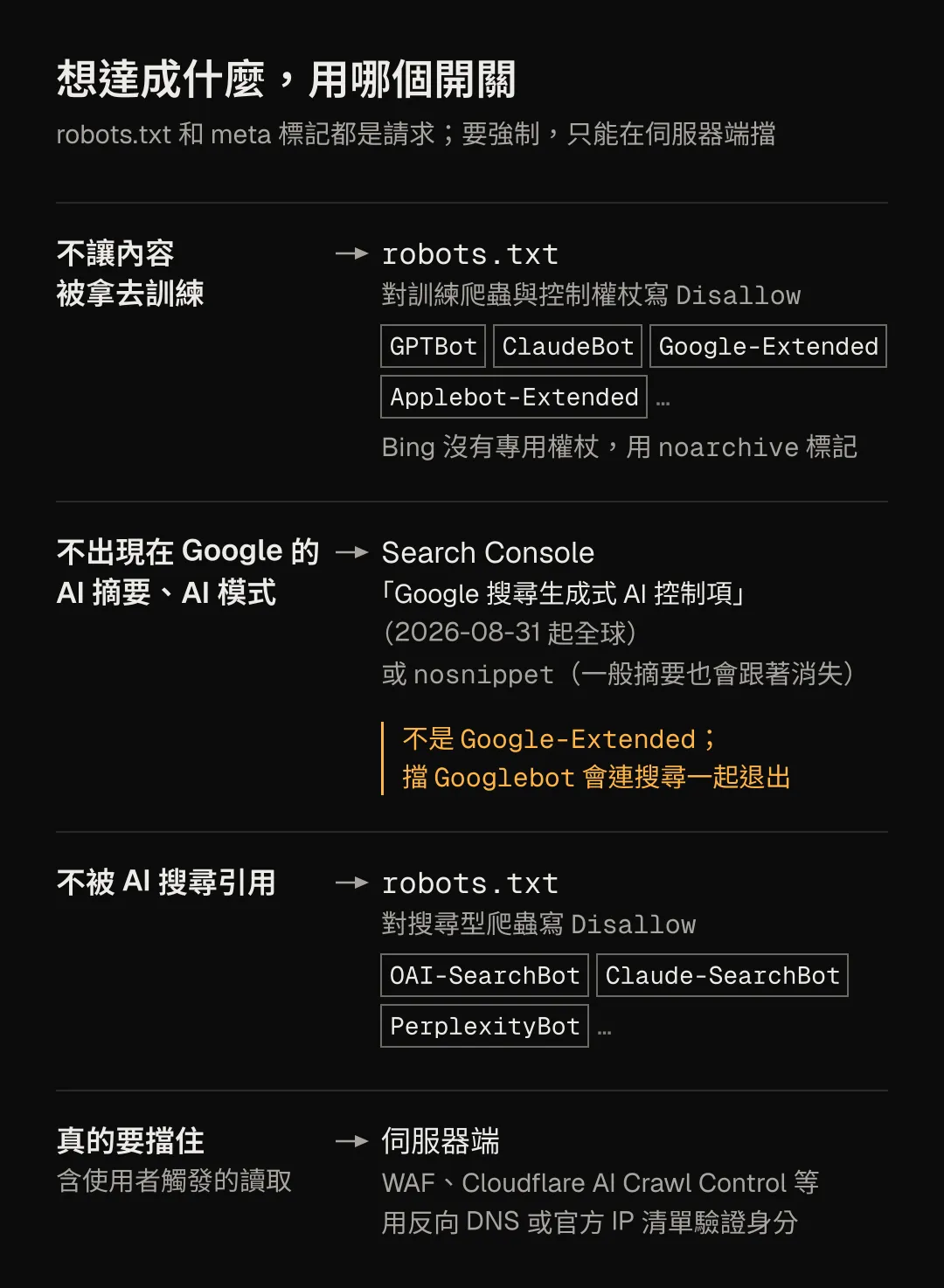
不同目標用不同開關:訓練與 AI 搜尋寫在 robots.txt,Google 的 AI 摘要靠 Search Console,要強制只能在伺服器端。
| 目標 | robots.txt 怎麼寫 | 另外要做或注意 |
| --- | --- | --- |
| 全部開放 | 不必點名 AI 爬蟲(範本一) | 放行不保證被引用 |
| 不讓內容被拿去訓練 | 對訓練類名稱寫 Disallow(範本二) | Bing 沒有訓練專用名稱,改用 noarchive;只影響之後的抓取 |
| 不被 AI 搜尋引用 | 再加上 AI 搜尋類名稱(範本三) | 使用者觸發的擷取不一定照做 |
| 不出現在 Google AI 摘要、AI 模式 | 不靠 robots.txt:Google-Extended 管不到,擋 Googlebot 會連搜尋一起退出 | 用 Search Console 的控制項或 nosnippet(見下一節) |
| 只保護部分目錄 | 在具名群組寫路徑(範本四) | 會員內容用登入保護 |
| 真的要擋 | robots.txt 做不到 | 在伺服器端處理(WAF、Cloudflare AI Crawl Control 等),並驗證來源 |
###### 範本一:全部開放
```
User-agent: *
Allow: /
Sitemap: https://example.com/sitemap.xml
```
沒有規則符合時本來就是允許,`Allow: /` 只是把意思寫明;沒有 robots.txt(回 404)在 Google 看來也等於沒有限制。本站就是這一型,見下文「實例」。
###### 範本二:不給訓練,保留搜尋與 AI 搜尋
```
User-agent: GPTBot
User-agent: ClaudeBot
User-agent: Google-Extended
User-agent: Applebot-Extended
User-agent: meta-externalagent
User-agent: Amazonbot
User-agent: CCBot
User-agent: MistralAI-Training
Disallow: /
User-agent: *
Allow: /
```
使用前要知道的代價與限制:
- `Google-Extended` 也管 Gemini 應用程式與 Vertex AI 的 grounding。
- `Amazonbot`、`meta-externalagent` 也用於改善產品或建立索引,不只訓練;`CCBot` 建立的開放資料庫有各種用途。
- Bing 要另外用 noarchive;Google 的 AI 摘要也不歸這裡管。
- 只影響之後的抓取:Anthropic 說的是網站「之後的內容」,本站查核的業者頁面都沒有說改了 robots.txt 會刪除已收集的資料。
###### 範本三:連 AI 搜尋也退出,保留一般搜尋
```
# 訓練(同範本二)
User-agent: GPTBot
User-agent: ClaudeBot
User-agent: Google-Extended
User-agent: Applebot-Extended
User-agent: meta-externalagent
User-agent: Amazonbot
User-agent: CCBot
User-agent: MistralAI-Training
Disallow: /
# AI 搜尋與 AI 回答索引
User-agent: OAI-SearchBot
User-agent: Claude-SearchBot
User-agent: PerplexityBot
User-agent: Amzn-SearchBot
User-agent: meta-webindexer
User-agent: MistralAI-Index
User-agent: DuckAssistBot
Disallow: /
User-agent: *
Allow: /
```
Google 的 AI 摘要另外處理(見下一節);Bing 的 Copilot 用 noarchive,Apple 的 AI 回答用 nosnippet。`Amzn-SearchBot` 服務的是 Amazon 產品裡的搜尋(例如 Alexa),擋了也會退出那裡的搜尋。
若連使用者觸發的擷取也要提出要求,可以再加一組:
```
User-agent: ChatGPT-User
User-agent: Claude-User
User-agent: Perplexity-User
User-agent: meta-externalfetcher
User-agent: Amzn-User
User-agent: MistralAI-User
Disallow: /
```
效果因業者而異:Anthropic 表示 robots.txt 適用,Mistral 說明 robots.txt 裡的 MistralAI-User 規則決定使用者請求能抓哪些網站;OpenAI、Perplexity、Meta、Amazon 的說法從可能不適用、可能繞過到通常會忽略都有(見上方清單);Google 則沒有名稱可寫。另外,擋了 Claude-User,使用者請 Claude 讀你的網頁時,它也不會去抓。
###### 範本四:只保護部分目錄
```
User-agent: GPTBot
User-agent: ClaudeBot
Disallow: /premium/
Disallow: /admin/
User-agent: *
Disallow: /admin/
```
具名群組不會繼承萬用群組,所以 /admin/ 要再寫一次;其他名稱照同樣方式加進這一組。會員或付費內容真正的保護是登入。Google 的 AdsBot 等特殊用途爬蟲不理萬用群組,/admin/ 對它們無效(見上文例外)。
##### 擋了會影響 Google 排名或 AI 摘要嗎?
AI 摘要與 AI 模式屬於 Google 搜尋,由 Googlebot 抓取;Google-Extended 不影響排名,也不能讓網站退出這兩項功能。它管的是訓練:Search Console 說明也指出,要限制這些 AI 功能所用模型的訓練,用的是 Google-Extended。
###### Google 的開關各管一件事:Googlebot、Google-Extended 與 Search Console
| 控制方式 | 一般搜尋結果 | AI 摘要、AI 模式 | AI 訓練 | 備註 |
| --- | --- | --- | --- | --- |
| robots.txt 擋 Googlebot | 不再檢索 | 同樣不再檢索 | — | 網址仍可能出現,只是沒有說明文字 |
| noindex | 整頁退出 | 一起退出 | — | 頁面不能同時被 robots.txt 擋,Google 才讀得到 |
| nosnippet、data-nosnippet、max-snippet | nosnippet 不顯示摘要;max-snippet 限制長度;data-nosnippet 標記的段落不顯示 | nosnippet:不顯示,也不當作直接輸入;max-snippet:限制可當作直接輸入的份量;data-nosnippet:標記的段落不顯示 | — | data-nosnippet 可以只標一段 |
| Search Console「Google 搜尋生成式 AI 控制項」 | 不影響,不是排名或收錄訊號 | 網站退出,也不當作參考基準 | 不影響 | 也涵蓋 Google 探索的生成式 AI 功能;2026-08-31 起全球適用;通常幾天內生效,部分內容更久 |
| robots.txt 擋 Google-Extended | 不影響收錄與排名 | 不會因此退出 | 不用於 Gemini 訓練;也限制 AI 摘要等功能所用模型的訓練 | 也管 Gemini 應用程式、Vertex AI 的 grounding |
「—」表示 Google 沒有把它列為這一項的控制方式。資料截至 2026-10-14。
要退出 AI 摘要與 AI 模式、又保留一般搜尋,用的是 Search Console 的[「Google 搜尋生成式 AI 控制項」](https://support.google.com/webmasters/answer/16908024?hl=zh-Hant):依序點選「設定」>「Google 搜尋生成式 AI」,選擇納入(預設)、排除,或沿用上層資源的設定。依 Google 的說明,排除後這些功能不顯示網站的連結和內容,也不拿它當參考基準;AI 訓練則交給 Google-Extended,要完全不出現在 Google 搜尋仍要用 noindex。
只想處理個別頁面或段落,可以用 [nosnippet、data-nosnippet 或 max-snippet](https://developers.google.com/search/docs/crawling-indexing/robots-meta-tag),代價是一般搜尋結果的摘要也會跟著消失(nosnippet)或變短(max-snippet)。為了避開 AI 功能而擋 Googlebot,等於連一般搜尋一起退出。
###### 擋 OpenAI、Anthropic 的爬蟲:不影響 Google;擋搜尋爬蟲才影響它們的 AI 搜尋
GPTBot、ClaudeBot 等名稱和 Google 的收錄、排名無關。受影響的是這些公司自己的 AI 搜尋,而且看的是搜尋爬蟲,不是訓練爬蟲:
- ChatGPT 搜尋看 OAI-SearchBot:擋了,網站不會出現在搜尋答案中,但仍可能以導覽連結出現,約 24 小時後反映。只擋 GPTBot 不影響這一項。
- Claude 看 Claude-SearchBot(搜尋索引)與 Claude-User(回答時即時擷取)。
- Perplexity 看 PerplexityBot,最多 24 小時反映。
###### Bing 與 Copilot:沒有 AI 專用名稱,用 noarchive、nocache
Microsoft 沒有替 Copilot 或 AI 訓練另設名稱,bingbot 同時服務搜尋與 AI。依 [Bing 的 robots meta 說明](https://www.bing.com/webmasters/help/robots-meta-tags-and-attributes-that-bing-supports-5198d240),AI 用途要用頁面上的 meta 標籤控制:
- `noarchive`:Chat 與 Copilot 的回答不連結這一頁,也不用於訓練 Microsoft 的生成式 AI 基礎模型。
- `nocache`:Chat 與 Copilot 只顯示網址、標題與摘要,訓練也只用這三項;兩者同時出現時,以 nocache 處理。
寫成 `` 就只對 Bing 生效。Bing 在 [2023 年推出這兩個選項](https://blogs.bing.com/webmaster/2023/9/Announcing-new-options-for-webmasters-to-control-usage-of-their-content-in-Bing-Chat/)時表示,這些頁面仍會出現在 Bing 搜尋結果。Cloudflare 在 2026-09-15 提到,Microsoft 正在開發以 robots.txt 表達「不訓練」的支援,目標是 2027 年初;這是 Cloudflare 的說法,本站沒有找到 Microsoft 的公告。
###### Apple:Applebot-Extended 管訓練,nosnippet 管 AI 回答
- 訓練:對 `Applebot-Extended` 寫 Disallow,內容就不用於訓練 Apple 的基礎模型;它不抓網頁,也不影響 Apple 的搜尋。
- AI 回答:Applebot 抓到的資料也可能在 Siri 與搜尋用 AI 回答一般知識問題時當作參考。頁面加 `nosnippet`(或 `X-Robots-Tag: applebot: nosnippet`)可以退出這種用途,代價是 Applebot 不會替這一頁產生描述或網頁答案,連到這頁的建議只顯示標題。
- 付費內容:結構化資料標了 `isAccessibleForFree: false` 的頁面,Apple 不會拿來當 AI 輸出的參考。
- 擋 Applebot 本身,會連 Spotlight、Siri、Safari 的搜尋一起退出。
##### robots.txt 做不到的事
[RFC 9309](https://www.rfc-editor.org/rfc/rfc9309) 寫明,robots.txt 的規則「不是一種存取授權」。Google 的 [robots.txt 入門說明](https://developers.google.com/search/docs/crawling-indexing/robots/intro)也提到,robots.txt 無法強制爬蟲照做:正派的爬蟲會遵守,其他的不一定。具體來說:
- 不能保證每支爬蟲照做:使用者觸發的擷取最明顯,見範本三。
- 不能回溯:設定只影響之後的抓取。
- 不能讓網址從搜尋消失:被 Disallow 的網址,Google 仍可能不經抓取就收錄,只是沒有說明文字;要不出現在結果中,得用 noindex 或密碼保護。
- llms.txt 也不行:llms.txt 是給 AI 的閱讀清單,不是權限檔,詳見[本站整理的 llms.txt 指南](https://lijiabao.dev/articles/what-is-llms-txt/)。
真的要拒絕連線,得在伺服器或 CDN 端處理,例如登入、WAF、速率限制或機器人管理,並用下文的方法確認對方身分。Anthropic 也提醒,直接封鎖 IP 不一定可靠,因為這會讓它讀不到 robots.txt。
這方面也有公開爭議。Cloudflare 在 [2025-08-04 的文章](https://blog.cloudflare.com/perplexity-is-using-stealth-undeclared-crawlers-to-evade-website-no-crawl-directives/)說,在全站禁止抓取、並用 WAF 封鎖 Perplexity 兩支爬蟲的測試網域上,Perplexity 仍能回答網頁內容;Cloudflare 還觀察到一支以一般瀏覽器身分出現、輪換 IP 的未申報爬蟲。
[Perplexity 同一天回應](https://www.perplexity.ai/hub/blog/agents-or-bots-making-sense-of-ai-on-the-open-web),表示使用者驅動的代理不是爬蟲,並說 Cloudflare 把第三方雲端瀏覽器服務 BrowserBase 的流量算到它頭上。本站沒有找到獨立的查證,這仍是雙方各自的說法。
###### Content-Signal 與 IETF AI 偏好:都是表態,不是規則
- Content-Signal:Cloudflare 在 2025-09-24 提出的欄位,在 robots.txt 對 search、ai-input、ai-train 三種用途表達偏好,寫法見前文連結的 llms.txt 指南。本站查核的業者爬蟲文件都沒有提到會讀這一行,Google 也會略過它。
- IETF AI 偏好:[aipref 工作小組](https://datatracker.ietf.org/wg/aipref/about/)正在制定類似的詞彙與寫法,例如 `Content-Usage: train-ai=n`。兩份文件仍是網際網路草案,原訂 2026 年 8 月送交 IESG 的里程碑沒有達成,技術上的強制也不在它的範圍內。
- noai、noimageai:DeviantArt 在 2022 年提出的非標準標籤;Meta 表示它採用 robots.txt 這類業界標準,而不是 NoAI 標籤這種非標準格式。
robots.txt 和這些訊號表達的都是偏好;著作權等法律問題,請洽詢律師。
###### 主機被爬到很慢時
robots.txt 只對遵守它的爬蟲有用,`Crawl-delay` 的支援也不一致(見上文)。Google 還提醒,不要用讓 robots.txt 回 401、403 的方式限制抓取速度,因為 4xx(429 除外)不會讓 Google 放慢抓取,robots.txt 回 4xx 還會被當成沒有限制。流量問題要靠 CDN 或防火牆的速率限制與機器人管理。
##### WordPress、Cloudflare 怎麼設
###### WordPress
WordPress 預設輸出的是[虛擬的 robots.txt](https://developer.wordpress.org/reference/functions/do_robots/),主機上沒有實體檔案。常見改法如下,介面名稱可能隨版本改變,請以畫面為準:
- Yoast SEO:Settings → Advanced → Crawl optimization 的「Block unwanted bots」。依 [Yoast 的說明](https://yoast.com/help/block-unwanted-bots-with-yoast-seo/),免費版只能擋 Google 的 AdsBot,Google-Extended、GPTBot、CCBot 的開關要 Premium。
- All in One SEO(AIOSEO):Tools → Robots.txt Editor,先啟用自訂 robots.txt,裡面有「Block AI Crawlers」區塊([AIOSEO 說明頁](https://aioseo.com/docs/using-the-robots-txt-tool-in-all-in-one-seo/),2026-08-14 更新)。
- Rank Math:先開 Advanced Mode,再到 General Settings → Edit robots.txt([Rank Math 說明](https://rankmath.com/kb/how-to-edit-robots-txt-with-rank-math/))。
- WordPress.com:Settings → Reading → Site Visibility 選 Public,勾選「Prevent third-party sharing」,會停止把網站公開內容分享給 WordPress.com 的第三方授權夥伴,並把「已知的 AI 機器人」加進 robots.txt;[WordPress.com 的說明頁](https://wordpress.com/support/privacy-settings/make-your-website-public/)沒有列出是哪些。
根目錄若放了實體的 robots.txt,伺服器通常會直接送出它,外掛的設定就不會生效;Rank Math 也要求先刪除實體檔。改完請開啟 `https://你的網域/robots.txt` 確認。
###### Cloudflare(2026-09-15 之後)
Cloudflare 在 [2026-09-15 改了 AI 爬蟲設定](https://blog.cloudflare.com/accountable-mixed-use-ai-crawlers/),較早的教學可能還是舊的選項名稱。現在 AI 爬蟲分成 Search、Training、Agent 三類各自設定,所有方案都能用,位置在網域(zone)的 Security Settings:篩選 Bot traffic,再選 Configure AI bot policies。和 robots.txt 最相關的是:
- Disallow AI Training(只有 Training 有):透過 Bot Preference Sync 在 robots.txt 發布不訓練的偏好。Cloudflare 認定為「Accountable」的混合用途爬蟲(Googlebot、Applebot、Bingbot)仍可為搜尋抓取;其他訓練爬蟲(Cloudflare 稱為訓練專用,例如 Amazon、Anthropic、Meta、OpenAI 的)直接在邊緣被擋。儀表板上這個選項標示為 Disallow。
- Block、Block on pages with ads:現在也套用到 Applebot、Bingbot、Googlebot 這些混合用途爬蟲,所以搜尋也會受影響。
其他變化:
- 舊的「Block AI Bots」自 2026-09-15 起列為停用,「Managed robots.txt」由 Bot Preference Sync 取代;舊設定已自動移轉,Training 原本選 Block 或 Block on pages with ads 的,都改成 Disallow AI Training。
- 新加入的網域會依是否靠廣告營利,套用不同的預設建議:靠廣告營利的網站,Training 預設為 Disallow AI Training、Agent 為 Block on pages with ads;兩種預設都允許 Search。
- 網站原本就有 robots.txt 時,[Bot Preference Sync](https://developers.cloudflare.com/bots/additional-configurations/managed-robots-txt/) 會把 Cloudflare 的區塊加在檔案最前面;它對新客戶預設開啟,可以關閉([Cloudflare 2026-08-21 的說明](https://blog.cloudflare.com/bot-preference-sync/))。
- 依 Cloudflare 的說明,Disallow AI Training 對 Google、Apple 是透過 Google-Extended、Applebot-Extended 傳達;Bing 目前還收不到,要自己加 noarchive(見上文)。
Cloudflare 自己的統計(2026-09-15):不到 1% 的 Cloudflare 網站封鎖搜尋爬蟲,17% 用了某種方式阻擋訓練。另外,所有方案都有的 AI Crawl Control 可以逐一允許或封鎖爬蟲,並追蹤 robots.txt 的遵守情況。改完設定,記得抓線上的 robots.txt,看看開頭有沒有 `# BEGIN Cloudflare Managed content` 區塊。
##### 怎麼確認設定生效?6 個檢查
1. 抓線上的檔案:用 `curl -sL https://你的網域/robots.txt` 或無痕視窗開啟,看有沒有不是你寫的段落,例如 CDN 加上的區塊。
2. 逐一對照群組:確認每個名稱照哪一段走。Google 開源的 [robots.txt 解析器](https://github.com/google/robotstxt)可以在本機測試。
3. 看 Search Console 的 [robots.txt 報表](https://support.google.com/webmasters/answer/6062598):在「設定」裡,顯示 Google 抓到的版本,最多列 20 個主機,可以要求重新檢索。它只代表 Google,測不了 GPTBot 等其他爬蟲;舊的「robots.txt 測試工具」已由這份報表取代(Google 在 2023 年 11 月宣布停用)。
4. 看存取紀錄:依名稱篩選,再用業者公布的 IP 清單或反向 DNS 確認是不是本尊(見下表)。使用者代理字串可以偽造;兩個控制權杖不會出現在紀錄裡。
5. 給它時間:OpenAI(搜尋)、Perplexity、Meta、Amazon 約 24 小時內,Google 的快取通常也最多 24 小時,DuckDuckGo 寫 72 小時,Anthropic 與 Apple 沒有說明;Search Console 的生成式 AI 控制項通常要幾天(控制項上線後 1 到 2 天內排除,部分內容更久)。
6. Cloudflare 使用者看 AI Crawl Control:它會追蹤爬蟲是否遵守 robots.txt。自己用 curl 假冒 GPTBot 的使用者代理字串,只測得到依字串判斷的規則。
| 業者 | 公布的 IP 清單或驗證方式 |
| --- | --- |
| OpenAI | 每支爬蟲各一份 JSON,例如 [gptbot.json](https://openai.com/gptbot.json)、[searchbot.json](https://openai.com/searchbot.json) |
| Anthropic | [bots.json](https://claude.com/crawling/bots.json),三支爬蟲合併成一份 |
| Google | [反向 DNS 再正向確認](https://developers.google.com/crawling/docs/crawlers-fetchers/verify-google-requests),主機名稱應屬於 googlebot.com、google.com 或 googleusercontent.com;或比對 [IP 範圍檔](https://developers.google.com/static/crawling/ipranges/common-crawlers.json) |
| Apple | 反向 DNS `*.applebot.apple.com`,或 [applebot.json](https://search.developer.apple.com/applebot.json) |
| Microsoft | [bingbot.json](https://www.bing.com/toolbox/bingbot.json),或 Bing 的 Verify Bingbot 工具 |
| Perplexity | [perplexitybot.json](https://www.perplexity.com/perplexitybot.json)、[perplexity-user.json](https://www.perplexity.com/perplexity-user.json) |
| Amazon | [Amazonbot 的 IP 頁面](https://developer.amazon.com/amazonbot/ip-addresses/),Amzn-SearchBot、Amzn-User 另有各自的頁面 |
| Common Crawl | 反向 DNS `*.crawl.commoncrawl.org`(只有 IPv4),或 [ccbot.json](https://index.commoncrawl.org/ccbot.json) |
| DuckDuckGo | [duckassistbot.json](https://duckduckgo.com/duckassistbot.json) |
| Mistral AI | MistralAI-User、MistralAI-Index 各一份;MistralAI-Training 沒有公布 |
| Meta | 說明頁沒有公布 |
Google 的 IP 範圍檔在 2026 年搬到 `/static/crawling/ipranges/`,舊路徑目前會轉到新檔。另外,Google 正在實驗以密碼學簽章([Web Bot Auth](https://developers.google.com/crawling/docs/crawlers-fetchers/web-bot-auth))標示部分 AI 代理的請求,OpenAI 的 [ChatGPT Work 雲端瀏覽器](https://help.openai.com/en/articles/11845367)也會簽署請求(RFC 9421);Google 說不是每個請求都簽,IP 與反向 DNS 檢查仍要保留。Web Bot Auth 本身仍是 IETF 草案;RFC 9421 是它採用的簽章標準。
##### 實例:本站的 robots.txt
以下是[本站的 robots.txt](https://lijiabao.dev/robots.txt) 全文,截至 2026-10-14。它在建置時由網站程式產生,共 285 位元組:
```
# lijiabao.dev
# Content signals: https://contentsignals.org/
# For language models: https://lijiabao.dev/llms.txt (full text: https://lijiabao.dev/llms-full.txt)
User-agent: *
Content-Signal: search=yes, ai-input=yes, ai-train=yes
Allow: /
Sitemap: https://lijiabao.dev/sitemap.xml
```
逐項來看:
- 只有萬用群組:沒有任何具名群組,所以前面表中的名稱都照這一段走,整個檔案也沒有 Disallow。`Allow: /` 依規則可以省略,寫出來是為了讓意思明確。
- Content-Signal:對 search、ai-input、ai-train 三種用途都表示同意。不認得這個欄位的爬蟲會略過它(Google 只解析四個欄位),它也不會切斷群組。
- llms.txt 那一行是註解:robots.txt 沒有 llms.txt 欄位,所以寫成 `#` 註解:解析器會略過,打開檔案的人或模型看得到。
- 沒有 Cloudflare 的區塊:檔案裡沒有 `# BEGIN Cloudflare Managed content`,表示 Cloudflare 的 robots.txt 功能沒有在前面加內容。
這是本站的設定:在 robots.txt 這一層,搜尋、AI 回答與 AI 訓練一律允許。它是一個有文件可查的例子,不是建議。robots.txt 也只呈現這一層的表態;CDN 或防火牆在邊緣有沒有另外的設定,從這個檔案看不出來。
##### 常見問題
###### 擋了 GPTBot,網站還會出現在 ChatGPT 的搜尋答案裡嗎?
仍可能出現。會不會出現在搜尋答案裡,看的是 OAI-SearchBot,不是 GPTBot;OpenAI 寫明兩者各自獨立。也要確認萬用群組沒有寫 `Disallow: /`,因為 OAI-SearchBot 沒有專屬群組時會照它走。放行也不保證會被引用。
###### 擋 AI 爬蟲會影響 Google 排名嗎?
擋 GPTBot、ClaudeBot、CCBot 等其他公司的爬蟲,和 Google 排名無關;Google 也寫明 Google-Extended 不影響收錄、不是排名訊號。會影響的是對 Googlebot 寫 Disallow(不再檢索)或加 noindex(退出搜尋結果)。
###### 擋了 Google-Extended,網站會從 AI 摘要消失嗎?
不會。Google-Extended 管 Gemini 的訓練與 grounding,AI 摘要與 AI 模式屬於 Google 搜尋。要退出,可以在 Search Console 的「設定」>「Google 搜尋生成式 AI」選擇排除;只想限制個別頁面,用 nosnippet、data-nosnippet 或 max-snippet。
###### robots.txt 擋得住所有 AI 嗎?已經被抓走的內容呢?
擋不住。robots.txt 不是存取授權,使用者觸發的擷取,多家業者都表示可能不照做;設定也只影響之後的抓取。真的要擋,得靠登入、WAF 或 CDN 的機器人管理。
###### 怎麼確認設定生效?
抓線上的 /robots.txt(CDN 可能加了內容),確認每個名稱照哪個群組走,再用存取紀錄與業者公布的 IP 清單或反向 DNS 確認來源。有寫明時間的業者多半約 24 小時,DuckDuckGo 寫 72 小時。
###### WordPress 找不到 robots.txt 檔案,要去哪裡改?
WordPress 預設輸出虛擬的 robots.txt,要用 SEO 外掛的編輯器修改:Yoast SEO 的 AI 爬蟲開關要 Premium,AIOSEO 有「Block AI Crawlers」區塊,Rank Math 要先開 Advanced Mode。根目錄若有實體 robots.txt,通常會蓋過外掛的設定。
###### 用 Cloudflare 的話,還需要自己寫 robots.txt 嗎?
看你的設定。Training 選「Disallow AI Training」並開啟 Bot Preference Sync 時,Cloudflare 會在 robots.txt 前面加上不訓練的偏好,並在邊緣擋下其他訓練爬蟲,Googlebot、Bingbot、Applebot 仍可為搜尋抓取;不過 Bing 目前收不到這個偏好,要另加 noarchive。選「Block」則連搜尋一起受影響。改完請抓線上的檔案確認。
###### AI 爬蟲把主機爬到很慢,robots.txt 有用嗎?
只對遵守規則的爬蟲有用。Crawl-delay 不是標準,Google、Apple、Amazon 都不支援;流量問題要靠 CDN 或防火牆的速率限制與機器人管理。
##### 重點整理
- AI 爬蟲分訓練、搜尋/AI 回答索引、使用者觸發三類,另有控制權杖與混合用途爬蟲。
- 同一家公司的名稱原則上各自獨立;一個爬蟲只聽一個群組,具名群組不會繼承萬用群組的規則。
- Google-Extended 管 Gemini 的訓練與 grounding,不影響排名,也不會讓網站退出 AI 摘要;AI 摘要要用 Search Console 的控制項或 nosnippet。
- robots.txt 是請求:使用者觸發的擷取不一定照做,設定也只影響之後的抓取。
- Cloudflare 自 2026-09-15 起,Block 也會擋 Googlebot 等混合用途爬蟲;只退出訓練的是 Disallow AI Training。
- 改完要抓線上版本、看存取紀錄,並等約 24 小時。
想看更多類似的整理,可以瀏覽[本站編輯整理的文章](https://lijiabao.dev/articles/)。
##### 來源
1. [RFC 9309 — Robots Exclusion Protocol(IETF, 2022-09,提議標準)](https://www.rfc-editor.org/rfc/rfc9309) rfc-editor.org
2. [Google — How Google interprets the robots.txt specification(2026-08-31)](https://developers.google.com/crawling/docs/robots-txt/robots-txt-spec) developers.google.com
3. [Google — List of Google's common crawlers(Googlebot、Google-Extended;2026-07-14)](https://developers.google.com/crawling/docs/crawlers-fetchers/google-common-crawlers) developers.google.com
4. [Google — List of Google's special-case crawlers(2026-09-17)](https://developers.google.com/crawling/docs/crawlers-fetchers/google-special-case-crawlers) developers.google.com
5. [Google — List of Google user-triggered fetchers(2026-08-19)](https://developers.google.com/crawling/docs/crawlers-fetchers/google-user-triggered-fetchers) developers.google.com
6. [Google — Robots meta tag, data-nosnippet, and X-Robots-Tag specifications(2026-03-24)](https://developers.google.com/search/docs/crawling-indexing/robots-meta-tag) developers.google.com
7. [Search Console 說明 — Google 搜尋生成式 AI 控制項(2026-08-31 起全球適用)](https://support.google.com/webmasters/answer/16908024?hl=zh-Hant) support.google.com
8. [Google — Verify requests from Google crawlers and fetchers(2026-03-20)](https://developers.google.com/crawling/docs/crawlers-fetchers/verify-google-requests) developers.google.com
9. [OpenAI — Overview of OpenAI Crawlers](https://developers.openai.com/api/docs/bots) developers.openai.com
10. [Anthropic — Does Anthropic crawl data from the web, and how can site owners block the crawler?(2026 年 4 月)](https://support.claude.com/en/articles/8896518-does-anthropic-crawl-data-from-the-web-and-how-can-site-owners-block-the-crawler) support.claude.com
11. [Apple — About Applebot(2026-09-04)](https://support.apple.com/en-us/119829) support.apple.com
12. [Meta — Meta Web Crawlers(2026-05-21)](https://developers.facebook.com/documentation/sharing/webmasters/web-crawlers) developers.facebook.com
13. [Perplexity — Perplexity Crawlers](https://docs.perplexity.ai/docs/resources/perplexity-crawlers) docs.perplexity.ai
14. [Amazon — About AmazonBot](https://developer.amazon.com/amazonbot) developer.amazon.com
15. [Bing Webmaster Tools — Robots meta tags and attributes that Bing supports](https://www.bing.com/webmasters/help/robots-meta-tags-and-attributes-that-bing-supports-5198d240) bing.com
16. [Cloudflare — Have it both ways: stay discoverable in search while disallowing AI training(2026-09-15)](https://blog.cloudflare.com/accountable-mixed-use-ai-crawlers/) blog.cloudflare.com
17. [Cloudflare Docs — robots.txt setting(Bot Preference Sync,2026-10-08)](https://developers.cloudflare.com/bots/additional-configurations/managed-robots-txt/) developers.cloudflare.com
18. [Cloudflare — Perplexity is using stealth, undeclared crawlers to evade website no-crawl directives(2025-08-04)](https://blog.cloudflare.com/perplexity-is-using-stealth-undeclared-crawlers-to-evade-website-no-crawl-directives/) blog.cloudflare.com
19. [Perplexity — Agents or bots? Making sense of AI on the open web(2025-08-04)](https://www.perplexity.ai/hub/blog/agents-or-bots-making-sense-of-ai-on-the-open-web) perplexity.ai
20. [lijiabao.dev — robots.txt(截至 2026-10-14)(外部網站)](https://lijiabao.dev/robots.txt) lijiabao.dev
21. [Google — Robots.txt Introduction and Guide(2025-12-10)](https://developers.google.com/search/docs/crawling-indexing/robots/intro) developers.google.com
22. [Google — How HTTP status codes affect Google's crawlers(2026-02-04)](https://developers.google.com/crawling/docs/troubleshooting/http-status-codes) developers.google.com
23. [Google Search Central — AI features and your website(2025-12-10)](https://developers.google.com/search/docs/appearance/ai-features) developers.google.com
24. [Google Search Central Blog — New location for the Google crawlers' IP range files(2026-03-31)](https://developers.google.com/search/blog/2026/03/crawler-ip-ranges) developers.google.com
25. [Google — Authenticate requests with Web Bot Auth (experimental)(2026-10-13)](https://developers.google.com/crawling/docs/crawlers-fetchers/web-bot-auth) developers.google.com
26. [Search Console 說明 — robots.txt 報表](https://support.google.com/webmasters/answer/6062598) support.google.com
27. [google/robotstxt — Google 開源的 robots.txt 解析器(GitHub)](https://github.com/google/robotstxt) github.com
28. [Search Engine Land — Google Search Console adds robots.txt report(2023-11-15)](https://searchengineland.com/google-search-console-adds-robots-txt-report-434708) searchengineland.com
29. [OpenAI — ChatGPT Work's Cloud browser allowlisting](https://help.openai.com/en/articles/11845367) help.openai.com
30. [Bing Webmaster Tools — Which crawlers does Bing use?](https://www.bing.com/webmasters/help/which-crawlers-does-bing-use-8c184ec0) bing.com
31. [Bing Webmaster Blog — Announcing new options for webmasters to control usage of their content in Bing Chat(2023-09-22)](https://blogs.bing.com/webmaster/2023/9/Announcing-new-options-for-webmasters-to-control-usage-of-their-content-in-Bing-Chat/) blogs.bing.com
32. [Common Crawl — CCBot](https://commoncrawl.org/ccbot) commoncrawl.org
33. [Common Crawl — FAQ(Crawl-delay)](https://commoncrawl.org/faq) commoncrawl.org
34. [Mistral AI — Mistral crawlers](https://docs.mistral.ai/robots) docs.mistral.ai
35. [DuckDuckGo — Is DuckAssistBot related to DuckDuckGo?](https://duckduckgo.com/duckduckgo-help-pages/results/duckassistbot) duckduckgo.com
36. [Cohere — Cohere Web Crawlers](https://docs.cohere.com/docs/cohere-web-crawlers) docs.cohere.com
37. [The Register — Taming AI content crawlers is no longer a manual affair(2024-07-30)](https://www.theregister.com/software/2024/07/30/taming-ai-content-crawlers-is-no-longer-a-manual-affair/1203397) theregister.com
38. [ai-robots-txt/ai.robots.txt(GitHub)](https://github.com/ai-robots-txt/ai.robots.txt) github.com
39. [IETF — AI Preferences (aipref) Working Group](https://datatracker.ietf.org/wg/aipref/about/) datatracker.ietf.org
40. [IETF — draft-ietf-aipref-attach-05:Associating AI Usage Preferences with Content in HTTP(2026-08-19,網際網路草案)](https://datatracker.ietf.org/doc/draft-ietf-aipref-attach/) datatracker.ietf.org
41. [DeviantArt — UPDATE All Deviations Are Opted Out of AI Datasets(noai/noimageai,2022-11-11)](https://www.deviantart.com/team/journal/A-New-Standard-for-Opting-Out-of-AI-Datasets-934500371) deviantart.com
42. [Cloudflare — Giving users choice with Cloudflare's new Content Signals Policy(2025-09-24)](https://blog.cloudflare.com/content-signals-policy/) blog.cloudflare.com
43. [Cloudflare — Say it once: introducing Bot Preference Sync(2026-08-21)](https://blog.cloudflare.com/bot-preference-sync/) blog.cloudflare.com
44. [Cloudflare Docs — AI Crawl Control(2026-08-14)](https://developers.cloudflare.com/ai-crawl-control/) developers.cloudflare.com
45. [WordPress Developer Resources — do_robots()](https://developer.wordpress.org/reference/functions/do_robots/) developer.wordpress.org
46. [Yoast — How to block unwanted bots from your site with Yoast SEO](https://yoast.com/help/block-unwanted-bots-with-yoast-seo/) yoast.com
47. [AIOSEO — Using the Robots.txt Tool in All in One SEO(2026-08-14)](https://aioseo.com/docs/using-the-robots-txt-tool-in-all-in-one-seo/) aioseo.com
48. [Rank Math — Using Rank Math's Robots.txt Generator](https://rankmath.com/kb/how-to-edit-robots-txt-with-rank-math/) rankmath.com
49. [WordPress.com — Make your WordPress website public](https://wordpress.com/support/privacy-settings/make-your-website-public/) wordpress.com
[全部文章](https://lijiabao.dev/articles/)
---
### llms.txt 是什麼?讓 AI 讀懂網站的完整指南
> llms.txt 是 2024 年提出、給 AI 讀的 Markdown 網站索引。本文說明格式與寫法、和 robots.txt 的差別、Google 的立場,並附本站真實範例。
URL: https://lijiabao.dev/articles/what-is-llms-txt/ · lang: zh-Hant · 由 lijiabao.dev 編輯整理,不是李家宝本人的觀點 · 發布 2026-10-13 · 更新 2026-10-14
另一語言版本: https://lijiabao.dev/en/articles/what-is-llms-txt/index.md
#### llms.txt 是什麼?讓 AI 讀懂網站的完整指南
lijiabao.dev 編輯整理
lijiabao.dev 編輯整理 · 發布 2026-10-13 · 更新 2026-10-14
llms.txt 是 2024 年提出、給 AI 讀的 Markdown 網站索引。本文說明格式與寫法、和 robots.txt 的差別、Google 的立場,並附本站真實範例。
llms.txt 是放在網站上的一個 Markdown 檔,替大型語言模型(LLM)和 AI 代理挑出網站的重點連結並附上說明。它由 Answer.AI 共同創辦人 Jeremy Howard 在 2024 年 9 月 3 日提出,2026 年 8 月更新為 v2。它是社群提案,不是正式標準,不能控制 AI 能不能抓你的網站,也不保證排名或被 AI 引用。
讀完這篇,你會知道 llms.txt 的格式怎麼寫、它和 robots.txt、sitemap.xml 差在哪、Google 與各家 AI 公司實際說過什麼,並能照著繁體中文範本寫出自己的檔案。文末用本站的 [llms.txt](https://lijiabao.dev/llms.txt) 當實例,所有資料截至 2026-10-13。
##### llms.txt 是什麼?30 秒看懂
- 它是什麼:一份給 AI 讀的「導覽清單」。網站作者用 Markdown 寫下網站名稱、一行摘要,再分組列出重要頁面的連結與一句說明。
- 誰提出、何時:Jeremy Howard(Answer.AI 與 fast.ai 的共同創辦人)在 [Answer.AI 部落格](https://www.answer.ai/posts/2024-09-03-llmstxt.html)發表提案,日期是 2024-09-03。規格網站是 [llmstxt.org](https://llmstxt.org/),目前標題為「The /llms.txt file, v2」。
- 地位:規格自稱是「informal overview」,開放社群提供意見。它不是 IETF RFC,也不是 W3C 標準。
- 為什麼需要:網頁 HTML 夾雜導覽列、廣告與 JavaScript,整個網站又放不進模型的上下文視窗(context window)。提案的想法是,網站作者最清楚哪些內容值得讀,不如直接寫一份精簡清單。
規格也說明了用途:llms.txt 主要預期在推論時使用,也就是 AI 代理協助使用者、需要查資料時才去讀,而不是為了模型訓練。
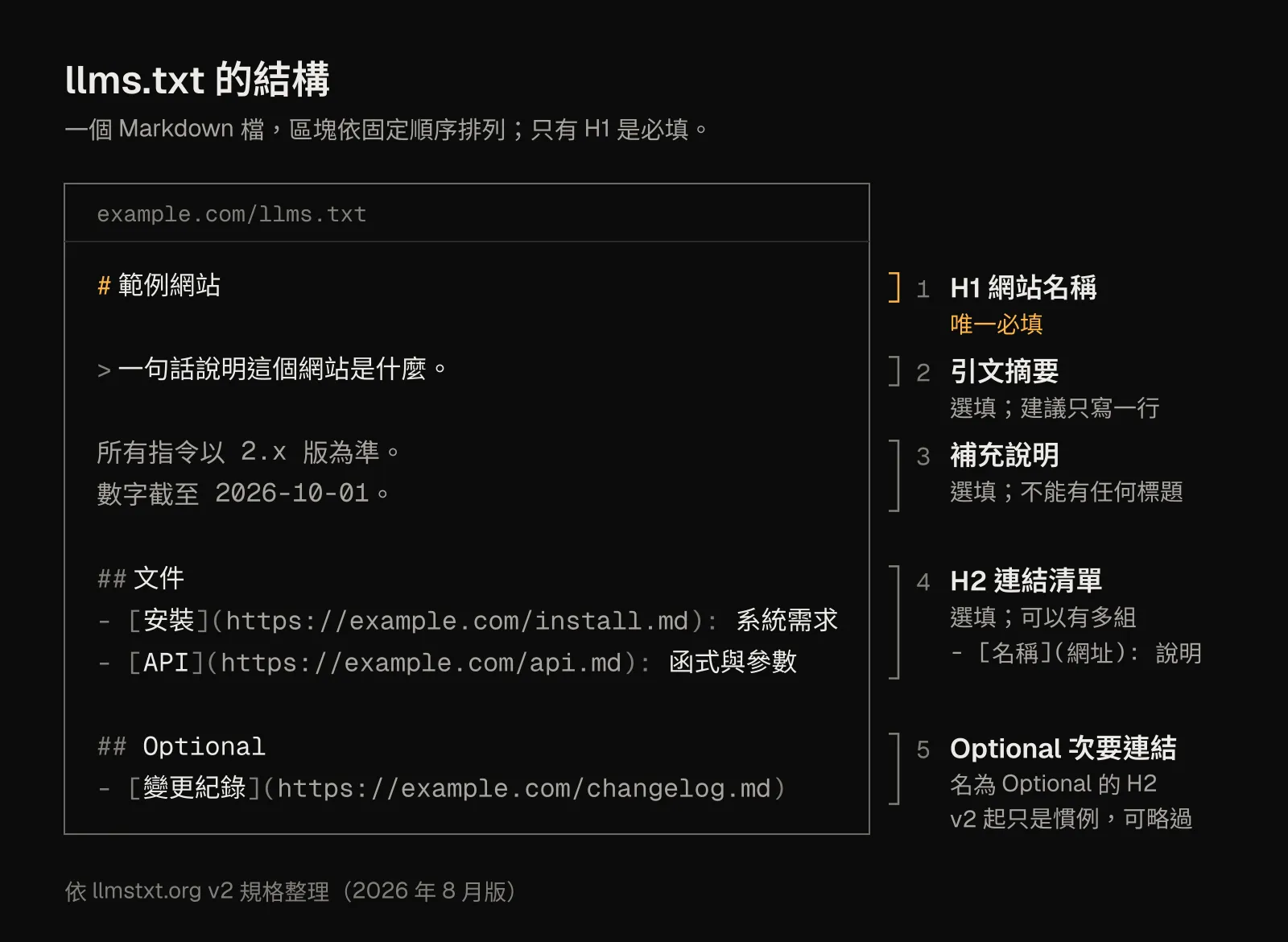
llms.txt 的結構:只有 H1 必填,其餘區塊都是選填,但順序固定(依 llmstxt.org v2)。
##### llms.txt 的格式:H1、摘要、連結清單與 Optional
###### 區塊與順序
規格規定了區塊的先後順序,但只有 H1 是必填:
| 順序 | 區塊 | 必填? | 內容 |
| --- | --- | --- | --- |
| 1 | H1(`#`) | 是,唯一必填 | 網站或專案名稱 |
| 2 | 引文(`>`) | 否 | 一段簡短摘要,說明讀者需要先知道的事 |
| 3 | 一般 Markdown 段落 | 否 | 補充說明、注意事項;不能有任何標題 |
| 4 | H2(`##`)區段 | 否 | 「檔案清單」:每項是 `- [名稱](網址)`,可加 `: 說明` |
檔案開頭可以有位元組順序標記(BOM),這一點在 2026 年 6 月加入規格。
###### 連結怎麼寫
每個清單項目必須有 `[名稱](網址)` 形式的 Markdown 連結,後面可以接冒號與一句說明,例如 `- [安裝教學](https://example.com/install.md): 系統需求與三種安裝方式`。規格的寫作建議很簡單:用語精簡清楚、每條連結附一句有資訊量的說明、避免沒有解釋的術語。連結最好指向頁面的 Markdown 版本,而不是厚重的 HTML。
###### Optional 區段:從「可略過」變成慣例
名為 `## Optional` 的 H2 區段放次要連結。v1(2024)賦予它特殊意義:需要較短的上下文時,可以略過這一區的網址。v2 的[變更說明](https://llmstxt.org/changes.md)則寫明,Optional 現在只是慣例,不再帶有機械式的語意,因為負責展開上下文的工具 `llms_txt2ctx` 已不屬於提案的一部分。這個參考工具本身仍然存在,而且預設仍會略過 Optional。
###### 放在哪裡
最常見的位置是網站根目錄的 `/llms.txt`。v2 也允許放在任何路徑,例如 `/docs/llms.txt`,此時它只涵蓋該路徑以下的網址;同時有好幾份適用時,AI 代理應該採用路徑最具體的那一份。規格考慮過 `/.well-known/`(RFC 8615),但因為那只能放在網域根目錄,而很多作者只能控制某個子路徑(例如 GitHub Pages 的專案網站),所以沒有採用。
##### llms-full.txt 與每頁 .md:規格裡有什麼、沒有什麼
###### 每頁的 Markdown 版本(規格內)
提案建議替每個頁面提供乾淨的 Markdown 版本,放在同一網址加上 `.md`。v1 只有一種寫法:在完整網址後面加 `.md`(`page.html.md`;沒有檔名的網址用 `index.html.md`)。v2 另外允許直接替換副檔名(`page.md`,或 `index.md`)。
###### 讓 AI 代理找得到(v2 新增)
v2 定義了兩種連結關係,可以寫成 HTML 的 `` 元素,也可以寫成 HTTP `Link:` 標頭:
- `rel="alternate" type="text/markdown"`:從頁面指向它的 Markdown 版本。
- `rel="describedby"`:從頁面指向涵蓋它的 llms.txt。
標頭寫法的好處是對非 HTML 的資源也有效,而且可以直接在伺服器或 CDN 設定。
###### llms-full.txt(規格外的慣例)
很多文章把 llms-full.txt 說成規格的一部分,這不正確:llmstxt.org 的規格在任何版本都沒有定義 llms-full.txt。它是文件平台帶起的慣例,做法是把整個文件網站的內文合成一個 Markdown 檔。[Mintlify 的說明](https://www.mintlify.com/docs/ai/llmstxt)會同時產生 llms.txt 與 llms-full.txt,Mintlify 也[表示](https://www.mintlify.com/customers/anthropic)這個格式是和客戶 Anthropic 一起發展的;這是 Mintlify 自己的說法。
要注意的是檔案大小。2026-10-13 實測,platform.claude.com 的 llms-full.txt 約 43.4 MB,developers.cloudflare.com 的約 67.7 MB,遠超過一般上下文視窗能容納的量。這正是 v2 強調 llms.txt 本身要保持精簡、細節放在連結後面的原因。
##### llms.txt、robots.txt、sitemap.xml 差在哪?
三個檔案常被放在一起討論,但用途完全不同:
| | robots.txt | sitemap.xml | llms.txt |
| --- | --- | --- | --- |
| 主要用途 | 告訴爬蟲哪些網址請勿(或可以)抓取 | 列出希望被發現的網址 | 替 AI 挑出重點內容並附說明 |
| 標準地位 | IETF RFC 9309(2022 年 9 月,提議標準) | sitemaps.org 協定 0.90(業界規格) | 社群提案(2024),非 IETF/W3C 標準 |
| 位置 | 主機根目錄 `/robots.txt` | 任意網址,常在 robots.txt 宣告 | 根目錄 `/llms.txt`,v2 允許子路徑 |
| 格式 | 純文字:`User-agent` 群組加 `Allow`/`Disallow` | XML(`urlset`、`url`、`loc`) | Markdown:H1、引文、H2 連結清單 |
| 規模 | 解析上限至少 500 KiB | 每檔最多 5 萬個網址、50 MB | 刻意精簡,要放得進上下文視窗 |
| 能否限制存取 | 不能強制,只是請求 | 不能,只是提示 | 不能,純粹是說明 |
| 對 Google Search 的影響 | 控制 Googlebot 抓取 | 協助發現網址 | 沒有,Google Search 忽略它 |
sitemap 的數字出自 [sitemaps.org 協定](https://www.sitemaps.org/protocol.html)。llms.txt 規格自己也說明了分工:robots.txt 說的是「哪些自動化存取可以接受」,llms.txt 則是代理需要資訊時才去讀;sitemap 不能取代 llms.txt,因為它常常沒有給 LLM 讀的版本、不含外部網址,而且全部網址往往大到放不進上下文視窗。
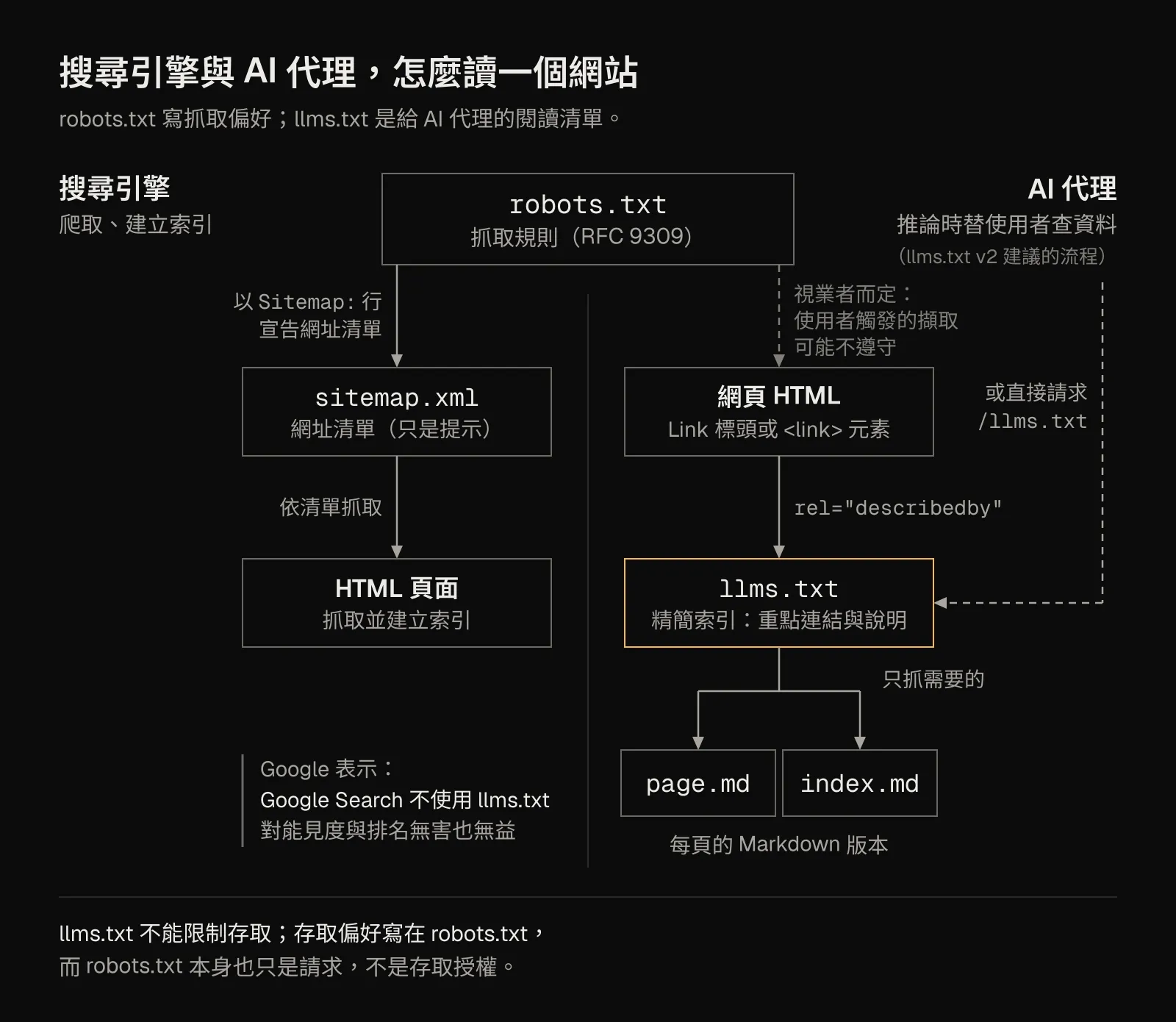
robots.txt 管抓取偏好,sitemap.xml 給搜尋引擎網址清單;右側是 llms.txt v2 建議的讀取流程,不是實測到的代理行為。llms.txt 不能限制存取。
###### 想限制 AI 訓練或 AI 回答,要看 robots.txt
llms.txt 是閱讀清單,不是權限檔。把 `User-agent`、`Disallow` 寫進 llms.txt 不會有任何作用。要表達「可不可以拿去訓練」,應該在 robots.txt 針對各家爬蟲設定:
- OpenAI:`GPTBot` 抓取可能用於訓練的內容,`OAI-SearchBot` 用於 ChatGPT 的搜尋功能,兩者可分開設定。由使用者觸發的 `ChatGPT-User`,[OpenAI 說明](https://developers.openai.com/api/docs/bots) robots.txt 規則「可能不適用」。
- Anthropic:`ClaudeBot`(訓練)、`Claude-User`(回應使用者提問時擷取)、`Claude-SearchBot`(搜尋品質),[官方說明](https://support.claude.com/en/articles/8896518-does-anthropic-crawl-data-from-the-web-and-how-can-site-owners-block-the-crawler)表示三者都遵守 robots.txt。
- Google:`Google-Extended` 是控制權杖,沒有自己的爬蟲,用來決定內容能否用於 Gemini 的訓練與 grounding;[Google 表示](https://developers.google.com/crawling/docs/crawlers-fetchers/google-common-crawlers)它不影響網站是否出現在 Google Search。
另一個選項是 Cloudflare 在 2025-09-24 發布的 [Content Signals](https://blog.cloudflare.com/content-signals-policy/):在 robots.txt 加一行 `Content-Signal:`,分別表達 `search`(搜尋索引與短摘錄,不含 AI 生成的搜尋摘要)、`ai-input`(即時餵給 AI 模型,例如 RAG)、`ai-train`(訓練或微調)三種用途的偏好。Cloudflare 自己說明,這是偏好,不是技術上的阻擋。
```
# 範例:允許搜尋,不希望被拿去訓練(Google-Extended 也涵蓋 Gemini 的 grounding)
User-agent: GPTBot
User-agent: ClaudeBot
User-agent: Google-Extended
Disallow: /
User-agent: *
Content-Signal: search=yes, ai-input=yes, ai-train=no
Allow: /
Sitemap: https://example.com/sitemap.xml
```
注意:`Google-Extended` 同時控制 Gemini 的訓練與 grounding,擋掉它也會讓內容不被 Gemini 拿來即時引用;它不影響 Google Search。
兩點提醒。第一,[RFC 9309](https://www.rfc-editor.org/rfc/rfc9309) 寫明 robots.txt 的規則「不是一種存取授權」,真的要擋得靠登入或防火牆。第二,Google 的 robots.txt [只支援](https://developers.google.com/crawling/docs/robots-txt/robots-txt-spec) `user-agent`、`allow`、`disallow`、`sitemap` 四個欄位,`Content-Signal` 會被忽略,Search Console 可能顯示「Syntax not understood」,[Cloudflare 文件](https://developers.cloudflare.com/bots/additional-configurations/managed-robots-txt/)表示沒有觀察到對抓取或 SEO 的影響。本站查核的 OpenAI、Anthropic、Google、Perplexity 爬蟲文件,都沒有提到會讀取 `Content-Signal`(2026-10-13)。
各家 AI 爬蟲的官方名稱、群組比對規則,以及 Google 在 2026 年新增的 AI 摘要控制項,另見本站整理的 [AI 爬蟲與 robots.txt 設定說明](https://lijiabao.dev/articles/ai-crawlers-robots-txt/)。
##### 哪些 AI 真的會讀 llms.txt?目前的證據
這是最容易被誇大的部分。結論先講:證據不一致,而且偏向「主要 AI 爬蟲很少抓取,更沒有證據顯示會拿來使用」。
###### Google:Search 不使用,Chrome Lighthouse 會檢查
Google 對 llms.txt 的說法依產品而不同:
- Google Search:2026-06-15,Google 在 Search Central 的[生成式 AI 功能最佳化指南](https://developers.google.com/search/docs/fundamentals/ai-optimization-guide)中加入說明:要出現在 Google Search(包括生成式 AI 功能),不需要建立新的機器可讀檔案或 Markdown,因為 Google Search 本身不使用它們;為其他服務維護 llms.txt 完全沒問題,但對 Google Search 的能見度與排名「既無害也無益」。同一份指南把建立 llms.txt 這類檔案列為做 Google Search 時可以忽略的技巧。指南把這類做法稱為「AEO/GEO」技巧;GEO(生成式引擎優化)一詞出自 2023 年的論文〈[GEO: Generative Engine Optimization](https://arxiv.org/abs/2311.09735)〉。
- John Mueller 的發言:2025 年 4 月,他在 Reddit 表示就他所知沒有 AI 服務說過會使用 llms.txt,並把它比作 keywords meta 標籤,因為內容是網站自己宣稱的([Search Engine Journal 報導](https://www.searchenginejournal.com/google-says-llms-txt-comparable-to-keywords-meta-tag/544804/))。Search Engine Journal 在 2026 年 6 月報導,他在 Google 的 Podcast《Search Off the Record》中補充,llms.txt 無法幫 LLM 判斷該推薦哪個網站,但可能對已經在網站上的代理有幫助([SEJ 報導](https://www.searchenginejournal.com/googles-mueller-says-llms-txt-cant-help-llms-differentiate-sites/579304/))。這些是 Mueller 在社群網站與 Podcast 上的發言,Google 的正式文件以上面的指南為準。
- Google 自己的檔案:2025-12-03,Search Central 的開發者文件曾出現一份 llms.txt,當天下午就移除([Search Engine Roundtable 報導](https://www.seroundtable.com/google-adds-llms-txt-to-search-developer-docs-40533.html)),2026-10-13 實測仍是 404。Google 其他網站上的 llms.txt 則還在,[SEJ 的整理](https://www.searchenginejournal.com/googles-llms-txt-guidance-depends-on-which-product-you-ask/575431/)指出 Google 的說法要看是哪個產品。
- Chrome Lighthouse(另一個產品):Lighthouse 13.3.0(2026-05-07)把「Agentic Browsing」類別加入預設設定,其中有 [llms.txt 稽核](https://developer.chrome.com/docs/lighthouse/agentic-browsing/llms-txt)。依 Lighthouse 的[稽核原始碼](https://github.com/GoogleChrome/lighthouse/blob/main/core/audits/agentic/llms-txt.js),它檢查檔案有 H1、至少一個 Markdown 連結、至少 50 個字元;回應 5xx 或 429(請求過多)判定不通過,404 等其他 4xx 判定「不適用」,因為提供這個檔案「目前是選用的」。這個類別和 SEO 類別是分開的。
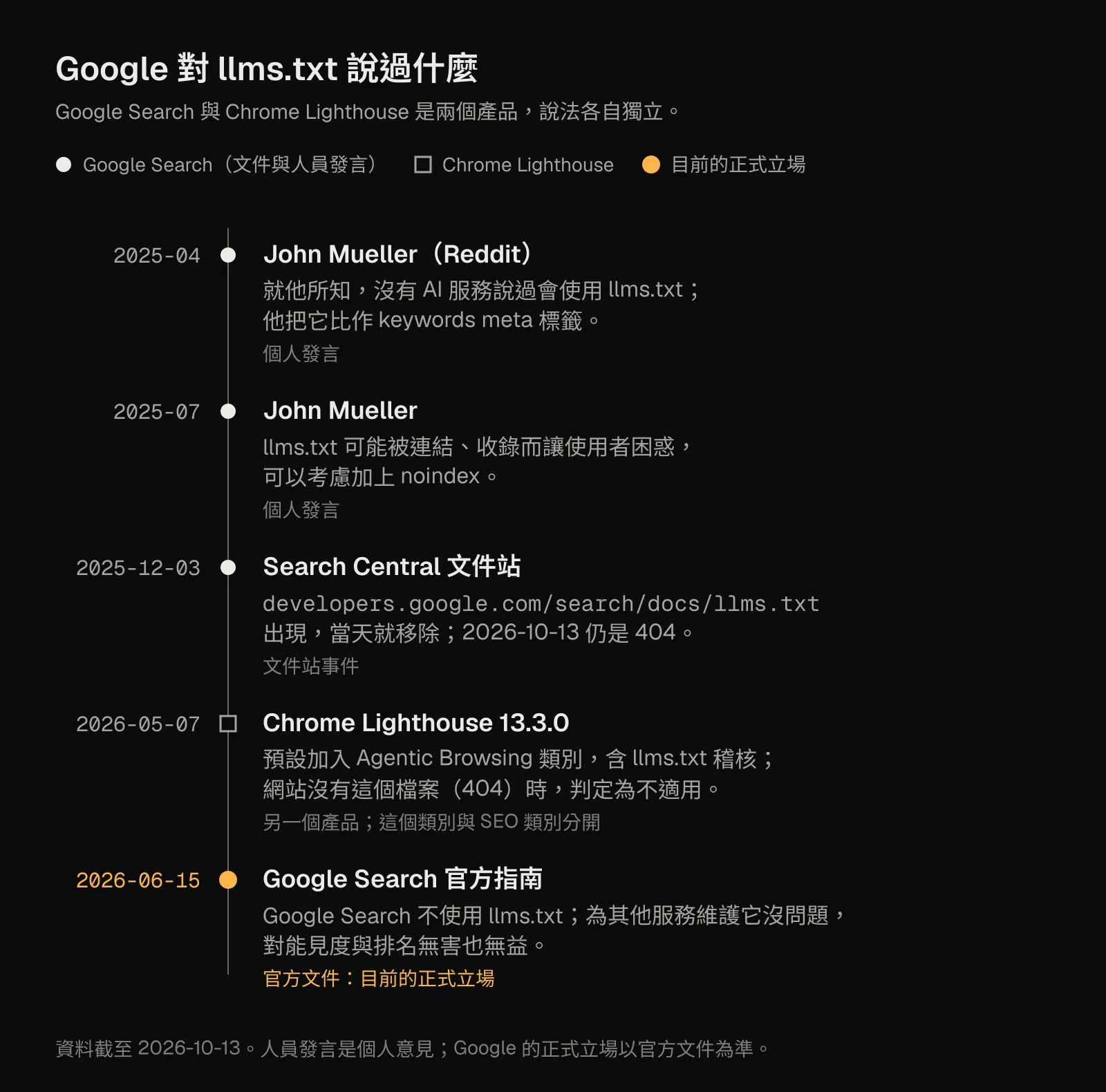
Google 的說法依產品而不同:Search 官方指南說不使用 llms.txt,Chrome Lighthouse 則有一項選用的 llms.txt 稽核。
###### AI 公司自己有 llms.txt,不等於它們的爬蟲會讀你的
OpenAI、Anthropic、Google(Gemini API)都替自家開發者文件發布了 llms.txt,2026-10-13 實測都回應 200。但 OpenAI 與 Anthropic 的爬蟲說明只談 robots.txt,沒有把 llms.txt 列為爬蟲會讀取的訊號。本站在 2026-10-13 查核時,沒有找到 OpenAI、Anthropic、Perplexity 或 Google 正式表示會抓取並使用第三方網站 llms.txt 的公開說法。
###### 伺服器紀錄與研究數據
- SE Ranking(2025-11-07):檢查約 30 萬個網域,10.13% 有 llms.txt;統計檢定與模型都找不到它和 LLM 引用次數的關聯,拿掉這個變數模型反而更準([研究](https://seranking.com/blog/llms-txt/))。
- Ahrefs(2026-06-15):分析 2026 年 5 月約 13.7 萬個網域,其中 28% 有 llms.txt(因樣本來自其客戶,這是偏高的上限);有檔案的網站中約 97% 整個月沒有任何請求。具名的 AI 機器人(訓練爬蟲、檢索機器人、AI 助理與代理合計)約占請求的 19.5%,其中 GPTBot 最多(4.51%)([研究](https://ahrefs.com/blog/llmstxt-study/))。Ahrefs 也提醒,被抓取不等於被使用。
- Mintlify 與 Profound(2025-06-27):25 家公司、7 天的 CDN 紀錄,llms.txt 每站造訪中位數 14 次,同一資料中 llms-full.txt 的中位數是 79 次([文章](https://www.mintlify.com/blog/how-often-do-llms-visit-llms-txt))。這是廠商行銷資料,樣本很小。
###### 目前最明確的用途:程式開發代理與文件工具
證據最一致的場景是技術文件。規格作者在 v2 變更說明中表示,程式開發代理能穩定地使用這類檔案;Ahrefs 的資料裡,Anthropic 的程式開發代理 Claude-Code 抓取 llms.txt 的次數僅次於 GPTBot,超過所有 AI 搜尋與助理類機器人。換句話說,llms.txt 目前最可能派上用場的,是使用者叫 AI 代理「去查這個函式庫的文件」的時候,而不是搜尋排名。
##### 怎麼寫 llms.txt:7 個步驟(附繁體中文範本)
1. 決定範圍:整站放 `/llms.txt`,或只替某一區放,例如 `/docs/llms.txt`。
2. 寫 H1:網站或專案名稱。這是唯一必填的部分。
3. 寫一行摘要:用 `>` 開頭,只寫一行。官方參考解析器只會擷取第一個 `>` 行。
4. (選做)補充說明:幾行一般文字,例如資料日期、使用注意事項。這裡不能有標題。
5. 用 H2 分組列連結:每行 `- [名稱](網址): 說明`,連到頁面的 Markdown 版本;次要連結放進 `## Optional`。
6. 提供 .md 版本並宣告:替頁面產生 `page.md` 或 `index.md`,再用 `` 與 `Link: <…/llms.txt>; rel="describedby"` 讓代理找得到。
7. 建置時自動產生並測試:從和頁面相同的來源產生,避免過期。測試方法是規格建議的:只給 AI 代理這份 llms.txt,問它關於網站內容的問題。也可以跑 Lighthouse 的 Agentic Browsing 稽核。
下面是一份可以直接改用的範本(網域為虛構的 example.com):
```markdown
# 範例軟體文件
> 範例軟體是一套開源的影像壓縮工具。本檔列出安裝、設定與 API 文件的 Markdown 版本。
所有指令以 2.x 版為準。數字截至 2026-10-01。
## 入門
- [安裝](https://example.com/docs/install.md): 系統需求與三種安裝方式
- [快速上手](https://example.com/docs/quickstart.md): 五分鐘壓縮第一張圖片
## API
- [API 參考](https://example.com/docs/api.md): 所有函式、參數與回傳值
- [錯誤代碼](https://example.com/docs/errors.md): 每個錯誤代碼的原因與處理方式
## Optional
- [版本紀錄](https://example.com/changelog.md): 歷次版本的變更
- [網站地圖](https://example.com/sitemap.xml): 全站網址清單
```
WordPress 外掛 Yoast SEO、AIOSEO,Wix、Mintlify、GitBook 等平台,以及 VitePress、Docusaurus 的外掛都能自動產生;完整清單以 [llmstxt.org 列出的整合](https://llmstxt.org/)為準。
##### 常見錯誤
- 沒有 H1,或連結沒有名稱:H1 是唯一必填,`[名稱]` 缺漏會讓參考解析器失敗。2026-10-13 實測,web.dev 的 llms.txt 就沒有 H1(第一個標題是 `## Docs`),第一條清單項目也少了 `[名稱]`,只有 `(網址)`;有發布不代表符合格式。
- 摘要寫成多行引文:參考解析器只保留第一行。
- 在說明段落裡放標題,或在連結清單裡混用 H3。
- 只連到厚重的 HTML,沒有提供 Markdown 版本。
- 把整站塞進一個巨大的索引:llms.txt 要放得進上下文視窗;幾十 MB 的 llms-full.txt 也不能取代它。
- 當成存取控制:在 llms.txt 寫 `User-agent`、`Disallow` 不會有作用,應該寫在 robots.txt。
- 期待 Google 排名或 AI 引用:Google 官方說無害也無益,SE Ranking 也找不到關聯。
- 和實際頁面不同步,或寫了頁面沒有的宣稱。這正是 Mueller「網站自己宣稱」批評的重點。
- 讓 llms-full.txt 被搜尋引擎收錄:Mueller 曾表示 llms.txt [可以考慮加上 noindex](https://www.seroundtable.com/google-noindex-llms-txt-39798.html),因為別的網站可能連到它而被收錄,使用者點進來會覺得奇怪;複製全站內文的 llms-full.txt 更適用同樣的道理。
##### 實例:本站的 llms.txt 怎麼做
本站在 2026-10-01 加入 llms.txt、llms-full.txt、每頁 Markdown 版本與開放式 robots.txt。以下描述的是 2026-10-13 的狀態;發布本文之前,llms.txt 約 4.3 KB。
結構。開頭是 H1、一行中英雙語的引文摘要(產生程式的註解寫明,刻意保持一行,因為解析器只讀第一個 `>` 行)、網站標語、標示資料日期的「數字截至 2026-09-30」,以及一行 robots.txt 政策。接著是「頁面(Markdown 版本)」區段,列出首頁、[微光小鎮](https://lijiabao.dev/glimmertown/)、[前沿實驗室](https://lijiabao.dev/frontier/)的中英文版,共 6 條,都連到 `index.md`,例如[微光小鎮頁的 Markdown 版本](https://lijiabao.dev/glimmertown/index.md)。最後的 Optional 區段放 [llms-full.txt](https://lijiabao.dev/llms-full.txt)、sitemap.xml 與 GitHub 連結。依產生程式的註解,GitHub 頁面是 HTML,不是給 LLM 讀的文字,所以放在可略過的區段。
```markdown
# 李家宝 Li Jiabao — lijiabao.dev
> 微光小鎮與前沿實驗室:成文規則、多家廠商的模型、公開紀錄。每個數字都附出處。 GlimmerTown and Frontier Lab: written rules, models from many vendors, a public record. Every number has a source.
…
數字截至 2026-09-30。 Numbers as of 2026-09-30.
搜尋、AI 回答與 AI 訓練,robots.txt 一律允許。 Search, AI answers and AI training are all allowed by robots.txt.
## 頁面(Markdown 版本) · Pages (Markdown versions)
- [微光小鎮 GlimmerTown — 李家宝](https://lijiabao.dev/glimmertown/index.md): 一座原創的等距像素城市:單一 HTML 檔、零依賴、可離線。三條開發線,同一座城。
- [前沿實驗室 — 李家宝](https://lijiabao.dev/frontier/index.md): 1 個治理庫、15 個學科實驗室、150 張問題卡。狀態照實標示。
…
## Optional
- [llms-full.txt](https://lijiabao.dev/llms-full.txt): 全站完整內文:每一頁,中文與英文 · Every page in full, zh-Hant and English
- [sitemap.xml](https://lijiabao.dev/sitemap.xml): 網站地圖 · Sitemap
- [lijiabao1998](https://github.com/lijiabao1998): 19 個作品倉庫(截至 2026-09-30) · 19 work repositories as of 2026-09-30
…
```
建置時產生。`astro build` 之後執行 `scripts/llms.mjs`,從建好的 HTML `` 轉成 Markdown,所以內容不會和頁面不同步;任何一條本站連結對不到實際檔案,建置就失敗。本站編輯整理的文章與李家宝本人的觀點分列不同標題,文章會列在「lijiabao.dev 編輯整理(非本人觀點)」之下;本文發布後,Optional 之前就多了這個區段,列出文章索引與本文。
HTTP 標頭。每個回應都帶 `Link: ; rel="describedby"`;HTML 頁面有 `` 指向 `index.md`;`.md` 以 `text/markdown` 回應,並用 `rel="canonical"` 指回 HTML 頁;llms-full.txt(發布本文之前約 57 KB)加上 `X-Robots-Tag: noindex`。這些做法對應 v2 的探索建議。
robots.txt。[本站的 robots.txt](https://lijiabao.dev/robots.txt) 設定為 `Content-Signal: search=yes, ai-input=yes, ai-train=yes`、`Allow: /`,並宣告 sitemap。指向 llms.txt 的是一行註解,因為 robots.txt 沒有 llms.txt 欄位。
##### 常見問題
###### llms.txt 能提升 Google 排名,或讓 AI 引用我的網站嗎?
不能這樣期待。Google 官方指南寫明 Google Search 不使用 llms.txt,對排名與能見度無害也無益。其他 AI 服務也沒有官方文件把它列為引用依據,SE Ranking 的研究同樣找不到關聯。
###### 可以用 llms.txt 禁止 AI 拿內容去訓練嗎?
不行。llms.txt 是內容導覽,不是存取規則。訓練偏好請寫在 robots.txt,例如針對 `GPTBot`、`ClaudeBot`、`Google-Extended` 設定。robots.txt 本身也只是請求,不是存取授權。
###### ChatGPT、Claude、Perplexity 會讀 llms.txt 嗎?
證據不一致。這些公司替自家文件發布了 llms.txt,但爬蟲說明只談 robots.txt。Ahrefs 統計 2026 年 5 月有 llms.txt 的網站中,約 97% 整月沒有任何請求。目前最明確的使用者是程式開發代理。
###### 只有幾頁的小網站需要 llms.txt 嗎?
不是必要。它對 Google Search 沒有影響;如果網站會被 AI 代理查詢(例如文件、產品規格),建一份的成本很低;否則先把頁面本身寫好即可。
###### llms-full.txt 一定要做嗎?
不一定。規格沒有定義 llms-full.txt。內容多的技術文件站可以考慮;一般網站提供每頁的 Markdown 版本並從 llms.txt 連過去,通常就夠了。如果要做,建議加上 noindex。
###### llms.txt 可以用中文寫嗎?要放在哪裡?
可以。規格規定的是 Markdown 結構,沒有限定語言,建議存成 UTF-8。標準位置是根目錄的 `/llms.txt`;v2 也允許放在子路徑,只涵蓋該路徑以下的頁面。
###### 怎麼知道有沒有 AI 讀了我的 llms.txt?
看伺服器或 CDN 的存取紀錄,篩選 `/llms.txt` 的請求並比對 User-Agent。User-Agent 可以偽造,必要時用業者公布的 IP 範圍核對,例如 OpenAI 有公布爬蟲的 IP 範圍。被抓取也不代表內容被引用。
##### 重點整理
- llms.txt 是 2024 年提出的社群提案:一份 Markdown 導覽清單,只有 H1 必填,2026 年 8 月更新為 v2。
- 它不控制存取,也不影響 Google Search;存取與訓練偏好寫在 robots.txt。
- llms-full.txt 不在規格裡;每頁的 Markdown 版本和 `rel="describedby"` 才是 v2 的建議。
- 主要 AI 爬蟲讀取的證據很少,最受益的是技術文件和會被程式代理查詢的網站。
- 建立成本低,最好在建置時從頁面自動產生。先把頁面本身寫好、robots.txt 設對,llms.txt 是補充,不是捷徑。
想看更多類似的整理,可以瀏覽[本站編輯整理的文章](https://lijiabao.dev/articles/)。
##### 來源
1. [llmstxt.org — The /llms.txt file, v2(Jeremy Howard)](https://llmstxt.org/) llmstxt.org
2. [llmstxt.org — Changes(v2, August 2026)](https://llmstxt.org/changes.md) llmstxt.org
3. [Answer.AI — /llms.txt—a proposal to provide information to help LLMs use websites(2024-09-03)](https://www.answer.ai/posts/2024-09-03-llmstxt.html) answer.ai
4. [Google Search Central — Google's Guide to Optimizing for Generative AI Features on Google Search(2026-06-15 加入 llms.txt 說明)](https://developers.google.com/search/docs/fundamentals/ai-optimization-guide) developers.google.com
5. [Google — Google's common crawlers(Google-Extended)](https://developers.google.com/crawling/docs/crawlers-fetchers/google-common-crawlers) developers.google.com
6. [Google — How Google interprets the robots.txt specification](https://developers.google.com/crawling/docs/robots-txt/robots-txt-spec) developers.google.com
7. [Chrome for Developers — Lighthouse audit: llms.txt](https://developer.chrome.com/docs/lighthouse/agentic-browsing/llms-txt) developer.chrome.com
8. [GoogleChrome/lighthouse — llms-txt.js(稽核原始碼)](https://github.com/GoogleChrome/lighthouse/blob/main/core/audits/agentic/llms-txt.js) github.com
9. [GoogleChrome/lighthouse — Changelog(13.3.0, 2026-05-07)](https://github.com/GoogleChrome/lighthouse/blob/main/changelog.md) github.com
10. [Search Engine Journal — Google Says LLMs.Txt Comparable To Keywords Meta Tag(2025-04-17)](https://www.searchenginejournal.com/google-says-llms-txt-comparable-to-keywords-meta-tag/544804/) searchenginejournal.com
11. [Search Engine Roundtable — Google Says It Makes Sense To Noindex LLMs.txt(2025-07-22)](https://www.seroundtable.com/google-noindex-llms-txt-39798.html) seroundtable.com
12. [Search Engine Roundtable — Google Adds LLMs.txt To Search Developer Docs Portal(2025-12-03)](https://www.seroundtable.com/google-adds-llms-txt-to-search-developer-docs-40533.html) seroundtable.com
13. [Search Engine Journal — Google's llms.txt Guidance Depends On Which Product You Ask(2026-05-20)](https://www.searchenginejournal.com/googles-llms-txt-guidance-depends-on-which-product-you-ask/575431/) searchenginejournal.com
14. [Search Engine Journal — Google's Mueller Says llms.txt Can't Help LLMs Differentiate Sites(2026-06-15)](https://www.searchenginejournal.com/googles-mueller-says-llms-txt-cant-help-llms-differentiate-sites/579304/) searchenginejournal.com
15. [SE Ranking — Does LLMs.txt impact your AI visibility and citations? No, according to research(2025-11-07)](https://seranking.com/blog/llms-txt/) seranking.com
16. [Ahrefs — We Analyzed 137K Sites: 97% of llms.txt Files Never Get Read(2026-06-15)](https://ahrefs.com/blog/llmstxt-study/) ahrefs.com
17. [Mintlify Docs — llms.txt](https://www.mintlify.com/docs/ai/llmstxt) mintlify.com
18. [Mintlify — Anthropic customer story](https://www.mintlify.com/customers/anthropic) mintlify.com
19. [Mintlify — How often do LLMs visit llms.txt?(2025-06-27)](https://www.mintlify.com/blog/how-often-do-llms-visit-llms-txt) mintlify.com
20. [OpenAI — Overview of OpenAI Crawlers](https://developers.openai.com/api/docs/bots) developers.openai.com
21. [Anthropic — Does Anthropic crawl data from the web, and how can site owners block the crawler?](https://support.claude.com/en/articles/8896518-does-anthropic-crawl-data-from-the-web-and-how-can-site-owners-block-the-crawler) support.claude.com
22. [RFC 9309 — Robots Exclusion Protocol(IETF, 2022-09)](https://www.rfc-editor.org/rfc/rfc9309) rfc-editor.org
23. [sitemaps.org — Sitemaps XML format(protocol 0.90)](https://www.sitemaps.org/protocol.html) sitemaps.org
24. [Cloudflare — Giving users choice with Cloudflare's new Content Signals Policy(2025-09-24)](https://blog.cloudflare.com/content-signals-policy/) blog.cloudflare.com
25. [Cloudflare Docs — Managed robots.txt](https://developers.cloudflare.com/bots/additional-configurations/managed-robots-txt/) developers.cloudflare.com
26. [Aggarwal et al. — GEO: Generative Engine Optimization(arXiv:2311.09735, 2023)](https://arxiv.org/abs/2311.09735) arxiv.org
27. [lijiabao.dev — llms.txt(外部網站)](https://lijiabao.dev/llms.txt) lijiabao.dev
28. [lijiabao.dev — robots.txt(外部網站)](https://lijiabao.dev/robots.txt) lijiabao.dev
[全部文章](https://lijiabao.dev/articles/) [Read this in English](https://lijiabao.dev/en/articles/what-is-llms-txt/)
---
### Articles — lijiabao.dev
> Tutorials, round-ups and explainers edited by lijiabao.dev. Not Li Jiabao's personal views.
URL: https://lijiabao.dev/en/articles/ · lang: en · Edited by lijiabao.dev — not Li Jiabao's personal views
Other language: https://lijiabao.dev/articles/index.md
Edited by lijiabao.dev
#### Articles
Tutorials, round-ups and explainers, edited by lijiabao.dev. They are not Li Jiabao's personal views; his own views appear only under Views.
##### [Why does Show password try to submit the form?](https://lijiabao.dev/en/articles/html-button-type-implicit-form-submit/)
Edited by lijiabao.dev · 2026-11-23
Trace an unexpected submission to the native button type, then test the password toggle and the real submit action separately.
##### [Why does fetch skip catch when an API returns 404?](https://lijiabao.dev/en/articles/fetch-http-error-response-json-handling/)
Edited by lijiabao.dev · 2026-11-21
A 404 can resolve the fetch promise. Check the response status, body parsing and application result separately before choosing what an error message should say.
##### [Can a native FAQ disclosure work with a keyboard?](https://lijiabao.dev/en/articles/native-details-summary-keyboard-access/)
Edited by lijiabao.dev · 2026-11-20
Check the native FAQ path from summary focus and the Space key to answer links, visible focus, and assistive technology support.
##### [Why does the same PDF open in one tab and download in another?](https://lijiabao.dev/en/articles/pdf-preview-download-content-disposition/)
Edited by lijiabao.dev · 2026-11-19
Trace the final document response, compare a direct visit with a download link, and separate file naming from PDF rendering.
##### [An old screen after Back: how page restoration differs from HTTP caching](https://lijiabao.dev/en/articles/bfcache-history-navigation-http-cache/)
Edited by lijiabao.dev · 2026-11-18
A restored page is different from a new HTTP response. Separate history navigation, live data checks, and authorization before treating an old screen as a deployment failure.
##### [Why does text disappear while a web font loads?](https://lijiabao.dev/en/articles/web-font-display-text-visibility-loading/)
Edited by lijiabao.dev · 2026-11-16
Choose a web-font display policy by testing readable fallback text, late swaps and layout changes under cold-cache and failed-request conditions.
##### [Image dimensions and aspect ratio: reserving space before pictures load](https://lijiabao.dev/en/articles/image-dimensions-aspect-ratio-layout-shift/)
Edited by lijiabao.dev · 2026-11-15
Reserve image space before decoding completes. A practical explanation of intrinsic dimensions, CSS aspect ratio, responsive crops and the limits of a single CLS test.
##### [Image alt text and visible captions are different CMS outputs](https://lijiabao.dev/en/articles/image-alt-text-visible-caption-field-mapping/)
Edited by lijiabao.dev · 2026-11-13
Alternative text and visible captions serve different purposes. Trace CMS fields through templates and published HTML before removing unexpected image descriptions.
##### [An ampersand in a sitemap needs XML escaping, not blanket URL encoding](https://lijiabao.dev/en/articles/sitemap-xml-escaping-url-percent-encoding/)
Edited by lijiabao.dev · 2026-11-07
XML escaping and URL percent encoding solve different problems in a sitemap. Preserve query semantics, serialize once per layer, then parse the deployed output back for verification.
##### [Why npm ci fails on a clean checkout: check the lockfile and install conditions](https://lijiabao.dev/en/articles/npm-ci-lockfile-reproducible-install-boundaries/)
Edited by lijiabao.dev · 2026-11-06
Diagnose npm ci failures by checking the committed lockfile, tool versions, tree-shaping options, platform requirements and install stage before changing the project.
##### [Why a blocked crawler may never see your noindex directive](https://lijiabao.dev/en/articles/robots-disallow-noindex-crawl-access/)
Edited by lijiabao.dev · 2026-11-05
Robots rules govern crawling, while noindex governs search inclusion. Check whether the intended crawler can fetch the directive before treating a configuration change as a search outcome.
##### [HEAD returned 200. Why a live release still needs GET](https://lijiabao.dev/en/articles/http-head-vs-get-live-content-verification/)
Edited by lijiabao.dev · 2026-11-04
Use HEAD for response metadata and GET for delivery evidence. A practical release checklist for redirects, article bodies, assets, and cache observations.
##### [Noopener, noreferrer and nofollow solve different link problems](https://lijiabao.dev/en/articles/external-link-noopener-noreferrer-nofollow/)
Edited by lijiabao.dev · 2026-11-03
Separate opener access, referral information and search relationship signals before choosing rel values. Verify rendered links and each intended behavior independently instead of applying one unexplained string everywhere.
##### [Should a hero image use lazy loading? Start with LCP image discovery](https://lijiabao.dev/en/articles/lcp-hero-image-lazy-loading-discovery/)
Edited by lijiabao.dev · 2026-11-02
A small hero image can still arrive late. Identify the actual LCP element, inspect resource discovery, and distinguish eager loading, fetch priority, and preload before measuring a change.
##### [The First Commit You Can See May Not Be the Project’s Beginning](https://lijiabao.dev/en/articles/git-shallow-history-earliest-commit-verification/)
Edited by lijiabao.dev · 2026-11-01
Check shallow history, available refs, commit dates and file lineage before using Git to establish a project or article timeline. Publication needs separate evidence.
##### [Hidden, aria-hidden and inert solve different interface problems](https://lijiabao.dev/en/articles/hidden-aria-hidden-inert-visibility-accessibility/)
Edited by lijiabao.dev · 2026-10-31
Separate visual presentation, accessibility exposure and interaction when choosing hidden, aria-hidden or inert. Verify each behavior without treating hidden content as access control.
##### [Renaming an image to .webp does not optimize it: verify the encoding and delivery](https://lijiabao.dev/en/articles/webp-extension-encoding-transfer-size-validation/)
Edited by lijiabao.dev · 2026-10-30
Verify an image conversion from the encoded file through the production page. Separate dimensions, compression choices, selected resources, file size, and measured network transfer.
##### [A secret is in Git history. Why deleting the file does not finish the response](https://lijiabao.dev/en/articles/secret-in-git-history-revocation-and-removal/)
Edited by lijiabao.dev · 2026-10-29
Deleting a secret from the latest Git revision does not revoke it. Separate credential invalidation, service recovery, history cleanup, and evidence of what remains unverified.
##### [Should every npm audit fix use --force? Review the change before trusting the result](https://lijiabao.dev/en/articles/npm-audit-fix-force-dependency-validation/)
Edited by lijiabao.dev · 2026-10-28
Separate dependency advisories, potentially breaking updates, reproducible installation and feature checks before treating an npm audit remediation as complete.
##### [Choosing 301, 302, 307, or 308: methods and caching](https://lijiabao.dev/en/articles/http-redirect-status-method-and-cache/)
Edited by lijiabao.dev · 2026-10-27
Understand how redirect status codes affect request methods, caching and search signals before changing a URL.
##### [no-cache does not mean no storage: tracing stale browser and CDN responses](https://lijiabao.dev/en/articles/cache-control-no-cache-browser-cdn-revalidation/)
Edited by lijiabao.dev · 2026-10-26
Separate storage, revalidation and cache layers when a deployed page still looks old. Understand ETag, 304 responses and the limits of browser reloads and targeted CDN purges.
##### [An API opens in the browser. Why does fetch still fail with CORS?](https://lijiabao.dev/en/articles/cors-browser-navigation-versus-script-access/)
Edited by lijiabao.dev · 2026-10-25
Opening a URL and allowing a website to read its response are different operations. Trace origins, preflights, credentials and opaque responses without confusing browser access with backend authorization.
##### [A missing frontend environment variable is not a reason to expose a secret](https://lijiabao.dev/en/articles/frontend-public-env-secrets-build-time-boundary/)
Edited by lijiabao.dev · 2026-10-24
Separate browser, build, and server settings before fixing missing values. Public prefixes make values available to client code; they do not protect credentials.
##### [An API request timed out. Check the result before retrying.](https://lijiabao.dev/en/articles/api-timeout-retry-idempotency-result-lookup/)
Edited by lijiabao.dev · 2026-10-23
A timeout does not prove that a write failed. Understand idempotency contracts, preserve the original operation identity and reconcile uncertain outcomes before creating duplicates.
##### [Ours or theirs? Read the operation before resolving a Git conflict](https://lijiabao.dev/en/articles/git-merge-conflict-ours-theirs-review/)
Edited by lijiabao.dev · 2026-10-22
Understand how merge and rebase label conflicting sides, preserve the intent of both changes, and review the staged result before treating a conflict as resolved.
##### [After git push, verify which commit Cloudflare serves in production](https://lijiabao.dev/en/articles/git-commit-cloudflare-production-verification/)
Edited by lijiabao.dev · 2026-10-21
Match the remote commit, Cloudflare build and deployment, and exact production page before reporting a publication as complete.
##### [Passing tests is a start: what proves a feature is complete?](https://lijiabao.dev/en/articles/passing-tests-versus-feature-acceptance-evidence/)
Edited by lijiabao.dev · 2026-10-20
Connect acceptance criteria to observable behavior, real dependencies, persisted data and the deployed revision. Report what passing tests actually establish.
##### [Moving an article URL: redirects and canonical tags have different jobs](https://lijiabao.dev/en/articles/article-url-move-redirect-versus-canonical/)
Edited by lijiabao.dev · 2026-10-19
A permanent redirect moves requests; a canonical tag identifies a preferred version. Verify the destination, internal links and sitemap before calling an article URL move complete.
##### [Robots.txt does not lock an admin page: verify access control separately](https://lijiabao.dev/en/articles/robots-txt-not-admin-access-control/)
Edited by lijiabao.dev · 2026-10-18
Separate crawler rules, search indexing, and authorization. Check actual responses for signed-out and different-role users, including APIs and files.
##### [A 200 response does not prove an article was published](https://lijiabao.dev/en/articles/http-success-article-verification/)
Edited by lijiabao.dev · 2026-10-17
Verify the exact URL, main content, rendered page and production version before treating an HTTP 200 response as evidence of a successful article release.
##### [Sitemap lastmod should not become today on every build](https://lijiabao.dev/en/articles/sitemap-lastmod-content-updates/)
Edited by lijiabao.dev · 2026-10-16
Separate meaningful page changes from deployment time, choose a trustworthy date source, and verify both changed and unchanged URLs in the built and live sitemap.
##### [Hreflang and canonical for bilingual articles](https://lijiabao.dev/en/articles/bilingual-articles-hreflang-canonical/)
Edited by lijiabao.dev · 2026-10-15
Give each language page a clear preferred URL, connect genuine translations, and verify the built and live outputs before calling a release complete.
##### [What is llms.txt? Format, examples and what Google says](https://lijiabao.dev/en/articles/what-is-llms-txt/)
Edited by lijiabao.dev · 2026-10-13
llms.txt is a proposed Markdown index of a site's key pages for AI agents. This guide covers the format, robots.txt, Google's stance and a live example.
[RSS feed](https://lijiabao.dev/en/articles/rss.xml)
---
### Why does Show password try to submit the form?
> Trace an unexpected submission to the native button type, then test the password toggle and the real submit action separately.
URL: https://lijiabao.dev/en/articles/html-button-type-implicit-form-submit/ · lang: en · Edited by lijiabao.dev — not Li Jiabao's personal views · Published 2026-11-23
Other language: https://lijiabao.dev/articles/html-button-type-implicit-form-submit/index.md
#### Why does Show password try to submit the form?
Edited by lijiabao.dev
Edited by lijiabao.dev · Published 2026-11-23
Trace an unexpected submission to the native button type, then test the password toggle and the real submit action separately.
Check the rendered HTML of the password toggle. An ordinary form button with no explicit type normally acts as a submit button when it has a form owner. Give the toggle type=“button” and the sign-in control type=“submit”. Each control now has a distinct job, even before JavaScript runs.

##### What makes a form button a submitter?
The visible label helps the person filling out the form. The browser instead looks at the element, its type and its form owner. Clicking an eye icon next to an empty required password field may show a validation message. That is a useful clue. A submission attempt can trigger validation before there is anything to see in the network panel.
##### Check the owner as well as the type
In the browser inspector, select the actual form button. Look at its type attribute and its form association. A button can sit outside a form and still belong to it through a form attribute that names its id. A component that works in isolation may therefore behave differently when a sign-in page supplies the surrounding markup.
##### Give the toggle a narrow job
For the visibility control, set type=“button” and let its handler switch the password field between masked and visible text without changing the value. Leave the sign-in control as type=“submit”. Handle the submission on the form. When you intentionally offer two submission actions, such as Save draft and Publish, the submit event’s submitter property can identify which control initiated it.
##### How do you test a form button with a keyboard?
Start with an empty required field. Focus the visibility toggle and activate it, then repeat the test with a pointer. The masking should change without a validation prompt or a submission. Fill the required fields with test data and activate the real sign-in control. In a test environment, check that its expected validation and submission still take place. A successful toggle alone does not exercise that second path.
##### Would moving the toggle outside the form solve it?
First check for an explicit form attribute. Moving the control may also change focus order or detach the icon from its label visually. An explicit button type usually preserves the relationship between the toggle and the password field while making the intended behavior clear.
When the same form button component appears on a registration screen, a login screen and an account settings page, a small integration test for each role can catch a misplaced default before an ordinary click starts a request.
Related reading: [Can a native FAQ disclosure work with a keyboard?](https://lijiabao.dev/en/articles/native-details-summary-keyboard-access/) · [Hidden, aria-hidden and inert solve different interface problems](https://lijiabao.dev/en/articles/hidden-aria-hidden-inert-visibility-accessibility/)
##### Sources
1. [MDN: The button element](https://developer.mozilla.org/en-US/docs/Web/HTML/Reference/Elements/button) developer.mozilla.org
2. [MDN: SubmitEvent.submitter](https://developer.mozilla.org/en-US/docs/Web/API/SubmitEvent/submitter) developer.mozilla.org
[All articles](https://lijiabao.dev/en/articles/) [以中文閱讀這一篇](https://lijiabao.dev/articles/html-button-type-implicit-form-submit/)
---
### Why does fetch skip catch when an API returns 404?
> A 404 can resolve the fetch promise. Check the response status, body parsing and application result separately before choosing what an error message should say.
URL: https://lijiabao.dev/en/articles/fetch-http-error-response-json-handling/ · lang: en · Edited by lijiabao.dev — not Li Jiabao's personal views · Published 2026-11-21
Other language: https://lijiabao.dev/articles/fetch-http-error-response-json-handling/index.md
#### Why does fetch skip catch when an API returns 404?
Edited by lijiabao.dev
Edited by lijiabao.dev · Published 2026-11-21
A 404 can resolve the fetch promise. Check the response status, body parsing and application result separately before choosing what an error message should say.
A 404 is still an HTTP response that the browser received. Reliable fetch error handling must inspect that response and decide what it means for the feature. A catch handler does not automatically receive every unsuccessful HTTP status, so reaching the next line is not proof that the API returned usable data.

##### Start fetch error handling by identifying what completed
MDN explains that fetch resolves with a Response when a response becomes available. Status codes such as 404 and 504 do not, by themselves, reject that promise. A network failure or an invalid request can reject it instead. The distinction determines which evidence the application has: an HTTP error response can still offer a status and body, while a rejected request may not provide those same details.
##### Check ok against the endpoint’s actual contract
Response.ok is true for status codes from 200 through 299. Code can inspect that value and deliberately throw an error, or handle particular statuses without throwing. Useful fetch error handling preserves differences the interface can act on. A missing record, an authentication problem and a temporary service error need not all become “connection lost.” Map those cases using the actual API contract rather than a generic message pasted into every client.
##### Reading JSON is a separate asynchronous operation
response.json() returns another promise. MDN documents a SyntaxError when the body cannot be parsed as JSON, so a 200 response can still be followed by a parsing failure. An HTML page from the server will not become valid JSON because the request succeeded. An endpoint whose successful response has no body also needs an appropriate path. Check the expected response format, then validate the fields the application requires after parsing.
##### Keep the failing stage visible in fetch error handling
A single catch at the end of a chain may receive a request failure, a deliberately thrown HTTP error, a parsing exception or an error while updating the interface. Preserve the stage and any available status in a controlled error record. Do not copy authentication values or private response contents into ordinary logs. Returning an empty array for every exception can conceal the problem by telling the reader there are no records when the application actually failed to retrieve them.
##### Exercise failure paths before calling the feature complete
In an authorized test environment, useful cases include valid JSON, a 404 with a JSON body, an HTML error page, an invalid body and a request without an available response. Check both the displayed message and whether stale or empty data is being presented as a fresh result. These are proposed checks, not completed test results. The retry policy belongs beside fetch error handling, but it needs its own evidence: failure to read a response does not establish that a write never happened on the server.
Identify whether a response arrived, inspect its HTTP status, read its body appropriately, and verify the result the feature needs. When each failure retains its stage, the next maintainer can investigate the connection, endpoint or interface without having to guess what “fetch failed” meant.
Related reading: [An API opens in the browser. Why does fetch still fail with CORS?](https://lijiabao.dev/en/articles/cors-browser-navigation-versus-script-access/) · [An API request timed out. Check the result before retrying.](https://lijiabao.dev/en/articles/api-timeout-retry-idempotency-result-lookup/)
##### Sources
1. [MDN: fetch promises and HTTP error responses](https://developer.mozilla.org/en-US/docs/Web/API/Window/fetch) developer.mozilla.org
2. [MDN: Response.ok status range](https://developer.mozilla.org/en-US/docs/Web/API/Response/ok) developer.mozilla.org
3. [MDN: Response.json and parsing exceptions](https://developer.mozilla.org/en-US/docs/Web/API/Response/json) developer.mozilla.org
[All articles](https://lijiabao.dev/en/articles/) [以中文閱讀這一篇](https://lijiabao.dev/articles/fetch-http-error-response-json-handling/)
---
### Can a native FAQ disclosure work with a keyboard?
> Check the native FAQ path from summary focus and the Space key to answer links, visible focus, and assistive technology support.
URL: https://lijiabao.dev/en/articles/native-details-summary-keyboard-access/ · lang: en · Edited by lijiabao.dev — not Li Jiabao's personal views · Published 2026-11-20
Other language: https://lijiabao.dev/articles/native-details-summary-keyboard-access/index.md
#### Can a native FAQ disclosure work with a keyboard?
Edited by lijiabao.dev
Edited by lijiabao.dev · Published 2026-11-20
Check the native FAQ path from summary focus and the Space key to answer links, visible focus, and assistive technology support.
Yes. A details element with a summary provides a browser-managed disclosure, so a basic FAQ does not need a JavaScript component library just to open an answer. The remaining question is whether the finished design preserves that behaviour and makes each question understandable.

##### Where is the control inside a details element?
Put the question in the first summary child, followed by its answer. The HTML standard defines this as a way to reveal additional information; activating the summary changes the open state. A specific question such as “Can I change my booking time?” gives readers a useful choice before they expand anything. A repeated label such as “More” does much less.
##### Follow the keyboard path through one answer
MDN documents opening and closing the disclosure by focusing it and pressing Space. A useful acceptance check starts with the pointer left alone: reach the question with Tab, locate the focus indicator, activate it, then visit any answer links and return with Shift+Tab. These are proposed checks, not results from a completed cross-browser test. Although a details element supplies native interaction, record the operating system’s keyboard navigation settings, browser and assistive technology used for the actual check.
##### Keep the focus indicator when changing the design
An arrow can be redesigned, but the person using the keyboard still needs to see which question will respond. W3C’s Focus Visible guidance explains that purpose. If a stylesheet removes the default outline, provide a clear replacement; a hover colour alone does not identify keyboard focus. Also check that a custom icon follows the actual open state. Otherwise the answer and its visual cue may disagree.
##### Does a details element need custom key handlers?
Ordinary disclosure does not need a second keyboard implementation. A handler that switches open while the browser also performs its default action can interfere with that behaviour, so diagnose the actual event sequence before adding another fix. Observe toggle when the application needs to react to a state change. The details element also has a specific semantic purpose: the HTML standard distinguishes disclosure from tabs and menus. Sharing an arrow-shaped icon does not make those controls interchangeable.
##### Does successful toggling prove the whole FAQ is accessible?
No. MDN notes that browsers can expose summary roles differently, affecting the semantics of headings placed inside them. Check the announced name and state in the combinations your audience uses. Giving several disclosures the same name creates an exclusive group, but readers may want two answers open for comparison. The standard explicitly asks authors to consider that tradeoff. Leave independent questions open together when exclusivity has no useful purpose.
A useful handover records whether questions can be reached, focus remains visible, answers can be read and followed, and which browser and assistive technology combinations were checked. That gives the next maintainer more to work with than a screenshot of clickable rows.
Related reading: [Hidden, aria-hidden and inert solve different interface problems](https://lijiabao.dev/en/articles/hidden-aria-hidden-inert-visibility-accessibility/), [Image alt text and visible captions are different CMS outputs](https://lijiabao.dev/en/articles/image-alt-text-visible-caption-field-mapping/)
##### Sources
1. [MDN: details disclosure behaviour](https://developer.mozilla.org/en-US/docs/Web/HTML/Reference/Elements/details) developer.mozilla.org
2. [WHATWG HTML: details and summary](https://html.spec.whatwg.org/multipage/interactive-elements.html#the-details-element) html.spec.whatwg.org
3. [MDN: summary and accessibility support](https://developer.mozilla.org/en-US/docs/Web/HTML/Reference/Elements/summary) developer.mozilla.org
4. [W3C WAI: Focus Visible](https://www.w3.org/WAI/WCAG22/Understanding/focus-visible.html) w3.org
[All articles](https://lijiabao.dev/en/articles/) [以中文閱讀這一篇](https://lijiabao.dev/articles/native-details-summary-keyboard-access/)
---
### Why does the same PDF open in one tab and download in another?
> Trace the final document response, compare a direct visit with a download link, and separate file naming from PDF rendering.
URL: https://lijiabao.dev/en/articles/pdf-preview-download-content-disposition/ · lang: en · Edited by lijiabao.dev — not Li Jiabao's personal views · Published 2026-11-19
Other language: https://lijiabao.dev/articles/pdf-preview-download-content-disposition/index.md
#### Why does the same PDF open in one tab and download in another?
Edited by lijiabao.dev
Edited by lijiabao.dev · Published 2026-11-19
Trace the final document response, compare a direct visit with a download link, and separate file naming from PDF rendering.
A support report says the handbook downloads, yet pasting its address into a new tab opens it just fine. Both observations can be accurate. Content-Disposition tells the browser how the server would like a particular response handled. The link a reader follows and the reader’s own PDF settings also matter. Start with the exact action that surprised the reader.

##### Where to find Content-Disposition
Open the browser’s Network panel, clear the earlier entries, and repeat the action. Find the response that actually delivers the document. A redirect, sign-in page, or HTML landing page can appear first. Record the final response’s content type and disposition together. Remove temporary access parameters before sharing any address from that trace.
##### What inline and attachment ask for
A PDF served as application/pdf with Content-Disposition set to inline can open in a supported viewer. An attachment disposition asks the browser to handle the file as a download. That does not guarantee a visible Save dialog. A reader who has chosen a default downloads folder may simply find the document there afterward.
##### Reading a filename from Content-Disposition
The filename parameter can supply a simple fallback such as manual.pdf. The extended filename* parameter can carry an encoded name with characters outside ASCII. If two readers get identical pages inside the PDF but different names on disk, check the parameters actually sent and the receiving platform’s filename rules. Rebuilding the PDF to change its embedded fonts would address a different issue.
##### Compare a direct visit with the page link
Open the document URL directly. Then visit the original page and activate its download link, keeping the file, browser, and device constant. If the outcomes differ, inspect the link’s download attribute and whether the link points to the same origin. In supported same-origin cases, a link can initiate a download even when a direct visit opens the viewer.
##### A colleague can preview the file. What should I check next?
Compare the final responses, then compare PDF preferences. A browser can be set to save PDFs by default, and a particular device may lack a viewer. Matching Content-Disposition values and matching media types narrow the investigation. They do not show that the two machines have identical settings.
A good handoff describes the starting link, what the reader saw, and the resulting filename. Repeating that same path after a change tests the experience that prompted the report.
Related reading: [An old screen after Back: how page restoration differs from HTTP caching](https://lijiabao.dev/en/articles/bfcache-history-navigation-http-cache/), [no-cache does not mean no storage: tracing stale browser and CDN responses](https://lijiabao.dev/en/articles/cache-control-no-cache-browser-cdn-revalidation/)
##### Sources
1. [RFC 6266](https://www.rfc-editor.org/rfc/rfc6266.html) rfc-editor.org
2. [MDN Web Docs](https://developer.mozilla.org/en-US/docs/Web/HTTP/Reference/Headers/Content-Disposition) developer.mozilla.org
[All articles](https://lijiabao.dev/en/articles/) [以中文閱讀這一篇](https://lijiabao.dev/articles/pdf-preview-download-content-disposition/)
---
### An old screen after Back: how page restoration differs from HTTP caching
> A restored page is different from a new HTTP response. Separate history navigation, live data checks, and authorization before treating an old screen as a deployment failure.
URL: https://lijiabao.dev/en/articles/bfcache-history-navigation-http-cache/ · lang: en · Edited by lijiabao.dev — not Li Jiabao's personal views · Published 2026-11-18
Other language: https://lijiabao.dev/articles/bfcache-history-navigation-http-cache/index.md
#### An old screen after Back: how page restoration differs from HTTP caching
Edited by lijiabao.dev
Edited by lijiabao.dev · Published 2026-11-18
A restored page is different from a new HTTP response. Separate history navigation, live data checks, and authorization before treating an old screen as a deployment failure.
##### What bfcache retains
A direct visit shows the new article, while the Back button brings an older screen into view. That difference deserves investigation before another deployment. A browser may use bfcache to restore a previously retained page rather than build a fresh document from a network response. Record the navigation that produced the result, then decide which part of the system needs evidence.

MDN distinguishes retained page state from a conventional cache of HTTP responses. An eligible document can be restored when the user navigates through history. The browser may therefore resume an existing page instead of repeating the original loading path. This is an optimization, not a promise that every Back navigation will use it. A fast transition alone does not identify the mechanism, and the discussion here describes an investigation method rather than a test already performed on a client’s site.
##### Keep the navigation path in the report
Direct navigation, reload, and returning from another page are different observations. Write down the exact address, the starting page, and a recognizable piece of content. Language routes, redirects, and authentication state also belong in the comparison. If one observer reloads while another presses Back, calling both results a visit to the same URL hides an important difference. A useful report preserves the steps that another person can repeat with safe test data.
##### Separate an old response from a restored screen
An outdated network response and a retained document that has not refreshed its data can produce a similar picture. Neither should be assumed from appearance alone. Application state and other browser features may also matter. Check whether a new request occurred, which response it produced, and whether the deployed build actually contained the change. That last check prevents an investigation from blaming caching for content that never reached the release in the first place.
##### Observe the page-show event deliberately
The pageshow event provides an observation point when a page is shown, including initial loading and history traversal. MDN documents its persisted flag for retained-page restoration. Instrument a suitable test environment and compare the event with the navigation steps; do not paste unexplained monitoring into a production customer page. An event value describes part of the lifecycle. It does not by itself verify the identity, freshness, or authorization of every item displayed by the application.
##### After bfcache restoration, choose what needs refreshing
A reservation slot and an explanatory article do not necessarily need the same freshness policy after bfcache restoration. Define the acceptable age and consequence of stale data before choosing an update strategy. For an illustrative booking interface, a useful design question is whether availability should be rechecked before a user acts on it. That is a requirement to evaluate, not a claim that this site runs such a system. Avoid an automatic full reload merely because it makes the observed difference disappear; it may also discard useful context.
##### Treat logout and server authorization separately
Use a non-sensitive test account to examine what appears after logout and a return to the earlier page. Also check the server’s response to subsequent protected requests. A blank screen does not prove that every authorization rule works, while an old screen does not, on its own, prove that the server still grants access. Visible sensitive information deserves its own handling. The display policy, request authorization, and storage choices need coordinated review rather than a single header offered as a complete security solution.
##### State the browser and test conditions
Chrome DevTools includes a dedicated inspection workflow for history-cache restoration and reasons a page may not qualify. Interfaces and eligibility rules can change, so use current guidance for the browser under examination. Record the version, page, and result rather than treating one successful check as a guarantee for all devices. If a feature prevents restoration, first understand its purpose. Removing functional behavior just to obtain a successful diagnostic result can trade a visible test failure for a less obvious application problem.
##### Deliver a repeatable comparison
Report the distinctive content seen after each navigation, the request evidence available, the lifecycle observation, and the data that was or was not refreshed. Keep deployment verification alongside this evidence so the two questions remain connected. Avoid real purchases or repeated customer submissions when testing navigation. A targeted change should be checked using the same conditions that exposed the issue. When evidence is missing, retain that limit instead of describing a refreshed screen as proof that every user now sees the same version.
Investigating bfcache begins with how the user returned to the page. Once that path is clear, deployment evidence, HTTP responses, and live application state can be checked at the right level without repeatedly publishing an article that is already live.
Related reading: [no-cache does not mean no storage: tracing stale browser and CDN responses](https://lijiabao.dev/en/articles/cache-control-no-cache-browser-cdn-revalidation/); [Choosing 301, 302, 307, or 308: methods and caching](https://lijiabao.dev/en/articles/http-redirect-status-method-and-cache/)
##### Sources
1. [web.dev:往返快取的原理與生命週期](https://web.dev/articles/bfcache?hl=en) web.dev
2. [MDN:pageshow 事件](https://developer.mozilla.org/en-US/docs/Web/API/Window/pageshow_event) developer.mozilla.org
3. [Chrome DevTools:往返快取檢查](https://developer.chrome.com/docs/devtools/application/back-forward-cache) developer.chrome.com
4. [MDN:往返快取名詞說明](https://developer.mozilla.org/en-US/docs/Glossary/bfcache) developer.mozilla.org
[All articles](https://lijiabao.dev/en/articles/) [以中文閱讀這一篇](https://lijiabao.dev/articles/bfcache-history-navigation-http-cache/)
---
### Why does text disappear while a web font loads?
> Choose a web-font display policy by testing readable fallback text, late swaps and layout changes under cold-cache and failed-request conditions.
URL: https://lijiabao.dev/en/articles/web-font-display-text-visibility-loading/ · lang: en · Edited by lijiabao.dev — not Li Jiabao's personal views · Published 2026-11-16
Other language: https://lijiabao.dev/articles/web-font-display-text-visibility-loading/index.md
#### Why does text disappear while a web font loads?
Edited by lijiabao.dev
Edited by lijiabao.dev · Published 2026-11-16
Choose a web-font display policy by testing readable fallback text, late swaps and layout changes under cold-cache and failed-request conditions.
##### What does font-display control?
Text can already exist in the document while remaining temporarily invisible on screen. A downloaded font may not be ready, and the browser must decide whether to wait or show a fallback. The font-display descriptor governs that decision. It does not compress the font or guarantee faster network delivery, so diagnose the waiting stage before choosing a policy.

The font timeline distinguishes a block period, a swap period and eventual failure handling. During a block period, the browser can reserve space using an invisible fallback. During a swap period, it can show fallback text and replace it when the requested face becomes ready.
These stages are different from receiving the HTML or finishing a network request. Observe when the text becomes readable as well as what the final page looks like. A successful font response alone does not establish a good reading experience.
##### Compare waiting with visible replacement
The block strategy allows a short initial wait and a later swap. The swap strategy makes the initial block extremely short while retaining the opportunity to replace the fallback. Exact timing is browser-dependent; a fixed duration is not a universal promise.
Early text is valuable, but replacement can change line breaks. A heading that moves from two lines to three can shift nearby controls. Evaluate both initial readability and the stability of the resulting layout rather than treating either as the entire outcome.
##### Understand the limited swap window
The fallback strategy provides a short opportunity to swap. The optional strategy has no later swap period. Neither should be described as a universal switch that prevents every font request. They control display behaviour under the browser’s loading conditions.
A first visit may therefore retain a fallback appearance. Decide whether that is acceptable for the content and brand. Letting the browser choose its automatic policy is also a decision, rather than proof that the same behaviour will occur everywhere.
##### Test the fallback with the actual language
An English sample heading is insufficient for a site with Traditional Chinese articles. Character coverage, punctuation and line wrapping can differ. Missing glyphs may come from another face, so the visible paragraph is not necessarily explained by a single downloaded file.
Use real headings, numerals and body text. Check emphasis as well as regular weight. Removing invisible text is useful, but it does not settle whether the fallback is comfortable to read or suitably close to the intended layout.
##### Where should font-display be declared?
For an individual downloaded face, configure the descriptor in its face declaration, rather than adding it only to a paragraph selector. This structural example uses an illustrative asset path and is not a deployed change:
```css
@font-face {
font-family: "ArticleText";
src: url("/fonts/article-text.woff2") format("woff2");
font-display: swap;
}
```
Match the file’s weight and style as well. A build tool or hosted stylesheet can produce the final rules, so inspect the delivered stylesheet instead of assuming that a source edit reached production.
##### Diagnose discovery before adding preloads
Separate a late reference to a font from a slow transfer after discovery. A preload can help a specific discovery problem, but preloading every weight can compete with other important resources. Chrome’s guidance explicitly warns against excessive preloading.
Record which resource the change targets and when its request begins. More early requests are not evidence of improvement. A smaller font also does not explain a delay that occurs before the browser learns that it needs the resource.
##### Verify cold-cache and failure behaviour
Compare an uncached visit with a warm-cache visit under recorded device and network conditions. Observe a failed font request too: the page should still have a readable, acceptable fallback. One quick reload with a cached font cannot represent a new visitor.
Inspect layout movement separately, especially around multiline headings and clickable controls. This article describes a verification approach; it reports no site deployment, measured speed gain or ranking improvement.
##### Common questions
###### Is a system font always preferable?
No. It can remove a download dependency, but appearance, language coverage and product requirements still matter. Compare those trade-offs with the actual content.
###### Why does an edited page still show the previous face?
Confirm the deployed stylesheet and selected face before attributing the result to caching. Coverage, matching rules and loading conditions can each affect what appears.
A font policy should answer when reading can begin and what changes afterwards. Test font-display alongside fallback design and delivered resources, keeping each conclusion tied to an observed loading condition.
Related reading: [Image dimensions and aspect ratio: reserving space before pictures load](https://lijiabao.dev/en/articles/image-dimensions-aspect-ratio-layout-shift/); [Should a hero image use lazy loading? Start with LCP image discovery](https://lijiabao.dev/en/articles/lcp-hero-image-lazy-loading-discovery/)
##### Sources
1. [MDN:網頁字型顯示描述子](https://developer.mozilla.org/en-US/docs/Web/CSS/Reference/At-rules/@font-face/font-display) developer.mozilla.org
2. [Chrome Developers:字型載入與文字可見性](https://developer.chrome.com/docs/lighthouse/performance/font-display) developer.chrome.com
3. [CSS Fonts Level 4編輯草案:字型顯示時間軸](https://drafts.csswg.org/css-fonts-4/#font-display-desc) drafts.csswg.org
[All articles](https://lijiabao.dev/en/articles/) [以中文閱讀這一篇](https://lijiabao.dev/articles/web-font-display-text-visibility-loading/)
---
### Image dimensions and aspect ratio: reserving space before pictures load
> Reserve image space before decoding completes. A practical explanation of intrinsic dimensions, CSS aspect ratio, responsive crops and the limits of a single CLS test.
URL: https://lijiabao.dev/en/articles/image-dimensions-aspect-ratio-layout-shift/ · lang: en · Edited by lijiabao.dev — not Li Jiabao's personal views · Published 2026-11-15
Other language: https://lijiabao.dev/articles/image-dimensions-aspect-ratio-layout-shift/index.md
#### Image dimensions and aspect ratio: reserving space before pictures load
Edited by lijiabao.dev
Edited by lijiabao.dev · Published 2026-11-15
Reserve image space before decoding completes. A practical explanation of intrinsic dimensions, CSS aspect ratio, responsive crops and the limits of a single CLS test.
##### Give the first layout a useful estimate
A page can download its lead image quickly and still feel unstable. The reader starts a paragraph, the picture arrives, and the paragraph moves. This article focuses on the space available before the picture is ready: how to describe it, how responsive layouts can invalidate it, and how to check the delivered result. Image discovery and compression remain separate concerns.

An image does not need to be decoded before its intended proportions can be known. If the design uses a three-to-two image at a displayed width of 300 CSS pixels, the corresponding height is 200. Those numbers are a worked example, not a report about a deployed site.
Providing that information early lets the browser place following content without waiting to discover the image dimensions. Missing image dimensions are one of the common causes discussed in web.dev’s CLS guidance. The useful outcome is a stable reading position, rather than a picture that appears quickly but pushes everything below it out of the way.
##### Intrinsic dimensions can coexist with a flexible layout
The HTML width and height attributes provide dimensions from which a browser can calculate an aspect ratio. Their values are numbers without a px suffix. CSS can still make the image fit a narrower container, for example by combining a maximum width with an automatic height.
A common mistake is removing these attributes because an image must work on mobile. Flexibility and early proportion information are compatible. Inspect the effective styles as well: another rule may impose a fixed height, stretch the image, or make a wrapper determine the final box. A correct-looking fully loaded screenshot does not explain the initial layout.
##### Decide which box owns the ratio
The CSS aspect-ratio property describes a preferred width-to-height relationship. At least one dimension must be automatic for that preference to affect sizing. When both dimensions are already fixed, adding a ratio declaration is not a general repair for the box.
Replaced content such as an image also has an intrinsic ratio. With an auto-and-ratio value, the supplied ratio can act before loading and the intrinsic ratio can take over afterward. An inaccurate estimate can therefore still cause an adjustment. Decide whether the component follows the original image or deliberately uses a fixed crop, then make its dimensions consistent with that decision.
##### A different crop needs a deliberate reservation
Resolution variants of the same composition can share a ratio. Art direction is different: a portrait crop for a small screen may replace a wide desktop image. Reserving the desktop height for both can produce a mismatch when the mobile asset becomes available.
Check the actual source selected at each relevant breakpoint, including picture and source conditions. The fallback src alone is not evidence for every viewport. A fixed-ratio wrapper is another valid design, provided the selected image is meant to fit inside it and loading does not change the wrapper’s height.
##### Stable geometry is not the whole visual review
An image box can remain perfectly still while object-fit cuts off a face, a diagram label, or an important edge. Review the content at its intended size. A thumbnail may tolerate a controlled crop; an explanatory image may need its full natural proportions.
Treat these as two acceptance questions: does surrounding content stay in place, and can the reader see what the image is meant to communicate? A neat card grid should not win by hiding information that the article depends on.
##### Observe a visit, not just one finished frame
Start with an empty image cache and a documented network condition so delayed dimensions are easier to notice. Watch initial loading and then scroll to images farther down the page. Keep the conditions comparable when assessing a change.
Lab tools and field data cover different experiences. A loading test can miss shifts associated with later scrolling or delayed content. Fonts and embeds can also move the page after the lead image has settled. Fixing one image is useful evidence about that component; it does not by itself establish the experience of every visit.
##### Verify the HTML that reaches production
Framework image components may transform source declarations during a build. Read the delivered markup and confirm that the intended dimensions or reservation survive, then match them to the selected asset and the visible box.
Keep a small record of the source dimensions, expected layout and observed failure location. That makes the next action specific: repair a mobile ratio mismatch at its breakpoint, or investigate an inserted block that pushes content down. Repeatedly reducing image quality will not correct an unrelated geometry problem.
Describe image space early, keep that description consistent with responsive choices, and observe the complete reading interaction. This connects asset dimensions to a stable layout without confusing them with download priority or transfer size.
Related reading: [Should a hero image use lazy loading? Start with LCP image discovery](https://lijiabao.dev/en/articles/lcp-hero-image-lazy-loading-discovery/); [Renaming an image to .webp does not optimize it: verify the encoding and delivery](https://lijiabao.dev/en/articles/webp-extension-encoding-transfer-size-validation/)
##### Sources
1. [web.dev:Optimize Cumulative Layout Shift](https://web.dev/articles/optimize-cls) web.dev
2. [MDN:HTML img element](https://developer.mozilla.org/en-US/docs/Web/HTML/Reference/Elements/img) developer.mozilla.org
3. [MDN:CSS aspect-ratio](https://developer.mozilla.org/en-US/docs/Web/CSS/Reference/Properties/aspect-ratio) developer.mozilla.org
4. [web.dev:Why lab and field data can be different](https://web.dev/articles/lab-and-field-data-differences) web.dev
[All articles](https://lijiabao.dev/en/articles/) [以中文閱讀這一篇](https://lijiabao.dev/articles/image-dimensions-aspect-ratio-layout-shift/)
---
### Image alt text and visible captions are different CMS outputs
> Alternative text and visible captions serve different purposes. Trace CMS fields through templates and published HTML before removing unexpected image descriptions.
URL: https://lijiabao.dev/en/articles/image-alt-text-visible-caption-field-mapping/ · lang: en · Edited by lijiabao.dev — not Li Jiabao's personal views · Published 2026-11-13
Other language: https://lijiabao.dev/articles/image-alt-text-visible-caption-field-mapping/index.md
#### Image alt text and visible captions are different CMS outputs
Edited by lijiabao.dev
Edited by lijiabao.dev · Published 2026-11-13
Alternative text and visible captions serve different purposes. Trace CMS fields through templates and published HTML before removing unexpected image descriptions.
##### Alternative text is a replacement, not a default label underneath
An editor has one image-description field. After publishing, the description appears beneath the image as well as in its alternative text. That does not necessarily mean the browser has exposed a hidden attribute. The content system may be sending one stored value to two different destinations. Understanding the result starts with separating the purpose of the text from the name of the field and the markup produced by the template.

The HTML img element can carry alternative text in its alt attribute. MDN documents this separately from the image source and dimensions. Assistive technologies may use the alternative, and browsers may present replacement content when an image cannot be displayed. Calling alt permanently invisible is therefore misleading.
However, a persistent line beneath a successfully displayed image does not prove that the browser is rendering the attribute there. Inspect the elements responsible for the line. Alternative text should also reflect the image’s role in context: an informative diagram, a functional image link and a decorative flourish need different decisions. A list of location and service keywords is not a substitute for that decision.
##### A visible caption has its own structure
The figcaption element supplies a caption for a figure. A template that outputs a figure containing an image and a figcaption can expose that explanation to readers while expressing their relationship in markup. This is different from putting the same string in alt.
Not every site uses figcaption. A component may create a plain paragraph or another visible structure. Absence of that particular element does not prove there is no caption, and proximity alone does not establish that the semantic relationship is appropriate. Identify the actual output before deciding what needs to change.
##### One field can have two consumers
Imagine a field called imageDescription. A component reads it once for the image’s alt attribute and again for a paragraph below. The repeated text comes from the mapping, not spontaneous browser duplication. Renaming the editor label to Alternative text does not change those two consumers.
Likewise, separate altText and caption fields do not guarantee separate output if the component still connects them incorrectly. Follow the value from the editing form through storage, transformations and rendering. This is an illustrative data flow, not a claim that every CMS or this website has that implementation.
##### Related text does not have to be identical text
A caption might explain provenance, context or why an illustration matters. Alternative text should preserve the information needed when the image is unavailable to a reader. Those purposes can overlap without requiring identical sentences. Decide what the image contributes alongside the surrounding content.
Do not erase meaningful alternatives simply to remove an unwanted visible line. Decorative images can warrant an empty alternative in the appropriate context, but that is a semantic choice, not a blanket cleanup technique. Nor should a caption become a place to repeat the title, paste a fragment of the article or add another cluster of search terms.
##### Separate future fields without silently rewriting the archive
If the purposes need independent values, a content model can expose separate fields and connect each to the appropriate output. First examine existing records. Some may have only one value; others may depend on a visible explanation. A global migration can change published meaning as well as layout.
Clear guidance for new entries can explain which text appears on the page and which provides a replacement. Existing content needs its own agreed scope and validation if migration is warranted. This article describes that boundary; it does not report an archive migration or changes to existing articles.
##### Preview, source HTML and rendered output answer different questions
A corrected editor preview establishes only that preview’s behavior. Production may use another template or transformation. Inspect the built HTML for the alt value and the element carrying the visible text, then verify the published page. If JavaScript adds content, distinguish the initial response from the resulting document.
Counting occurrences in source code is insufficient. A string may also live in serialized data or other non-visible locations. Three source matches do not automatically mean a reader sees the sentence three times. Conversely, correct initial HTML does not establish that a later component leaves it unchanged.
##### Check the component’s actual reach
A shared image component may appear in article pages, listing cards and other layouts. Test the affected uses rather than assuming one article proves all of them. A long caption suited to an essay may overwhelm a card; an absent value might leave an unnecessary empty container.
Inspect narrow and wide layouts, reading order and accessible names where relevant. Visual tidiness is useful evidence for layout, but it is not complete accessibility validation. Results should state which assistive-technology checks were performed, rather than turning one successful observation into a claim of universal compliance.
##### Report the mapping and the deployment separately
A useful handover distinguishes prepared fields, revised mapping, verified build output and confirmed production behavior. If only a local preview has been tested, say so. If a published page differs, investigate the deployed source and caching conditions instead of repeatedly editing content until something appears to change.
Improved alternative text also does not establish a ranking increase. Its content and accessibility purposes are valuable without an unmeasured SEO promise. Precise verification helps the next maintainer identify whether an unexpected line belongs to the stored content, the template or an older deployed version.
Alternative text, visible captions and CMS fields are connected but distinct. Define the reader’s need, trace each value to its output and verify the published result. That preserves useful replacements while keeping visible explanations where they actually help.
Related reading: [Should a hero image use lazy loading? Start with LCP image discovery](https://lijiabao.dev/en/articles/lcp-hero-image-lazy-loading-discovery/); [Renaming an image to .webp does not optimize it: verify the encoding and delivery](https://lijiabao.dev/en/articles/webp-extension-encoding-transfer-size-validation/)
##### Sources
1. [MDN:The Image Embed element](https://developer.mozilla.org/en-US/docs/Web/HTML/Reference/Elements/img) developer.mozilla.org
2. [MDN:The Figure Caption element](https://developer.mozilla.org/en-US/docs/Web/HTML/Reference/Elements/figcaption) developer.mozilla.org
[All articles](https://lijiabao.dev/en/articles/) [以中文閱讀這一篇](https://lijiabao.dev/articles/image-alt-text-visible-caption-field-mapping/)
---
### An ampersand in a sitemap needs XML escaping, not blanket URL encoding
> XML escaping and URL percent encoding solve different problems in a sitemap. Preserve query semantics, serialize once per layer, then parse the deployed output back for verification.
URL: https://lijiabao.dev/en/articles/sitemap-xml-escaping-url-percent-encoding/ · lang: en · Edited by lijiabao.dev — not Li Jiabao's personal views · Published 2026-11-07
Other language: https://lijiabao.dev/articles/sitemap-xml-escaping-url-percent-encoding/index.md
#### An ampersand in a sitemap needs XML escaping, not blanket URL encoding
Edited by lijiabao.dev
Edited by lijiabao.dev · Published 2026-11-07
XML escaping and URL percent encoding solve different problems in a sitemap. Preserve query semantics, serialize once per layer, then parse the deployed output back for verification.
##### Identify the two layers before changing a string
A URL can work in a browser and still break an XML sitemap when it is pasted into the document without proper serialization. A second mistake is subtler: the XML parses successfully, but the URL inside it no longer means what the generator intended. Query parameters make the distinction visible. XML escaping protects the surrounding document syntax, while URL encoding preserves data within the URL. Treating both as one global replacement operation can silently change the destination.

The loc element contains a page URL, and the sitemap surrounding that value is XML. Each layer has its own rules. The sitemap protocol requires UTF-8 and escaped data values, but that does not mean the application should repeatedly transform every string until it looks safe. Establish what the generator accepts and what it already serializes. A library that expects an ordinary URL should not receive a manually XML-escaped value unless its documented interface explicitly requires that representation.
##### Preserve separators between query parameters
Consider the invented URL `https://example.com/catalog?kind=chair&page=2`. In the XML text representation, the separator is written as `&`. Reading the element with an XML parser restores the ordinary ampersand in the URL value. The intended destination still has two parameters. It does not gain a parameter whose name begins with amp;. This is why source XML and a browser’s parsed tree can display different representations without disagreeing about the underlying value.
##### Encode a value differently from a separator
A query value containing A&B presents a different problem. Here the ampersand belongs to the value; it should not start another parameter. An appropriate query serializer can represent that character as `%26`. The resulting complete URL can then be serialized into XML. Replacing every ampersand in a complete URL with `%26` is not equivalent: it can encode real separators as data and alter the parameters the application receives. Decide whether a character is structure or value before applying a transformation.
##### Watch for a valid document with the wrong URL
Double escaping can leave XML syntactically valid. For example, processing an already escaped `&` again may produce `&` in the source. A parser then returns an extra entity-looking fragment in the URL rather than the intended separator. Repeated percent encoding can likewise transform an existing percent sign. RFC 3986 explicitly cautions against encoding or decoding the same string more than once. The practical lesson is to track representation boundaries, rather than assuming an additional pass is always harmless.
##### Give URL and XML tools separate responsibilities
One maintainable design builds the URL and its query values using a suitable URL interface, then passes the completed URL as text to an XML serializer. The serializer handles the document representation. This is an architectural example, not a claim that one snippet works unchanged in every framework. A sitemap package may already combine both stages, so inspect its contract before adding a wrapper. Similar function names do not establish that a URL encoder and an XML serializer are interchangeable.
##### Parse the result and compare its meaning
Representative checks should include multiple parameters, a value containing a reserved character, and a non-ASCII path if the site uses one. First parse the generated XML. Then retrieve the loc text and compare it with the expected serialized URL. Parse the query according to the same application conventions and confirm that values and parameter names survive. This catches mistakes that a simple search for the loc tag or an HTTP success status cannot detect. Keep the original expected values available for the comparison instead of deriving them from the already transformed output.
##### Verify the production artifact too
A correct local file is evidence about the build, not necessarily the document served by the public domain. Fetch the deployed sitemap and establish that it is the current XML rather than a login page, error document, or stale response. Repeat the meaningful sample comparison against that artifact. If the generator was wrong, fix that generation boundary and verify the new output; recreating every article is not a necessary way to repair serialization. Keep the deployed revision alongside the observation so a later maintainer can reproduce the result.
##### Keep serialization separate from indexing decisions
Well-formed XML does not establish that every listed URL should be indexed. The site still needs an intentional set of canonical destinations, and search engine crawling and indexing require their own observations. A parsed URL that retains the correct parameters answers a technical data-integrity question. It does not prove ranking, indexation, or even that a parameterized page belongs in the sitemap. Those are separate decisions, and preserving the distinction prevents a narrow syntax fix from becoming an unsupported SEO claim.
Build the intended URL first, serialize it once at the XML boundary, and parse it back before accepting the result. That sequence preserves both a readable document and the meaning of the destination it contains.
Related reading: [Sitemap lastmod should not become today on every build](https://lijiabao.dev/en/articles/sitemap-lastmod-content-updates/); [Moving an article URL: redirects and canonical tags have different jobs](https://lijiabao.dev/en/articles/article-url-move-redirect-versus-canonical/)
##### Sources
1. [Sitemaps.org: Protocol](https://www.sitemaps.org/protocol.html) sitemaps.org
2. [RFC 3986: Uniform Resource Identifier (URI): Generic Syntax](https://www.rfc-editor.org/rfc/rfc3986.html) rfc-editor.org
3. [MDN: URLSearchParams toString() method](https://developer.mozilla.org/en-US/docs/Web/API/URLSearchParams/toString) developer.mozilla.org
4. [Google Search Central: Build and submit a sitemap](https://developers.google.com/search/docs/crawling-indexing/sitemaps/build-sitemap) developers.google.com
[All articles](https://lijiabao.dev/en/articles/) [以中文閱讀這一篇](https://lijiabao.dev/articles/sitemap-xml-escaping-url-percent-encoding/)
---
### Why npm ci fails on a clean checkout: check the lockfile and install conditions
> Diagnose npm ci failures by checking the committed lockfile, tool versions, tree-shaping options, platform requirements and install stage before changing the project.
URL: https://lijiabao.dev/en/articles/npm-ci-lockfile-reproducible-install-boundaries/ · lang: en · Edited by lijiabao.dev — not Li Jiabao's personal views · Published 2026-11-06
Other language: https://lijiabao.dev/articles/npm-ci-lockfile-reproducible-install-boundaries/index.md
#### Why npm ci fails on a clean checkout: check the lockfile and install conditions
Edited by lijiabao.dev
Edited by lijiabao.dev · Published 2026-11-06
Diagnose npm ci failures by checking the committed lockfile, tool versions, tree-shaping options, platform requirements and install stage before changing the project.
##### Establish which files the command is actually using
A project runs on an existing laptop but fails during npm ci on a clean checkout. Switching the command or deleting the lockfile may make an installation continue, but it also changes the conditions being tested. A useful repair first identifies the failed stage, then connects a reviewed change to another clean installation. The examples below describe an investigation method, not a test performed against a particular repository.

npm documents that ci requires an existing lockfile and rejects dependency declarations that do not match it. It does not update the manifest or lockfile to reconcile the difference. Check the working directory and source commit before editing anything. A monorepo root, a nested application and a partially merged checkout can present different files even when the terminal looks familiar.
The package-lock documentation describes a resolved dependency tree, including information used to retrieve and verify packages. Treat that committed file as project evidence. An existing local installation, including its hidden lockfile, does not establish that another checkout has everything required.
##### Capture the first actionable failure
Keep the command, commit, relevant tool versions and the first message that identifies a cause. A final nonzero exit code does not distinguish manifest validation from a failed download or install script. Remove credentials and private data before sharing logs.
Avoid changing several conditions at once. If connectivity or private-package access failed, rebuilding the dependency tree does not address the same question. Keep an uncertain cause explicitly uncertain while choosing the next check.
##### Use a disposable checkout for installation checks
npm ci removes an existing node_modules directory before installing. It is therefore an operation with local effects, not a read-only inspection command. Preserve unrelated work and any local state that matters, then use an appropriate isolated checkout for the test.
Record the source version used there. Passing with an uncommitted file or a previously installed package would answer a different question from whether the reviewed repository can be installed cleanly.
##### Compare tool versions and tree-shaping configuration
Read the project’s existing Node and npm requirements and its CI configuration. Do not replace them all with current releases just to see whether the error disappears. npm specifically calls out options such as legacy-peer-deps and install-links when they affected the tree used to create the lockfile.
That requirement is a reason to identify the original configuration, not a general recommendation to add bypass flags. Relevant settings may come from project files, user configuration or environment variables. Compare only what is needed and keep authentication material private. A repair for one repository should not silently change the machine-wide defaults used by other projects.
##### Separate a resolved tree from installed contents
Platform-specific and optional packages can affect what a particular machine installs. Configuration can also omit categories from disk even though they remain represented in the lockfile. Read the npm configuration definitions and the affected package’s own requirements before interpreting a missing build tool as a request to add another dependency.
A missing native binary is an example worth investigating, not proof of one universal lockfile defect. Platform, package contents, download failures and script prerequisites may require different evidence. Keep those possibilities separate until the actual failure supports a conclusion.
##### Regenerate only the change you can explain
If the manifest and lockfile are genuinely inconsistent, use the project’s intended toolchain and method in an appropriate branch or isolated workspace. Review the manifest, lockfile and necessary configuration together. Identify actual version, source and relationship changes rather than accepting a large diff as one indivisible repair.
Do not manually remove unfamiliar lockfile entries merely because the JSON still parses afterward. If the tool rewrites a large portion, understand the format and version differences before accepting it. A narrowly scoped installation repair does not automatically authorize a broad dependency upgrade or security migration.
##### Validate the repaired source from another clean state
Run the standard installation on the complete revised checkout without relying on the previous node_modules. If success still requires a different command or option, record that condition rather than claiming the original workflow has been restored.
Then run the required build and relevant checks, and inspect meaningful outputs or behavior. Installation success does not verify every route or feature. If deployment is in scope, confirm its source commit separately. A previous green deployment cannot validate a later lockfile change.
##### Hand over evidence with its limits
State the original failed stage, the files changed and the conditions under which the new checks passed. Distinguish diagnosis only, installation passed, build passed and behavior still unverified. A network retry that succeeds is a useful observation, but it does not by itself establish a lockfile repair.
Keep the record attached to the actual commit and applicable configuration. If the cause remains unresolved, leave the smallest reproducible conditions and the next specific check. That gives the next person a better starting point than another unrecorded ignore flag.
A reliable npm ci repair preserves the connection between source, configuration and observed results. Classify the failure, review the necessary change and test that same source cleanly, so moving to a new machine does not depend on unexplained local leftovers.
Related reading: [Should every npm audit fix use –force? Review the change before trusting the result](https://lijiabao.dev/en/articles/npm-audit-fix-force-dependency-validation/); [HEAD returned 200. Why a live release still needs GET](https://lijiabao.dev/en/articles/http-head-vs-get-live-content-verification/)
##### Sources
1. [npm documentation: npm-ci](https://docs.npmjs.com/cli/v11/commands/npm-ci/) docs.npmjs.com
2. [npm documentation: package-lock-json](https://docs.npmjs.com/cli/v11/configuring-npm/package-lock-json/) docs.npmjs.com
3. [npm documentation: config](https://docs.npmjs.com/cli/v11/using-npm/config/) docs.npmjs.com
[All articles](https://lijiabao.dev/en/articles/) [以中文閱讀這一篇](https://lijiabao.dev/articles/npm-ci-lockfile-reproducible-install-boundaries/)
---
### Why a blocked crawler may never see your noindex directive
> Robots rules govern crawling, while noindex governs search inclusion. Check whether the intended crawler can fetch the directive before treating a configuration change as a search outcome.
URL: https://lijiabao.dev/en/articles/robots-disallow-noindex-crawl-access/ · lang: en · Edited by lijiabao.dev — not Li Jiabao's personal views · Published 2026-11-05
Other language: https://lijiabao.dev/articles/robots-disallow-noindex-crawl-access/index.md
#### Why a blocked crawler may never see your noindex directive
Edited by lijiabao.dev
Edited by lijiabao.dev · Published 2026-11-05
Robots rules govern crawling, while noindex governs search inclusion. Check whether the intended crawler can fetch the directive before treating a configuration change as a search outcome.
##### Write down the intended outcome first
A public event page has finished serving its original purpose. The owner wants to keep it available to people with the link, but remove it from search results. Someone adds noindex to the page and also blocks its path in robots.txt. That combination looks cautious, yet it may prevent the crawler from seeing the instruction that was supposed to solve the problem. The following example is fictional and does not describe a change to this website.

The event page is public; it is simply no longer intended for search discovery. A private staff document has a different requirement: unauthorized visitors must not receive its contents. Those requirements should not share a single catch-all fix. Define whether the task concerns access, crawling, search presentation, or the continued existence of the resource before editing any configuration.
##### A crawl restriction is not an indexing instruction
Disallow tells a matching crawler which paths it should not fetch. It does not authenticate visitors, and it does not by itself guarantee exclusion from search. Google explains that a blocked URL may still appear when it is discovered through other links. A successful browser visit tells you that your browser could read the page; it does not establish what an obedient crawler will fetch.
##### The directive has to be reachable
Google’s noindex documentation requires the crawler to access the relevant directive. If the event path is blocked, a new tag inside its HTML may never be read during that crawl. For a public page, review the specific restriction and the intended indexing instruction together. This is not a reason to remove every restriction across a website, and it is never a reason to expose private material just so a bot can read a tag.
##### Inspect the delivered response
An HTML robots meta tag and an X-Robots-Tag response header are ways of communicating indexing rules to supporting crawlers. Check the production URL, including redirects, response headers, and the actual HTML. A checkbox in a CMS, a line in a source file, or a tag on a preview domain is only part of the delivery chain. It needs to reach the resource that the search system is processing.
##### Keep release evidence separate from search evidence
Suppose the new response is publicly verified at midday. A search tool might still show an earlier crawl. These observations can coexist without proving that either tool is broken. Record the exact URL, observation time, and deployed version. Then distinguish configuration delivered, crawler access checked, directive observed, and search outcome observed. Do not collapse those states into a single green result.
##### Test a bounded public example
Within an authorized environment, choose one page whose public status is understood. Check its applicable crawl rules and delivered indexing directives before changing anything. After the change, read the same URL again. Avoid exporting entire responses containing personal information into a general log. If a result cannot be confirmed, keep it pending rather than adding more conflicting controls or repeatedly publishing the page.
##### Plan for removal and future reopening
A resource that no longer exists needs a response appropriate to that fact. Private content needs access control. A public page intended to return to search needs its previous exclusion settings reviewed when it reopens. Search removal tools also have their own scope and should be used according to their documentation. None of these outcomes follows simply because the page was added back to a navigation list.
The useful question is whether the intended crawler can receive the intended instruction. Once that is established, track the search system’s response separately. More restrictions do not automatically produce a clearer or faster result.
Related reading: [Robots.txt does not lock an admin page: verify access control separately](https://lijiabao.dev/en/articles/robots-txt-not-admin-access-control/); [A 200 response does not prove an article was published](https://lijiabao.dev/en/articles/http-success-article-verification/)
##### Sources
1. [Google Search Central: Block Search indexing with noindex](https://developers.google.com/search/docs/crawling-indexing/block-indexing) developers.google.com
2. [Google Search Central: Introduction to robots.txt](https://developers.google.com/search/docs/crawling-indexing/robots/intro) developers.google.com
3. [MDN: X-Robots-Tag](https://developer.mozilla.org/en-US/docs/Web/HTTP/Reference/Headers/X-Robots-Tag) developer.mozilla.org
[All articles](https://lijiabao.dev/en/articles/) [以中文閱讀這一篇](https://lijiabao.dev/articles/robots-disallow-noindex-crawl-access/)
---
### HEAD returned 200. Why a live release still needs GET
> Use HEAD for response metadata and GET for delivery evidence. A practical release checklist for redirects, article bodies, assets, and cache observations.
URL: https://lijiabao.dev/en/articles/http-head-vs-get-live-content-verification/ · lang: en · Edited by lijiabao.dev — not Li Jiabao's personal views · Published 2026-11-04
Other language: https://lijiabao.dev/articles/http-head-vs-get-live-content-verification/index.md
#### HEAD returned 200. Why a live release still needs GET
Edited by lijiabao.dev
Edited by lijiabao.dev · Published 2026-11-04
Use HEAD for response metadata and GET for delivery evidence. A practical release checklist for redirects, article bodies, assets, and cache observations.
##### Start with the question you want the request to answer
A release dashboard shows a successful deployment. A command-line check with curl -I also returns 200. Both are useful. Neither check has downloaded the article a reader is supposed to see. Treat HEAD as a quick probe and reserve a separate GET for the part of release verification that depends on the content.

HTTP defines HEAD in relation to GET, without the response content. A server should generally send the same headers it would send for GET, although the specification permits it to omit fields that would only be known after generating the content. Look at the response status, declared media type, cache directives, or a redirect target. Record the request method so someone reading the results will know that no document body was available to inspect.
##### Preserve the first response as well as the final URL
Send an ordinary GET using the public URL and a reader’s access conditions. Check whether it redirects before you examine the body. A browser might silently take an English article request to the Chinese home page, where the final response is still 200. On the other hand, a redirect from a bare path to the same article with a trailing slash may be the intended result. Compare the whole trip to the site’s routing rules and identify the page at the end of it.
##### Choose a marker that belongs to this release
Check a sentence unique to the new version in the main content area. The article title could also appear in a navigation menu, a related link, or a metadata tag, so a text match anywhere in the response can give you false confidence. For pages expected to render on the server, look for the passage in the HTML. For a client-rendered article, examine the rendered page as a separate check. Write down which surface you verified so the result is reproducible.
##### Verify the asset as an independent resource
Follow the actual image URL referenced by the article. The server may respond successfully with an HTML fallback where an image is expected. The extension is another clue, but the decoder is what tells you whether a usable image came back. Inspect the media type and confirm the fetched image is the version you shipped. A lightweight HEAD probe can help triage a long list of resources before you fetch the few that matter to the release.
##### Keep comparisons fair when cache enters the picture
Method, hostname, redirects, credentials, language, and conditional headers can change what you observe. Record them before comparing responses. If a conditional request returns 304, identify which stored representation is being reused. If two observations differ, avoid labeling the CDN as the cause based on a single response header. Compare the deployment commit and the actual body served at the relevant URL. Keep the observations scoped to the paths and conditions you checked.
##### Include one negative control when it fits the site
Try a path you know was never created. If that route and the real article both yield the same success status, you have a useful clue about fallback routing. The important distinction is visible when you inspect the GET bodies. A valid article should contain the expected material and a missing route should behave the way the site intends. Make that comparison in each published language when the paths have different routing behavior.
##### Leave the next person a release record they can use
A useful note might say that HEAD returned 200, the anonymous GET resolved to the expected English path, the HTML contained the new paragraph, and the hero image decoded. If you could only check headers on the other language version, label that check as incomplete. Keep search indexing and release verification as separate observations. The result should make it clear which request to repeat and which evidence to examine when the page changes again.
HEAD is a fast way to understand how the server describes a resource. When the deliverable is the resource itself, fetch it, identify it, and save enough detail for another person to repeat the check.
Related reading: [no-cache does not mean no storage: tracing stale browser and CDN responses](https://lijiabao.dev/en/articles/cache-control-no-cache-browser-cdn-revalidation/); [A 200 response does not prove an article was published](https://lijiabao.dev/en/articles/http-success-article-verification/)
##### Sources
1. [RFC 9110: HEAD](https://www.rfc-editor.org/rfc/rfc9110.html#name-head) rfc-editor.org
2. [MDN: HEAD request method](https://developer.mozilla.org/en-US/docs/Web/HTTP/Reference/Methods/HEAD) developer.mozilla.org
[All articles](https://lijiabao.dev/en/articles/) [以中文閱讀這一篇](https://lijiabao.dev/articles/http-head-vs-get-live-content-verification/)
---
### Noopener, noreferrer and nofollow solve different link problems
> Separate opener access, referral information and search relationship signals before choosing rel values. Verify rendered links and each intended behavior independently instead of applying one unexplained string everywhere.
URL: https://lijiabao.dev/en/articles/external-link-noopener-noreferrer-nofollow/ · lang: en · Edited by lijiabao.dev — not Li Jiabao's personal views · Published 2026-11-03
Other language: https://lijiabao.dev/articles/external-link-noopener-noreferrer-nofollow/index.md
#### Noopener, noreferrer and nofollow solve different link problems
Edited by lijiabao.dev
Edited by lijiabao.dev · Published 2026-11-03
Separate opener access, referral information and search relationship signals before choosing rel values. Verify rendered links and each intended behavior independently instead of applying one unexplained string everywhere.
##### Start with three requirements, not a familiar attribute string
A site can add the same rel string to every external link and still leave the actual requirement unclear. Preventing a newly opened page from accessing its opener, withholding referral information, and describing a commercial relationship are separate decisions. They can share one HTML element without becoming the same feature. The examples below describe a fictional editorial site and a possible verification workflow. They are not a claim that any particular production site or third-party destination has been tested.

Write down the intended opening behavior, the information that may leave with the request, and the relationship the publisher wants to describe. A documentation citation may need a different decision from an advertisement. Ask which behavior is required before choosing the values. A successful click demonstrates navigation, but says little about the other requirements. Likewise, finding rel in a source file proves that some text exists in the implementation; it does not prove that the final page preserves it or that every intended outcome has been observed. Keeping separate acceptance criteria makes disagreements easier to locate.
##### Noopener concerns the opener relationship
MDN describes noopener as opening the destination without giving the new browsing context access through Window.opener. It does not itself remove the Referer header. Current HTML also gives ordinary target=_blank links the corresponding implicit behavior. State the requirement as isolation from the originating page, then check the actual implementation and supported environments. A controlled pair of test pages can be useful here. There is no reason to expose a signed-in production session to an unfamiliar destination just to see what that destination might do. Use only a test environment and actions that are within the authorized scope.
##### Noreferrer changes referral disclosure as well
MDN explains that noreferrer withholds referrer information and also supplies the noopener behavior. Choosing it therefore makes a different decision from opener isolation alone. Decide whether withholding that information is wanted instead of treating the two words as interchangeable decoration. An analytics report with less referral detail is also different from a report proving that fewer people clicked. Before changing a shared component, identify who relies on the available reporting and what comparison would remain meaningful. A privacy decision can be entirely appropriate while still requiring a clear description of its reporting consequences. Neither consequence should be invented from a missing field alone.
##### Nofollow describes a search relationship
Google documents nofollow, sponsored and ugc for different link relationships. These values do not provide opener isolation or authentication, and a destination can still be discovered elsewhere. The practical task is to describe the relationship that actually exists. Do not turn an ordinary editorial reference into a paid placement in the metadata merely because both lead outside the site. If the real requirement is to protect private content, address access control at that content instead. If it concerns search presentation, use the appropriate indexing controls. Those are separate work items with different evidence, rather than additional meanings hidden inside a link attribute.
##### Combine values only when the requirements justify them
Consider a fictional article that opens an official reference in another tab while retaining ordinary referral information. Its opening and opener requirements can be handled without automatically deciding to suppress referral data. If a separate requirement calls for withholding that data, evaluate noreferrer for that purpose. A paid reference needs its own relationship decision. This example is a way to reason about configuration, not a universal recipe for every website. Several values may appear together, but each should have a reason that a future maintainer can explain. Record that reason alongside the implementation rather than leaving an unexplained string copied from another project.
##### Inspect the generated anchor, not only the editor field
Markdown, CMS serialization and frontend components can all participate in creating the final link. Identify which layer produces each link in scope, then inspect the built anchor, its destination, its target and its rel values. If client-side code changes the element, inspect the resulting DOM as well. A template may override a value that looked correct in an editor, or a second transformation may append values unexpectedly. Keep the investigation limited to the current change. Discovering an unrelated old link or form does not make it part of the authorized edit. Save a small representative example and the observed output so that another maintainer can reproduce the check.
##### Report navigation, referral behavior and search markup separately
In a controlled environment, confirm the destination and opening behavior first. Use a receiving page you control when observing opener or referral behavior, and avoid sending private paths, personal information or credentials to a public testing service. For the search relationship, inspect the emitted markup and explain why it matches the publisher’s actual relationship. A single browser visit cannot prove how Google has processed the link. Label an unavailable observation as unverified instead of filling the gap with a successful navigation result. These distinctions make a short report more useful: it tells the reader exactly which claim each observation supports.
##### Keep representative cases when the shared component changes
A site with a centralized link component can review a few real link types after a change: an editorial citation, an existing paid placement, or a user contribution where those cases actually exist. Do not create a fictional production advertisement just to satisfy a checklist. After release, inspect the production page too, because a local build and a cached public response can differ. Preserve the intended requirement, the limited edit and the checks that were completed. This is a proposed maintenance practice, not a claim that monitoring or automatic site-wide rewriting has been installed. The objective is understandable behavior that can be checked again when the relevant code changes.
Treat every rel value as an answer to a specific requirement. Choose opener isolation, referral disclosure and search relationship marking independently, then gather evidence for each outcome. That produces a more maintainable implementation than one attribute string applied everywhere without explanation.
Related reading: [Robots.txt does not lock an admin page: verify access control separately](https://lijiabao.dev/en/articles/robots-txt-not-admin-access-control/); [Hreflang and canonical for bilingual articles](https://lijiabao.dev/en/articles/bilingual-articles-hreflang-canonical/)
##### Sources
1. [MDN: rel=noopener](https://developer.mozilla.org/en-US/docs/Web/HTML/Reference/Attributes/rel/noopener) developer.mozilla.org
2. [MDN: rel=noreferrer](https://developer.mozilla.org/en-US/docs/Web/HTML/Reference/Attributes/rel/noreferrer) developer.mozilla.org
3. [Google Search Central: qualify outbound links](https://developers.google.com/search/docs/crawling-indexing/qualify-outbound-links) developers.google.com
[All articles](https://lijiabao.dev/en/articles/) [以中文閱讀這一篇](https://lijiabao.dev/articles/external-link-noopener-noreferrer-nofollow/)
---
### Should a hero image use lazy loading? Start with LCP image discovery
> A small hero image can still arrive late. Identify the actual LCP element, inspect resource discovery, and distinguish eager loading, fetch priority, and preload before measuring a change.
URL: https://lijiabao.dev/en/articles/lcp-hero-image-lazy-loading-discovery/ · lang: en · Edited by lijiabao.dev — not Li Jiabao's personal views · Published 2026-11-02
Other language: https://lijiabao.dev/articles/lcp-hero-image-lazy-loading-discovery/index.md
#### Should a hero image use lazy loading? Start with LCP image discovery
Edited by lijiabao.dev
Edited by lijiabao.dev · Published 2026-11-02
A small hero image can still arrive late. Identify the actual LCP element, inspect resource discovery, and distinguish eager loading, fetch priority, and preload before measuring a change.
##### Identify the element that actually becomes LCP
An article cover has been converted to a compact WebP, yet the main picture still appears noticeably late. The remaining delay may begin before the image is downloaded: the browser first needs to discover a usable source. Delivering fewer bytes and starting the necessary request promptly are separate jobs. This guide follows that distinction through LCP identification, image loading, priority hints, and verification. It describes an investigation method, without claiming that a particular production website has been changed or that a performance gain has already been measured.

Largest Contentful Paint concerns the rendering of the largest eligible content element in the viewport. That element is not automatically the asset a design system calls the hero. It may be another image or a text block. Inspect the relevant page under the intended conditions before deciding which resource deserves attention. A prominent homepage picture does not establish the candidate on every article page.
Mobile and desktop layouts can produce different candidates. Record the exact URL, viewport, test conditions, and identified element. That information keeps subsequent work attached to an observed problem. A single run is evidence about that run, rather than proof that every visitor waits for the same asset.
##### Avoid delaying the image needed for the initial view
The web.dev LCP optimization guide specifically advises against lazy-loading the LCP image. Native `loading="lazy"` allows the browser to defer an image according to its loading policy. It is not merely a visual effect that hides an already downloaded picture. Applying the same lazy default to all images can therefore delay a resource needed for the initial experience.
Check component defaults and the rendered production output, rather than assuming the source template is the final markup. Removing lazy loading from an identified critical image does not imply that all images farther down the page should become eager. Keep the change focused, and inspect the resulting requests instead of treating one attribute as a complete performance solution.
##### Give the browser an early usable source
An image URL stored only in a custom data attribute may not become a fetchable image source until JavaScript runs. A CSS background can depend on stylesheet discovery and parsing. In both cases, the final page may look correct while the browser received the important URL relatively late. Visual presence at the end of loading does not establish early discovery.
Inspect the initial response, the generated HTML, and the actual request sequence. Determine whether the image is a normal image element, a background, or content inserted by a script. When appropriate, expose its usable source earlier. Also verify the generated asset path and response: promptly discovering the wrong URL does not help the page render its intended content.
##### Use fetch priority as a hint, not as discovery
For an image already identified as important, `fetchpriority="high"` can express a relative priority preference. MDN describes this as a hint, with actual handling left to the browser and its circumstances. It is not a guarantee that one request always runs first. Nor does it create a URL that the browser has not yet discovered.
Marking every thumbnail and decoration as high priority weakens the distinction the hint is meant to communicate. Identify the important resource, then inspect when its request begins and what competes with it. Priority does not replace suitable dimensions, encoding, server behavior, or the other parts of image delivery. Its value should be assessed within the whole request sequence.
##### Preload the resource the page will really select
Preload can be useful when a critical image is otherwise difficult to discover early. It should target an actual need, rather than become a mandatory list added to every template. If ordinary HTML already exposes the image promptly, first establish where the remaining delay occurs. Another hint is not necessarily the missing step.
Responsive images require particular care. A preload that selects one asset while the image element selects another can cause unnecessary downloading. Check the relationship with `srcset`, `sizes`, format selection, and the requests made at the relevant viewport. If a change brings extra resources into early competition, record that result honestly instead of counting additional requests as evidence of successful optimization.
##### Separate request delay, transfer, and rendering
A late image can involve several stages: the document response, resource discovery, the transfer itself, or the conditions required to render it. A total score alone does not reveal which stage changed. The LCP breakdown in web.dev provides a way to relate timings to the network sequence and the visible result.
For example, a smaller file may still be requested only after a script executes. That remaining wait should not automatically be blamed on insufficient compression. An image already downloaded but not yet displayed points toward another part of the investigation. Keeping these stages separate makes it easier to choose the next change without simultaneously altering quality, loading behavior, and unrelated page features.
##### Preserve layout space and useful image quality
Image dimensions and reserved layout space address movement when content arrives. They are related to a good loading experience, but they are not the same question as resource discovery. Check both. An improvement in LCP should not hide a new layout problem, and a stable layout does not establish that its main image started loading promptly.
Inspect the final selected asset at the size readers will use. A severely degraded image is not a satisfactory outcome simply because fewer bytes were transferred. The earlier guide to WebP encoding and delivery covers that side of verification. Here, the focus remains timing: neither renaming a file nor reserving its space proves that the browser obtained its source at the right stage.
##### Measure comparable conditions and report the scope
Compare the same URL under recorded device and network conditions, with more than one observation where needed. Separate first-load behavior from cache reuse. One warm-cache result does not describe a new visitor. Confirm the production build and deployment as well; a source change is not evidence that the live page uses it.
A useful report can state which image stopped using lazy loading, whether its source became discoverable earlier, and how the observed timing stages changed. Keep unmeasured visitor conditions unknown. Do not turn a loading adjustment into an unsupported claim about search rankings. The goal is a traceable explanation of what improved, what remained unchanged, and which bottleneck deserves the next investigation.
A critical image needs both an appropriate file and timely discovery. Identify the real LCP candidate, inspect how its source reaches the browser, and distinguish loading policy from priority and preload. Then verify the delivered page under clear conditions so that the performance conclusion matches the evidence.
Related reading: [Renaming an image to .webp does not optimize it: verify the encoding and delivery](https://lijiabao.dev/en/articles/webp-extension-encoding-transfer-size-validation/); [no-cache does not mean no storage: tracing stale browser and CDN responses](https://lijiabao.dev/en/articles/cache-control-no-cache-browser-cdn-revalidation/)
##### Sources
1. [web.dev: Optimize Largest Contentful Paint](https://web.dev/articles/optimize-lcp) web.dev
2. [MDN: HTML img element](https://developer.mozilla.org/en-US/docs/Web/HTML/Reference/Elements/img) developer.mozilla.org
3. [MDN: HTMLImageElement fetchPriority property](https://developer.mozilla.org/en-US/docs/Web/API/HTMLImageElement/fetchPriority) developer.mozilla.org
4. [Chrome for Developers: LCP request discovery](https://developer.chrome.com/docs/performance/insights/lcp-discovery) developer.chrome.com
5. [MDN: rel=preload](https://developer.mozilla.org/en-US/docs/Web/HTML/Reference/Attributes/rel/preload) developer.mozilla.org
6. [web.dev: Browser-level image lazy loading for the web](https://web.dev/articles/browser-level-image-lazy-loading) web.dev
[All articles](https://lijiabao.dev/en/articles/) [以中文閱讀這一篇](https://lijiabao.dev/articles/lcp-hero-image-lazy-loading-discovery/)
---
### The First Commit You Can See May Not Be the Project’s Beginning
> Check shallow history, available refs, commit dates and file lineage before using Git to establish a project or article timeline. Publication needs separate evidence.
URL: https://lijiabao.dev/en/articles/git-shallow-history-earliest-commit-verification/ · lang: en · Edited by lijiabao.dev — not Li Jiabao's personal views · Published 2026-11-01
Other language: https://lijiabao.dev/articles/git-shallow-history-earliest-commit-verification/index.md
#### The First Commit You Can See May Not Be the Project’s Beginning
Edited by lijiabao.dev
Edited by lijiabao.dev · Published 2026-11-01
Check shallow history, available refs, commit dates and file lineage before using Git to establish a project or article timeline. Publication needs separate evidence.
##### Define the event you are trying to date
A team receives a working checkout of a long-running website. The files look complete, the build succeeds, and the oldest visible commit is surprisingly recent. That date is tempting to place in a handover report as the start of the project. Before doing so, establish what history this checkout actually contains. Git describes the objects and references available to the investigation; it does not automatically reconstruct every earlier repository, import or deployment. The following approach explains the boundaries of that evidence without claiming to have audited a reader’s system.

The first commit in a repository, the first appearance of a particular article, and the first public release of that article are different events. An investigation becomes much easier when it names the event before selecting a command. A repository created during a migration may contain years of previously published material in its initial import. That import establishes when the material entered this history, not when every page first reached readers.
Likewise, an article may have been committed while still a draft. Its presence in source control does not establish that a production deployment succeeded. Write down the question in terms that the available records can answer. If the goal is publication age, expect to consult more than the commit graph.
##### Check whether the checkout is shallow
A shallow clone can contain a complete current working tree while omitting older commit ancestry. This is useful in build environments, but it is a poor basis for an unqualified statement about the beginning of a project. Complete files and complete historical coverage are separate properties.
The documented command `git rev-parse --is-shallow-repository` reports `true` for a shallow repository and `false` otherwise. A `true` result is an immediate reason to qualify the oldest visible record. A `false` result removes that particular limitation, but it does not prove that every remote branch, deleted reference, earlier repository or collaborator’s copy is available. Treat the result as an answer to one precise question rather than a certificate of universal completeness.
##### Obtain more history without rewriting it
Git fetch provides options for extending shallow history. In an appropriate checkout, `git fetch --unshallow origin` can request the missing ancestry. First confirm that `origin` is the intended source and that the existing read access is appropriate. A familiar remote name is not evidence of identity.
The source matters too. Git’s documentation distinguishes a complete source from one that is itself shallow. Retrieval can only obtain what the source can supply, subject to access and availability. Record the outcome, rather than equating an attempted command with a complete investigation.
Fetching historical objects is not a reason to discard local edits, reset someone else’s branch or force-push rewritten history. In a shared working directory, preserve existing work and limit operations to the authorized purpose. An investigation should not silently become a repository migration.
##### Understand what all references actually covers
The word `all` in a command is easy to overread. For revision traversal, `--all` uses the references available in the local repository. It does not independently contact every remote, search all forks or restore branches that were deleted before this copy was created. A clone that fetched a single branch can therefore provide a narrower view than a maintainer expects.
Choose the relevant branches and tags according to the question, then verify which were obtained. Record the specific commit identities and reference scope used for the conclusion. Keep private connection details out of public reports; reproducibility requires safe identifiers and a clear boundary, not credentials or every internal URL. If an earlier source cannot be accessed, leave that portion unverified instead of silently treating the current copy as exhaustive.
##### Separate graph roots from the earliest timestamp
The official revision-list documentation identifies `git rev-list --max-parents=0 --all` as a way to list root commits within the selected traversal. There can be more than one root. A shallow boundary also needs to be understood before a root-like visible result is described as the genuine beginning of the full project.
Graph ancestry and timestamps answer different questions. Author dates and committer dates have different meanings, and imports or recreated commits can make them diverge. Select and name the field being reported. Do not substitute the smallest date for the earliest ancestor without explanation.
Reversing displayed output does not repair an incomplete candidate set. Other filters and count limits still matter; adding `--reverse` to a command normally used for the latest record is not a general method for finding the oldest event across every history.
##### Follow the content, not just its current filename
For an article-level question, inspect the relevant path and the changes that introduced or moved it. A folder rename, format conversion or bulk import can make the current path appear much younger than the underlying material. Git offers history-following options for a single file, including `--follow`, but these still require interpretation. They are not a guarantee that every copy, split or substantial rewrite will be recognized as one continuous lineage.
Read the candidate change itself. A message saying “add articles” may describe an import rather than original authorship or publication. When an earlier platform or repository is unavailable, state the earliest record established in the accessible history. Failure to retrieve an older version is not proof that no older version existed.
##### Require separate evidence for public release
Source history can establish that content existed in a particular commit. A public-release claim needs evidence that connects source to a successful deployment or another reliable observation of public availability. A date written in article metadata is an editable content field. It may be useful context, but it should not automatically replace execution records.
The same distinction applies in reverse: a page being readable today does not reveal its first public minute. Deployment logs, migration records and other retained evidence may provide different levels of precision. Use the precision those records support. If the strongest conclusion is “present by this commit” or a bounded period, report that rather than inventing an exact day merely to fill a table.
##### Deliver a conclusion with a reproducible boundary
A useful handover names the repository, the event being investigated, the available reference scope, the shallow-status result and the relevant full commit identifiers. It also distinguishes completed retrieval from inaccessible sources and missing deployment evidence. Another person should be able to understand both the result and the limit without rerunning an undefined search from scratch.
The aim is not to surround every date with doubt. It is to attach each claim to the evidence that actually supports it. A clearly bounded earliest-known record is valuable. Calling it the universal beginning of a project when the investigation only covered a build checkout is an avoidable overstatement. Resolve the scope first, then choose the date language that scope deserves.
The oldest visible commit is a finding to interpret, not a complete origin story. Check shallow history, available references, file lineage and date semantics, then obtain separate evidence for publication. That sequence produces a timeline a future maintainer can understand and verify.
Related reading: [After git push, verify which commit Cloudflare serves in production](https://lijiabao.dev/en/articles/git-commit-cloudflare-production-verification/); [A secret is in Git history. Why deleting the file does not finish the response](https://lijiabao.dev/en/articles/secret-in-git-history-revocation-and-removal/)
##### Sources
1. [Git documentation: git-rev-parse](https://git-scm.com/docs/git-rev-parse) git-scm.com
2. [Git documentation: git-fetch](https://git-scm.com/docs/git-fetch) git-scm.com
3. [Git documentation: git-rev-list](https://git-scm.com/docs/git-rev-list) git-scm.com
[All articles](https://lijiabao.dev/en/articles/) [以中文閱讀這一篇](https://lijiabao.dev/articles/git-shallow-history-earliest-commit-verification/)
---
### Hidden, aria-hidden and inert solve different interface problems
> Separate visual presentation, accessibility exposure and interaction when choosing hidden, aria-hidden or inert. Verify each behavior without treating hidden content as access control.
URL: https://lijiabao.dev/en/articles/hidden-aria-hidden-inert-visibility-accessibility/ · lang: en · Edited by lijiabao.dev — not Li Jiabao's personal views · Published 2026-10-31
Other language: https://lijiabao.dev/articles/hidden-aria-hidden-inert-visibility-accessibility/index.md
#### Hidden, aria-hidden and inert solve different interface problems
Edited by lijiabao.dev
Edited by lijiabao.dev · Published 2026-10-31
Separate visual presentation, accessibility exposure and interaction when choosing hidden, aria-hidden or inert. Verify each behavior without treating hidden content as access control.
##### Describe the state before choosing an attribute
An interface can look closed while its controls remain reachable. It can also look available while important information has disappeared from accessibility APIs. These are different failures, even when a developer describes both as hidden content. Choosing between `hidden`, `aria-hidden` and `inert` starts with the behavior the component needs. The scenarios below are hypothetical review examples, not a claim that this site has changed its components or completed assistive-technology testing.

Imagine a booking interface with a collapsible explanation and a confirmation dialog. Closing the explanation may mean that its content should no longer be presented. Opening the dialog may leave the page behind it visible while preventing interaction with that background. The same visual design language does not make these the same requirement.
A useful brief says what a visitor can see, reach and understand in each state. It also identifies where focus is before and after a change. That brief gives a reviewer something observable to check. A request to hide the panel leaves too many choices unresolved, particularly when the panel contains links, errors or other controls.
##### Use hidden for presentation, with attention to its actual state
The ordinary hidden state indicates that content should not currently be presented. It usually removes that content from the rendered layout. The attribute is enumerated rather than a JavaScript-style switch: assigning the text `false` is not a reliable way to turn it off. Authors should use the appropriate attribute state instead of guessing from the word’s appearance.
There is also a distinct `until-found` state, which can allow find-in-page or fragment navigation to reveal content. Styling can affect the eventual presentation as well. Consequently, reviewing the source attribute alone is insufficient. Check the chosen state, the resulting styling and the supported browsers before claiming that a section is consistently unavailable to visitors.
##### Do not mistake aria-hidden for visual hiding or disabling
Setting `aria-hidden` to `true` removes an element and its children from accessibility exposure. It does not itself make the pixels disappear or disable the controls. A visible button that remains in the focus sequence while being hidden from accessibility APIs is therefore a warning sign, not a complete implementation of a closed interface.
Use particular care with ancestors of focusable elements. Setting a child to `false` does not undo a hidden ancestor. For decorative or duplicated content, first establish that equivalent meaning and functionality remain available. Removing redundant material can help, but removing a warning or a control’s useful description can create a mismatch between what different visitors encounter.
##### Use inert when a region must stop participating in interaction
An inert region and its relevant descendants cannot be focused or clicked in the usual interactive way and are removed from the tab order and accessibility tree. This addresses a different need from changing presentation alone. It does not automatically supply a visual treatment explaining why a region is unavailable.
That distinction matters when the dimmed background of a dialog still resembles an active page. Visitors need understandable cues in addition to the underlying behavior. Native modal dialogs have specific rules, so authors should review the component and its APIs rather than assuming that every descendant behaves identically in every situation. For a single control, an appropriate native disabling mechanism may be a better fit than disabling an entire region.
##### Treat focus and state changes as part of the component
For the hypothetical collapsible explanation, ask how the trigger communicates its state and what happens if focus is inside the content when it closes. Making a panel transparent does not answer whether its links remain in the keyboard sequence. Similarly, removing a region from an accessibility tree does not define where a person’s next action should go.
A confirmation dialog introduces its own entry, background-interaction and return-focus questions. Prefer suitable native elements and an established interaction pattern, then verify the behavior needed by the actual design. W3C guidance emphasizes that adding ARIA semantics does not supply the keyboard interaction a role promises. A role and a convincing screenshot cannot replace the missing behavior.
##### Keep access control at the data boundary
None of these mechanisms is an authorization system. If private information has already been delivered to a browser, making its container invisible is not a dependable way to keep it confidential. The server’s decision to provide data and the client’s decision to display a region are separate concerns.
For a hypothetical restricted panel, review whether an unauthorized request receives information it should not have, and separately review whether the interface presents the permitted actions correctly. Use authorized test identities and appropriate environments. There is no reason to borrow another person’s account or expose real customer material merely to demonstrate this distinction. An untested data boundary should remain recorded as unverified.
##### Collect separate evidence for separate behaviors
A focused acceptance pass can inspect the open and closed visual states, walk the relevant task with a keyboard, and examine accessibility information and the assistive-technology combinations appropriate to the audience. Those observations answer different questions. A screenshot without a button does not prove that keyboard users cannot reach it; an absent accessibility node does not prove that its data was never sent.
Automated checks can support this work when their assertions correspond to the requirement. A rule that catches one focusable hidden control is useful evidence about that rule, not a certificate that every interaction is accessible. Record the browser, state and relevant environment, and keep the scope proportional to the change rather than accumulating unrelated passing checks.
##### Report the verified scope instead of an accessibility label
A practical handoff explains which state changed, why the chosen mechanism fits, what was observed and what remains untested. If the work only inspected DOM attributes, say so. Do not describe it as completed screen-reader acceptance. If a particular browser and assistive-technology pairing was tested, preserve that pairing instead of generalizing to every visitor.
When the layers disagree, revisit the intended behavior and repair the relevant part. Adding another hiding attribute to suppress the symptom can make the mismatch harder to understand. This article offers a way to reason about an implementation, not a complete component recipe or a claim about search rankings. The result becomes maintainable when each completion statement is tied to evidence that actually supports it.
Choose a mechanism after deciding what should be presented, exposed and interactive. Then verify those behaviors independently. Keeping the distinctions visible in the review prevents one successful screenshot from standing in for keyboard behavior, accessibility semantics and authorization.
Related reading: [Passing tests is a start: what proves a feature is complete?](https://lijiabao.dev/en/articles/passing-tests-versus-feature-acceptance-evidence/); [A 200 response does not prove an article was published](https://lijiabao.dev/en/articles/http-success-article-verification/)
##### Sources
1. [MDN: hidden](https://developer.mozilla.org/en-US/docs/Web/HTML/Reference/Global_attributes/hidden) developer.mozilla.org
2. [MDN: aria-hidden](https://developer.mozilla.org/en-US/docs/Web/Accessibility/ARIA/Reference/Attributes/aria-hidden) developer.mozilla.org
3. [MDN: inert](https://developer.mozilla.org/en-US/docs/Web/HTML/Reference/Global_attributes/inert) developer.mozilla.org
4. [HTML Standard: Inert subtrees](https://html.spec.whatwg.org/multipage/interaction.html#inert-subtrees) html.spec.whatwg.org
5. [W3C ARIA Authoring Practices Guide: Read Me First](https://www.w3.org/WAI/ARIA/apg/practices/read-me-first/) w3.org
[All articles](https://lijiabao.dev/en/articles/) [以中文閱讀這一篇](https://lijiabao.dev/articles/hidden-aria-hidden-inert-visibility-accessibility/)
---
### Renaming an image to .webp does not optimize it: verify the encoding and delivery
> Verify an image conversion from the encoded file through the production page. Separate dimensions, compression choices, selected resources, file size, and measured network transfer.
URL: https://lijiabao.dev/en/articles/webp-extension-encoding-transfer-size-validation/ · lang: en · Edited by lijiabao.dev — not Li Jiabao's personal views · Published 2026-10-30
Other language: https://lijiabao.dev/articles/webp-extension-encoding-transfer-size-validation/index.md
#### Renaming an image to .webp does not optimize it: verify the encoding and delivery
Edited by lijiabao.dev
Edited by lijiabao.dev · Published 2026-10-30
Verify an image conversion from the encoded file through the production page. Separate dimensions, compression choices, selected resources, file size, and measured network transfer.
##### A new extension does not re-encode the contents
A cover image is renamed from photo.png to photo.webp, and the asset folder now looks ready. That does not establish that the image was converted, that the page uses it, or that a first-time visitor downloads fewer bytes. Image optimization needs evidence about both the output file and the resource actually delivered. Those checks answer different questions and should remain distinct.

An image format has an internal structure. Google’s WebP container specification describes a RIFF container with a WEBP identifier, among other requirements. Renaming PNG bytes does not create that structure. A viewer may still open the renamed file by detecting its contents, so successful viewing alone does not prove conversion.
Use a decoder to check the output format, dimensions, and readability. A signature check can provide an early clue, but a matching header does not establish that the whole file is valid. Preserve the source and write a separate output rather than overwriting the only original during an experiment.
##### Choose useful dimensions before comparing compression
A small article card and an image intended for detailed inspection have different requirements. Consider display size, pixel density, and cropping before deciding how many pixels to deliver. Keeping every source at full resolution can waste bandwidth; reducing it until fine text becomes unreadable misses the purpose of the asset.
Record dimensions alongside bytes. Comparing a half-size image with a full-size PNG can demonstrate a smaller deliverable, but it cannot attribute the entire difference to WebP. To compare encoding choices, keep the content, dimensions, and acceptable visual quality reasonably aligned, then state the limits of that comparison.
##### WebP is a family of choices, not a fixed saving
WebP supports lossy and lossless encoding as well as transparency. Photographs, diagrams, small text, and transparent edges can respond differently to those choices. A quality setting in one encoder also need not be equivalent to the same number in another.
Published format comparisons are useful context, not a promise for every asset. Re-encoding an already compact image may produce a larger file. Keep the measured result, inspect its quality, and adjust the actual settings if needed. The extension cannot serve as a pass condition, and a smaller file is not useful if it loses information that readers need.
##### Confirm that the build selects the new resource
Adding a file to the repository does not make an article use it. Check imports, paths, capitalization, and generated output. A framework may create derivative files with different names, sizes, or formats, so the source path is not always the URL that appears in production.
Responsive markup introduces another selection step. A picture element or srcset can offer several candidates, and the browser chooses a resource under its current conditions. Inspect the selected URL rather than assuming the first src is universal. If the template or preload still fetches the original PNG, the unused WebP does not reduce that request.
##### Inspect the production response as well as its label
Open the actual page and check that the intended image renders. Then verify the response for that image URL, including its content and declared media type. Content-Type describes what the server claims to send; it can be misconfigured. A successful HTTP response containing an error page is not a valid image delivery.
A CDN may also transform images or negotiate different representations. Record the exact URL, relevant request conditions, and observation time. When the response differs from the expected asset, investigate that difference before purging unrelated caches. This is a targeted verification step, not evidence that every visitor has already received an identical representation.
##### Distinguish file bytes from observed transfer
A local file size measures stored bytes. Network measurements can also reflect content encoding, headers, validation, and cache reuse. Resource Timing exposes encodedBodySize and transferSize for different purposes, while cross-origin restrictions can hide information. A zero value does not, by itself, establish a zero-cost image.
Compare under controlled conditions and measure normal cache reuse separately. A warm-cache observation cannot stand in for a first visit. Report the output file size, the initial-load observation, and subsequent reuse as separate results. Avoid a single percentage that mixes unlike measurements or attributes a cache hit to a better image encoder.
##### Review the picture at its intended use size
Inspect faces, small lettering, gradients, and transparent edges in the real layout. Tiny previews can conceal artifacts, while extreme magnification may impose a requirement the page does not have. Where several display sizes matter, review the relevant candidates rather than judging every use from one thumbnail.
Fewer bytes alone also do not prove a faster page. Loading order, connection conditions, caching, and layout still matter. Performance claims require suitable metrics and a reproducible environment. A file-format change is not evidence of a ranking improvement, and this article does not claim to have measured a speed gain for a particular production website.
##### Keep a result that another maintainer can reproduce
A useful handoff can retain the source reference, dimensions, encoder settings, output hash, and byte count. Add the production asset URL and the conditions of the response check. Keep credentials, private photographs, and unrelated personal information out of shared execution records.
Record conversion, build selection, and public delivery separately. If one remains unverified, check that stage rather than regenerating every asset or rewriting historical articles. The next maintainer can then distinguish a missed conversion from a stale reference, an unexpected delivery path, or a change in measurement conditions. That is a stronger completion criterion than a folder full of correctly named files.
A useful optimized image is correctly encoded, appropriate for its display, selected by the built page, and delivered as expected. Its visual quality and measured size need clear conditions. Calling a file WebP is only the start of that verification.
Related reading: [no-cache does not mean no storage: tracing stale browser and CDN responses](https://lijiabao.dev/en/articles/cache-control-no-cache-browser-cdn-revalidation/); [A 200 response does not prove an article was published](https://lijiabao.dev/en/articles/http-success-article-verification/)
##### Sources
1. [WebP container specification](https://developers.google.com/speed/webp/docs/riff_container) developers.google.com
2. [WebP frequently asked questions](https://developers.google.com/speed/webp/faq) developers.google.com
3. [HTML picture element](https://developer.mozilla.org/en-US/docs/Web/HTML/Reference/Elements/picture) developer.mozilla.org
4. [Resource timing: encoded body size](https://developer.mozilla.org/en-US/docs/Web/API/PerformanceResourceTiming/encodedBodySize) developer.mozilla.org
5. [Resource timing: transfer size](https://developer.mozilla.org/en-US/docs/Web/API/PerformanceResourceTiming/transferSize) developer.mozilla.org
[All articles](https://lijiabao.dev/en/articles/) [以中文閱讀這一篇](https://lijiabao.dev/articles/webp-extension-encoding-transfer-size-validation/)
---
### A secret is in Git history. Why deleting the file does not finish the response
> Deleting a secret from the latest Git revision does not revoke it. Separate credential invalidation, service recovery, history cleanup, and evidence of what remains unverified.
URL: https://lijiabao.dev/en/articles/secret-in-git-history-revocation-and-removal/ · lang: en · Edited by lijiabao.dev — not Li Jiabao's personal views · Published 2026-10-29
Other language: https://lijiabao.dev/articles/secret-in-git-history-revocation-and-removal/index.md
#### A secret is in Git history. Why deleting the file does not finish the response
Edited by lijiabao.dev
Edited by lijiabao.dev · Published 2026-10-29
Deleting a secret from the latest Git revision does not revoke it. Separate credential invalidation, service recovery, history cleanup, and evidence of what remains unverified.
A clean latest revision can create false confidence after a credential leak. The file is gone, the build passes, and the incident ticket is ready to close. Yet the issuing service has no reason to invalidate a credential because a repository gained a deletion commit. A useful response separates four questions: whether the old credential works, whether legitimate services have recovered, which retained copies have been addressed, and what evidence is still missing. This article describes a general approach; it does not report an audit or make changes to any real account.

##### Identify the credential without distributing it again
Start with its provider, type, owner, and granted permissions. A token for a disposable test resource and a production credential do not have the same consequences, even when both look like long strings in a settings file. Use a safe identifier and an access-controlled reference when coordinating the response. Copying the full value into chat or a ticket creates another place to manage.
Map the known locations: local history, remote branches, build output, or an accidentally shared log. Record unknown coverage honestly. This inventory should guide the work; it should not become a reason to postpone containment until every possible copy has been found.
##### Invalidate authority separately from removing text
GitHub’s leaked-secret guidance makes clear that deleting code or recreating a repository does not stop a still-valid credential from being used. An authorized owner must revoke or rotate it through the issuing service. Making a repository private can change current visibility, but it does not withdraw access already granted by the old value.
Confirm invalidation using reliable provider information and an approved verification process. Do not paste the credential into random testing tools to see whether it still works. A status update should identify what was confirmed without reproducing the value.
##### Recover legitimate services deliberately
A shared credential may serve several environments or jobs. Find the actual consumers rather than assuming that a local configuration change covers production. Supply replacement credentials through the established secret-management mechanism, with the permissions those consumers need. Avoid restoring availability by committing the replacement to the same unsafe location.
The ordering of replacement and revocation depends on the incident and the service’s controls. Treat it as an explicit decision. Avoid leaving an exposed credential active indefinitely while waiting for a convenient maintenance window. After the change, verify the intended operation and check that errors, logs, and generated pages do not reveal the replacement.
##### Keep the exposure timeline distinct from the discovery time
The moment someone notices a leak is not necessarily when it began. Record the earliest confirmed exposure, the discovery, and the invalidation time as separate facts. If the provider offers relevant activity records, have an authorized person review the appropriate interval and investigate findings through the existing incident process.
Missing or incomplete logs do not prove that nobody used the credential. Conversely, a suspicious-looking event is something to investigate, not automatic proof of a breach. A restrained incident record states the evidence, its coverage, and the next decision without publishing unrelated customer information.
##### Decide whether history rewriting serves a remaining goal
Credential invalidation and retention cleanup have different purposes. The former removes authority from the old value. The latter may reduce continued disclosure of sensitive content. Before rewriting history, identify what still needs to be removed, who depends on the repository, and which work must be preserved.
GitHub documents significant coordination costs and changed commit identifiers when history is rewritten. Do not treat a force push as a cosmetic cleanup while collaborators are still advancing branches. Obtain the required authorization, define the scope, and plan the transition. A named tool is not a substitute for a repository-specific plan.
##### Account for copies beyond the central branch
A rewritten remote does not silently update every clone, fork, review reference, or saved artifact. Known copies need corresponding handling. Collaborators also need to avoid pushing an old branch back into the cleaned repository. State which locations were addressed and which remain outside your control.
Coordinate using safe references rather than embedding the sensitive content in every notification. Platform support may have a role for particular retained references, subject to its policies. Neither deleting the repository nor changing its visibility provides a universal way to erase downloaded copies.
##### Make prevention a tested workflow
Ignore rules help prevent certain untracked files from being added, but they do not remove information that Git already tracks. Keep examples separate from real configuration and use the established credential store. Add appropriately scoped checks to the submission workflow, then verify what they actually detect.
Available scanning and push-protection features vary in coverage and configuration. Confirm what is enabled instead of assuming that platform support means a repository is protected. An absent alert is not a complete security assessment. If a control reports a false positive, resolve it through the defined process rather than making bypassing the normal publishing routine.
##### Close each claim with its own evidence
A useful handoff can say that the old credential is confirmed inactive, the affected operation has been verified with the replacement, specified repository references have been cleaned, and particular historical records remain unavailable. Those statements let another person continue from the real boundary.
A search of the latest branch supports only a narrower observation: the searched content was not present there. It does not independently establish invalidation, complete copy removal, or the absence of unauthorized use. Keep these claims separate even when one tool displays a green result.
Removing a file can contribute to cleanup, but it does not revoke a credential. Finish the response by connecting the provider’s authority controls, legitimate service recovery, and the stated retention scope. Where evidence ends, preserve an explicit open item instead of letting a clean repository view imply more than it proves.
Related reading: [前端讀不到環境變數,把密鑰改成公開變數也不是解法](https://lijiabao.dev/articles/frontend-public-env-secrets-build-time-boundary/)、[Git push完成後,怎麼確認Cloudflare正式站使用哪個commit](https://lijiabao.dev/articles/git-commit-cloudflare-production-verification/)
##### Sources
1. [GitHub: Remediating a leaked secret](https://docs.github.com/en/code-security/tutorials/remediate-leaked-secrets/remediating-a-leaked-secret) docs.github.com
2. [GitHub: Removing sensitive data from a repository](https://docs.github.com/en/authentication/keeping-your-account-and-data-secure/removing-sensitive-data-from-a-repository) docs.github.com
[All articles](https://lijiabao.dev/en/articles/) [以中文閱讀這一篇](https://lijiabao.dev/articles/secret-in-git-history-revocation-and-removal/)
---
### Should every npm audit fix use --force? Review the change before trusting the result
> Separate dependency advisories, potentially breaking updates, reproducible installation and feature checks before treating an npm audit remediation as complete.
URL: https://lijiabao.dev/en/articles/npm-audit-fix-force-dependency-validation/ · lang: en · Edited by lijiabao.dev — not Li Jiabao's personal views · Published 2026-10-28
Other language: https://lijiabao.dev/articles/npm-audit-fix-force-dependency-validation/index.md
#### Should every npm audit fix use --force? Review the change before trusting the result
Edited by lijiabao.dev
Edited by lijiabao.dev · Published 2026-10-28
Separate dependency advisories, potentially breaking updates, reproducible installation and feature checks before treating an npm audit remediation as complete.
A lower vulnerability count after a forced dependency update is useful information, but it is not the whole delivery result. An advisory can disappear while a build integration stops working. A successful installation can also leave important behavior untested. This article describes a review approach; it does not report an update, security assessment or test run performed for any particular repository.

##### Identify the dependency before choosing the command
Read the affected package, version range, dependency relationship and linked advisory. Establish whether the package is declared directly or arrives through another dependency. The report is a starting point for investigation, rather than a request to apply every suggested change without inspection.
Next, establish where the dependency is used. A build tool and a package running on a public server can have different exposure conditions. That distinction needs evidence from the project and advisory. Being listed as a development dependency does not, by itself, establish that a vulnerability is irrelevant.
##### A patched version is not the same as a compatible change
Semantic versioning distinguishes expected patch, minor and major changes. The version number helps communicate compatibility expectations, but it does not verify the application using the package. Read the relevant release and migration information for the proposed change.
For example, a hypothetical build-tool upgrade might remove an advisory while also changing a configuration interface. If the resulting site loses an output route, the lower advisory count has not established a complete delivery. This is an illustrative possibility, not a failure reproduced by this article.
##### Understand what force allows
The npm audit documentation states that `--force` permits remediation outside the stated dependency range, including major-version changes. The option broadens what npm is allowed to install. It does not adapt application code to every new interface or run a stronger acceptance process.
Treat a proposed forced update as a change requiring review. Know which dependency moves, why that version is proposed and what compatibility work may follow. Making a command proceed is different from understanding the condition that originally blocked it.
##### Review the plan and preserve a usable baseline
The documented dry-run example, npm audit fix `--dry-run` `--json`, can help inspect a proposed operation. Use commands appropriate to the project’s tool versions and environment. A preview is a plan, not an installed fix or a passing verification result.
Keep a clear baseline and use an appropriate branch or isolated environment. Preserve unrelated local work. After making an approved change, inspect the manifest, lockfile and necessary configuration differences. Distinguish dependency changes from formatting or metadata changes instead of accepting a large diff as an indivisible block.
##### Check a clean installation separately
According to the npm ci documentation, the project needs a lockfile, a mismatch with package.json causes an error, and the command does not rewrite the manifest or lockfile. A reproducible installation also depends on the relevant tool versions and project configuration.
An updated lockfile does not establish that an existing node_modules directory reflects it. Conversely, an old local environment that still works does not prove a clean environment can install the reviewed dependency tree. Investigate installation failures rather than deleting the lockfile and silently validating a newly resolved, different tree.
##### Choose checks from the behavior affected
Run the project’s required checks and examine the behavior touched by the update. Build tooling calls for reviewing meaningful outputs. Runtime changes call for exercising the relevant interfaces and failure cases. Existing tests are useful when their scope matches the change. Repeating a superficial check does not expand that scope.
Record the environment and what was actually exercised. Compilation does not prove a form reaches its destination, and a working home page does not validate every route. Keep untested behavior explicitly unverified. Do not invent a successful result to fill a reporting gap.
##### Keep unresolved advisories attached to a decision
Some findings may not have an acceptable compatible remediation immediately available. Record the affected version, advisory, project relevance and next action. An update, replacement or other response should follow the actual environment and the responsible team’s judgment.
Avoid turning uncertainty into a safety claim. The absence of a demonstrated exploit in this review does not establish that exploitation is impossible. Equally, a shared package name does not prove identical exposure in every application. A useful decision explains what is known and what still needs assessment.
##### Report three results, not one reassuring number
Separate the advisory result, installation result and feature-validation result. Include the scan context and time so a later reviewer knows what the statement covers. New advisories or dependency changes can alter the picture; one scan is not a permanent certification.
If the change is deployed, connect the reviewed source to the deployed version and observed production behavior. This article has not carried out those actions. Its purpose is to make completion reviewable: a clear account of the known issue, the actual change and the checks that support the delivery claim.
A forced update can be part of a justified remediation. It should not replace the reasoning that connects an advisory to a reviewed change and a working application. Preserve those connections, and the result becomes more useful than a screenshot showing zero findings.
Related reading: [Git push完成後,怎麼確認Cloudflare正式站使用哪個commit](https://lijiabao.dev/articles/git-commit-cloudflare-production-verification/)、[no-cache不是不快取,網站更新怎麼分辨瀏覽器與CDN的舊回應](https://lijiabao.dev/articles/cache-control-no-cache-browser-cdn-revalidation/)
##### Sources
1. [npm audit](https://docs.npmjs.com/cli/v11/commands/npm-audit/) docs.npmjs.com
2. [npm ci](https://docs.npmjs.com/cli/v11/commands/npm-ci/) docs.npmjs.com
3. [npm Docs: About audit reports](https://docs.npmjs.com/about-audit-reports/) docs.npmjs.com
4. [npm Docs: About semantic versioning](https://docs.npmjs.com/about-semantic-versioning/) docs.npmjs.com
[All articles](https://lijiabao.dev/en/articles/) [以中文閱讀這一篇](https://lijiabao.dev/articles/npm-audit-fix-force-dependency-validation/)
---
### Choosing 301, 302, 307, or 308: methods and caching
> Understand how redirect status codes affect request methods, caching and search signals before changing a URL.
URL: https://lijiabao.dev/en/articles/http-redirect-status-method-and-cache/ · lang: en · Edited by lijiabao.dev — not Li Jiabao's personal views · Published 2026-10-27
Other language: https://lijiabao.dev/articles/http-redirect-status-method-and-cache/index.md
#### Choosing 301, 302, 307, or 308: methods and caching
Edited by lijiabao.dev
Edited by lijiabao.dev · Published 2026-10-27
Understand how redirect status codes affect request methods, caching and search signals before changing a URL.
A redirect can send a visitor to a new URL, but choosing the status code requires more than asking whether the destination works. A POST request, a browser cache and a search crawler each respond to different parts of the HTTP message. This guide separates redirect duration, request method, caching and search signals so a migration can be tested before it reaches production.

##### Start with duration
A 301 or 308 indicates that the resource has a new permanent location. A 302 or 307 indicates a temporary change. For a confirmed article URL migration, a server-side permanent redirect is often appropriate; for a short-lived experiment, a temporary redirect may fit the actual intent. [Google Search Central](https://developers.google.com/search/docs/crawling-indexing/301-redirects) describes a permanent redirect as a signal in favour of the target URL becoming canonical. A temporary redirect does not provide the same signal, although other canonicalization signals can still affect the result.
##### Understand the POST compatibility caveat
[RFC 9110](https://www.rfc-editor.org/rfc/rfc9110.html#section-15.4) allows a user agent to change POST to GET when automatically following 301 or 302, due to historical behaviour. That does not mean every client will do so. Test the clients that actually use the endpoint instead of treating one browser as proof of all behaviour. The distinction matters when a redirect occurs in a form, an API write or another operation that carries a request body.
##### 307 and 308 preserve the request method
For automatic redirection, 307 and 308 require the user agent not to change the request method. A POST is therefore not meant to turn into a GET merely because it follows one of these responses. The target server can still reject the request, and older clients may behave differently. If the desired flow is to submit a form and then retrieve a separate result page, evaluate 303 See Other for that purpose rather than choosing a code only by its duration.
##### Caching is a separate decision
The HTTP specification describes 301 and 308 as heuristically cacheable. Whether a response is stored and for how long also depends on response headers, request conditions and the cache implementation. A 302 or 307 can also be cached when applicable requirements and explicit caching information permit it. Do not assume that temporary means never cached, or that editing an origin rule immediately invalidates every browser and CDN copy. Set an intentional Cache-Control policy and verify the actual response at each layer.
##### Inspect every hop
Check that the Location header points to the intended scheme, host, path and query string. Follow the chain from the original URL to the final response and look for loops. Rules can be applied in an application, a reverse proxy or a CDN; one layer may redirect before another receives the request. A final page that loads is useful evidence, but it does not explain which intermediate status codes were returned or whether the request method changed.
##### Test safely before and after release
Use non-sensitive test data in a staging environment. Verify GET and any supported POST flow, including the method and body received at the destination. For cross-origin redirects, also review authentication, cookies, CORS and the handling of sensitive data; client behaviour and security controls vary. After release, inspect response headers and the final resource with safe requests rather than repeatedly submitting real transactions. Account for stale cache entries when comparing the old and new rule.
##### Separate HTTP success from search indexing
A valid redirect response does not mean Google has already updated its index. Permanent redirects can contribute a canonicalization signal, while indexing and search presentation depend on additional information. Update relevant internal links and sitemaps to the intended URL, then monitor Search Console. A successful HTTP response or an indexing request is not a promise of ranking.
Choose the code for the intended lifetime and method semantics, then verify caching and search behaviour separately. The useful evidence is the complete request path, not just the final page that appears.
Further reading: [Article moves: redirects and canonical tags](https://lijiabao.dev/en/articles/article-url-move-redirect-versus-canonical/); [Tracing browser and CDN revalidation](https://lijiabao.dev/en/articles/cache-control-no-cache-browser-cdn-revalidation/).
##### Sources
1. [RFC 9110: HTTP Semantics](https://www.rfc-editor.org/rfc/rfc9110.html#section-15.4) rfc-editor.org
2. [RFC 9111: HTTP Caching](https://www.rfc-editor.org/rfc/rfc9111.html) rfc-editor.org
3. [Google Search Central: Redirects and Google Search](https://developers.google.com/search/docs/crawling-indexing/301-redirects) developers.google.com
[All articles](https://lijiabao.dev/en/articles/) [以中文閱讀這一篇](https://lijiabao.dev/articles/http-redirect-status-method-and-cache/)
---
### no-cache does not mean no storage: tracing stale browser and CDN responses
> Separate storage, revalidation and cache layers when a deployed page still looks old. Understand ETag, 304 responses and the limits of browser reloads and targeted CDN purges.
URL: https://lijiabao.dev/en/articles/cache-control-no-cache-browser-cdn-revalidation/ · lang: en · Edited by lijiabao.dev — not Li Jiabao's personal views · Published 2026-10-26
Other language: https://lijiabao.dev/articles/cache-control-no-cache-browser-cdn-revalidation/index.md
#### no-cache does not mean no storage: tracing stale browser and CDN responses
Edited by lijiabao.dev
Edited by lijiabao.dev · Published 2026-10-26
Separate storage, revalidation and cache layers when a deployed page still looks old. Understand ETag, 304 responses and the limits of browser reloads and targeted CDN purges.
A deployment finishes, yet refreshing an article still shows an old paragraph. Disabling every cache may feel like the fastest answer, but storage and reuse happen at different layers. A response marked no-cache can still be stored. First identify the exact resource, the request conditions and the response being observed. This guide describes an investigation; it does not claim to have changed or tested any reader’s production configuration.

##### Identify the exact resource and the expected change
Record the final URL, observation time and a distinctive passage from the new body. Language paths, redirects and trailing slashes can lead to different resources. A new image or a changed listing excerpt does not prove that the article itself has changed.
Check the source and deployed revision first, using the [Git-to-production verification guide](https://lijiabao.dev/en/articles/git-commit-cloudflare-production-verification/). If the build never included the paragraph, caching is only an unconfirmed explanation. Keeping that alternative open prevents a deployment investigation from becoming a search for evidence of one predetermined cause.
##### no-cache requires validation before reuse
[RFC 9111](https://www.rfc-editor.org/rfc/rfc9111.html) defines the unqualified no-cache response directive in terms of successful validation before reuse. It does not simply prohibit storage. Retaining a representation and checking whether it remains valid can avoid downloading an unchanged body again.
Seeing a stored response is therefore insufficient to declare the directive broken. Inspect the request and validation result. Also distinguish a newly issued network request from a page restored through browser history; the [MDN caching guide](https://developer.mozilla.org/en-US/docs/Web/HTTP/Guides/Caching) discusses that distinction. An old-looking screen alone does not reveal which operation occurred.
##### no-store and private address different constraints
Storage restrictions and restrictions on shared caches are separate policy decisions. no-store concerns storage, while private restricts shared-cache storage. Neither encrypts a page or implements the application’s authorization rules. Personalized responses still require a deliberate decision about who may receive them.
Adding a new header is also not a remote deletion command for every copy already stored elsewhere. If a response was improperly shared, investigate the actual platform and existing copies. Do not report an incident resolved merely because one configuration line changed; cache policy and access control need their own evidence.
##### ETag and 304 provide validation evidence
The [ETag reference](https://developer.mozilla.org/en-US/docs/Web/HTTP/Reference/Headers/ETag) explains how a validator can be carried in a conditional request. The recipient can evaluate whether the selected representation has changed. Treat the tag as a representation validator, rather than assuming it is a Git revision.
A [304 Not Modified response](https://developer.mozilla.org/en-US/docs/Web/HTTP/Reference/Status/304) avoids retransmitting the resource body under the applicable conditions. It is neither a deployment certificate nor an automatic failure. If an expected change is missing, investigate the validator, resource and responding source instead of repeatedly publishing the same article.
##### Observe browser and CDN behavior separately
A browser may retain a local response, while an intermediary CDN applies its own configuration. Developer tools can distinguish local cache use from network activity. A second browser showing different content is useful evidence, but does not by itself identify the failing layer.
Compare the same exact URL, body, Cache-Control, ETag and relevant platform headers, recording the environment. [Cloudflare’s origin cache control documentation](https://developers.cloudflare.com/cache/concepts/cache-control/) distinguishes platform behavior and source directives. Actual behavior depends on the project configuration; one header cannot prove that every visitor used the same node or revision.
##### Reload controls are not global purge commands
Normal reloads, force reloads and fetch cache modes should not be treated as interchangeable based on their names. The [Request.cache reference](https://developer.mozilla.org/en-US/docs/Web/API/Request/cache) describes browser HTTP cache behavior. Those modes do not instruct every CDN location to delete its stored objects.
Record the diagnostic method before interpreting the result. Disabling local cache in developer tools may help isolate an observation, but does not change the production policy for all visitors. A fresh page in that test environment supports a narrowly described success, rather than a claim that the entire network has synchronized.
##### Target a purge only after identifying its scope
When evidence points to a stale CDN resource, select an appropriate invalidation method within the authorized maintenance scope. Purging a whole site after seeing one old article discards useful distinctions. Cloudflare’s [single-file purge documentation](https://developers.cloudflare.com/cache/how-to/purge-cache/purge-by-single-file/) also explains why custom cache keys affect how an object must be targeted.
After the platform accepts the operation, fetch the production resource again and inspect the actual body and assets. Acceptance, updated output and identical results for every visitor are different claims. This article describes the process without claiming to have performed any purge.
##### Report the observation and its remaining limits
A useful handoff states which deployment was checked, which request returned the expected body, and whether associated assets were verified. Leave inaccessible layers unverified. An uncertain log upload or one stale view is not automatic justification for publishing another copy.
The same principle appears in [HTTP success versus article verification](https://lijiabao.dev/en/articles/http-success-article-verification/) and [tests versus feature acceptance](https://lijiabao.dev/en/articles/passing-tests-versus-feature-acceptance-evidence/). Investigating HTTP caching means connecting each observation to its source and conditions, so the next action addresses an identified gap.
##### Sources
1. [RFC 9111 — HTTP Caching](https://www.rfc-editor.org/rfc/rfc9111.html) rfc-editor.org
2. [MDN — HTTP caching](https://developer.mozilla.org/en-US/docs/Web/HTTP/Guides/Caching) developer.mozilla.org
3. [MDN — ETag](https://developer.mozilla.org/en-US/docs/Web/HTTP/Reference/Headers/ETag) developer.mozilla.org
4. [MDN — 304 Not Modified](https://developer.mozilla.org/en-US/docs/Web/HTTP/Reference/Status/304) developer.mozilla.org
5. [MDN — Request cache](https://developer.mozilla.org/en-US/docs/Web/API/Request/cache) developer.mozilla.org
6. [Cloudflare — Origin Cache Control](https://developers.cloudflare.com/cache/concepts/cache-control/) developers.cloudflare.com
7. [Cloudflare — Purge by single-file](https://developers.cloudflare.com/cache/how-to/purge-cache/purge-by-single-file/) developers.cloudflare.com
[All articles](https://lijiabao.dev/en/articles/) [以中文閱讀這一篇](https://lijiabao.dev/articles/cache-control-no-cache-browser-cdn-revalidation/)
---
### An API opens in the browser. Why does fetch still fail with CORS?
> Opening a URL and allowing a website to read its response are different operations. Trace origins, preflights, credentials and opaque responses without confusing browser access with backend authorization.
URL: https://lijiabao.dev/en/articles/cors-browser-navigation-versus-script-access/ · lang: en · Edited by lijiabao.dev — not Li Jiabao's personal views · Published 2026-10-25
Other language: https://lijiabao.dev/articles/cors-browser-navigation-versus-script-access/index.md
#### An API opens in the browser. Why does fetch still fail with CORS?
Edited by lijiabao.dev
Edited by lijiabao.dev · Published 2026-10-25
Opening a URL and allowing a website to read its response are different operations. Trace origins, preflights, credentials and opaque responses without confusing browser access with backend authorization.
An API URL displays data when opened directly, yet a website calling the same URL cannot read the result. Both observations can be correct. Navigating to a document and giving another website’s JavaScript access to its response are different operations. A useful investigation starts by identifying which page initiates the request and which code needs the response, rather than repeatedly opening the endpoint in another tab.

##### Compare origins before comparing application names
An origin combines the scheme, host and port. The [MDN same-origin policy guide](https://developer.mozilla.org/en-US/docs/Web/Security/Defenses/Same-origin_policy) explains this boundary. Changing a path generally does not create a different origin; changing a host, scheme or port can. Two development services on the same computer may therefore be cross-origin even when one team owns both.
Write down the origin actually shown in the application’s address bar and the endpoint actually requested. Include any redirect destination. A shared company name, repository or login does not answer this question. This small inventory also prevents a development URL from being mistaken for the production caller when reviewing server settings.
##### Direct navigation does not test script access
The address bar can navigate to a JSON document without granting the previous page access to it. A person being able to visit another site does not imply that every open site can read that site’s data. Reproduce the failure from the real application and inspect its request, rather than treating a separate tab as a substitute.
A command-line client is another distinct test environment. Its successful response can establish reachability under those conditions, but it does not demonstrate that browser code can consume the response. Record the client, account and action used for each check. Otherwise several individually accurate observations can produce an inaccurate claim that the integration works.
##### A preflight is conditional, not a universal first request
The [MDN CORS guide](https://developer.mozilla.org/en-US/docs/Web/HTTP/Guides/CORS) describes the preflight exchange used for certain cross-origin requests. The browser may send OPTIONS to ask whether the intended method and headers are permitted. Requests meeting the relevant conditions can proceed without that exchange, and previously obtained preflight permission may be cached.
Absence of OPTIONS therefore does not, on its own, establish a defect. Inspect the actual method, headers and content type. If a preflight fails, examine that response rather than changing only the API’s normal success response. Keep the reproduction conditions clear so that a cached result is not mistaken for evidence of a new configuration.
##### An unreadable response does not prove that nothing happened
Some requests reach the server and cause a change even though browser checks prevent JavaScript from reading the response. In a different case, an unsuccessful preflight can stop the intended request from being sent. The same broad category of console message cannot establish which sequence occurred.
For a booking, notification or record creation, check the server result using safe identifiers before trying again. Repeatedly pressing Submit can create duplicate work while the interface still reports failure. Separate evidence about execution from evidence about reading the result. Where an operation must tolerate retries, the application also needs an appropriate design for preventing duplicate effects.
##### Credentials need an intentional origin policy
Credentialed cross-origin access requires compatible client behavior and server responses. The [Fetch Standard’s CORS protocol](https://fetch.spec.whatwg.org/#http-cors-protocol) specifies how these checks interact. In a credentials-including request, a wildcard allowed origin is not a general solution. The service owner must decide which origins should be allowed and configure the response accordingly.
Cookie attributes, third-party cookie restrictions and the current login state introduce additional conditions. Fixing CORS does not prove that the expected authentication information is attached. Check those questions separately, using an account appropriate for the test. Avoid copying a broad allow-all example merely because it removes one error in a local environment.
##### No-cors does not turn an API into readable JSON
[MDN’s Request.mode reference](https://developer.mozilla.org/en-US/docs/Web/API/Request/mode) distinguishes the modes available to a request. Setting no-cors is not an instruction to bypass browser security and expose another origin’s response. The request has restrictions, and its cross-origin response is normally opaque to the calling code.
If the feature needs to read JSON and render it, an unreadable response does not meet the requirement. Correct the configuration of a service you are authorized to manage, or assess an appropriate server-side integration. A server intermediary still needs authorization and controlled destinations; it should not become an unrestricted proxy. Removing a console message is not equivalent to making the data flow work.
##### Follow the failing response to the component that produced it
Inspect the browser’s network record for the caller origin, request method, response status and relevant headers. Distinguish preflight traffic from the intended operation. Keep cookies and authentication values out of public screenshots. Then identify the components involved, which may include the application, a reverse proxy and an edge service.
An error response or redirect can behave differently from the normal success response. A server failure can therefore appear alongside a CORS message and needs its own investigation. Make changes at the responsible configuration point and avoid conflicting duplicate headers. Disabling the user’s browser security is not a production fix, even if it temporarily changes a developer’s local result.
##### Verify the browser flow and backend authorization separately
Return to the intended page with an appropriate account. Confirm that code can read the required data, the interface displays the correct result, and failure states remain understandable. A 200 entry in a network panel is only one observation. The distinction between [passing tests and feature acceptance evidence](https://lijiabao.dev/en/articles/passing-tests-versus-feature-acceptance-evidence/) helps keep the final conclusion tied to what was actually exercised.
CORS governs browser access to cross-origin responses. It does not replace the API’s authentication and authorization checks. An allowed origin does not entitle every caller to every record, and a browser refusing access does not protect an otherwise unguarded endpoint from other clients. Verify readable responses, permitted identities and correct data as separate parts of the same integration.
##### Sources
1. [MDN — Cross-Origin Resource Sharing](https://developer.mozilla.org/en-US/docs/Web/HTTP/Guides/CORS) developer.mozilla.org
2. [MDN — Same-origin policy](https://developer.mozilla.org/en-US/docs/Web/Security/Defenses/Same-origin_policy) developer.mozilla.org
3. [MDN — Request mode](https://developer.mozilla.org/en-US/docs/Web/API/Request/mode) developer.mozilla.org
4. [Fetch Standard — CORS protocol](https://fetch.spec.whatwg.org/#http-cors-protocol) fetch.spec.whatwg.org
[All articles](https://lijiabao.dev/en/articles/) [以中文閱讀這一篇](https://lijiabao.dev/articles/cors-browser-navigation-versus-script-access/)
---
### A missing frontend environment variable is not a reason to expose a secret
> Separate browser, build, and server settings before fixing missing values. Public prefixes make values available to client code; they do not protect credentials.
URL: https://lijiabao.dev/en/articles/frontend-public-env-secrets-build-time-boundary/ · lang: en · Edited by lijiabao.dev — not Li Jiabao's personal views · Published 2026-10-24
Other language: https://lijiabao.dev/articles/frontend-public-env-secrets-build-time-boundary/index.md
#### A missing frontend environment variable is not a reason to expose a secret
Edited by lijiabao.dev
Edited by lijiabao.dev · Published 2026-10-24
Separate browser, build, and server settings before fixing missing values. Public prefixes make values available to client code; they do not protect credentials.
A setting works locally, but the deployed page cannot read it. Adding a public prefix may seem like a quick fix. If the value is a service credential, however, that change can turn a configuration error into an exposure. Before changing an environment variable, identify the code that needs it, where that code runs, and whether the value belongs in a browser at all.

##### Locate the code before moving its settings
One repository can contain build scripts, server request handlers, and browser code. Sharing a source tree does not give those components the same environment. Start with the exact read operation and identify its execution context. A static build and a page rendered for each request may consume settings at different times.
A public service address and a private credential for that service are different kinds of information. The browser may legitimately need the address. It does not follow that it should receive the credential with permission to perform privileged operations. Separate the public configuration from the authentication requirement before deciding which part of the application is missing a value.
##### A public prefix permits delivery to client code
[Astro’s environment variable documentation](https://docs.astro.build/en/guides/environment-variables/) describes the PUBLIC_ prefix for values accessible to client code. [Vite’s documentation](https://vite.dev/guide/env-and-mode) explains its default VITE_ prefix. These are tool-specific conventions, so copying a prefix between frameworks is not a general configuration method.
Neither convention encrypts the value. Once a value is included in assets delivered to a browser, a visitor can generally inspect that content. Minification, an unfamiliar variable name, and the absence of a visible label do not provide confidentiality. If a proposed fix requires making a private key public, stop and reconsider where the authenticated operation should happen.
##### Static output does not reread every platform setting
Some settings are consumed during a build and written into HTML or JavaScript. Changing a platform variable after deployment does not necessarily change the files already produced. For a static site, check whether a rebuild is required and whether the production build uses the expected branch, mode, and configuration scope.
[Cloudflare Pages build configuration](https://developers.cloudflare.com/pages/configuration/build-configuration/) is a useful reference for that platform, but build configuration does not establish how every runtime receives values. Functions, adapters, and platform bindings may have separate rules. Read the documentation for the actual deployment model. A local development server reading a setting successfully is evidence about local development, not proof that the deployed application has the same configuration.
##### Debug missing values without printing credentials
Check the setting’s name, scope, and execution context. When diagnostic output is necessary, record whether the required value exists or passes an expected format check. Avoid printing the value itself, authentication headers, or URLs containing credentials. Temporary debugging output can remain in build logs and later appear in shared screenshots.
Parse types deliberately as well. Tools such as Vite generally provide environment values as strings, so the text false should not be treated as a Boolean without explicit interpretation. Validate required configuration and stop the affected operation when it is absent. A safe error identifying the missing setting is more useful than silently substituting an empty string and producing a confusing downstream failure.
##### Server-side access still requires an authorization design
A controlled server can hold the credential and perform the private operation, returning only the result needed by the browser. Creating a proxy endpoint does not automatically make that arrangement safe. The endpoint still needs suitable authentication, authorization, input validation, and resource limits for its purpose.
Consider the response boundary too. Keeping a key out of the frontend bundle does not help if a handler forwards an entire upstream response containing unnecessary private information. Select the fields needed by the client and handle errors without returning a full configuration object. The correct implementation depends on the service contract and deployment environment. This architectural discussion does not claim that a production system has passed a security review.
##### A private variable name does not prevent output leaks
A value without a public prefix can still be exposed by application code. A server may insert it into generated HTML, serialize it into client data, or pass it to a component that executes in the browser. Follow the value to its final output instead of relying only on the variable’s name.
After a change, inspect relevant build assets, page source, and network responses for values that should remain private. Those checks have limits: failing to find one known string does not prove that every possible disclosure path is absent. If a real credential has been confirmed exposed, revoke or rotate it according to the provider’s rules and review its use. Deleting the current file cannot make the old credential secret again.
##### Finish with deployment and behavior evidence
Confirm the version and environment used by the build, then inspect the deployed artifacts and the response received by the browser. The [Git commit to Cloudflare production verification guide](https://lijiabao.dev/en/articles/git-commit-cloudflare-production-verification/) explains how to keep source, deployment, and public output as separate checks. A passing local test should not stand in for production evidence.
Acceptance should answer concrete questions: Is the public setting correct? Does private authentication stay in the intended environment? Does missing configuration produce a clear response? Can the actual feature finish its work? The distinction between [passing tests and feature acceptance](https://lijiabao.dev/en/articles/passing-tests-versus-feature-acceptance-evidence/) applies here too. Reading a value is one step; deciding whether that value belongs in that location is part of the fix.
##### Sources
1. [Astro — Using environment variables](https://docs.astro.build/en/guides/environment-variables/) docs.astro.build
2. [Vite — Env Variables and Modes](https://vite.dev/guide/env-and-mode) vite.dev
3. [Cloudflare Pages — Build configuration](https://developers.cloudflare.com/pages/configuration/build-configuration/) developers.cloudflare.com
[All articles](https://lijiabao.dev/en/articles/) [以中文閱讀這一篇](https://lijiabao.dev/articles/frontend-public-env-secrets-build-time-boundary/)
---
### An API request timed out. Check the result before retrying.
> A timeout does not prove that a write failed. Understand idempotency contracts, preserve the original operation identity and reconcile uncertain outcomes before creating duplicates.
URL: https://lijiabao.dev/en/articles/api-timeout-retry-idempotency-result-lookup/ · lang: en · Edited by lijiabao.dev — not Li Jiabao's personal views · Published 2026-10-23
Other language: https://lijiabao.dev/articles/api-timeout-retry-idempotency-result-lookup/index.md
#### An API request timed out. Check the result before retrying.
Edited by lijiabao.dev
Edited by lijiabao.dev · Published 2026-10-23
A timeout does not prove that a write failed. Understand idempotency contracts, preserve the original operation identity and reconcile uncertain outcomes before creating duplicates.
An agent sends a request to create a record, waits, and receives a timeout. Should it immediately send the request again? The missing response leaves more than one possibility: the server might not have received the request, or it might have completed the write without returning a response to the client. A reliable retry strategy starts with that uncertainty and the service contract. Waiting longer or generating a new identifier does not resolve it by itself.

##### Preserve an uncertain outcome as its own state
Consider a hypothetical order service. A client submits an order but cannot obtain the final response. This is a design example, not a claim that this website implemented or tested such a service. The available observation is that confirmation is missing. It does not establish that no order exists, and it does not justify telling the user that the order is complete.
Keep enough non-sensitive information to identify the intended operation and when it was attempted. Authentication headers, complete personal details and private payloads do not belong in a general progress report. After an interruption, read the unresolved operation before starting another one. An empty local success list is not evidence that the remote system remained unchanged.
##### HTTP idempotency describes intended effects
[RFC 9110](https://www.rfc-editor.org/rfc/rfc9110.html#section-9.2.2) defines idempotent methods by their intended server effects: repeating an identical request has the same intended effect as making it once. It does not require every response or ancillary log entry to be identical.
A POST that creates a resource does not become safe to repeat merely because it uses HTTP. Even when a method has idempotent semantics, the application still needs to respect the endpoint’s actual contract and relevant external effects. Name the behavior the service explicitly supports. Do not promote a desired property into an already implemented guarantee.
##### An idempotency key needs a server-side contract
A random key attached by the client does nothing unless the service recognizes it and applies defined rules. Check its scope, retention, parameter matching and concurrency behavior. A request field called a key is not evidence that these mechanisms exist.
[Stripe’s documentation](https://docs.stripe.com/api/idempotent_requests) illustrates a specific contract: its API v1 stores the first status and response after endpoint execution begins, and the same key can return that stored result, including certain error responses. Other services and versions can behave differently. Read the documentation for the exact integration rather than treating a familiar header name as universal protection against duplicate effects.
##### Reconcile with an identifier tied to the original work
Where the service offers an order lookup, job-status endpoint or another read operation, use an identifier that reliably corresponds to the original attempt. Check the returned content as well. A record with a similar name is not necessarily the record being investigated. If identity remains ambiguous, preserve the uncertainty and use the appropriate reconciliation process.
If a supported idempotency key was used initially, follow the service’s rules for that key and its original parameters. Generating a different key merely to make a retry appear new can defeat the mechanism intended to recognize the same work. Where neither lookup nor idempotency is supported, manual reconciliation may be necessary. More retries cannot supply a missing contract.
##### One database record does not prove one external effect
Creating a record might trigger a notification, payment or background process. Finding only one row does not establish that every downstream effect happened exactly once. Identify the boundaries that need their own transaction, deduplication or result lookup. A single key should not become shorthand for an unverified guarantee across several services.
Recovery should target the unresolved step. A missing notification does not necessarily call for a new order. A confirmed order does not prove the notification completed. Distinct states make it possible to repair the missing work without repeating a successful action upstream.
##### Test lost responses as well as immediate errors
In an authorized test environment, useful scenarios include a request that never arrives, a write followed by a lost response, repeated requests with the same key, and a key reused with different parameters. Observe the final records and the relevant effects. These are proposed tests, not results reported by this article.
A test double that always returns an error before execution misses the uncertain interval that can cause duplicate creation. Check what the assertions establish. The related article on [passing tests and feature acceptance](https://lijiabao.dev/en/articles/passing-tests-versus-feature-acceptance-evidence/) explains why a successful test needs to observe the claimed behavior, not merely a call to a function named retry.
##### Report submission, reconciliation and confirmation separately
Tell the user which stage is confirmed and which still needs investigation. Keep a safe operation identifier and appropriate timing evidence. A successful status or a quiet log cannot substitute for the business result. For a related content example, see [successful responses and actual article verification](https://lijiabao.dev/en/articles/http-success-article-verification/).
When lookup confirms that the original work completed, continue from there. If the result remains uncertain, retain a clear pending item. A dependable retry policy can acknowledge that it does not yet know, and let the service contract, original operation identity and observed result determine the next action.
##### Sources
1. [RFC 9110 — Idempotent Methods](https://www.rfc-editor.org/rfc/rfc9110.html#section-9.2.2) rfc-editor.org
2. [Stripe — Idempotent requests](https://docs.stripe.com/api/idempotent_requests) docs.stripe.com
[All articles](https://lijiabao.dev/en/articles/) [以中文閱讀這一篇](https://lijiabao.dev/articles/api-timeout-retry-idempotency-result-lookup/)
---
### Ours or theirs? Read the operation before resolving a Git conflict
> Understand how merge and rebase label conflicting sides, preserve the intent of both changes, and review the staged result before treating a conflict as resolved.
URL: https://lijiabao.dev/en/articles/git-merge-conflict-ours-theirs-review/ · lang: en · Edited by lijiabao.dev — not Li Jiabao's personal views · Published 2026-10-22 · Updated 2026-10-22
Other language: https://lijiabao.dev/articles/git-merge-conflict-ours-theirs-review/index.md
#### Ours or theirs? Read the operation before resolving a Git conflict
Edited by lijiabao.dev
Edited by lijiabao.dev · Published 2026-10-22 · Updated 2026-10-22
Understand how merge and rebase label conflicting sides, preserve the intent of both changes, and review the staged result before treating a conflict as resolved.
An editor offers two versions of a file and a convenient button to accept one. The conflict markers disappear, but has the intended work survived? Resolving Git merge conflicts requires a content decision before it becomes a matter of continuing an operation. The labels `ours` and `theirs` describe sides within a particular operation. They are not permanent names for your work and somebody else’s work.

##### Identify the operation before interpreting the interface
Start with `git status` and establish whether a merge or a rebase is currently paused. Note the starting branch, the integration target, and the work being brought together. Inspecting that state does not select a version, and it does not require restarting the operation to recreate the same screen.
Also identify unrelated, uncommitted work. A conflict is not permission to absorb every change in the working directory into the current task. If another person’s edits are present, preserve their boundaries while deciding what the integration actually requires. Labels such as current and incoming should be interpreted alongside the operation and the file contents, rather than by remembering which pane was on the left in another editor. This article describes a review process; it does not claim to have operated on a reader’s repository.
##### Merge and rebase can assign the sides differently
The [checkout documentation](https://git-scm.com/docs/git-checkout) associates `ours` and `theirs` with stages two and three of an unmerged index entry. During an ordinary merge, the distinction can be understood from the currently checked-out side and the side being merged into it. That intuition needs care during a rebase.
The [rebase documentation](https://git-scm.com/docs/git-rebase) explains that ours is the series reconstructed so far, starting from the upstream side, while theirs is the working-branch side being replayed. Before accepting a version, verify that its contents contain the intended change. Neither label establishes ownership, quality, or a universally safer choice.
##### Reconstruct the purpose of both changes
Consider a hypothetical file where one branch corrects an article URL and another adds its English title. Both changes may be necessary. A conflict identifies an integration problem; it does not decide which requirement should disappear. Read the surrounding format and the code that consumes the data, then establish the result each change was meant to produce.
This is an illustrative example, not a reported incident. In an actual task, related commits and existing acceptance criteria can explain what should remain. A newer timestamp alone is not a reason to discard the other side. If the requirements genuinely conflict, obtain the relevant product decision rather than mechanically concatenating two versions or silently cancelling another author’s feature.
##### Check the scope of a whole-file choice
Selecting an entire side can replace more than the few lines currently attracting attention. Before doing so, inspect the file for independent fixes, data, or language variants that exist only on the other side. Resolve the necessary portions deliberately. Removing conflict markers changes the text state; it does not prove that the resulting feature is complete.
Generated files and dependency lockfiles also need their own repository workflow. Determine their sources and generation rules before deciding whether to regenerate them. A conflict resolution should not quietly become a dependency upgrade or a project-wide rebuild of unrelated output. Keep changes outside the authorized task separate so reviewers can understand what the integration actually changed.
##### Review the staged result, then verify the affected behavior
After editing and staging the specific files, inspect `git diff --cached` to see what is prepared for the next commit. A correct-looking working file does not establish that the index contains the same version. `git diff --check` can catch certain textual problems, but it does not validate application logic, editorial meaning, or agreement between translations.
Run the build or checks appropriate to the change and inspect the affected routes or behavior. As explained in [passing tests versus feature acceptance](https://lijiabao.dev/en/articles/passing-tests-versus-feature-acceptance-evidence/), verification should name its scope. A successful check cannot establish behavior it never exercised. If unmerged paths remain, report them as unfinished rather than promoting a partial resolution to a completed integration.
##### Leave enough context for the next person to continue
A useful handoff records the operation, the files resolved, the requirements retained, and the checks completed. If the task pauses, preserve the state instead of resetting it merely to obtain a clean-looking interface. The person continuing should be able to understand the content decision without reconstructing the entire conversation.
The goal of resolving Git merge conflicts is a coherent result that preserves the intended work. Committing and deployment remain separate stages; [checking the production version](https://lijiabao.dev/en/articles/git-commit-cloudflare-production-verification/) describes that later boundary. Keeping the content decision, version delivery, and public verification distinct makes it easier to identify the missing step when something still behaves incorrectly.
##### Sources
1. [Git checkout documentation](https://git-scm.com/docs/git-checkout) git-scm.com
2. [Git rebase documentation](https://git-scm.com/docs/git-rebase) git-scm.com
3. [Git status documentation](https://git-scm.com/docs/git-status) git-scm.com
4. [Git diff documentation](https://git-scm.com/docs/git-diff) git-scm.com
[All articles](https://lijiabao.dev/en/articles/) [以中文閱讀這一篇](https://lijiabao.dev/articles/git-merge-conflict-ours-theirs-review/)
---
### After git push, verify which commit Cloudflare serves in production
> Match the remote commit, Cloudflare build and deployment, and exact production page before reporting a publication as complete.
URL: https://lijiabao.dev/en/articles/git-commit-cloudflare-production-verification/ · lang: en · Edited by lijiabao.dev — not Li Jiabao's personal views · Published 2026-10-21 · Updated 2026-10-21
Other language: https://lijiabao.dev/articles/git-commit-cloudflare-production-verification/index.md
#### After git push, verify which commit Cloudflare serves in production
Edited by lijiabao.dev
Edited by lijiabao.dev · Published 2026-10-21 · Updated 2026-10-21
Match the remote commit, Cloudflare build and deployment, and exact production page before reporting a publication as complete.
A new article has reached GitHub and a Cloudflare job shows a green status, yet the public website still displays yesterday’s content. Creating the article again is a poor first response. Reconcile three separate observations instead: the remote Git branch, the platform build and deployment, and the exact domain readers use. Each can succeed while another remains incomplete. This is a verification method, not a claim that these checks or any cache changes have been performed on a reader’s project.

##### Preserve the exact commit intended for delivery
Record the repository, branch, and full commit identifier. A file in a working directory is not necessarily committed, and a local commit is not necessarily present on the remote branch. Check that the intended article and new assets belong to the recorded commit, then confirm the remote received it. A short identifier in an unlabeled screenshot leaves unnecessary ambiguity about both repository and revision.
If another contributor has advanced the remote, keep the original identifier and establish whether the newer history includes the intended change. Do not reset the branch simply to make two displayed values match. Uncommitted files call for reviewing the authorized change set, not repeating a push. A publication can add its own content without rewriting existing articles to manufacture a fresh revision.
##### Identify the actual Cloudflare project and production branch
Cloudflare Pages Git integration can create preview deployments for branches as well as provide build status information. A working preview does not establish that the production domain has changed. Verify the project, connected repository, and production branch before interpreting a successful job. Two projects with similar names can both report success while only one serves the domain under review.
Workers Builds is a different build and deployment path. Determine which product the site actually uses and inspect its corresponding records. Do not apply Pages assumptions to every site hosted by Cloudflare. This reconciliation is normally a read of existing configuration; it does not require reconnecting a repository, creating a replacement project, or moving a domain merely to check a content release.
##### Connect the build record to the commit and deployment outcome
Inspect the source revision, timing, and final outcome of the relevant build. Dependency installation, compilation, and deployment are different stages. A successful message from the middle of a log cannot stand in for the final delivery outcome. Where deployment has a separate record, preserve that association as well, so the reported result refers to the artifact that was actually released.
A project may have automatic deployments disabled or branch rules that do not trigger the expected job. The absence of a matching build is then an unresolved observation, not evidence that pushing silently deployed the change. If a job fails, address the failing step. Duplicating the article at a second URL introduces another variable without explaining why the original revision did not reach production.
##### Read unique content at the production URL
After matching platform records, request the precise public URL, including its language path and trailing-slash convention. Inspect the main heading, a distinctive body passage, the image, and relevant links. A title found in a navigation card is not enough. The related article on [successful responses and real article content](https://lijiabao.dev/en/articles/http-success-article-verification/) explains why a successful status code still needs content evidence.
If the build is current but the public page is old, record the observation time and inspect the actual domain, redirects, and response. Caching is one possible layer to investigate, not an automatic diagnosis. A preview domain, another subdomain, or a different route may explain the discrepancy. Make only an authorized, relevant change after establishing the cause, then read the result again before declaring recovery.
##### Respect the limits of a page without a revision marker
A public page may not expose its commit identifier. Reading the new article proves that readers can obtain that content; by itself, it may not prove that the entire website was produced exclusively from one particular commit. Use the platform record to connect the delivered content to its source, and state what each observation establishes. If the platform association cannot be verified, keep that layer unresolved.
A non-sensitive build identifier could improve future traceability, but adding one is a separate product or deployment change. It should not slip into an ordinary article publication. Such a marker must not contain credentials, private configuration, or a dump of environment variables. An untested marker proposal also cannot be described as an already operational verification feature.
##### Report three outcomes and retry only the missing work
A compact handoff can state that the remote commit was confirmed, its matching build and deployment completed, and the public article body and image were read back. Name any unresolved layer and the next check. Read both language editions independently; a correct Chinese page does not prove the English route is correct. Search indexing remains a separate state from successful publication.
When only log synchronization failed, synchronize the log. When an existing build is still running, inspect that job. When an image is missing, check the assets associated with the delivered revision. None of these observations automatically calls for recreating content. As with [feature acceptance beyond passing tests](https://lijiabao.dev/en/articles/passing-tests-versus-feature-acceptance-evidence/), the useful handoff preserves evidence boundaries so the next person can continue from the real gap.
##### Sources
1. [Cloudflare Pages Git integration](https://developers.cloudflare.com/pages/configuration/git-integration/) developers.cloudflare.com
2. [Cloudflare Workers Builds](https://developers.cloudflare.com/workers/ci-cd/builds/) developers.cloudflare.com
3. [Cloudflare Pages preview deployments](https://developers.cloudflare.com/pages/configuration/preview-deployments/) developers.cloudflare.com
[All articles](https://lijiabao.dev/en/articles/) [以中文閱讀這一篇](https://lijiabao.dev/articles/git-commit-cloudflare-production-verification/)
---
### Passing tests is a start: what proves a feature is complete?
> Connect acceptance criteria to observable behavior, real dependencies, persisted data and the deployed revision. Report what passing tests actually establish.
URL: https://lijiabao.dev/en/articles/passing-tests-versus-feature-acceptance-evidence/ · lang: en · Edited by lijiabao.dev — not Li Jiabao's personal views · Published 2026-10-20
Other language: https://lijiabao.dev/articles/passing-tests-versus-feature-acceptance-evidence/index.md
#### Passing tests is a start: what proves a feature is complete?
Edited by lijiabao.dev
Edited by lijiabao.dev · Published 2026-10-20
Connect acceptance criteria to observable behavior, real dependencies, persisted data and the deployed revision. Report what passing tests actually establish.
A coding agent reports that every test passed. Before closing the task, ask what those tests observed. A green indicator after clicking Save establishes very little if the test never checks the stored value. Acceptance connects a requirement to a result another person can verify. The preference-setting example below is hypothetical; it does not describe a test run or a feature change performed on this website.

##### Describe completion from outside the implementation
“Add saving” leaves several questions unanswered. A more useful description might say that an authorized user can change a preference, reopen the page and retrieve the same value. An unauthorized user cannot change it. If saving fails, the interface reports the actual outcome. These are example requirements, not a demand for a large acceptance framework around every small edit.
Identify the observable result and its prerequisites. Calling a function with a particular name is usually weaker evidence than retrieving the required state. When the intended permission rule or failure behavior is undecided, keep it open for a decision. Do not let an agent quietly define the requirement around whichever implementation was easiest to write.
##### Read the assertions behind the test names
A case called “saves successfully” may only assert that a success message appears. Inspect what makes it pass: does it observe the intended result, or merely accept a value supplied by the implementation? [Playwright’s best-practice guidance](https://playwright.dev/docs/best-practices) emphasizes user-visible behavior. Using Playwright, by itself, does not establish that a particular test follows that guidance.
Unit tests can establish valuable properties of a small component. Integration tests and browser tests answer other questions. They can complement one another without one category becoming a universal substitute for the others. Report the layer that passed, and avoid extending its conclusion to dependencies it never exercised.
##### Make replaced dependencies visible
A test double can make a scenario repeatable and isolate a defect. It also creates a boundary. If the data service always returns a prepared success response, the test has not verified production credentials, network access or persistent storage. Record which dependencies were replaced so the next reviewer can understand where the evidence stops.
When a scenario needs the real integration, use an appropriate environment and authorized test data. A customer record is not an interchangeable test fixture. Missing access or an unavailable dependency should produce an explicit verification gap, rather than an assumption that some other green test must cover it.
##### Wait for the relevant result in asynchronous flows
The interface may update before a background write completes. A useful check can retrieve the value again or reopen the page, while understanding whether the observation still comes from local memory or a cache. Five quiet seconds after a click do not define successful persistence.
[Playwright’s assertion documentation](https://playwright.dev/docs/test-assertions) distinguishes retrying web assertions from other assertion forms. Retrying a well-chosen condition helps synchronize an observation. Retrying the wrong condition does not improve its meaning: waiting until a decorative icon changes still does not verify the stored preference.
##### Check that failures do not become false success
In a suitable environment, introduce a controlled failure and inspect the resulting message and state. Does the application preserve or change previous data as required? This can reveal a different class of defect from running the happy path repeatedly. Permission-sensitive behavior also needs an appropriate boundary check; a hidden button alone is not evidence that a write is protected.
Use authorized test identities and agreed methods. Testing a rule does not justify obtaining another person’s account or bypassing a system. Preserve the prerequisites and the observed outcome. Scenarios that were not exercised remain unverified, even when the surrounding checklist contains many completed items.
##### Associate the result with the deployed revision
Tests describe a revision, configuration and environment. Production may differ in any of those dimensions. Connect the result to a version identifier, then perform release checks appropriate to the change. A green screenshot without an environment or date makes later investigation unnecessarily difficult.
This does not mean rerunning everything after every minor update. Choose checks that address the material release risks. For published pages, see the distinction between [successful HTTP responses and actual article content](https://lijiabao.dev/en/articles/http-success-article-verification/). If URLs change, [redirect and canonical verification](https://lijiabao.dev/en/articles/article-url-move-redirect-versus-canonical/) adds another concern. A test suite’s name does not automatically perform either job.
##### Deliver a bounded completion claim
A short handoff can state the requirement, revision, environment, result and remaining limitation, with reproducible steps or sanitized evidence. Credentials, customer information and complete private logs do not belong in a public acceptance report. Include what is needed to assess the conclusion, with access to additional evidence handled appropriately.
Code review contributes another perspective; [Google’s review guidance](https://google.github.io/eng-practices/review/reviewer/looking-for.html) offers useful questions about a change. It does not replace runtime observation. “Local logic passed; real persistence is unverified” is more informative than an unqualified claim that all tests succeeded. A feature is ready to call complete when the required claims have suitable evidence and the handoff accurately identifies any work that remains.
##### Sources
1. [Playwright Best Practices](https://playwright.dev/docs/best-practices) playwright.dev
2. [Playwright Assertions](https://playwright.dev/docs/test-assertions) playwright.dev
3. [Google Engineering Practices: What to look for in a code review](https://google.github.io/eng-practices/review/reviewer/looking-for.html) google.github.io
[All articles](https://lijiabao.dev/en/articles/) [以中文閱讀這一篇](https://lijiabao.dev/articles/passing-tests-versus-feature-acceptance-evidence/)
---
### Moving an article URL: redirects and canonical tags have different jobs
> A permanent redirect moves requests; a canonical tag identifies a preferred version. Verify the destination, internal links and sitemap before calling an article URL move complete.
URL: https://lijiabao.dev/en/articles/article-url-move-redirect-versus-canonical/ · lang: en · Edited by lijiabao.dev — not Li Jiabao's personal views · Published 2026-10-19
Other language: https://lijiabao.dev/articles/article-url-move-redirect-versus-canonical/index.md
#### Moving an article URL: redirects and canonical tags have different jobs
Edited by lijiabao.dev
Edited by lijiabao.dev · Published 2026-10-19
A permanent redirect moves requests; a canonical tag identifies a preferred version. Verify the destination, internal links and sitemap before calling an article URL move complete.
An article has a new permanent address. Does adding a canonical tag to the new page finish the move? Readers may still arrive through an old bookmark, newsletter or external link. Those requests need a working route to the article, while search systems need consistent signals about its preferred address. This guide uses hypothetical paths; it does not describe a migration currently being performed on this site or claim that any search results have already changed.

##### Decide whether the article is moving or both versions remain useful
A permanent change of address is different from keeping two similar pages available for separate user needs. In the first case, someone following the old address should normally reach the corresponding article at its new location. In the second, retaining access while specifying a preferred version may be part of the design. Establish that relationship before choosing an implementation.
Create a precise old-to-new mapping. A homepage is not a useful replacement merely because it responds successfully. Google’s migration guidance warns against sending many unrelated old URLs to one irrelevant destination. If content has disappeared without an appropriate replacement, handle its absence honestly instead of inventing a connection.
##### A redirect changes the request path; a canonical tag does not
A server-side 301 response with a Location header tells the client that the resource has moved permanently. Browsers normally request the destination next. Google also treats suitable permanent redirects as a strong canonicalization signal. Its documentation includes 308 and other approaches; the correct choice must also respect HTTP behavior and the application’s requirements. The examples here concern ordinary article GET requests, not a rule to copy blindly onto forms or APIs.
A canonical tag identifies a preferred representative for duplicate or very similar content. It does not automatically navigate the reader elsewhere. An old URL that returns a 200 page containing a canonical reference is therefore a different arrangement from a permanent HTTP redirect. Verification should reflect the behavior actually intended.
##### Make the destination usable before connecting the old address
Publish and inspect the destination first. Confirm its heading, main paragraphs, images and required links. Its canonical reference should use the intended new address, and temporary staging restrictions such as noindex should not remain accidentally. A successful status alone cannot establish that the correct article is present.
For a hypothetical move from `https://example.com/old-guide` to `https://example.com/current-guide`, inspect the latter as an article before switching the former. This is a planning example, not a reported test. The distinction between a successful response and delivered content is explored in [article publication verification](https://lijiabao.dev/en/articles/http-success-article-verification/).
##### Align internal links, discovery files and language equivalents
Update links under the site’s control to point directly to the intended destination. Readers should not need an avoidable redirect every time they use the site’s own navigation. Sitemaps should identify the URLs intended as canonical, consistent with the pages themselves. A single-page path change, a section move and a domain migration may require different additional work.
For translated articles, map each old language version to its appropriate new counterpart and inspect reciprocal language references. Sending every English URL to a Chinese homepage does not preserve that relationship. Include images and downloadable resources if their addresses also change. Moving the HTML does not ensure that embedded content survives, and unnecessary asset renaming adds work without improving the reader’s experience.
##### Inspect the old URL’s first response, then the complete journey
A browser that follows redirects automatically may show only the final page. Record the first response, its destination, any intermediate hops and the final address separately. Then inspect the destination’s main content. This reveals loops, wrong-language destinations and chains through outdated addresses that a simple screenshot of the last page would miss.
Prefer a direct path from a known old address to its relevant final destination. Test examples that should match and paths that should remain outside the rule. An overly broad mapping can quietly redirect unrelated articles. Seeing the rule in a configuration file is only source evidence; reading its behavior from the production domain establishes another part of the result.
##### Check the deployed layer and account for caching
Redirects may be implemented by the application, hosting platform or CDN. Identify which layer owns the rule and verify the version actually deployed. A local test or successful source push does not prove what a visitor receives from the public hostname. If the response differs, investigate the environment and cache before adding a competing rule somewhere else.
Permanent redirects can also be cached. Prepare accurate mappings and a verification method before release, and retain sufficient operational evidence to diagnose later reports. A working new page today does not mean every external reference has been updated or that the old entry point can immediately be discarded.
##### Separate a working redirect from Google’s processing
Reaching the correct live article confirms useful navigation. Recrawling, canonical selection and changes to search results are subsequent processes. Inspect the exact URLs and current Search Console evidence rather than treating an indexing request as proof that every signal has transferred. No redirect configuration guarantees unchanged rankings.
Keep the observed response chain, destination-content checks and deployed version together. Use migration tools only where their documented scope applies; a single article path change does not automatically call for a whole-domain procedure. A reliable conclusion describes what was verified and what still depends on later search processing.
##### Sources
1. [Google Search Central — Redirects and Google Search](https://developers.google.com/search/docs/crawling-indexing/301-redirects) developers.google.com
2. [Google Search Central — Canonical URLs](https://developers.google.com/search/docs/crawling-indexing/consolidate-duplicate-urls) developers.google.com
3. [Google Search Central — Site moves with URL changes](https://developers.google.com/search/docs/crawling-indexing/site-move-with-url-changes) developers.google.com
4. [MDN — 301 Moved Permanently](https://developer.mozilla.org/en-US/docs/Web/HTTP/Reference/Status/301) developer.mozilla.org
5. [RFC 9110 — HTTP Semantics](https://www.rfc-editor.org/rfc/rfc9110.html) rfc-editor.org
6. [Google Search Central — Build a sitemap](https://developers.google.com/search/docs/crawling-indexing/sitemaps/build-sitemap) developers.google.com
[All articles](https://lijiabao.dev/en/articles/) [以中文閱讀這一篇](https://lijiabao.dev/articles/article-url-move-redirect-versus-canonical/)
---
### Robots.txt does not lock an admin page: verify access control separately
> Separate crawler rules, search indexing, and authorization. Check actual responses for signed-out and different-role users, including APIs and files.
URL: https://lijiabao.dev/en/articles/robots-txt-not-admin-access-control/ · lang: en · Edited by lijiabao.dev — not Li Jiabao's personal views · Published 2026-10-18
Other language: https://lijiabao.dev/articles/robots-txt-not-admin-access-control/index.md
#### Robots.txt does not lock an admin page: verify access control separately
Edited by lijiabao.dev
Edited by lijiabao.dev · Published 2026-10-18
Separate crawler rules, search indexing, and authorization. Check actual responses for signed-out and different-role users, including APIs and files.
Adding an admin area to a Disallow rule may stop a cooperating crawler from fetching it. It does not establish who may read its data or perform an action. Access control needs to make that decision when the actual request arrives. The examples below describe a hypothetical admin area; they do not describe this site’s administrative setup or report a completed security assessment of any particular website.

##### Crawler instructions do not authenticate a request
RFC 9309 expressly separates the Robots Exclusion Protocol from access authorization. Publishing a robots.txt file gives cooperating crawlers instructions about fetching resources. It does not add a security check to an admin interface, a downloadable file, or the data behind a page.
The file is normally readable by the public. Listing a path does not make that path secret, and choosing a difficult-to-guess admin address does not replace authorization. The useful question is whether an unauthorized request receives protected content, regardless of how the requester learned the address.
##### Signing in and having permission are separate decisions
Two people can both be signed in while having different permissions. An ordinary member may be allowed to read a limited set of records, while an administrator can manage a broader set. OWASP distinguishes authorization from authentication and recommends checking applicable permissions on every request.
The implementation may use application sessions, server-level authentication, or another mechanism appropriate to the architecture. First define which identities may access which resources and actions. Then verify that those decisions are enforced. Testing everything in one already authenticated browser session cannot establish what a signed-out visitor or another role would receive.
##### Protect the data and files as well as the interface
Hiding a button in the browser does not protect its underlying operation. A JavaScript redirect to a login page also cannot prove that the server withheld private data before the redirect. APIs, attachments, exports, and other resources need their own applicable access checks.
Consider a hypothetical site whose admin screen requires a login but whose data endpoint returns a complete record list without one. The visible gate does not cover that endpoint. Within an authorized test scope, identify the resources that are supposed to be private and check each relevant path. A password box on the landing page is insufficient evidence. Prefer necessary read-only checks; do not modify production records merely to demonstrate that a permission exists.
##### Noindex is an indexing instruction, not a password
Google’s noindex documentation explains that its crawler needs to retrieve the rule to act on it. Blocking a page in robots.txt can prevent the crawler from seeing its noindex instruction. These controls need to be coordinated according to their purpose rather than added as interchangeable layers.
Neither rule prevents an ordinary visitor from reading a publicly accessible page. Use indexing controls for public content that should stay out of search. For private content, establish access protection first. Do not expose confidential material just to let a crawler read a noindex tag. Removing a search result and preventing access to the underlying data require separate evidence.
##### Compare the same resource under different identities
For your own system, use an environment where you are authorized to test. Compare a signed-out visitor, an ordinary member, and an administrator if those roles match the design. Other systems may need a different set of identities. A browser environment without an existing session helps avoid accidentally carrying administrator privileges into the signed-out check.
Write the expected access decision before reading the actual response. Where members may access only their own records, verify the resource-level boundary rather than only the login screen. Record the resource category, test identity, time, and outcome. Passwords, session cookies, and authorization tokens do not belong in the report.
##### Inspect the status, redirect, and content together
MDN’s HTTP authentication guide distinguishes requests needing authentication from requests where the supplied identity lacks sufficient permission. Applications may also redirect to a login page or use other responses appropriate to their design. A 200 response alone does not prove a data exposure, and a redirect alone does not prove complete protection.
Check what the final response contains. A public login screen is different from protected records, and the requests supplying those records need to obey the same access policy. Returning private content and subsequently hiding it with styles or client code is different from withholding it on the server. Keep sanitized conclusions from response inspection rather than copying full private payloads into ordinary test logs.
##### Recheck the boundary when features change
When adding an admin page, API, or export, add the corresponding authorization cases to the checks. Protection on an old entry point does not demonstrate that a new endpoint inherited the same rules. After logout or a permission change, verify subsequent requests according to the session design instead of relying on an earlier successful login.
Keep crawler-rule checks, indexing checks, and access tests as distinct results. They can be maintained together, but evidence for one cannot substitute for another. For a related distinction between machine-readable guidance and enforceable controls, see the site’s [guide to llms.txt](https://lijiabao.dev/en/articles/what-is-llms-txt/). To prevent unauthorized data access, examine the server and application’s authorization decisions.
An admin area’s protection is demonstrated by what actual requests can obtain. Crawler preferences describe fetching policy; access control determines which identities can receive data and perform actions.
##### Sources
1. [RFC 9309 — Robots Exclusion Protocol](https://www.rfc-editor.org/rfc/rfc9309.html) rfc-editor.org
2. [Google Search Central — Introduction to robots.txt](https://developers.google.com/search/docs/crawling-indexing/robots/intro) developers.google.com
3. [Google Search Central — Block Search indexing with noindex](https://developers.google.com/search/docs/crawling-indexing/block-indexing) developers.google.com
4. [MDN — HTTP authentication](https://developer.mozilla.org/en-US/docs/Web/HTTP/Guides/Authentication) developer.mozilla.org
5. [OWASP — Authorization Cheat Sheet](https://cheatsheetseries.owasp.org/cheatsheets/Authorization_Cheat_Sheet.html) cheatsheetseries.owasp.org
[All articles](https://lijiabao.dev/en/articles/) [以中文閱讀這一篇](https://lijiabao.dev/articles/robots-txt-not-admin-access-control/)
---
### A 200 response does not prove an article was published
> Verify the exact URL, main content, rendered page and production version before treating an HTTP 200 response as evidence of a successful article release.
URL: https://lijiabao.dev/en/articles/http-success-article-verification/ · lang: en · Edited by lijiabao.dev — not Li Jiabao's personal views · Published 2026-10-17
Other language: https://lijiabao.dev/articles/http-success-article-verification/index.md
#### A 200 response does not prove an article was published
Edited by lijiabao.dev
Edited by lijiabao.dev · Published 2026-10-17
Verify the exact URL, main content, rendered page and production version before treating an HTTP 200 response as evidence of a successful article release.
An article URL responds with HTTP 200 after a release. Is publication complete? The answer still depends on the content. That response might contain the home page, a “not found” message, or an application shell without the article. A useful release check connects the exact address, the main content and the production version instead of treating one status code as proof of all three.

##### A successful response has a limited meaning
HTTP status codes describe how a request was handled. A 2xx response indicates successful handling, but does not certify the topic, completeness or search eligibility of the returned document. Google also distinguishes receiving a successful response from deciding whether to index its content. A 200 response does not guarantee indexation.
Consider a server that sends its home page for every unknown article path. The request succeeds at the transport level, while the visitor never receives the intended article. Verification therefore needs a second question after checking availability: does this response contain the document that was actually released?
##### A soft 404 concerns the mismatch between content and status
Google discusses soft 404 errors when a page returns a success status even though its content indicates that the resource is missing or an error occurred. Empty main content and error messages are examples that may contribute to this classification. It is not a label that a maintainer can assign to every short article; the actual search assessment should be checked in the relevant inspection report.
The repair depends on the intended resource. A genuinely removed page without a suitable replacement needs an appropriate response. An article that should exist needs its routing or content delivery repaired. Redirecting every failed article to the home page merely to clear a report can preserve the original problem for visitors.
##### Check the exact address and the main article
Use the full public URL, including its language prefix and established trailing-slash convention. Record redirects and the final destination. Then compare the main heading, the beginning of the body and a distinctive passage with the approved article. Finding the site name or an excerpt in a listing is insufficient.
A simple title search can also produce a false positive. A broken article view may still show the same title in a sidebar or related-content card. Inspect the main content region, confirm that its paragraphs are readable, and check that its image loads. The evidence should correspond to what a visitor can read, rather than to incidental text elsewhere on the page.
##### Separate the original response from the JavaScript result
Some sites send an HTML application shell and load the article through JavaScript. This does not establish that search engines are unable to process the site. However, a failed data request or script can leave a successful HTTP response with no article. The verification record needs to identify which layer was actually checked.
Inspect the original HTML and then open the page in a browser. If the publishing architecture requires a pre-rendered article, verify that the source contains the required body. If the page uses client-side rendering, retain evidence of the completed visible result as well. Choose any technical repair from the architecture and search evidence; the mere presence of JavaScript is not a reason to rebuild an entire site.
##### Confirm which release the public domain serves
Pushing a commit, completing a build and serving that commit from the public domain are separate events. Deployment records can identify the source revision. The public page provides evidence of what readers currently receive. If they disagree, investigate the environment, cache or domain mapping before attempting another publication.
Report partial results accurately. “Build passed; production body not yet verified” is more useful than declaring the entire release successful. A timeout should remain an unconfirmed check with a next step. It does not prove that the article is absent and does not justify creating a duplicate post.
##### Test a valid article and a genuinely missing path
A bounded test can compare a known valid article with a deliberately nonexistent path. The first should return its own content. The second should produce the intended missing-resource behavior. If both resolve to the same successful home page, the difference between valid and invalid routes has not been demonstrated. A test path does not need to enter navigation or a sitemap.
For bilingual publishing, open both language versions independently. An English address can appear available while actually resolving to the Chinese home page. The article on [canonical and hreflang for bilingual articles](https://lijiabao.dev/en/articles/bilingual-articles-hreflang-canonical/) covers language relationships separately. Correct annotations still cannot replace evidence that the requested article exists.
##### Track search processing as a separate outcome
A verified public page proves that readers can retrieve the released article. Requesting indexing, receiving confirmation that a request was accepted, and observing an indexed URL are different outcomes. When Search Console reports a soft 404, investigate the exact URL, inspection time and available details. Do not attribute every weak traffic result to that classification without evidence.
A sitemap supports discovery, but cannot guarantee indexing or certify the contents of a URL. For the date signal specifically, see [sitemap lastmod and real content updates](https://lijiabao.dev/en/articles/sitemap-lastmod-content-updates/). Keeping release, public-content and search-processing evidence separate makes the next failure easier to locate, without repeatedly publishing an article that may already be online.
##### Sources
1. [Google Search Central — HTTP status codes and network errors](https://developers.google.com/crawling/docs/troubleshooting/http-status-codes) developers.google.com
2. [Google Search Central — Troubleshoot crawling errors](https://developers.google.com/search/docs/crawling-indexing/troubleshoot-crawling-errors) developers.google.com
3. [Google Search Central — Fix search-related JavaScript problems](https://developers.google.com/search/docs/crawling-indexing/javascript/fix-search-javascript) developers.google.com
[All articles](https://lijiabao.dev/en/articles/) [以中文閱讀這一篇](https://lijiabao.dev/articles/http-success-article-verification/)
---
### Sitemap lastmod should not become today on every build
> Separate meaningful page changes from deployment time, choose a trustworthy date source, and verify both changed and unchanged URLs in the built and live sitemap.
URL: https://lijiabao.dev/en/articles/sitemap-lastmod-content-updates/ · lang: en · Edited by lijiabao.dev — not Li Jiabao's personal views · Published 2026-10-16
Other language: https://lijiabao.dev/articles/sitemap-lastmod-content-updates/index.md
#### Sitemap lastmod should not become today on every build
Edited by lijiabao.dev
Edited by lijiabao.dev · Published 2026-10-16
Separate meaningful page changes from deployment time, choose a trustworthy date source, and verify both changed and unchanged URLs in the built and live sitemap.
Publishing one new article can rebuild an entire static website. If every old URL then receives today’s lastmod value, the sitemap may be reporting the build clock rather than meaningful page changes. A fresh-looking date is useful only when its meaning is clear. Start by identifying the event the field represents, then verify the source and output separately.

##### Keep content dates separate from release time
A first publication, an editorial revision, and a deployment are different events. Adding another article or changing shared navigation can regenerate an old page’s HTML without revising that article’s main content. Keep publication and update fields in the content model; keep release timestamps in the deployment record. One call to the current clock should not silently stand in for all three.
File timestamps need scrutiny too. Copying a checkout, restoring a backup, or running a formatter can change local filesystem metadata. That is not sufficient evidence of a substantive editorial revision. Compare the content record with version history before using a convenient timestamp as the source of truth.
##### Describe a significant page update
Google says it uses lastmod when the value is consistently and verifiably accurate. Its guidance associates the field with a significant update to the page: main content, structured data, or links can be relevant; a copyright-year change is not equivalent.
This does not make every keystroke a new publication, and it does not limit meaningful updates to body paragraphs alone. Establish an editorial rule appropriate to the page. A reviewer should be able to explain which change the date describes, rather than pointing only to a successful build that happened that morning.
##### Derive the value from structured content
A content collection might provide a required publication date and an optional update date. A generator can use those fields according to a documented rule, instead of substituting the build time. That is an implementation example, not a claim that a particular snippet has been tested on every framework or site.
Astro’s content collections provide structured data and schema validation that can support this approach. Check the actual field types, draft filtering, and date handling in the project. Define what happens when an update is missing or predates publication. HTML metadata, feeds, and sitemap generation should not independently invent three different answers for the same editorial event.
##### Leave an unsupported optional date out
The sitemap protocol makes lastmod optional and distinguishes a page’s modification time from the generation time of the sitemap file. When historical content has no trustworthy update source, omission is preferable to filling every entry with today for visual completeness.
A project may treat a verified publication date as the initial content version, but that assumption needs a real source. Imported sites and backdated articles require additional care. A visible date on a page is not automatically a verified publishing record. Preserve the uncertainty so that a future maintainer understands what is known and what remains unconfirmed.
##### Test an unchanged URL as well as a revised one
Checking that the new article appears is only half the validation. Select an old page that was not edited in the release, compare its sitemap entry before and after the build, and confirm that its lastmod remains stable. Then inspect a page with a meaningful revision and connect its value to the actual change.
Check canonical production URLs, draft exclusion, and language editions individually. Updating Chinese text does not prove that the English translation changed on the same date. Save the observed output and source revision. A schema containing an updated field does not by itself establish that the sitemap reads it correctly.
##### Read the production file after deployment
Correct local output is not proof that the production domain serves the same sitemap. Fetch the public file after deployment and compare URL membership, dates, and response status. If the result is stale or ambiguous, inspect the release and caching evidence before republishing content.
The date in a sitemap is not Google’s crawl date either. Discovery, an accepted submission, an actual fetch, indexation, and search performance require different evidence. Keeping those states separate makes later SEO observations easier to interpret and prevents a release log from claiming work that has not been verified.
##### Prefer an update signal that can be explained
A sitemap helps search engines discover and understand URLs; it does not guarantee indexation. Stable dates for unchanged content and traceable dates for genuine revisions provide a clearer maintenance model than refreshing every value on each deployment. They also make a regression easier to locate in the content, generator, or delivery stage.
For a related but separate navigation mechanism, see the site’s [llms.txt guide](https://lijiabao.dev/en/articles/what-is-llms-txt/). Language relationships are covered in the [bilingual canonical and hreflang article](https://lijiabao.dev/en/articles/bilingual-articles-hreflang-canonical/). Neither mechanism replaces accurate modification data in a sitemap.
##### Sources
1. [Google Search Central — Build and submit a sitemap](https://developers.google.com/search/docs/crawling-indexing/sitemaps/build-sitemap) developers.google.com
2. [Sitemaps.org — XML protocol](https://www.sitemaps.org/protocol.html) sitemaps.org
3. [Astro — Content collections](https://docs.astro.build/en/guides/content-collections/) docs.astro.build
[All articles](https://lijiabao.dev/en/articles/) [以中文閱讀這一篇](https://lijiabao.dev/articles/sitemap-lastmod-content-updates/)
---
### Hreflang and canonical for bilingual articles
> Give each language page a clear preferred URL, connect genuine translations, and verify the built and live outputs before calling a release complete.
URL: https://lijiabao.dev/en/articles/bilingual-articles-hreflang-canonical/ · lang: en · Edited by lijiabao.dev — not Li Jiabao's personal views · Published 2026-10-15
Other language: https://lijiabao.dev/articles/bilingual-articles-hreflang-canonical/index.md
#### Hreflang and canonical for bilingual articles
Edited by lijiabao.dev
Edited by lijiabao.dev · Published 2026-10-15
Give each language page a clear preferred URL, connect genuine translations, and verify the built and live outputs before calling a release complete.
An English translation and a Traditional Chinese article can share a subject while remaining two distinct published pages. Making both canonical tags point to the Chinese URL confuses two decisions: which URL represents this page, and which pages are its language alternatives. Treat those decisions separately before adding more SEO markup.

##### Start with actual translated content
A translated menu around an unchanged article does not create a complete English version. Google identifies a page’s language from visible content, so review the heading, summary, and substantive body together. Each version should explain the material for its readers, including sources, dates, and relevant limits.
Keep an unfinished translation as a draft. A language link should not advertise an empty page or present a short summary as the equivalent of a full guide. Editorial readiness comes before the relationship between URLs.
##### Canonical identifies the preferred URL
Canonicalization expresses a preference among duplicate or closely similar URLs. It is a signal, not a command that guarantees Google’s final choice. A genuinely translated body should not be consolidated into another language merely because the topic matches.
Google’s canonical guidance calls for a canonical in the same language when using language annotations, or a suitable substitute when no such canonical exists. For two complete, separately published translations, a common arrangement gives each page its own preferred URL. The English page points to the English path; the Chinese page points to the Chinese path.
##### Hreflang connects corresponding versions
Hreflang describes a language or regional relationship. Each corresponding page should identify itself and the other versions, using full URLs. A declaration on only one side leaves the pair incomplete.
Build the relationship from a stable article identity and locale, rather than matching similar titles. A link to an English article index can help readers when no translation exists, but the index is not that article’s English alternative. Keep navigation fallbacks separate from translation membership.
##### Script and fallback labels mean different things
The `zh-Hant` value identifies Traditional Chinese. Region targeting is a separate choice that should reflect the intended content; a country code alone is not a language. English can use `en` or a more specific value when the content justifies it.
An `x-default` destination provides a fallback for unmatched language settings. It is not an extra translation and cannot complete a missing version. Choose a destination deliberately, then check that the fallback and language URLs actually serve what their labels imply.
##### Derive outputs from the same publication data
Astro content collections can support one source of truth for published entries. Find related locales by article identity, apply the same draft filter, and derive page links and sitemap entries consistently. This is an implementation approach, not a claim that an untested site already passes it.
Keep publication dates, canonical URLs, and translation identity separate. A new date in the slug does not solve a relationship error. Inspect the generated output as well as the source records: two entries in a collection are not proof that two complete pages were built.
##### Verify the build and the public release
Read both built HTML files. Confirm substantive text, self-referencing canonical URLs, reciprocal language annotations, working internal links, and the appropriate images and alternative text. Finding a title in source is insufficient when the body appears only after JavaScript execution.
After deployment, repeat the checks on the production domain and its sitemap. A source commit, a successful build, and live content are separate pieces of evidence. Matching them establishes the release’s scope; none alone establishes Google indexation.
##### Let readers choose, then track pages separately
Google advises against automatically redirecting visitors based on a guessed language and recommends links between versions. For an article, a link to the same subject preserves reading context. If that version is absent, offer an honest index fallback rather than an invented article URL.
Measure the two URLs separately when search data becomes available. Chinese impressions do not establish English visibility, and accepted indexing requests do not establish indexation. The site’s [llms.txt guide](https://lijiabao.dev/en/articles/what-is-llms-txt/) covers another kind of content navigation; it does not replace these language relationships.
##### Sources
1. [Google Search Central — Tell Google about localized versions](https://developers.google.com/search/docs/specialty/international/localized-versions) developers.google.com
2. [Google Search Central — Canonical URLs](https://developers.google.com/search/docs/crawling-indexing/consolidate-duplicate-urls) developers.google.com
3. [Google Search Central — Managing multilingual sites](https://developers.google.com/search/docs/specialty/international/managing-multi-regional-sites) developers.google.com
4. [Astro — Content collections](https://docs.astro.build/en/guides/content-collections/) docs.astro.build
[All articles](https://lijiabao.dev/en/articles/) [以中文閱讀這一篇](https://lijiabao.dev/articles/bilingual-articles-hreflang-canonical/)
---
### What is llms.txt? Format, examples and what Google says
> llms.txt is a proposed Markdown index of a site's key pages for AI agents. This guide covers the format, robots.txt, Google's stance and a live example.
URL: https://lijiabao.dev/en/articles/what-is-llms-txt/ · lang: en · Edited by lijiabao.dev — not Li Jiabao's personal views · Published 2026-10-13
Other language: https://lijiabao.dev/articles/what-is-llms-txt/index.md
#### What is llms.txt? Format, examples and what Google says
Edited by lijiabao.dev
Edited by lijiabao.dev · Published 2026-10-13
llms.txt is a proposed Markdown index of a site's key pages for AI agents. This guide covers the format, robots.txt, Google's stance and a live example.
llms.txt is a Markdown file, usually served at `/llms.txt`, that gives large language models (LLMs) and AI agents a short, curated list of a site’s most useful pages, each with a one-line description. Jeremy Howard of Answer.AI proposed it on 2024-09-03, and the spec at [llmstxt.org](https://llmstxt.org/) reached v2 in August 2026. It is a community proposal, not an official standard. It does not control crawler access, it does not guarantee rankings or AI citations, and Google Search ignores it.
This guide covers the format, a template, the difference from robots.txt, what Google and AI vendors have said, and [this site’s llms.txt](https://lijiabao.dev/llms.txt) as a working example. Facts are as of 2026-10-13.
##### What is llms.txt? The short version
- What it is: a reading list for AI: the site’s name, a one-line summary and grouped links to key pages, each with a note.
- Who and when: Jeremy Howard, co-founder of Answer.AI and fast.ai, published the proposal on the [Answer.AI blog](https://www.answer.ai/posts/2024-09-03-llmstxt.html) on 2024-09-03. The spec is now titled “The /llms.txt file, v2”.
- Status: the spec calls itself an “informal overview” open to community input. It is not an IETF RFC or a W3C standard.
- Why it exists: HTML carries navigation, ads and JavaScript, and a whole site rarely fits in a context window.
The spec expects it to be used mainly at inference time, by agents helping users, rather than for training.
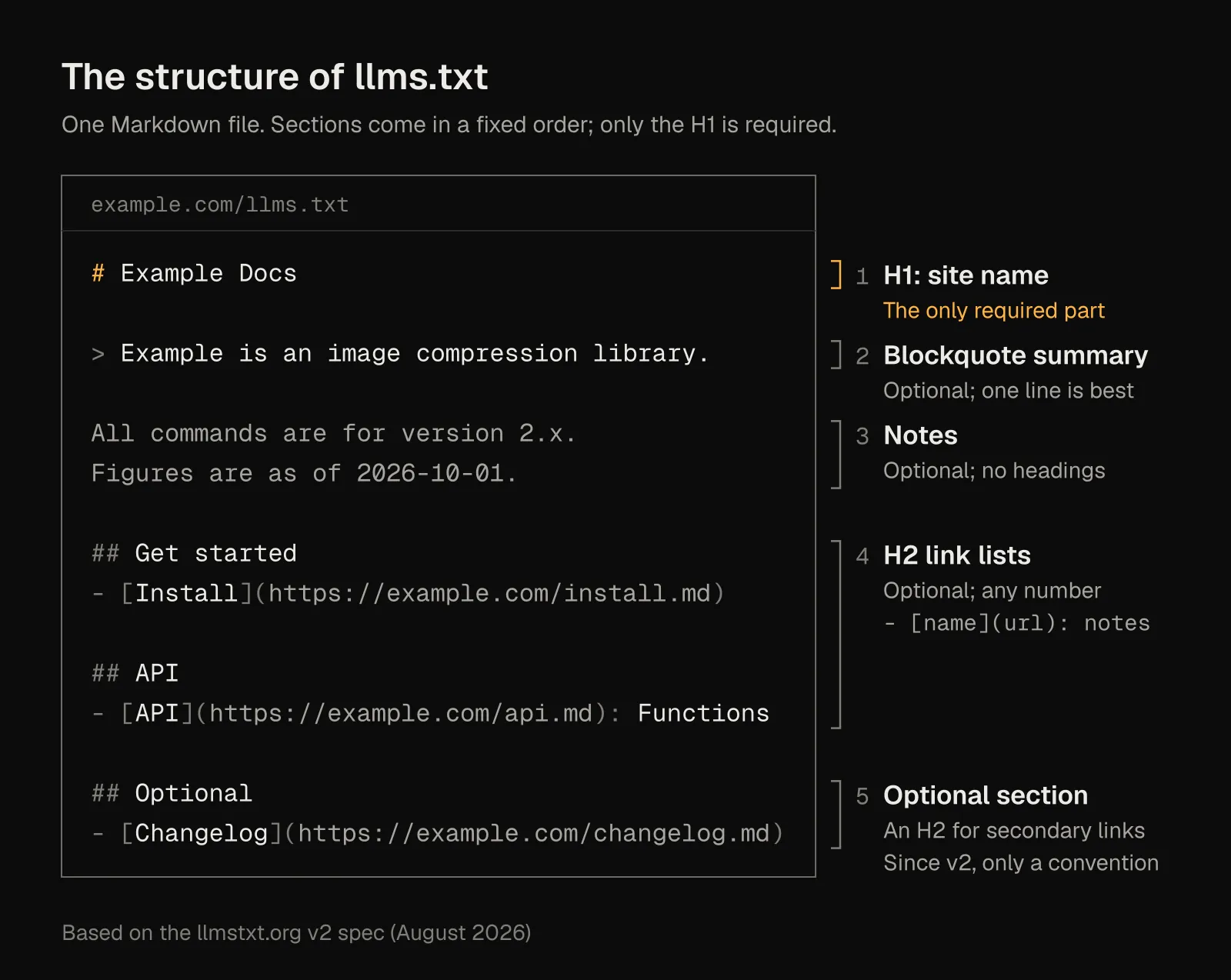
The structure of llms.txt: only the H1 is required, but the sections must come in this order (llmstxt.org v2).
##### The llms.txt format (spec v2)
###### Sections and their order: only the H1 is required
| Order | Section | Required? | Content |
| --- | --- | --- | --- |
| 1 | H1 (`#`) | Yes, the only required part | Site or project name |
| 2 | Blockquote (`>`) | No | A short summary |
| 3 | Plain Markdown | No | Notes and caveats; no headings |
| 4 | H2 (`##`) sections | No | Link lists: `- [name](url)`, optionally `: notes` |
A byte-order mark (BOM) at the start is allowed; that line joined the spec in June 2026.
###### How to write the links
Each list item needs a `[name](url)` link, optionally followed by a colon and a note. The spec asks for concise, clear language, an informative note per link and no unexplained jargon. Link to Markdown versions of pages, not heavy HTML.
###### The Optional section
An H2 named `## Optional` holds secondary links. In v1 (2024), tools could skip it when they needed a shorter context. The [v2 change notes](https://llmstxt.org/changes.md) make it a convention with no mechanical meaning, because the context-expansion tool `llms_txt2ctx` is no longer part of the proposal. That tool still exists and still skips Optional by default.
###### Where the file goes: the root or a subpath
Most sites use `/llms.txt`. The spec has allowed a subpath such as `/docs/llms.txt` since v1, and v2 defines what that means: a file covers the pages under its path, and when several apply, agents should use the most specific one. The spec considered `/.well-known/` (RFC 8615) and passed on it, because it exists only at the origin root, and many authors control only a path, such as a GitHub Pages project site. Note that Chrome Lighthouse checks only `/llms.txt` at the root.
##### llms.txt example: a template you can copy
A minimal llms.txt example for a fictional project on example.com:
```markdown
# Example Docs
> Example is an open-source image compression library. This file lists the Markdown versions of its install, configuration and API docs.
All commands are for version 2.x. Figures are as of 2026-10-01.
## Get started
- [Install](https://example.com/docs/install.md): System requirements and three ways to install
- [Quickstart](https://example.com/docs/quickstart.md): Compress your first image in five minutes
- [Configuration](https://example.com/docs/configuration.md): Every option, with its default and an example
## API
- [API reference](https://example.com/docs/api.md): Every function, parameter and return value
- [Error codes](https://example.com/docs/errors.md): What each error code means and how to fix it
## Optional
- [Changelog](https://example.com/changelog.md): Changes in every release
- [Sitemap](https://example.com/sitemap.xml): Every URL on the site
```
###### What real llms.txt files look like
Live checks on 2026-10-13 show wide variation. Anthropic’s docs file (about 82.9 KB) has no blockquote. Stripe’s (about 92.5 KB) has an Optional section. Cloudflare’s root file points to per-product files such as `/workers/llms.txt`. web.dev, a Google property, has no H1 at all, and its first list item lacks a `[name]`. Publishing a file is not the same as following the format.
##### llms-full.txt and per-page Markdown: what’s in the spec and what isn’t
###### Markdown versions of pages
The proposal asks for a clean Markdown copy of each page. v1 appends `.md` to the full URL (`page.html.md`, or `index.html.md`); v2 also allows replacing the extension (`page.md` or `index.md`).
###### How agents find them: rel=“alternate” and rel=“describedby”
v2 adds two link relations, as an HTML `` element or an HTTP `Link:` header:
- `rel="alternate" type="text/markdown"` points from a page to its Markdown version.
- `rel="describedby"` points from a page to the llms.txt that covers it.
The header also works for non-HTML resources and can be set at the server or CDN. The spec’s example:
```
Link: ; rel="alternate"; type="text/markdown", ; rel="describedby"
```
This site found no evidence yet that agents follow `rel="describedby"` in practice, and Lighthouse doesn’t test it.
###### llms-full.txt is a convention, not part of the spec
No version of the spec defines llms-full.txt. In the llmstxt.org repository the name appeared only in a directory table, added on 2024-11-21 and removed three days later. It is a docs-platform convention: a whole docs site in one Markdown file. [Mintlify](https://www.mintlify.com/docs/ai/llmstxt) generates both files and [says](https://www.mintlify.com/customers/anthropic) it developed the format with its customer Anthropic; that is Mintlify’s account.
On 2026-10-13, llms-full.txt measured about 43.4 MB on platform.claude.com, 67.7 MB on developers.cloudflare.com and 10.4 MB on vercel.com/docs, far beyond a typical context window. v2 takes the opposite approach: llms.txt stays small enough to fit in context, and the detail sits behind links.
##### llms.txt vs robots.txt vs sitemap.xml
| | robots.txt | sitemap.xml | llms.txt |
| --- | --- | --- | --- |
| Job | Asks crawlers not to fetch (or allows) URLs | Lists URLs to discover | Curates key content for AI, with notes |
| Status | IETF RFC 9309 (2022, Proposed Standard) | sitemaps.org protocol 0.90 | Community proposal (2024) |
| Location | `/robots.txt` at the host root | Any URL, often declared in robots.txt | `/llms.txt`, or a subpath (scope defined in v2) |
| Format | `User-agent` groups with `Allow`/`Disallow` | XML (`urlset`, `url`, `loc`) | Markdown: H1, blockquote, H2 link lists |
| Can it restrict access? | No; a request | No; a hint | No; it only describes |
| Effect on Google Search | Controls Googlebot crawling | Helps discovery | None; Search ignores it |
The llms.txt spec draws the same line: robots.txt says what automated access is acceptable, while llms.txt is read on demand. A [sitemap](https://www.sitemaps.org/protocol.html) can’t replace it, the spec adds, because it often lacks LLM-readable versions, omits external URLs and is too large for a context window.
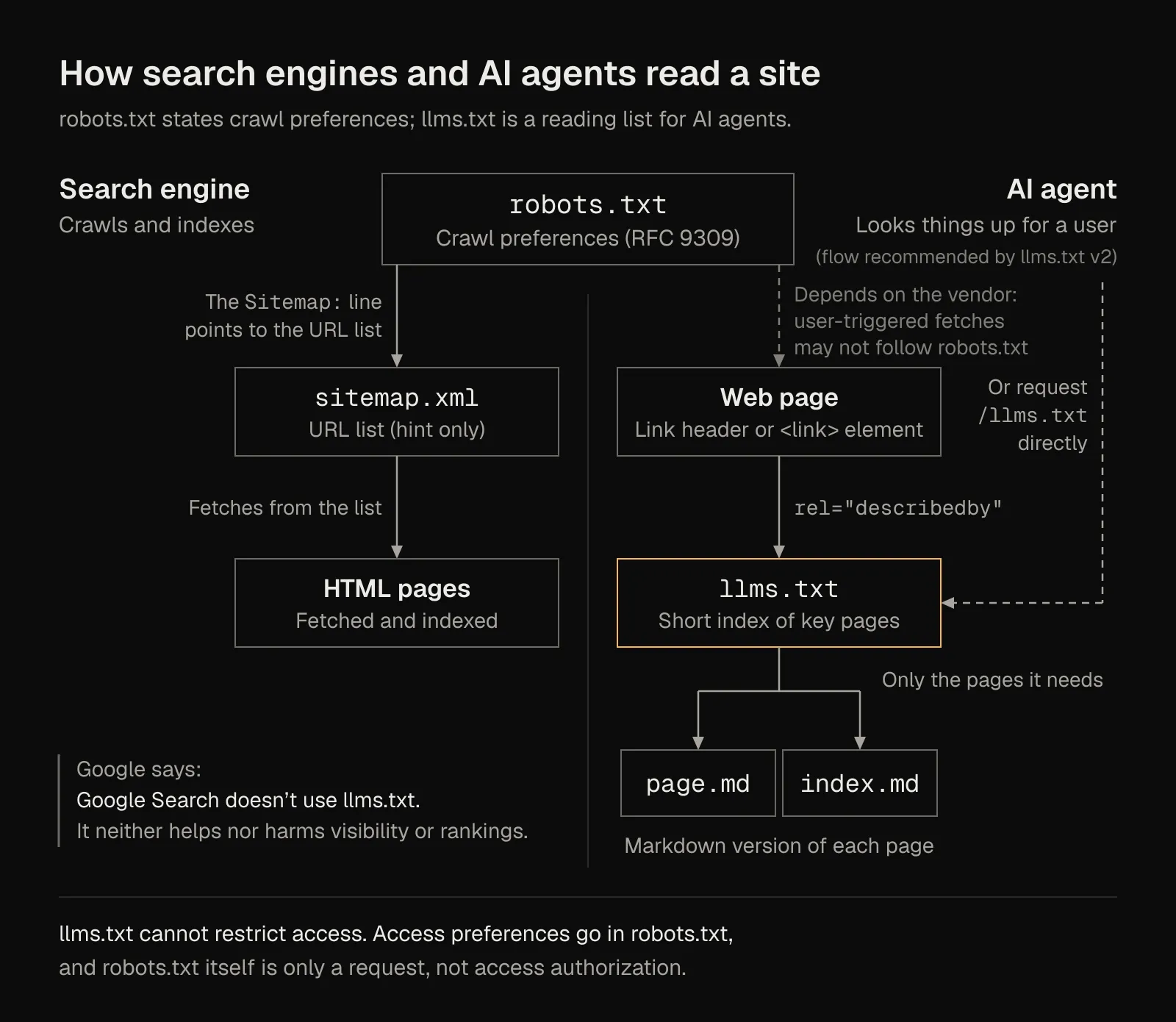
robots.txt holds crawl preferences and sitemap.xml lists URLs for search engines. The right side is the flow llms.txt v2 recommends, not measured agent behavior.
###### Want to limit AI training or AI answers? Use robots.txt
llms.txt is a reading list, not a permission file, so `User-agent` or `Disallow` lines in it do nothing. Set training preferences per crawler in robots.txt:
- OpenAI: `GPTBot` collects content that may be used for training; `OAI-SearchBot` serves ChatGPT search. For the user-triggered `ChatGPT-User`, [OpenAI says](https://developers.openai.com/api/docs/bots) robots.txt rules “may not apply”.
- Anthropic: `ClaudeBot` (training), `Claude-User` (fetches for a user’s question) and `Claude-SearchBot` (search). [Anthropic says](https://support.claude.com/en/articles/8896518-does-anthropic-crawl-data-from-the-web-and-how-can-site-owners-block-the-crawler) all three honor robots.txt.
- Google: `Google-Extended` is a product token with no crawler of its own. It covers Gemini training and grounding, and [Google says](https://developers.google.com/crawling/docs/crawlers-fetchers/google-common-crawlers) it doesn’t affect Google Search.
Cloudflare’s [Content Signals](https://blog.cloudflare.com/content-signals-policy/) (2025-09-24) add a `Content-Signal:` line with `search`, `ai-input` (real-time use such as RAG) and `ai-train` preferences. Cloudflare calls them preferences, not blocks. The related IETF aipref work (`Content-Usage`) is still an Internet-Draft.
```
# Example: allow search, opt out of training (Google-Extended also covers Gemini grounding)
User-agent: GPTBot
User-agent: ClaudeBot
User-agent: Google-Extended
Disallow: /
User-agent: *
Content-Signal: search=yes, ai-input=yes, ai-train=no
Allow: /
Sitemap: https://example.com/sitemap.xml
```
Disallowing `Google-Extended` also opts your content out of grounding in Gemini Apps and Grounding with Google Search on Vertex AI. It does not affect Google Search.
Two caveats. [RFC 9309](https://www.rfc-editor.org/rfc/rfc9309) says robots.txt rules are “not a form of access authorization”; real blocking needs authentication or a firewall. And Google [reads only](https://developers.google.com/crawling/docs/robots-txt/robots-txt-spec) `user-agent`, `allow`, `disallow` and `sitemap`, so it ignores `Content-Signal`; Search Console may flag the line, and [Cloudflare reports](https://developers.cloudflare.com/bots/additional-configurations/managed-robots-txt/) no crawl or SEO impact.
##### Does Google use llms.txt?
###### Google Search: no, and having one neither helps nor hurts
Google [announced](https://developers.google.com/search/blog/2026/05/a-new-resource-for-optimizing) its guide to optimizing for generative AI features on 2026-05-15; it already listed llms.txt among things Search doesn’t need. On 2026-06-15 the [guide](https://developers.google.com/search/docs/fundamentals/ai-optimization-guide) gained a note: you don’t need AI text files or Markdown to appear in Google Search, including its AI features, because Search doesn’t use them; keeping llms.txt for other services is fine and neither harms nor helps rankings. The guide tells site owners to prefer effective SEO over “AEO/GEO hacks”. The term GEO comes from a [2023 paper](https://arxiv.org/abs/2311.09735).
###### What Google staff have said
Google’s John Mueller has commented several times:
- Reported 2025-04-17 (Reddit): he knew of no AI service that said it uses llms.txt, and compared it to the keywords meta tag ([SEJ](https://www.searchenginejournal.com/google-says-llms-txt-comparable-to-keywords-meta-tag/544804/)).
- 2025-06-17: no AI system currently uses llms.txt ([SER](https://www.seroundtable.com/google-ai-llms-txt-39607.html)).
- 2025-07-22: noindex could make sense, since linked files can get indexed ([SER](https://www.seroundtable.com/google-noindex-llms-txt-39798.html)).
- Reported 2026-06-15, Search Off the Record (Google’s podcast): it can’t help an LLM choose between sites, but might help an agent already on one ([SEJ](https://www.searchenginejournal.com/googles-mueller-says-llms-txt-cant-help-llms-differentiate-sites/579304/)).
- Reported 2026-07-06 (Reddit): Google uses neither llms.txt nor llms-author.txt, and he knew of no crawler or LLM confirming it uses them, other than SEO tools ([SEJ](https://www.searchenginejournal.com/google-answers-question-about-llms-author-txt-for-seo/581547/)).
These are staff statements; the guide is official.
###### Chrome Lighthouse: an optional llms.txt audit
Lighthouse, a separate Google product, differs. Per its [changelog](https://github.com/GoogleChrome/lighthouse/blob/main/changelog.md), 13.2.0 (2026-04-30) implemented an [llms.txt audit](https://developer.chrome.com/docs/lighthouse/agentic-browsing/llms-txt), 13.3.0 (2026-05-07) added the Agentic Browsing category to the default config, and 13.5.0 (2026-09-17) grouped the audit under “agent discovery”. The source code shows:
- The [gatherer](https://github.com/GoogleChrome/lighthouse/blob/main/core/gather/gatherers/agentic/llms-txt.js) fetches only `/llms.txt` at the origin root.
- The [audit](https://github.com/GoogleChrome/lighthouse/blob/main/core/audits/agentic/llms-txt.js) wants an H1, a Markdown link and 50+ characters. A 5xx, a 429 or a failed fetch scores 0; a 404 or other 4xx is “not applicable”.
- The [category](https://github.com/GoogleChrome/lighthouse/blob/main/core/config/default-config.js) is scored as a fraction of audits passed, is described as still under development and subject to change, and is separate from SEO. It doesn’t test the v2 link relations.
###### Google’s own llms.txt files
On 2025-12-03 an llms.txt appeared in the Search Central docs and was removed the same day ([SER](https://www.seroundtable.com/google-adds-llms-txt-to-search-developer-docs-40533.html)); it was still 404 on 2026-10-13. Files on developer.chrome.com, web.dev and the Gemini API docs remain; as [SEJ put it](https://www.searchenginejournal.com/googles-llms-txt-guidance-depends-on-which-product-you-ask/575431/), Google’s guidance depends on the product.
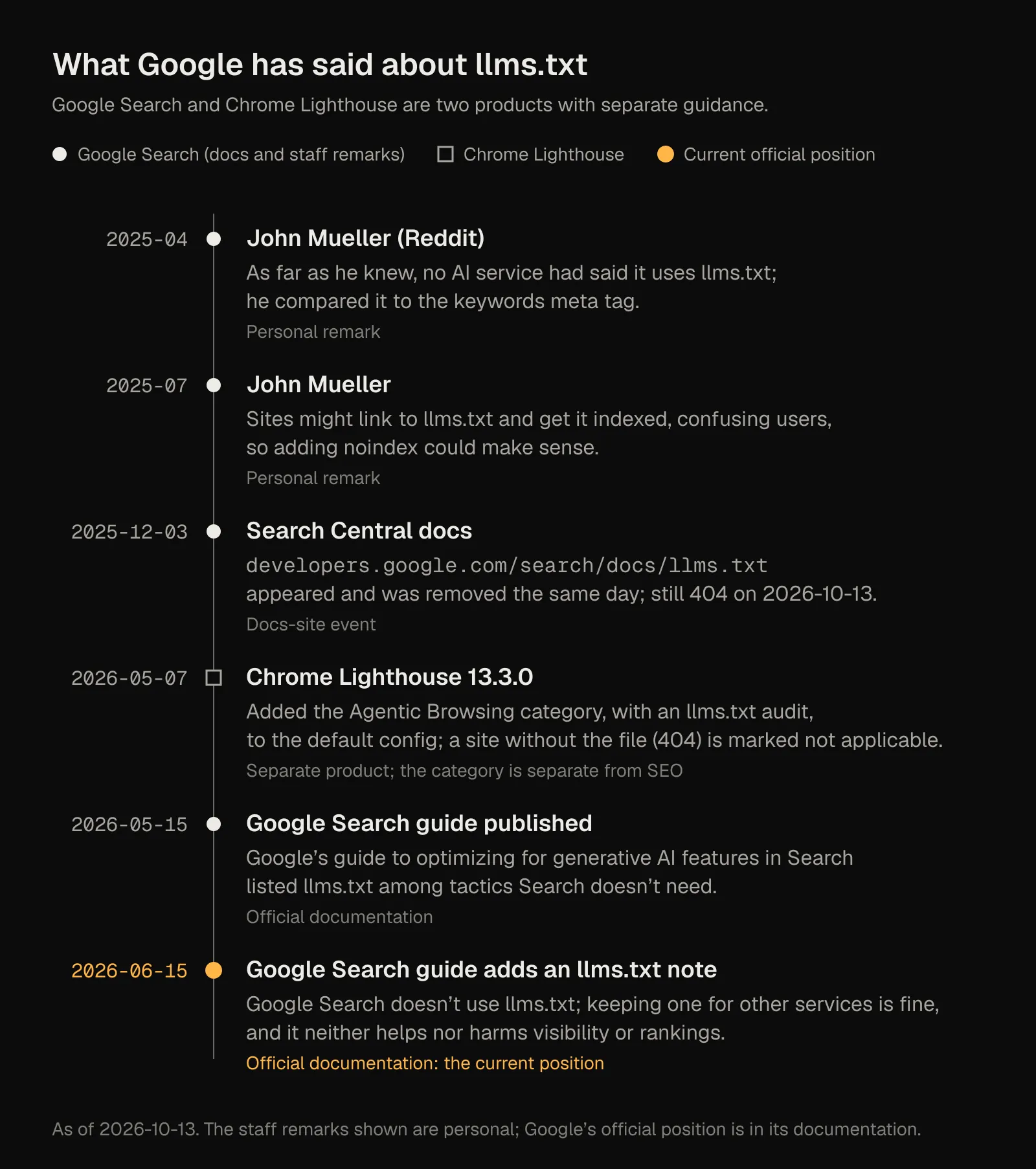
Google’s answer depends on the product: Search does not use llms.txt, while Chrome Lighthouse has an optional llms.txt audit.
##### Do ChatGPT, Claude and Perplexity read llms.txt?
###### Publishing llms.txt is not the same as reading yours
OpenAI, Anthropic, Perplexity and Google publish llms.txt for their own docs, but their crawler docs discuss robots.txt only. As of 2026-10-13, this site found no on-record statement from any of them that they use other sites’ llms.txt files.
###### What the data shows
| Source (date) | Population | Finding | Caveat |
| --- | --- | --- | --- |
| [Web Almanac 2025](https://almanac.httparchive.org/en/2025/seo) (2026-01-15) | HTTP Archive crawl | Valid llms.txt on 2.13% of desktop sites; 39.6% of files trace to All in One SEO, 3.6% to Yoast | Plugin defaults |
| [SE Ranking](https://seranking.com/blog/llms-txt/) (2025-11-07) | ~300,000 domains | 10.13% have one; no correlation with AI citations | SEO-tool vendor |
| [Ahrefs](https://ahrefs.com/blog/llmstxt-study/) (2026-06-15) | 137,210 domains, May 2026 | 28% have one; 97% of those got no requests; named AI bots made 19.5% of requests | Technical customer base, so 28% is an upper bound; fetched is not used |
| [Mintlify and Profound](https://www.mintlify.com/blog/how-often-do-llms-visit-llms-txt) (2025-06-27) | 25 companies, 7 days of CDN logs | Median 14 visits to llms.txt, 79 to llms-full.txt | Vendor marketing; tiny sample |
| [Common Crawl](https://commoncrawl.org/blog/a-content-analysis-of-llms-txt-files-from-the-july-2026-crawl-archive) (2026-08-31) | July 2026 crawl, 584,107 files | 11.72% of sampled `/llms.txt` fetches returned a text file; 49.90% follow the full shape; 68.27% are templated (Wix alone 41.34%) | Hosts it could fetch; one crawl |
Figures range from about 2% to 28% because the populations differ; plugin defaults inflate them.
###### Where it is used most: coding agents and docs tools
The v2 spec says llms.txt files are used most heavily for software documentation, where coding agents follow them to API references and tutorials. The spec author also writes in the v2 change notes that coding agents use these files reliably. In Ahrefs’ data, Anthropic’s coding agent Claude-Code was second only to GPTBot in llms.txt requests, ahead of every AI search and assistant bot. The payoff is agents reading docs for users, not rankings.
##### How to create an llms.txt file in 7 steps
1. Pick the scope: the whole site at `/llms.txt`, or a section such as `/docs/llms.txt`.
2. Write the H1: the site or project name, the only required part.
3. Add a one-line `>` summary. The reference parser keeps only the first `>` line.
4. Optionally add notes in plain text, such as the date of your figures. No headings.
5. Group links under H2s, one `- [Name](URL): note` per line, pointing to Markdown versions. Secondary links go under `## Optional`.
6. Serve `.md` versions and announce them with `` and a `Link: <…/llms.txt>; rel="describedby"` header.
7. Generate it at build time and test it, from the same source as your pages, so it stays in step with them.
###### llms.txt generators and plugins
Yoast SEO has a built-in generator that [Yoast says](https://yoast.com/features/llms-txt/) is free for everyone. AIOSEO, Wix, Mintlify, GitBook, VitePress and Docusaurus plugins, Drupal’s LLM Support and llms-txt-php also generate one; llmstxt.org lists more. Much of the web’s llms.txt comes from plugin defaults, so review the descriptions before you publish.
###### How to test your llms.txt
```
curl -I https://example.com/llms.txt
```
- Expect `200` with `text/plain` or `text/markdown`. The spec doesn’t mandate a type, but `text/html` usually means your app shell is answering. Also check that the body is your index, not your app shell or robots.txt.
- Run Lighthouse’s Agentic Browsing audit, or parse the file with the reference [`llms-txt`](https://pypi.org/project/llms-txt/) package (0.0.7, 2026-09-24).
- Try the spec’s test: give an agent only your llms.txt and ask it about your site.
##### Common llms.txt mistakes
- No H1, or links without a `[name]`, as on web.dev (2026-10-13). Both break the reference parser.
- A multi-line summary, or headings in the notes and H3s in link lists.
- HTML served at `/llms.txt` with status 200. In Common Crawl’s July 2026 crawl, 40.36% of successful responses at `/llms.txt` and `/llms-full.txt` were HTML, which Common Crawl attributes to single-page apps whose catch-all route serves the app shell, and 10.61% were robots.txt files. Separately, 22.56% of text files had no links.
- Access rules in llms.txt, heavy HTML links or one giant index.
- Claims the pages don’t support (Mueller’s keywords-meta-tag point), or steering AI: Common Crawl counted 3,793 mildly steering files and 102 promotional ones.
- An indexable llms-full.txt. Mueller’s noindex remark was about llms.txt; it applies even more to a copy of every page.
##### Real llms.txt example: how lijiabao.dev serves it
lijiabao.dev added llms.txt, per-page Markdown and an open robots.txt on 2026-10-01. The excerpt below is from the built file (“…” marks omitted lines, including the site’s tagline); it lists pages such as [GlimmerTown](https://lijiabao.dev/en/glimmertown/) and [Frontier Lab](https://lijiabao.dev/en/frontier/).
```markdown
# 李家宝 Li Jiabao — lijiabao.dev
> 微光小鎮與前沿實驗室:成文規則、多家廠商的模型、公開紀錄。每個數字都附出處。 GlimmerTown and Frontier Lab: written rules, models from many vendors, a public record. Every number has a source.
…
數字截至 2026-09-30。 Numbers as of 2026-09-30.
搜尋、AI 回答與 AI 訓練,robots.txt 一律允許。 Search, AI answers and AI training are all allowed by robots.txt.
## 頁面(Markdown 版本) · Pages (Markdown versions)
…
- [GlimmerTown — Li Jiabao](https://lijiabao.dev/en/glimmertown/index.md): One original isometric pixel-art city: a single HTML file, no dependencies, works offline. Three lines of development, one city.
…
- [Frontier Lab — Li Jiabao](https://lijiabao.dev/en/frontier/index.md): One governance repo, 15 discipline labs, 150 problem cards. Status shown as it is.
## lijiabao.dev 編輯整理(非本人觀點) · Edited by lijiabao.dev (not his personal views)
…
## Optional
- [llms-full.txt](https://lijiabao.dev/llms-full.txt): 全站完整內文:每一頁,中文與英文 · Every page in full, zh-Hant and English
- [sitemap.xml](https://lijiabao.dev/sitemap.xml): 網站地圖 · Sitemap
- [lijiabao1998](https://github.com/lijiabao1998): 19 個作品倉庫(截至 2026-09-30) · 19 work repositories as of 2026-09-30
…
```
- Structure. The bilingual blockquote is deliberately one line, since the reference parser keeps only the first `>` line. Six `index.md` links follow. Per the generator’s comments, GitHub links sit under `## Optional` because those pages are HTML.
- Built from the pages. After `astro build`, `scripts/llms.mjs` converts each page’s `` to Markdown; any broken site link fails the build.
- Separate credit. Site-edited articles have their own heading, “Edited by lijiabao.dev (not his personal views)”; Li Jiabao’s own views, when there are any, get a different one. This article is listed there as `(en, 2026-10-13)`.
- Size. Before this English version, llms.txt was 5,135 bytes and llms-full.txt about 90 KB (2026-10-13).
Response headers, checked on 2026-10-13:
```
# https://lijiabao.dev/llms.txt
Content-Type: text/plain; charset=utf-8
Link: ; rel="describedby"; type="text/plain"
# https://lijiabao.dev/en/glimmertown/index.md
Content-Type: text/markdown; charset=utf-8
Link: ; rel="describedby"; type="text/plain", ; rel="canonical"
# https://lijiabao.dev/llms-full.txt
X-Robots-Tag: noindex
# HTML of https://lijiabao.dev/en/glimmertown/
```
Every response carries the `describedby` header; the [Markdown version of the GlimmerTown page](https://lijiabao.dev/en/glimmertown/index.md) names the HTML as canonical; [llms-full.txt](https://lijiabao.dev/llms-full.txt) is `noindex`. [This site’s robots.txt](https://lijiabao.dev/robots.txt) sets `Content-Signal: search=yes, ai-input=yes, ai-train=yes` and `Allow: /`, and mentions llms.txt only in a comment, because robots.txt has no llms.txt field.
##### FAQ
###### Does llms.txt help or hurt SEO?
Neither, for Google: Search doesn’t use it. SE Ranking found no link between the file and AI citations across about 300,000 domains.
###### Can llms.txt block AI crawlers or stop AI training?
No. It is a reading list, not a permission file. Put preferences for `GPTBot`, `ClaudeBot` or `Google-Extended` in robots.txt, optionally with `Content-Signal`. Even robots.txt is a request, not access control.
###### Do ChatGPT, Claude and Perplexity read llms.txt?
No vendor has said so on record. In Ahrefs’ data for May 2026, 97% of the sites with an llms.txt got no requests for it that month. Coding agents are the clearest users.
###### Do I need llms-full.txt?
Usually not. It isn’t in the spec, and on big docs sites it runs to tens of megabytes. Per-page Markdown linked from llms.txt is usually enough. If you publish one, consider `noindex`.
###### Where should llms.txt go, and can a site have more than one?
Usually `/llms.txt`, the only place Lighthouse checks. Since v2, a subpath file such as `/docs/llms.txt` covers the pages under it, and the most specific file applies. Serve it as UTF-8 text.
###### Does a small site need llms.txt?
Not necessarily. It has no effect on Google Search. If people use AI agents to query your docs or product specs, a short file is cheap; otherwise, improve the pages.
###### How can I tell whether AI tools read my llms.txt?
Check server logs for `/llms.txt` requests and their User-Agent, verified against published IP ranges where they exist (OpenAI publishes them). A fetch doesn’t prove use.
##### Conclusion
llms.txt is a small, optional Markdown index for AI agents. It doesn’t control access or affect Google Search; that is the job of robots.txt and the pages themselves. It pays off mainly for documentation that agents read for users. If you add one, generate it from your pages and keep it short.
This guide is also available in [Traditional Chinese](https://lijiabao.dev/articles/what-is-llms-txt/). For more guides, see [the articles edited by lijiabao.dev](https://lijiabao.dev/en/articles/).
##### Sources
1. [llmstxt.org — The /llms.txt file, v2 (Jeremy Howard)](https://llmstxt.org/) llmstxt.org
2. [llmstxt.org — Changes (v2, August 2026)](https://llmstxt.org/changes.md) llmstxt.org
3. [Answer.AI — /llms.txt—a proposal to provide information to help LLMs use websites (2024-09-03)](https://www.answer.ai/posts/2024-09-03-llmstxt.html) answer.ai
4. [Google Search Central Blog — A new resource for optimizing for generative AI in Google Search (2026-05-15)](https://developers.google.com/search/blog/2026/05/a-new-resource-for-optimizing) developers.google.com
5. [Google Search Central — Google's Guide to Optimizing for Generative AI Features on Google Search (llms.txt note added 2026-06-15)](https://developers.google.com/search/docs/fundamentals/ai-optimization-guide) developers.google.com
6. [Google — Google's common crawlers (Google-Extended)](https://developers.google.com/crawling/docs/crawlers-fetchers/google-common-crawlers) developers.google.com
7. [Google — How Google interprets the robots.txt specification](https://developers.google.com/crawling/docs/robots-txt/robots-txt-spec) developers.google.com
8. [Chrome for Developers — Lighthouse audit: llms.txt](https://developer.chrome.com/docs/lighthouse/agentic-browsing/llms-txt) developer.chrome.com
9. [GoogleChrome/lighthouse — llms-txt.js (audit source)](https://github.com/GoogleChrome/lighthouse/blob/main/core/audits/agentic/llms-txt.js) github.com
10. [GoogleChrome/lighthouse — llms-txt.js (gatherer: fetches /llms.txt at the origin root)](https://github.com/GoogleChrome/lighthouse/blob/main/core/gather/gatherers/agentic/llms-txt.js) github.com
11. [GoogleChrome/lighthouse — default-config.js (Agentic Browsing category)](https://github.com/GoogleChrome/lighthouse/blob/main/core/config/default-config.js) github.com
12. [GoogleChrome/lighthouse — Changelog (13.2.0, 13.3.0, 13.5.0)](https://github.com/GoogleChrome/lighthouse/blob/main/changelog.md) github.com
13. [Search Engine Journal — Google Says LLMs.Txt Comparable To Keywords Meta Tag (2025-04-17)](https://www.searchenginejournal.com/google-says-llms-txt-comparable-to-keywords-meta-tag/544804/) searchenginejournal.com
14. [Search Engine Roundtable — Google Says No AI System Currently Uses LLMs.txt (2025-06-18)](https://www.seroundtable.com/google-ai-llms-txt-39607.html) seroundtable.com
15. [Search Engine Roundtable — Google Says It Makes Sense To Noindex LLMs.txt (2025-07-22)](https://www.seroundtable.com/google-noindex-llms-txt-39798.html) seroundtable.com
16. [Search Engine Roundtable — Google Adds LLMs.txt To Search Developer Docs Portal (2025-12-03)](https://www.seroundtable.com/google-adds-llms-txt-to-search-developer-docs-40533.html) seroundtable.com
17. [Search Engine Journal — Google's llms.txt Guidance Depends On Which Product You Ask (2026-05-20)](https://www.searchenginejournal.com/googles-llms-txt-guidance-depends-on-which-product-you-ask/575431/) searchenginejournal.com
18. [Search Engine Journal — Google's Mueller Says llms.txt Can't Help LLMs Differentiate Sites (2026-06-15)](https://www.searchenginejournal.com/googles-mueller-says-llms-txt-cant-help-llms-differentiate-sites/579304/) searchenginejournal.com
19. [Search Engine Journal — Google Answers Question About LLMs-Author.txt For SEO (2026-07-06)](https://www.searchenginejournal.com/google-answers-question-about-llms-author-txt-for-seo/581547/) searchenginejournal.com
20. [SE Ranking — Does LLMs.txt impact your AI visibility and citations? No, according to research (2025-11-07)](https://seranking.com/blog/llms-txt/) seranking.com
21. [Ahrefs — We Analyzed 137K Sites: 97% of llms.txt Files Never Get Read (2026-06-15)](https://ahrefs.com/blog/llmstxt-study/) ahrefs.com
22. [Common Crawl — A Content Analysis of llms.txt Files from the July 2026 Crawl Archive (2026-08-31)](https://commoncrawl.org/blog/a-content-analysis-of-llms-txt-files-from-the-july-2026-crawl-archive) commoncrawl.org
23. [HTTP Archive — Web Almanac 2025, SEO chapter (2026-01-15)](https://almanac.httparchive.org/en/2025/seo) almanac.httparchive.org
24. [Mintlify Docs — llms.txt](https://www.mintlify.com/docs/ai/llmstxt) mintlify.com
25. [Mintlify — Anthropic customer story](https://www.mintlify.com/customers/anthropic) mintlify.com
26. [Mintlify — How often do LLMs visit llms.txt? (2025-06-27)](https://www.mintlify.com/blog/how-often-do-llms-visit-llms-txt) mintlify.com
27. [OpenAI — Overview of OpenAI Crawlers](https://developers.openai.com/api/docs/bots) developers.openai.com
28. [Anthropic — Does Anthropic crawl data from the web, and how can site owners block the crawler?](https://support.claude.com/en/articles/8896518-does-anthropic-crawl-data-from-the-web-and-how-can-site-owners-block-the-crawler) support.claude.com
29. [RFC 9309 — Robots Exclusion Protocol (IETF, 2022-09)](https://www.rfc-editor.org/rfc/rfc9309) rfc-editor.org
30. [sitemaps.org — Sitemaps XML format (protocol 0.90)](https://www.sitemaps.org/protocol.html) sitemaps.org
31. [Cloudflare — Giving users choice with Cloudflare's new Content Signals Policy (2025-09-24)](https://blog.cloudflare.com/content-signals-policy/) blog.cloudflare.com
32. [Cloudflare Docs — Managed robots.txt](https://developers.cloudflare.com/bots/additional-configurations/managed-robots-txt/) developers.cloudflare.com
33. [IETF — draft-ietf-aipref-attach (Content-Usage), Internet-Draft](https://datatracker.ietf.org/doc/draft-ietf-aipref-attach/) datatracker.ietf.org
34. [Yoast — llms.txt](https://yoast.com/features/llms-txt/) yoast.com
35. [PyPI — llms-txt (reference parser, 0.0.7, 2026-09-24)](https://pypi.org/project/llms-txt/) pypi.org
36. [Aggarwal et al. — GEO: Generative Engine Optimization (arXiv:2311.09735, 2023)](https://arxiv.org/abs/2311.09735) arxiv.org
37. [lijiabao.dev — llms.txt (external site)](https://lijiabao.dev/llms.txt) lijiabao.dev
38. [lijiabao.dev — robots.txt (external site)](https://lijiabao.dev/robots.txt) lijiabao.dev
[All articles](https://lijiabao.dev/en/articles/) [以中文閱讀這一篇](https://lijiabao.dev/articles/what-is-llms-txt/)